VIOFO A329S - Testing/Review - RCG

It is really annoying thing while I'm test a dashcam or FW updates. Now have a fingers is not enough, need to use a credit card/another sd-card/something else. I'm do not believe in better cooling or construction troubles.
I don't think most people are going to be taking out the microSD on a regular basis
New FW update can't be installed via SSD. And also a new LPID mode saves files to the sd-card only. So if someone need to check a lot of parking files or update firmware - need to extract sd-card with some additional tool.

I take that you are speaking of the indentation above the SD slot? If so, then I have to agree, I have enough trouble as it is inserting or ejecting the card
Yes, we are talking about same thing.
Notch at one side, closer to the windshield is enough - cause then you move your finger to installed dashcam your nail placed at sd-card and finger pad goes to deepening. 2 notches at both sides is not required. A229Pro and early bodies was good enough for easy SD-card ejecting/inserting.
 
The idea was to make the cams part of a live streaming setup, so basically connecting it via HDMI to a cam link device as one video source (of probably 2 or 3). An USB-C connection would have probably been fine too, but wifi seems a little bit more tricky or at least inconvenient for that purpose, since it has higher latency, it "blocks" the wifi connectivity of the receiving device and it is overall not as easy to run within this hypothetical setup. Sadly I was way more hyped about the upcoming A329S before I figured out that it'll lack the hdmi port. Now both products, the A329 as well as the A329S, feel like a compromise which I'm probably not willing to make.
Do you need 3 channel or 2 channel, if 2 2-channel is enough, the A329 with HDMI port version will be OK.
 
  • Like
Reactions: Mtz
Do you need 3 channel or 2 channel, if 2 2-channel is enough, the A329 with HDMI port version will be OK.
2 would probably be fine, but 3 would still be nice to have. And since there's a 3-channel version now, the compromise of not having one or the other just s*cks - especially not knowing if there'll be a better fitting alternative in the future. I'd just regret buying now, I guess. Also I was kinda hyped about an "ultimate" version with the upcoming A329S and then got disappointed with it. So that's still part of the decision at the moment, might change over time.
 
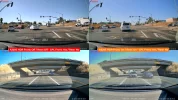
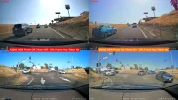
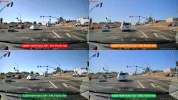
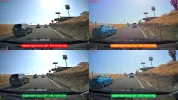
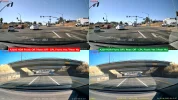
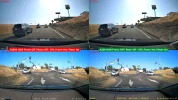
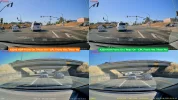
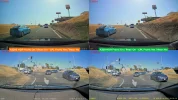
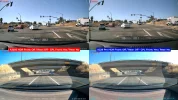
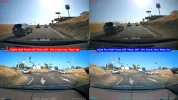
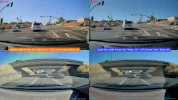
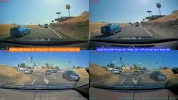
I gathered some daytime driving footage with an A229 Pro, A329, and an A329S production unit in my car. I'll gather some nighttime footage soon. I only have one production A329S unit, so I had to compare HDR on vs HDR off footage from a different driving loop with a 15 minute time gap. The front cameras have a CPL filter while the rear cameras do not have a CPL filter.

A329S Front+Rear HDR Off vs HDR On
a329s_fr_01_hdroff_vs_hdron.webpa329s_fr_02_hdroff_vs_hdron.webp

A329S Front vs A329 Front / HDR Off vs HDR On
a329s_vs_a329_f_01_hdroff_vs_hdron.webpa329s_vs_a329_f_02_hdroff_vs_hdron.webp

A329S Front+Rear vs A329 Front+Rear HDR Off
a329s_vs_a329_fr_01_hdroff.webpa329s_vs_a329_fr_02_hdroff.webp

A329S Front+Rear vs A329 Front+Rear HDR On
a329s_vs_a329_fr_01_hdron.webpa329s_vs_a329_fr_02_hdron.webp

A329S vs A229 Pro frame grabs in next post
 
A329S Front+Rear vs A229 Pro Front+Rear HDR Off
a329s_vs_a229pro_fr_01_hdroff.webpa329s_vs_a229pro_fr_02_hdroff.webp

A329S Front+Rear vs A229 Pro Front+Rear HDR On
a329s_vs_a229pro_fr_01_hdron.webpa329s_vs_a229pro_fr_02_hdron.webp
 
Thanks for comparison. A329S and A329 frames is almost same as it should be due the same hardware and same software sensor settings on the current FWs.
 
During my testing of the A329S 3-Channel prototype dash camera, I performed a series of parking mode power consumption tests. Recently, I asked VIOFO is there was any parking mode that would have a significant change in its power consumption based on the firmware version or the production hardwire. VIOFO stated there should be no notable differences in the parking mode power consumption with the production firmware / hardware.

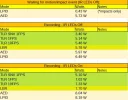
The power consumption data was gathered using a Fluke 117 multimeter measuring the amp draw with 12.6 volts being provided to the input power wires of a VIOFO HK4 hardwire kit. The Fluke 117 gathered mA values [min/max/avg] values were input into a spreadsheet with the average mA value being used to calculate the "Avg Watts" you see in these charts. Each parking mode/config option combination is run for a minimum of 5-minutes.

The time estimates are based on the simplifying assumption that the full battery pack capacity is available for use to the HK4 and the dash camera. The HK4's low voltage cutoff feature will turn off the power to the dash camera before the battery pack's full charge capacity has been consumed. In my previous tests of the VIOFO HK4 hardwire kit prototype unit with a way to turn off the low voltage cutoff feature, it would extend the parking mode run time in the 30 to 45 minute range. My parking mode time estimates are a bit overly optimistic, but are usable to get a general idea of how long a parking mode might function with each battery pack capacity listed in the chart.

No hybrid parking mode time estimates were calculated since hybrid parking mode is a combination of two parking modes that already have time estimates [AED+LPID, TLR 1FPS+LPID, LBR+LPID]. The main variable being how long you select to have the primary parking mode enabled [using the Cut-off Timer].

LPID = Low Power Impact Detection

Since LPID parking mode only writes videos to the microSD card, I only tested having a microSD card in the front camera with no SSD connected. If there's enough interest, I can run additional tests with a microSD card and a SSD drive connected.
1749166924712.webp


AED = Auto Event Detection

1749166986888.webp


TLR 10FPS = Time-Lapse 10FPS

1749167053446.webp


TLR 1FPS - Time-Lapse 1FPS

1749167101766.webp


TLR SNV 1FPS = Time-Lapse Super Night Vision 1FPS

1749167155319.webp


LBR = Low Bitrate

1749167202145.webp
 
If it is okay for you, let me rearrange your tables a bit.
Everything below is for A329S in ParkingMode, 3CH F+R+I, MicroSD, FW v1.0_250425:

1749190564205.webp


Modes is grouped by: not 30 FPS, not normal bitrate, 30FPS+good bitrate and arranged from most to less effective in Watts.

LPID is really good in waiting (due turn off all image sensors) but surprisingly worse on recording than AED. Can`t understand any reason for diff watts while recording between LPID and AED.
 

Attachments

  • 1749189988873.webp
    1749189988873.webp
    29.8 KB · Views: 111
Last edited:
During my testing of the A329S 3-Channel prototype dash camera, I performed a series of parking mode power consumption tests. Recently, I asked VIOFO is there was any parking mode that would have a significant change in its power consumption based on the firmware version or the production hardwire. VIOFO stated there should be no notable differences in the parking mode power consumption with the production firmware / hardware.
Presumably this testing was done with HDR On?

I don't want to make you repeat every test with HDR Off, since it probably has the same amount of effect on most of the tests, but it might be interesting to know how much effect it has on the first test of the "LBR = Low Bitrate" and first test of the "TLR SNV 1FPS = Time-Lapse Super Night Vision 1FPS" tables...

Also, when available, we need to know the difference between HK4 and HK6 power consumption. Hopefully very little, but you don't run a radio transceiver at zero power...

Can`t understand any reason for diff watts while recording between LPID and AED.
I'm not sure there is a difference?

The variation between LEDs On and LEDs Off is significantly larger across all the tests, than the difference between LPID and AED both with LEDs On, so it appears to me that there is either some measurement error, or there is variation in power draw due to something else, such as the memory card doing housekeeping during some of the tests but not others. I suspect it is not measurement error, rcg530 knows what he is doing and has good measurement equipment.

Might be interesting to repeat a few of the tests and find out what the variation is. I suspect the LEDs ON/LEDs Off tables could be simplified into simply saying that the LEDs On takes an additional 1.7 Watts for all tests, and removing half the tables. There is one cases in the tables where it is +2.07 Watts, but I don't see why the LEDs would take more power during AED than in LPID recording, it doesn't correspond to total power draw so it is not that the LEDs are dimming under load.
 
@Nigel I suppose that AED and LPID should not have any differences when recording a video. Cause it doing same job - record a video files from 3 channels with same quality settings + check g-sensor + try to recognize a voice commands probably (if it is was not turn off to negate ambient sounds). Of course here can be some fluctuations but 0.50 Watts when IR LEDs is Off is too much for it.
Of course then it is in waiting state - it have different consume of current.
 
During my testing of the A329S 3-Channel prototype dash camera, I performed a series of parking mode power consumption tests.
Thanks for the extensive test data - excellent work as usual 👍

Just curious, have you done any power consumption tests with multiplex enabled? I wonder if 3CH multiplex consumes any more or less power than recoding 3 separate video streams?
 
During my testing of the A329S 3-Channel prototype dash camera, I performed a series of parking mode power consumption tests.
A curiosity, the results in days and hours are referred to the use of a battery pack. For me who am not an expert and I am wondering whether to use the auxiliary battery of the car or a battery pack, can you have a result using the 12V battery of the car? Thanks
 
A curiosity, the results in days and hours are referred to the use of a battery pack. For me who am not an expert and I am wondering whether to use the auxiliary battery of the car or a battery pack, can you have a result using the 12V battery of the car? Thanks
It is hard to predict how much power a normal car battery will hold, it depends on things like age of the battery, and the chemistry used. The ratings printed on lead acid batteries are not a good guide to how much power a dashcam can draw, they are tested for starting engines drawing 100s of Amps, instead of dashcams drawing half an amp!

I think a good guide is to use the same figure as the 96Wh battery in the tables above, if you don't mind your car battery having a fairly short life, and the 76Wh battery if you want your car battery to last 5 years. There is more power than that in the car battery, but if you use it all regularly then the battery gets damaged.

Note that cars with AGM batteries will do rather better, and the 96Wh battery figures are reasonable. EV cars have small 12V batteries, so use the 57Wh figures, but many EVs will recharge their 12V batteries from their high voltage traction battery, so will run for weeks as long as the traction battery is well charged.
 
Presumably this testing was done with HDR On?
Looking back that the footage captured during my test runs, the parking mode HDR setting [which I believe defaults to on] was on. The SNV 1FPS footage does not have the "HDR" status line indicator so it appears to be recording with HDR off. In all of my previous dash camera tests [for any company], I've never found HDR on/off to make any notable difference in the power consumption amounts. The objective of my time estimates are to give a quick/easy idea of how long the dash camera might be able to record video [or wait in standby mode to record video] in parking mode.

The only parking mode that I retested was LPID. On May 12th, I installed a v1.0_250510 test firmware that improved the LPID response times to under 2 seconds after an impact event. The power consumption readings were the "same" as the v1.0_250425 firmware. I did find that the power consumption for LPID [while waiting for an impact event] seems to be 3 mA to 5 mA lower the first time it enters LPID mode. After it has been awakened by an impact event and it returns to waiting for an impact event [2nd through Nth times], the mA readings are about 3 mA to 5 mA higher than the first time it was waiting for an impact event.

I have not performed any multiplexed video parking mode power consumption tests. Adding the 2ch/3ch multiplex operational modes to the normal recording / parking recording power consumption test suite would have taken a lot more time. I do find the multiplex video offering an interesting one, I'm just not sure how many actual users will be using it. The next time I pull the dash cameras from my car, I'll see if I can run some multiplex video power consumption tests. I just don't know when that will be.

I will be testing the HK6 hardwire kit and its impact on the total power consumption levels [normal mode and parking mode]. I don't have one to test. I hope to get one "soon". I stepped through each cell in my main data collection spreadsheet and the parking mode spreadsheet that pulls data from the main spreadsheet to confirm that I'm pulling/reporting the correct values for each parking mode. There's a lot of copying/pasting of cell formulas while I create these spreadsheets, so I just wanted to make sure I didn't have an incorrect value being reported.

Here's the section of my main spreadsheet showing the HK4 power info and my footnotes. The "5 min or longer" statement does need to be clarified a bit. Various parking modes will have limited time frames when the dash camera is recording video. I "trigger" a parking mode event [motion or impact] to have it start recording. After about 5 seconds of recording, I have my Fluke 117 multimeter start to gather min/max/avg amp readings. Before the recordings stop for that event, I quickly gather the min/max/avg values. I let the dash camera return to its "waiting for triggering event state" for at least two minutes before I trigger another event. I usually trigger three events for each parking mode type so I can get a decent idea of how much power the dash camera consumes in that parking mode while recording.

1749224811405.webp
 
I have not performed any multiplexed video parking mode power consumption tests. Adding the 2ch/3ch multiplex operational modes to the normal recording / parking recording power consumption test suite would have taken a lot more time. I do find the multiplex video offering an interesting one, I'm just not sure how many actual users will be using it. The next time I pull the dash cameras from my car, I'll see if I can run some multiplex video power consumption tests. I just don't know when that will be.
I was not suggesting that you run the whole suite of tests with multiplex on and off - I realise that would take a lot of time!

I was thinking of just one or two tests, perhaps 3CH LPID and LBR, to see if switching to multiplex could extend the run time. It's not an option I would use frequently, but if I was leaving my car at the airport for a week I would consider it.

Only do the tests if you have the time, and at your convenience.
 
I was thinking of just one or two tests, perhaps 3CH LPID and LBR, to see if switching to multiplex could extend the run time. It's not an option I would use frequently, but if I was leaving my car at the airport for a week I would consider it.
Having the multiplexer feature enable with LPID parking mode shouldn't make any difference since the low power state of LPID has nothing recording. The LPID recordings may or may not have a difference in power consumption with multiplex videos enabled, but those should be the "rare" exceptions during a parking mode sessions. I'll see what I can do about testing over the next couple of weeks.
 
The parking mode default setting should be HDR = OFF. The main reason of HDR is to capture a license plate at night. To capture a license plate at night you need a strong light pointed to the opposite car license number. If it is complete dark, HDR will not help.
Also the parking mode is more for capturing persons and not cars so the HDR for capturing license plates are not important and HDR is not helping capturing persons in any way.

I want to see a situation when HDR On in parking mode added a value to the video compared to HDR Off.
 
Last edited:
HDR requires the camera to take 2 images at different exposures and combine them into one. If you choose Time Lapse you have the option of longer exposure but then does HDR even running?
 
Looking back that the footage captured during my test runs, the parking mode HDR setting [which I believe defaults to on] was on. The SNV 1FPS footage does not have the "HDR" status line indicator so it appears to be recording with HDR off. In all of my previous dash camera tests [for any company], I've never found HDR on/off to make any notable difference in the power consumption amounts.
I was wondering if the reason that SNV 1FPS uses noticeably less power than 1FPS, is because it doesn't use HDR. HDR does collect twice as many exposures, and also does more processing, especially with the better HDR we are getting on newer dashcams. It might not make a big difference on the higher power recording modes, but on the lower power parking modes like 1FPS and Low Bitrate, it maybe more noticeable?
 
Back
Top