S1 Pro MAX

kamkar

Well-Known Member
Joined
Oct 11, 2013
Messages
36,233
Reaction score
20,130
Country
Denmark
Dash Cam
+1 decade, many dashcams
Been given a chance to play with this little gem.
I really like the feel of it all, well aside for the mount for the rear camera, but i can make that better so not a deal breaker for me.

Have already run tree 256 GB memory cards thru the system during static testing in my window sill due to bead weather, that did turn out to not be so bad after all, but the first time ever forewarned ( top ) category 3 weather ( severe rain ) did not happen in my area, just regular old rain.


Memory card testing:
Trancend Ultra performance - black silver - OK
PNY XLR8. white red - OK
Kingston Canvas Go plus. - black blue ( GEN 3 ) - OK
Sandisk extreme plus. gold red - OK
Lexar professional. grey - Black - OK
PNY PRO Elite - grey black - OK
Adata Premier pro. black green - OK
Adata high endurance. - black red - OK
Kingston canvas select plus. Black ( GEN 2 ) - OK
Samsung PRO ultimate. Black - OK
Samsung PRO Plus U3 - blue - OK
Silicon power Inspire - Yellow Black - OK


So far i do seem to not get any notifications when parked, that confuse me a bit CUZ as far as i can see i should get them.
Otherwise no problem connecting via LTE when the system / car is running


The live preview freeze when the LCD turn off.
Also on my phone the live preview from the rear camera looked like OMG i forgot to remove protective sticker, but then home looking at raw footage i cant really see any problem ( not looked eagle eyed on this yet )
 
Last edited:
remoting in, just fine except only the rear camera seen to exist.

Screenshot_2025-07-24-02-40-49-071_com.sanjiang.vantrue.webp
 
Last edited:
Well that was then, remoting in now is not possible at all, the LTE say it is connected but the camera ( wifi ) always appear to be disconnected, i am now trying quick awake but the camera can not be awaken and it always time out.
I hope this will soon be like 70mai 4G which on the 2 cameras i have used is miles above where vantrue are at this early stage.

going fore drive soon, will mess with settings again.

conn disconn.webp
wait.webp
inacceseible.webp
 
Well that was then, remoting in now is not possible at all, the LTE say it is connected but the camera ( wifi ) always appear to be disconnected, i am now trying quick awake but the camera can not be awaken and it always time out.
I hope this will soon be like 70mai 4G which on the 2 cameras i have used is miles above where vantrue are at this early stage.

going fore drive soon, will mess with settings again.

View attachment 83215View attachment 83216View attachment 83217
Maybe the remote connection issue is linked to the dashcam being inaccessible when the screen is off?

I have the S1 Pro Max connected to the LT01 but I haven't done much remote testing yet. I did connect once but the bitrate was about 10kbps so there was no video.
 
Turing off phone wifi seem to better things, somehow i forgot to do that yesterday messing with my chronograph that instead of a APP connection just use wifi and the chrono have a build in webpage so to say.

I think you LTE into the LT01 and then wifi from there to the camera, unlike 70mai where it is wired, so some waiting getting a connection where on the 70mai it is 1 click and 1 second and you have remote preview.

When in car and system up and running no problem getting into it using LTE, of course with the waiting around for connection.

I will try and do some screen recordings tomorrow demonstrating the process.
 
Pulled some daytime footage, and it is working quite good.
I will whip up a little video now and add it to this post later.

 
Last edited:
I think you LTE into the LT01 and then wifi from there to the camera, unlike 70mai where it is wired, so some waiting getting a connection where on the 70mai it is 1 click and 1 second and you have remote preview.
I have the LT01 plugged into the S1 Pro Max, so it is a direct cable connection.

Are you trying to connect the S1 Pro Max to the WiFi hotspot of the LT01?
 
no absolutely not, if i can avoid wifi i will.
It is a pretty short cable from the LT01 to the camera.

No matter what mode i am in ( fast awake or deep low power ) waking up the system seem to be a lengthy process, at least compared to the 70mai i have been using lately where it is a matter of seconds from opening the APP and i have remote preview.
I am mostly looking at " the system is waking up " only to not have that happen, and then subsequent tries in same APP session i will get a MSG saying the system are not available and i should try later even if LTE say connected.

Of course the 70mai systems not having deep low power use mode, i am generally focussing on G-sensor for creating impacts as none of these systems have a timer for me to use with low bitrate mode.
But have played with the deep sleep mode of the Vantrue CUZ the 70mai systems use a lot of power parked using G-sensor, so my power bank dont last much more than half a day.

I am going to make some screen recordings and screen dumps today.
 
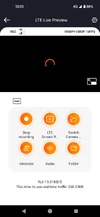
I just checked. If the S1PM is in parking mode and the screen is on, I can connect via LTE and see a live preview. If the S1PM is in parking mode with the screen off, I can connect but there is no preview.

@Jeff_Vantrue this seems to be related to connecting to the S1PM directly over WiFi, where the connection drops if the screensaver is active.

Connection with dashcam screen on:
Screenshot_20250727-130958.webp

Connection with dashcam screen off (notice the bitrate is lower):
Screenshot_20250727-130509.webp
 
I do like that speed / time / compass screen saver

There do seem to be some cross-linking going on that create havoc, i too have looked at the black screen
 
Okay so i am a bit freaked out today, today aside for the wait for system to wake up, i have always been able to LTE into the system, though it do take a few tries some times, i get successfully connected and then BAM i am thrown off, and i have to try again granted with shorter wait and most often a live preview.

I dont see the screen saver doing anything, io have tried to LTE into system while car and system on / driving, and with the screen saver engaged, absolutely no problem.
I have tried to stop, wait for system to go into parking mode and then LTE in, and also a success and the screen saver is on when the system wake up.

I do wish that the 4G and system was always connected, well aside for ultra low power use parking guard mode where of course you would have to wake up the system before you can get to see anything.
But otherwise in higher power use parking modes, shouldn’t the connection be there in like seconds / instantly ? i would prefer that.

Just did a LTE into the system, and the car been sitting parked for at least a hour in the back yard, and it still worked, though i did have to do 2 attempts, first attempt waking up system and spinning dots " loading " screen, but then after connection get kicked off, and so press LTE again to connect and now in this #2 attempt i get the wifi like rings in water loading screen and then in a couple of seconds BAM and connected.

I got screen recording of that, will share later.

Do feel there are some adjustments to be made.
 
Well that was then, remoting in now is not possible at all, the LTE say it is connected but the camera ( wifi ) always appear to be disconnected, i am now trying quick awake but the camera can not be awaken and it always time out.
I hope this will soon be like 70mai 4G which on the 2 cameras i have used is miles above where vantrue are at this early stage.

going fore drive soon, will mess with settings again.

View attachment 83215View attachment 83216View attachment 83217
sorry to know that you have issue with the LTE module. Could you please provide the app's log file so our engineers can further analyze and fix the issue. In the app's "About" page, tap the "About" text at the top five times or more, and a pop-up will appear to share the log~
 
That will be no problem Jeff, it seem to me connecting to the system with LTE are a bit on / off, it feel like at night it is not so possible but in daytime it is better.
Which of course is just a strange coincidence.

Where do you want me to send the 878kb zip file Jeff.
 
The screen recording of a connect / get disconnected / connect again as promised.

 
That will be no problem Jeff, it seem to me connecting to the system with LTE are a bit on / off, it feel like at night it is not so possible but in daytime it is better.
Which of course is just a strange coincidence.

Where do you want me to send the 878kb zip file Jeff.
please send it to my email via wendy.meng@vantrue.net
 
I have also noticed, after playing with LTE and failing, some times my mobile data are gone and i can not open any web page, i have to turn off mobile data and then back on to be able to do that.

Ill see if i can get a screen recording of that.

That is not going to be right now though CUZ the camera is just wham bam thank you mam working with LTE. 🙂

Did grab a couple of screen shots, demoing the perils of parking guard and environmental challenges.

Dashcam see.

Screenshot_2025-08-01-03-27-38-864_com.sanjiang.vantrue.webp


My CCTV see.

Screenshot_2025-08-01-03-28-15-583_com.mm.android.DMSS.webp


As you can see in case of a event this night too, i will not be able to get much useable from any dashcam, but my 1440p CCYV camera stand a good chance of a capture that can be of use.
Actually my CCTV camera are in dire need of a lens clean.
 
Last edited:
Got a OTA update today, which is great. So far not a single LTE attempt have failed.

In the previous days i attempted running low bitrate for parking, but doing so i was not at all able to access the system over LTE
 
Optimism over new firmware not valid. just got lucky a few times, tonight virtually impossible to get on LTE, and when i did, somehow the rear camera was gone.

I did clean glass last night and something might have come loose, just funny it do that now a day after and the car being parked.

Screenshot_2025-08-15-02-26-32-954_com.sanjiang.vantrue.webp
 
Optimism over new firmware not valid. just got lucky a few times, tonight virtually impossible to get on LTE, and when i did, somehow the rear camera was gone.

I did clean glass last night and something might have come loose, just funny it do that now a day after and the car being parked.

View attachment 83958
Sorry to hear that. Could you please take a photo of the 4G LTE Module installation and its wiring? The 4G antenna position shouldn’t have any cables running over it. Please send us a picture so we can take a look.
 
Back
Top