VIOFO A229 Pro FIRMWARE

The latest Firmware I see on their website for the A229 Pro front camera is September 18 2025
  • 250918
On December 4, 2025, Viofo removed firmware version V1.4_250918 from the firmware website.
On December 5, 2025, Viofo returned firmware version V1.4_250918 to the firmware website.
Differences found between firmware V1.4_250918 downloaded on December 4, 2025
and firmware V1.4_250918 downloaded on December 5, 2025: 26,236
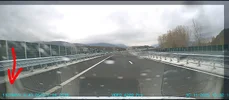
 
When you say "speed symbols" do you mean "Resolution Settings" for the rear camera? A screen shot of the speed symbols would help.
 

Attachments

  • Screenshot_20251130-221339+(1).webp
    Screenshot_20251130-221339+(1).webp
    147.4 KB · Views: 101
Now I understand (I think). The decimal point was missing in the KPH field for the rear camera speed stamp, it should be 110.7 KM/H and not 1107
And you are saying they fixed it, but identified it using the exact same Firmware number.

@Karagandinez noted that the difference was:

Differences found between firmware V1.4_250918 downloaded on December 4, 2025
and firmware V1.4_250918 downloaded on December 5, 2025: 26,236

I'm not sure what 26,236 refers to - is that the number of differences?
 
Last edited:
Now I understand (I think). The decimal point was missing in the KPH field for the rear camera speed stamp, it should be 110.7 KM/H and not 1107
And you are saying they fixed it, but identified it using the exact same Firmware number.

@Karagandinez noted that the difference was:

Differences found between firmware V1.4_250918 downloaded on December 4, 2025
and firmware V1.4_250918 downloaded on December 5, 2025: 26,236

I'm not sure what 26,236 refers to.
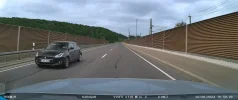
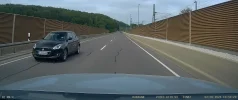
There is one more symbol, the speed in the picture is 107 km/h, but because of the fourth symbol it shows 1107 km/h
 
There is one more symbol, the speed in the picture is 107 km/h, but because of the fourth symbol it shows 1107 km/h
Yes the decimal point is missing. There should be 4 digits (symbols) but the last one (7) represents tenths of a Kilometer.
 
I'm not sure what 26,236 refers to - is that the number of differences?
Yes. The number of differences between firmware versions = 26236

Yes the decimal point is missing. There should be 4 digits (symbols) but the last one (7) represents tenths of a Kilometer.
There should be 3 characters, not 4, as in firmware version V1.4_250918, released before December 5, 2025.
Even better, the number of characters should match the number displayed on the electronic speedometer:
up to 10 km/h = 1, up to 100 km/h = 2, after 100 km/h = 3.

It is desirable that on multi-channel models, the symbols in the speed stamp are displayed as on single-channel models: V3, Mini 2 and M Pro.

 
Last edited:
Already tried that, but whether the display is on or off, a long press just enters the menu.
That is not right. Once you wake up the display, a long press should first bring up the menu settings, but continuing to hold it (don't let go) should power it off,
Essentially you are saying there is no way to power off the camera without removing the power cable.
Not that it should matter, but have you updated to the latest F/W? Previously a long press shut down the camera without bringing up the menu display.
 
I feel like now I should review my existing rear camera footage for that speed stamp.
The rear camera firmware doesn't affect the presence of symbols in the speedometer stamp.
The main firmware is responsible for this.
 
Hello, can you see how many characters the rear camera speed has, because with this firmware combination I have 4 speed characters, not 3. Thanks in advance!
I thought based on this comment it had to do with speed stamp for only the rear camera video file.
 
I thought based on this comment it had to do with speed stamp for only the rear camera video file.
That's true, but the error was in the main camera firmware.
Currently, firmware version V1.4_250918, available on the firmware website, has fixed the issue.

The problem was in the firmware for the front camera! Last week they fixed it and re-uploaded it to the official website!
 
That is not right. Once you wake up the display, a long press should first bring up the menu settings, but continuing to hold it (don't let go) should power it off,
Essentially you are saying there is no way to power off the camera without removing the power cable.
Not that it should matter, but have you updated to the latest F/W? Previously a long press shut down the camera without bringing up the menu display.
Thanks, I tried it and it did indeed turn off. It just took a surprisingly long time.
 
Hi, after updating the front camera to V1.4_250918 I noticed that how we manually turn off the dashcam has changed?

I used to press and hold the left-most button (menu button) for a couple of seconds to shut down the dashcam manually. (it's always been that way dating back 5 years on the A129 pro as well)

After updating the firmware, wanted to turn the dashcam off for the night (car sleeps in a garage) by pressing and holding the menu button and after 2s the settings appeared on the screen. Kept holding nothing happened.
Eventually what I did is press and hold menu button 2s til settings menu appears. Let go and then press and hold the menu button again and eventually it turned off.

Please don't tell me this is how we turn it off now? It's takes like 10-15s VS 3-5s before?

Is there another way to turn off the dashcam with the new fw?

EDIT: Somebody mentioned the same thing just above. According to @Hack_man we have to press once first to wake the screen and then press and hold?
I'll try tomorrow.
Before I did not have to press to wake the screen. I could press and hold menu button from a black screen and it would turn off
 
Last edited:
Hi, after updating the front camera to V1.4_250918 I noticed that how we manually turn off the dashcam has changed?

I used to press and hold the left-most button (menu button) for a couple of seconds to shut down the dashcam manually. (it's always been that way dating back 5 years on the A129 pro as well)

After updating the firmware, wanted to turn the dashcam off for the night (car sleeps in a garage) by pressing and holding the menu button and after 2s the settings appeared on the screen. Kept holding nothing happened.
Eventually what I did is press and hold menu button 2s til settings menu appears. Let go and then press and hold the menu button again and eventually it turned off.

Please don't tell me this is how we turn it off now? It's takes like 10-15s VS 3-5s before?

Is there another way to turn off the dashcam with the new fw?

EDIT: Somebody mentioned the same thing just above. According to @Hack_man we have to press once first to wake the screen and then press and hold?
I'll try tomorrow.
Before I did not have to press to wake the screen. I could press and hold menu button from a black screen and it would turn o

Yes, now I also press once to wake up the screen, then stop recording with a button REC,and then I hold it for a long time the button POWER-Leftmost button!
 
The bluetooth remote is soooooo worth it just for shutting off the camera at the end of the day.
But @Arese 's 15 seconds is way too long for the long press of the menu button, that just isn't right.
 
Hi, after updating the front camera to V1.4_250918 I noticed that how we manually turn off the dashcam has changed?

I used to press and hold the left-most button (menu button) for a couple of seconds to shut down the dashcam manually. (it's always been that way dating back 5 years on the A129 pro as well)

After updating the firmware, wanted to turn the dashcam off for the night (car sleeps in a garage) by pressing and holding the menu button and after 2s the settings appeared on the screen. Kept holding nothing happened.
Eventually what I did is press and hold menu button 2s til settings menu appears. Let go and then press and hold the menu button again and eventually it turned off.

Please don't tell me this is how we turn it off now? It's takes like 10-15s VS 3-5s before?

Is there another way to turn off the dashcam with the new fw?

EDIT: Somebody mentioned the same thing just above. According to @Hack_man we have to press once first to wake the screen and then press and hold?
I'll try tomorrow.
Before I did not have to press to wake the screen. I could press and hold menu button from a black screen and it would turn off
VIOFO has modified the "power off" button sequence on all of their recent firmware versions for all of the current models to use this "new" long button press approach.

I just timed it on an A229 Pro with 1.4_250918 firmware installed.

Starting with the screen off:

1) Quick click menu button to awaken screen
2) Press and hold menu button for 8 seconds to power down

The first 3 to 4 seconds of the long button press will cause it to enter the top level settings screen. Continuing to press the button for another 3 to 4 seconds will result in the power down of the dash camera.
 
Back
Top