Purchased A329T - Firmware Bugs / Problems (Help) - Suggestions

FWIW I spent half an hour getting in and out of my car, turning the ignition on & off, to see how the A329T responded when coming out of Low Bitrate parking mode. I even tried two different memory cards, and two different firmware versions.

@jsmith My findings were similar to your recent conclusions:
- If I press the three-line menu button in parking mode, it wakes the camera and triggers an event.
- If I turn on the 12V circuit (but not the engine), the A329T transitions from LBR to Normal without triggering the g-sensor.
- If I turn on the ignition, the A329T transitions from LBR to Normal without triggering the g-sensor. However my car is a petrol hybrid so this startup is almost identical to simply turning on the 12V circuit.
- The results were the same whether I remained seated quietly in the car, or got out and triggered a parking event by closing the trunk before starting the car. The first Normal driving video was always in the Movie folder, not the RO folder.

This brings me back to a question I asked earlier in this thread which I think got lost. When you start the engine, is your A329T saving Normal or Parking video files to the RO folder?

In my previous car with a 2L diesel engine, I recall the 12V circuit would suffer a voltage drop whilst the engine was starting. It's one of the reasons some dashcams have a boot delay option in the menu to prevent them from shutting down whilst booting up. In my new car the 12V ACC comes on instantly and there is no voltage drop, so I don't have a boot delay enabled.

Why does this matter? If your engine vibration on startup occurs before the A329T receives a stable ACC input, it may interpret that as a parking mode event moments before transitioning to normal recording.
 
FWIW I spent half an hour getting in and out of my car, turning the ignition on & off, to see how the A329T responded when coming out of Low Bitrate parking mode. I even tried two different memory cards, and two different firmware versions.

@jsmith My findings were similar to your recent conclusions:
- If I press the three-line menu button in parking mode, it wakes the camera and triggers an event.
- If I turn on the 12V circuit (but not the engine), the A329T transitions from LBR to Normal without triggering the g-sensor.
- If I turn on the ignition, the A329T transitions from LBR to Normal without triggering the g-sensor. However my car is a petrol hybrid so this startup is almost identical to simply turning on the 12V circuit.
- The results were the same whether I remained seated quietly in the car, or got out and triggered a parking event by closing the trunk before starting the car. The first Normal driving video was always in the Movie folder, not the RO folder.

This brings me back to a question I asked earlier in this thread which I think got lost. When you start the engine, is your A329T saving Normal or Parking video files to the RO folder?

In my previous car with a 2L diesel engine, I recall the 12V circuit would suffer a voltage drop whilst the engine was starting. It's one of the reasons some dashcams have a boot delay option in the menu to prevent them from shutting down whilst booting up. In my new car the 12V ACC comes on instantly and there is no voltage drop, so I don't have a boot delay enabled.

Why does this matter? If your engine vibration on startup occurs before the A329T receives a stable ACC input, it may interpret that as a parking mode event moments before transitioning to normal recording.

1. Saving to RO Photo and taking a snapshot I believe, too.

2. Did you attempt to verify rear camera flicker?

3. This is a Petrol Volvo not Diesel. Just the engine start is rougher by design as I have had car since new.
 
1. Saving to RO Photo and taking a snapshot I believe, too.
The RO folder can contain both driving and parking videos. Are these parking videos (with a PF suffix to the filename)?

2. Did you attempt to verify rear camera flicker?
No, not yet. I might be able to test that on Wednesday night. I currently have a rear telephoto installed so I may need to swap cameras to test.

3. This is a Petrol Volvo not Diesel. Just the engine start is rougher by design as I have had car since new.
OK. I was only trying to point out that for some users there will be a delay between turning on the ignition and there being a stable 12V ACC input, whereas other users may experience no delay. The timing may affect whether the rough start is detected during parking mode, or is ignored by the less-sensitive g-sensor setting in normal recording mode.
 
The RO folder can contain both driving and parking videos. Are these parking videos (with a PF suffix to the filename)?

Yes, the files in the RO folder are the same locked files you here after car starts and camera makes the "Snapshot" sound.

No, not yet. I might be able to test that on Wednesday night. I currently have a rear telephoto installed so I may need to swap cameras to test.

Ok Please let me know when you test.

OK. I was only trying to point out that for some users there will be a delay between turning on the ignition and there being a stable 12V ACC input, whereas other users may experience no delay. The timing may affect whether the rough start is detected during parking mode, or is ignored by the less-sensitive g-sensor setting in normal recording mode.

My understanding behind boot delay is it gives X seconds before the camera powers on after the car starts. I don't think this would have any bearing on the camera already being turned on and running during parking mode. The boot delay helps for certain vehicles where the camera might not get proper voltage immediately at start, and thus has it wait X seconds before booting.
 
Yes, the files in the RO folder are the same locked files you here after car starts and camera makes the "Snapshot" sound.
Correct - During a standard engine start (when you press the brake pedal and the start button simultaneously), the camera does not have enough time to switch from "Parking" mode to "Driving" mode.
Therefore, the triggered "event" video will be a parking video file saved in the (RO) folder. (Edit)
I am not sure, but the first driving video file could also be saved in the (RO) folder. (Edit)

My understanding behind boot delay is it gives X seconds before the camera powers on after the car starts. I don't think this would have any bearing on the camera already being turned on and running during parking mode. The boot delay helps for certain vehicles where the camera might not get proper voltage immediately at start, and thus has it wait X seconds before booting.
Correct - The "boot delay" feature is designed for starting the camera from a completely powered-off state, not for switching from "Parking" to "Driving."

However, here is a possible solution - You can perform a manual delayed start:

-Enter the vehicle
-Press the start button to turn on the ignition Only, without pressing the brake pedal.
- Wait a few seconds until the camera announces that 3ch driving recording has begun
- Then press the brake pedal and press the start button again to start the engine.

If you follow this procedure, and set your driving G-sensor to "Off" (some users disable it for driving anyway to avoid false triggers on rough roads), I think you will never encounter this problem again. (Edit)
 
Last edited:
Correct - During a standard engine start (when you press the brake pedal and the start button simultaneously), the camera does not have enough time to switch from "Parking" mode to "Driving" mode; as a result, the triggered "event" video will be saved to the "Parking" (RO) folder,
I am not sure, but maybe the first driving file also saved in driving RO folder.
There is only one "RO" folder for the A329S series of dash cameras. It stores emergency videos from normal recording mode and parking mode impact videos in the DCIM\Movie\RO directory.

1776101233736.webp


The A119 Mini 2 & A119M Pro do have a "Parking\RO" directory.

1776101869748.webp
 
I've tried to reproduce the parking mode to normal recording mode "video protected" issue by bringing two different A329S units into my office. So far, I cannot reproduce the problem. When installed in my vehicle, there are other dash cameras that are exiting parking mode and making their announcements. Either the A329S is "hearing" one of the other dash camera announcements and deciding that a voice command to lock the video was requested, their announcements are causing some sort of vibration picked up by the A329S, or the engine startup vibrations in my Chevy Caprice are triggering the event.

I'm going to disable voice commands for the A329S and see if the problem happens again in that vehicle over the next couple of weeks.
 
@VIOFO-Support

1. Said they'd put out an updated firmware for G-Sensor

2. Wanted to know if other cameras flickered. Only can replicate on Rear at the moment.

3. @rcg530 please let me know what you find out on the G-Sensor issue. Correct. All Locked files go to the RO folder.
 
FWIW I spent half an hour getting in and out of my car, turning the ignition on & off, to see how the A329T responded when coming out of Low Bitrate parking mode. I even tried two different memory cards, and two different firmware versions.

@jsmith My findings were similar to your recent conclusions:
- If I press the three-line menu button in parking mode, it wakes the camera and triggers an event. -

1. Confirmed Bug - Thanks

Let's see what happens with G-Sensor as other's continue to test.

Flicker:

Do you mind parking your car someone at night somewhere in a lighting situation similar to my videos (use light bitrate as easier) to see if you can replicate the flicker? Try a few different spots and all you need to do is let it sit a few minutes to see each time. Hopefully, you'll capture the flicker problem and confirm that issue, too.

Thank you for everyone assisting me here. Without a second camera, I'm limited on what I can duplicate and verify.

If @viofo and @VIOFO-Support feels inclined to send me a second unit for testing purposes, I'll be glad to check bugs against both units to verify issues I come across aren't a one off problem on a single unit. But as it stands, I limited to finding problems with the unit I purchased and asking others to verify these issues.
 
1. Confirmed Bug - Thanks

Let's see what happens with G-Sensor as other's continue to test.
.....
I do not see any Bug conformation in @TonyM post, unless I am missing something,
He did not trigger the G-sensor by starting the engine. (not sure what was his G-sensor sensitivity set to)
I got the same result both for Medium an Low sensetivity settings. (my car equipped with 3.5L V6 engine, no hybrid)
According to post @107 by @rcg530, so far, he also has not reproduced this issue

Pressing the three-bar button while in Parking Mode serves no practical purpose.
This constitutes a physical interaction with the dashcam, and the device responds accordingly.

@VIOFO-Support

1. Said they'd put out an updated firmware for G-Sensor
....
High G-sensor sensitivity (as high as practical) is beneficial in LPID parking mode.
In this mode, if the G-sensor sensitivity is not high enough, it will miss all minor and most of moderate impacts.
If @viofo intends to update the public firmware, by adjusting the sensitivity settings, they should be careful to avoid negatively impacting current performance and users.

I think the quick and simplest update would be to simply add an "Off" option to the parking G-sensor sensitivity menu. (same as for normal recording)
 
According to post @107 by @rcg530, so far, he also has not reproduced this issue
I have not reproduced it in with the A329S in my office, I have recently encountered the issue in my car.
 
I still don't understand what the problem is. Is the problem that you don't like hearing the Event notification every time you start the engine?

If something triggers the g-sensor during parking mode, the dashcam moves the relevant video file(s) from the Parking folder to the RO folder. It doesn't take up more space or stop the dashcam from working. Both the Parking and RO folders are eventually over-written by the loop record process - you don't need to reformat the card or do any other file housekeeping.

My RO folder contains hundreds of parking mode files, most of them triggered by closing doors when I get in or out of the car. Occasionally I hear the voice alert that an impact was detected during parking mode - that depends on the timing of the impact relative to the start or end of parking mode.
 
I have not reproduced it in with the A329S in my office, I have recently encountered the issue in my car.
Does this happen constantly or frequently, and at what sensitivity settings?

For me,
At high sensitivity, G-sensor triggered almost constantly - simply when opening, and primarily when closing the door.
At medium sensitivity, which is my choice for LBR, this occurs only really - depending on how hard I slam the door.
Practicaly never due to engine start.
 
Last edited:
I still don't understand what the problem is. Is the problem that you don't like hearing the Event notification every time you start the engine?

If something triggers the g-sensor during parking mode, the dashcam moves the relevant video file(s) from the Parking folder to the RO folder. It doesn't take up more space or stop the dashcam from working. Both the Parking and RO folders are eventually over-written by the loop record process - you don't need to reformat the card or do any other file housekeeping.

My RO folder contains hundreds of parking mode files, most of them triggered by closing doors when I get in or out of the car. Occasionally I hear the voice alert that an impact was detected during parking mode - that depends on the timing of the impact relative to the start or end of parking mode.
The problem description to me is that the transition from parking mode to normal recording mode is triggering an immediate "driving" impact event right as the dash camera has returned to normal recording mode. When it has occurred in my car, the engine has already been started and it has been idling for for almost 5 seconds. There's no obvious reason the A329S is triggering a driving mode impact event recording for that situation.
 
The problem description to me is that the transition from parking mode to normal recording mode is triggering an immediate "driving" impact event right as the dash camera has returned to normal recording mode.
Ok, thanks. I've been trying to understand whether it's a parking event file or a driving event file that we're discussing.

When it has occurred in my car, the engine has already been started and it has been idling for for almost 5 seconds. There's no obvious reason the A329S is triggering a driving mode impact event recording for that situation.
I agree there's no logical reason for a driving event to occur if the engine is idling.

I have the same g-sensor settings as you (parking high, driving low). I think all the driving event files on my card are manually triggered when I press the remote button, although I will review them to be sure.
 
The problem description to me is that the transition from parking mode to normal recording mode is triggering an immediate "driving" impact event right as the dash camera has returned to normal recording mode. When it has occurred in my car, the engine has already been started and it has been idling for for almost 5 seconds. There's no obvious reason the A329S is triggering a driving mode impact event recording for that situation.

Correct. For me it's immediate when I start my car. For you, it's 5 seconds later. Either way, the Event Lock Triggers with the motion of starting vehicle, causing a bunch of unnecessary files to pile up in the RO folder. This is an issue / bug that I have raised direct with Viofo Support, and they'll be adjusting the sensitivity. Let's see what happens.
I do not see any Bug conformation in @TonyM post, unless I am missing something,
He did not trigger the G-sensor by starting the engine. (not sure what was his G-sensor sensitivity set to)

Pressing the three-bar button while in Parking Mode serves no practical purpose.
This constitutes a physical interaction with the dashcam, and the device responds accordingly.

Not sure purpose of the Menu Button creating a "Lock Event" when pressed while camera is in parking mode. Seems that waking camera up shouldn't lock the video. yes, it's not a big deal, but just a "Bug" or annoyance. Again, I check products for bugs and quirks. Simply mentioning my results here.

High G-sensor sensitivity (as high as practical) is beneficial in LPID parking mode.
In this mode, if the G-sensor sensitivity is not high enough, it will miss all minor and most of moderate impacts.
If @viofo intends to update the public firmware, by adjusting the sensitivity settings, they should be careful to avoid negatively impacting current performance and users.

I think the quick and simplest update would be to simply add an "Off" option to the parking G-sensor sensitivity menu. (same as for normal recording)

I put it this way. If you're wanting people to compare videos and give reviews (which companies generally expect praise), I'd rather skip this part. If you want someone to help make your product better, more stable, and reliable behind the scenes, I'm your guy. Ask Vantrue the amount of feed back I offered, bug fixes I suggested, etc. Vantrue even redesigned their rear camera based upon my results. That says quite a bit.

To answer your question: I've let Viofo Support / Engineers know the problem. It'll be for them to decide how to proceed on making changes and/or adjustments. I don't step on toes, as I'm simply the messenger.

Flicker:

Viofo is sending me a second rear camera to see if I can replicate the issue on another unit. This will be helpful for troubleshooting purposes, too.
 
Last edited:
@rcg530
@TonyM
@jsmith

This is not a driving Event Lock issue, the Event Lock Triggers while the dash cam is still in LBR parking mode!
It’s a parking Event.

@jsmith, I do not do reviews, (English is not my native language, so it takes me longer to express my thoughts, type the text, check the spelling, and so on).

However, I have immense respect for the work of all the active members of this community who create product reviews, thereby helping manufacturers improve their products and helping users make informed purchasing decisions.
I try to contribute to this process as much as I can.
You asked for help and I wanted to get to the bottom of this issue.

I tested my camera again and this time I recorded video footage of the testing process.

-The first video is for parking G-sensor set to “Medium” – the Event Lock did not trigger.
-The second video is for parking G-sensor set to “High” – I was not gentle enough and Event Lock Triggered the moment I pressed the 3-line button.
-The third video is also for parking G-sensor set to “High” – But this time I was gentle enough so pressing 3-bar button did not trigger Event Lock, but starting the engine did trigger Event Lock (as expected).

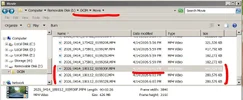
I also have the actual video recordings from the dashcam itself - corresponding to this same test - which confirm that this was indeed an Event that occurred while still in parking mode; furthermore, I have screenshots of the contents of the "Move" and "Move-RO" folders, which I will post shortly.

EDIT: I noticed that in the second video, I made a slip of the tongue: I said "driving mode" instead of "parking," and "low sensitivity" instead of "high." Nevertheless, I hope you still grasped the main point.


Last edited:
This is not a driving Event Lock issue, the Event Lock Triggers while the dash cam is still in LBR parking mode!
It’s a parking Event.
For me, it's a driving mode issue. The file that gets moved into the RO directory is a normal mode file F/R/I created right as it returns from LBR parking mode to normal recording mode, not a LBR PF/PR/PI file.
 
For me, it's a driving mode issue. The file that gets moved into the RO directory is a normal mode file F/R/I created right as it returns from LBR parking mode to normal recording mode, not a LBR PF/PR/PI file.
Your case differs from the one described by @jsmith
Hope this is a rare exception, and that you will manage to get to the root of the problem and let us know the results.
--------
In the meantime - here are the promised dash cam footage and snapshots:
The first video is still in parking mode - Event saved in RO folder; The video cuts out the moment the dashcam switches to driving mode.
The second video is the first driving recording, saved in regular movie folder (continues from the parking Event recording).


Attachments

  • Movie Folder.webp
    Movie Folder.webp
    72.5 KB · Views: 37
  • Movie-RO Folder.webp
    Movie-RO Folder.webp
    68.6 KB · Views: 35
Last edited:
Back
Top