Mini 0803 coming

That's a good thought.
I'll try to fix the looseness and see what happens.

I have also found three files that I can't copy from the micro card, so it could be that the connections is failing.

Thanks for the suggestion 🙂
 
I've fixed the looseness by following the instructions here:

I used 90gsm paper, and its now a really snug fit - no movement at all.

Have set the g setting to 3.5 and see how it goes.
(anyone recommend a suitable setting?)

Also changed the record loop to 3 mins (was 5) just in case the glitches were caused by something else.
Glad I found this forum.
 
Question about locking files.

When I lock a file, it sometimes also locks the previous file.
This is a good idea in case of you lock when the new file just begins.

But what is the rule ?

Sometimes it only locks 1 file.

My Loop setting is set to 5 min.
 
I've ordered one from E-Prance via Amazon but it hasn't arrived yet.

Good luck - I cancelled my Eprance/Amazon order after over a months wait for it to appear. They were very polite, but ultimately unable to help, and offered a full refund. I think I'll be ordering from a supplier with stock in the UK - it makes the returns process a lot quicker and easier too, should there be a problem.
 
I've fixed the looseness by following the instructions here:

I used 90gsm paper, and its now a really snug fit - no movement at all.......................
Thanks for the video, I have now modified my 0803 and it works really well. No more wobbly mount.
 
Good luck - I cancelled my Eprance/Amazon order after over a months wait for it to appear. They were very polite, but ultimately unable to help, and offered a full refund. I think I'll be ordering from a supplier with stock in the UK - it makes the returns process a lot quicker and easier too, should there be a problem.
My experience with E-Prance is positive, I ordered on Amazon and had my 0803 in 4 days. They were very quick to reply to my emails when I queried some of the functionality of the camera and have said they will take up my issues with the manufacturer.
 
I had a good experience with E-Prance via Amazon. I ordered my 0803 at 10:30 am on Monday, and it was delivered at 11:40 am on Tuesday!🙂

No complaints from me!

Fitted today and working fine. Noticed its a little loose in the GPS mount, so I'll be doing the paper mod.
 
+1 for EPRANCE from me also.
Very fair with me but unfortunately the distance ultimately means waiting for delivery but worth the wait when dealing with helpful seller.
 
Good luck - I cancelled my Eprance/Amazon order after over a months wait for it to appear. They were very polite, but ultimately unable to help, and offered a full refund. I think I'll be ordering from a supplier with stock in the UK - it makes the returns process a lot quicker and easier too, should there be a problem.

This is one of the many benefits we tell our customers if they are located in Canada, or even in the States (since we're your "hat"). We will always be faster than other stores in other countries to respond to your concerns!
 
Last edited by a moderator:
I'm new here but just purchased two 0803 mini dashcams from Foxoffer and I'm having the same issue that someone else posted above. When I try to connect them to my computer using the USB cable, the screen just displays "USB Connecting..." with a blue LED illuminated, but nothing happens. I'm unable to connect either of the cameras to any of my computers (running Windows XP, Windows 7, or OSX 10.8.1). The two cameras have 16GB internal memory and GPS base. 🙁
 
I'm new here but just purchased two 0803 mini dashcams from Foxoffer and I'm having the same issue that someone else posted above. When I try to connect them to my computer using the USB cable, the screen just displays "USB Connecting..." with a blue LED illuminated, but nothing happens. I'm unable to connect either of the cameras to any of my computers (running Windows XP, Windows 7, or OSX 10.8.1). The two cameras have 16GB internal memory and GPS base. 🙁
803 not connecting.webp
 
Try another USB cable ?

Anyway, it is always better to use a SD-card reader
 
Good Day

I am new here as well and am also having the same issue with my 0803 with 16gb internal memory when using the usb supplied cable, a blue screen saying usb connecting and that is it, cannot seem to transfer data to PC to view video.
I am going to try a micro sd card and see if that will work but still does not explain the blue screen with internal memory.

Take Care
 
When my Windows PC is connected directly to the camera body, I also see 'USB connecting...'

However, I have assumed this to be normal, because my PC (under 'computer' from the 'start' menu) recognises the internal camera memory as a 'Removable Disk', and I can access and copy files.
There was no other functionality available with the camera whilst it was connected this way.

If the disk doesn't show on the PC as a removable disk, then maybe its a PC problem rather than the camera - have you tried another USB port on the PC?

When I connected it to the PC via the USB plugged into the mount, the camera options were all available on the built in screen.
 
Try another USB cable ?

Anyway, it is always better to use a SD-card reader

I tried three different USB cables - two of them came with the cameras, and the third one was my own. Still nothing. In fact, I used one of the cables to connect to another device (an MP3 player, not the dashcams) and it connected without issue.

The reason I purchased the model with the internal memory is so that I wouldn't have to get extra SD cards that could get lost.

It sounds like Tatsudoshi's issue is identical to mine. I can't load anything, or view anything, from the camera on my computer.

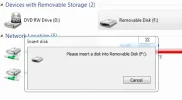
A new drive DOES show up on my computer, but it doesn't work (as per the attached screen shot).

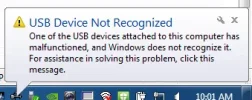
Also, Windows displays a failed USB connection message (as per the screen shot).

Firmware version 20140511 v1.0
 

Attachments

  • usb not recognized.webp
    usb not recognized.webp
    11.9 KB · Views: 133
  • dashcam not connecting F drive.webp
    dashcam not connecting F drive.webp
    11.6 KB · Views: 134
Last edited:
Most people would recommend using an external SD card as generally people dont remove the camera from their car. You can also go upto 64gb with an external SD card.
 
😉
Most people would recommend using an external SD card as generally people dont remove the camera from their car. You can also go upto 64gb with an external SD card.
I've been waiting for years for someone to develop a dashcam specifically to be removeable. If I dont remove my camera from my car when it's parked, there's a good chance that someone else will do it for me.
 
I find that my gps mount interferes with my radio signal.
Is there anyway to suppress this?
It's definately the GPS mount as when I use the none GPS mount its okay.
It seams to effect radio frequency >100 fm more than others
 
Good Day

I have tried a micro sd card and it worked but still no access to internal memory, the sd card info now comes up with codec errors on anything but the QTPlayer and cannot read.
Also in the menu on this 0803 with 16gb internal memory there is no option to go from internal memory or external memory like in the review I watched.
This thing came from Foxoffer with firmware version 20140511 v1.0
Not sure what to do at this point, might just send it back but then shipping to China will probably be as much as the camera.
I am starting to think that the firmware installed is for an 0803 without internal memory
Take care
 
Last edited:
Back
Top