2CH Panorama X2. FullHD + FullHD ( 256Gb ). Sony Exmor CMOS. WDR. GPS. 24/7 Parking Mode Rec.

gents,

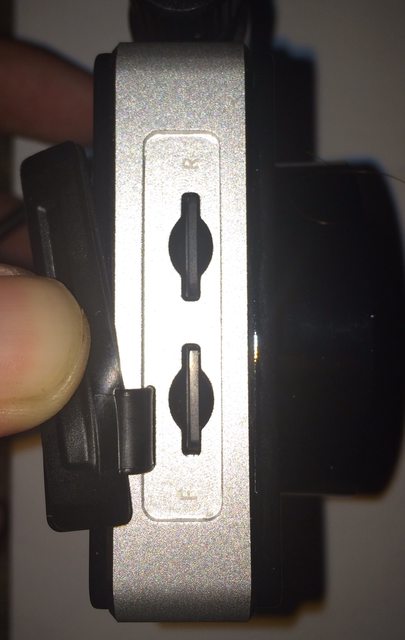
so the top slot is for the FRONT cam and the BOTTOM SD slot is for the REAR cam? Is this correct? manual does not make that clear (at least to me).
Also, can their be an addition to the firmware to show a "success" when the card has been properly formatted? As it stands now it just goes back to the menu screen. How does one know if the format was successful?

Should be the other way around. (are you finding otherwise?)
The top slot has a letter R (for reverse)
The bottom slot has a letter F (for front)
I'll update the manual as well shortly.
https://www.dropbox.com/s/rborg86z96v5aa2/panoramaX2_Eng_manual DRAFT #14.pdf?dl=1
KKOB1Kil.jpg


When you format the card, when it's complete it will back out to the previous page. There is no further confirmation yet, this may be enhanced in the future we'll see.
As far as Sandisk goes, glad yours works but I won't recommended Sandisk until they are given the all clear by Jokiin and SungMoon Jang. I believe you are only buying the high end SanDisk cards, the problem is with the entry level models. (as Jokiin says)
 
Last edited:
@Pier28 ,

thank you for clearing up the sd card slots for me. i did not even notice there were markings when i took the cam out to look at it. i just ASSumed the top was for FRONT since the on screen format option lists the FRONT on top and REAR on bottom. simple mistake on my part.

WRT Sandisk, I know you cats can only recommend what the dev does, and I totally understand that. however we all know that when a company recommends cards there are other cards that work (they just dont test them) and newer cards replace older cards.

Forums are all about helping one another out, and all I am trying to do is break the stereotype about sandisk. I have never seen so much negative press about sandisk as i have on this forum. it really surprised me as nearly all the forums i hit up, sandisk is in the top 2/3 of recommend cards for whatever the product may be.

I use a blackmagic design hyperdeck shuttle 2 (for use with my DSLR video package and RED EPIC and SCARLET cameras) with sandisk SSDs . half terabyte. i also use the same SSDs in my editing computer and two other computers (whats a hard drive? sooo 1990s 😉 ). Commercials have been shot on these SSDs from Sandisk. 😉

Don't mean to derail the thread and I apologize for that. For anyone who happens to visit this forum (who may be interested in this system) and is used to using sandisk cards in other gadgets, I want to just post up my personal experience here with sandisk so they dont get blindsided (like i did! ) 🙂
 
Damn this PX2 gets really HOT after recording for awhile as compared to the P2S.

The aluminum frame would be too hot to even touch at times..

But it all seems to be performing perfectly even under direct hot sunlight irregardless if it's too hot to touch.. Just a bit concern though..
 
It has been tested error free at 90c, don't see it getting that hot during any real world use
That's 194F for the non-metric folks. This thing can eat the heat no problem. We've shipped quite a few Panoramas to Texas.
 
Last edited:
I think some of the heat is that little LCD screen - just updating out of the stone ages thanks gents but once that actually gets turned off instead of showing that clock it will help heat a bit 🙂
 
Screw the clock seriously! 😵😀😛
 
Are the power cut off values changeable in software?

Currently we've got say 11.8, 12.1 & 12.4 options for cutoff - just wondering if with the loss of the 13.x value could 12.2 be added?

Is it worth maybe adding a diag screen where the camera displays what it is seeing itself like the Lukas so you could work out how long it would run for? Saves getting the old multimeter out?
 
I am assuming that if you order the front filter with the dashcam will ship with the filter when it is released at the end of this month?

I just realized this unit does not have wifi, not a deal breaker due to awesome video quality (which could get even better with new firmware releases).

I vote when you'll create the hidden DVR unit with 2-4 remote dashcams that you make it wifi enabled so you can bury it deep inside the console so people can steal your cameras but cant dig out the harddrive proving they stole it! Also, the use of micro SSD would be fantastic...imagine 25MB/s bitrate for all cameras and a 256gb SSD to store it all on (which would be cheaper than 2x128gb micro SD cards of the same build quality). *drool*
 
Screw the clock seriously! 😵😀😛

I think it's safe to say that I speak for most everyone that having that screen turn completely off instead of the the dark clock screensaver is preferred. (should be an easy fix/option soon)
 
I think it's safe to say that I speak for most everyone that having that screen turn completely off instead of the the dark clock screensaver is preferred. (should be an easy fix/option soon)

Good news, I just received & confirmed new 1.00.17 firmware turns the screen completely off while in parking mode. (testing now, will roll out slowly for more testing & feedback before posting for all)
 
I am assuming that if you order the front filter with the dashcam will ship with the filter when it is released at the end of this month?

I just realized this unit does not have wifi, not a deal breaker due to awesome video quality (which could get even better with new firmware releases).

-CPL filter should be in stock in 5 days, Correct
-High Quality Video and rich features are more important than WiFi. The files are quite large anyway. If you want to be creative, you can buy microSD to SD ribbon adapters and connect WiFi enabled SD cards no problem. (there you go, work around)
 
-CPL filter should be in stock in 5 days, Correct
-High Quality Video and rich features are more important than WiFi. The files are quite large anyway. If you want to be creative, you can buy microSD to SD ribbon adapters and connect WiFi enabled SD cards no problem. (there you go, work around)

That is why I do not care about the wifi feature. Better to be able to see clearly. Just giving suggestions about future projects.

Thanks for the update!
 
sorry I want that LED ring feature back! 😛

I have had the X2 running nonstop since wednesday and the heat has not been an issue. I also run the lcd screen 24/7, which also contributes to heat somewhat.

the metal around the housing is definitely doing its job taking the heat away from the components.

firmware updates pushing out. this is why i love this cam and applaud the devs, engineers for bringing what looks to be a quality camera system to market. 🙂
 
I'm with @Midnight2012 and we are installing his new Panorama X2 in his beautiful 2012 Ford F150. So far so good with the power cable install via add a fuse and crimped on quick disconnects. Fuse box is in the footwell of the passenger side.

5809cc135b7ab61857fbe723f79f10c3.jpg


Two "add a fuse" pigtails. One for ACC (switched) one for BAT+ (constant). Fuse panel cover won't fit over once we are done but the main panel still full hides and covers it.
118ea6ac98406de28198cd6cf23b485d.jpg

2baa2699d203a1d7df82c7b593870dff.jpg


Using #38 for ACC (switched) and #10 for BAT+ (constant)
35085a1f62b6dfd6e8d3b3da04da8b2f.jpg

ceb876138f0bf981350f92e532480691.jpg

a959c94bff28a77d777530f61afb2578.jpg


Ground point
1c915872f5298d3aea163d27cb4bb3d5.jpg


dc40f65206b2ffe627fc81864cfddd21.jpg

482b29c2c600234b717eeba620627fef.jpg


Split loom tube
6bbeb0c8aaea290bb3d26162f63ae73c.jpg
 
Last edited:
Back
Top