70mai 4K Omni Dash Camera review, bringing the fun back to the road!

Augustus

Well-Known Member
Joined
Aug 19, 2016
Messages
4,238
Reaction score
2,718
Location
Perth, Australia
Country
Australia
Dash Cam
Viofo, Vantrue, 70mai, Wolfbox
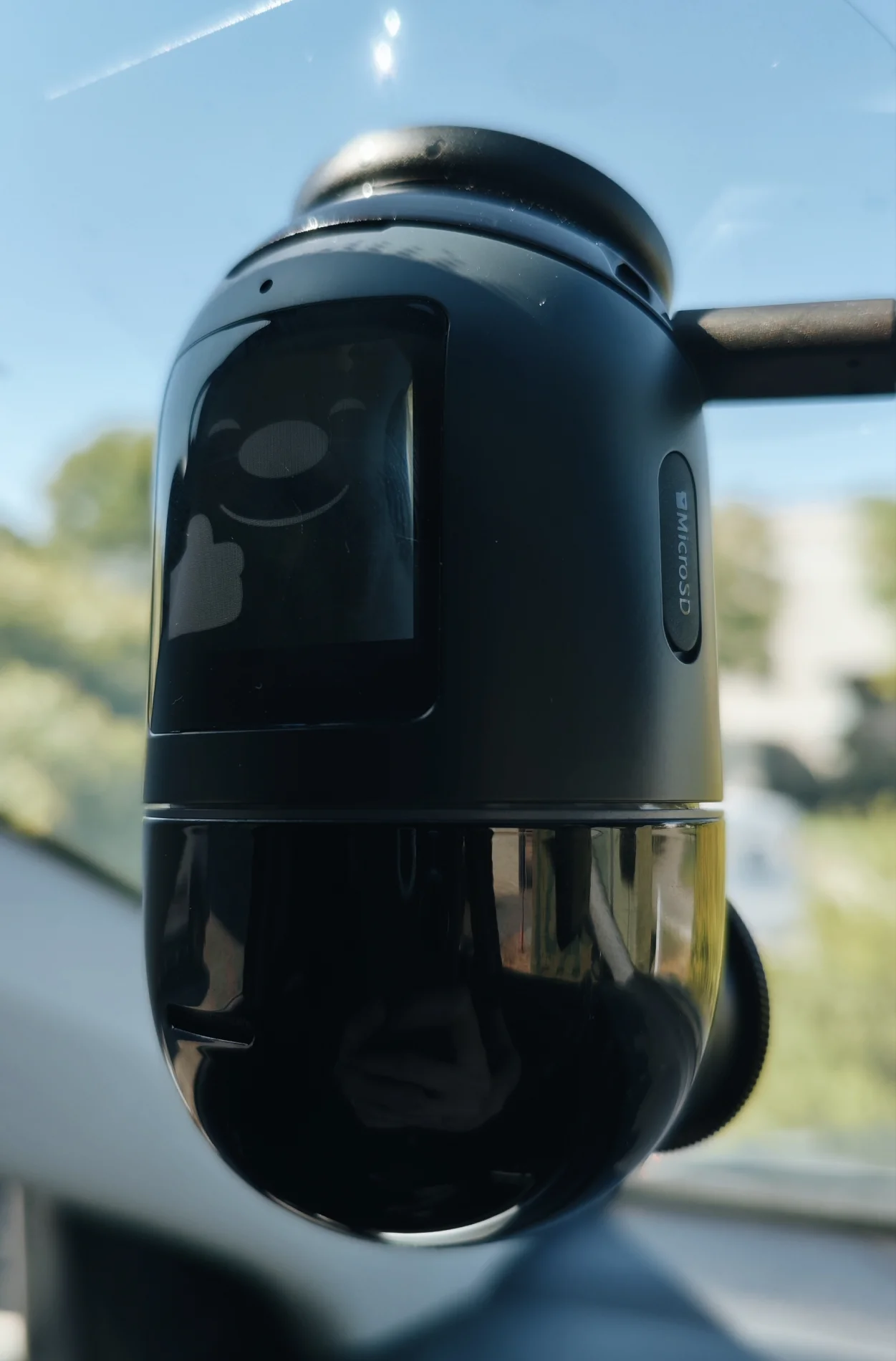
I have spent several weeks with 70mai's latest release, the 4K Omni, and have formulated my verdict on this dashcam. Does 70mai have a strong product on their hands, with their unique approach to 360-degree coverage? I'll try my best to answer these questions below.


70mai 4K Omni (Sony Starvis 2 IMX678/IMX662, Wi-Fi 6, 4K60 + HDR both channels)
1744186392551.webp


--------------------------------------------------------------------------------
Firmware: v1.2.96ww. The firmware version loaded from the factory onto the device was v1.0.78ww, and during the testing period I received two firmware updates of which I updated to in the latter part of testing.

App for testing: Android version v3.8.3, obtained from Google Play Store.
--------------------------------------------------------------------------------


The verdict:

With the relatively strong dashcam market in general, I was not expecting a follow-up to the original Omni X200. What 70mai did was improve on every single aspect that the original lacked, by adding another rear channel to including a much-improved image sensor.

The 4K Omni is a complete solution for those wanting interior coverage and of the road and other vehicles. The way all the parts work together has made this dashcam the most integrated and reliable dashcam I have tested to date. An easy recommendation from me.


My nitpickings:
  • Video footage can be overexposed and oversaturated at times
  • Rear camera does not have collision or motion detection
  • Rear camera resolution could be increased for the next generation


The positive:

  • Great video quality from the Starvis 2 IMX678 sensor in glorious 4K 60fps
  • MaIX screensaver adds fun and character for yourself and your passengers (I have not turned it off since using the Omni)
  • Integrates seamlessly with the UP04/05 4G hardwire surveillance kit
  • Parking mode functions work reliably along with motion tracking
  • ADAS functions work great for those with older vehicles
  • App and cloud functions are fast and accurate, a well-polished user experience
  • Firmware update support is strong, 70mai is listening to consumers
 
Last edited:
70mai 4K Omni Dash Camera Sample footage:


Daytime Footage (front): 4K30, HDR on, CPL on:


Daytime Footage (rear): 1080p, HDR on:


Night Footage (front): 4K30, HDR on, CPL on:


Night Footage (rear): 1080p, HDR on:


Daytime Footage (front): 4K60, HDR off, CPL on:


Night Footage (front): 4K60, HDR off, CPL on:


"Surround Scan" Collision Detection feature (front): 4K60, HDR off

 
Last edited:

70mai 4K Omni Dash Camera review, bringing the fun back to the road!​

Great title, most dashcams are fairly boring, the Omni creates a bit of entertainment.
Not everyone needs the ultimate in license plate reading, there are other things to consider.
 
Great title, most dashcams are fairly boring, the Omni creates a bit of entertainment.
Not everyone needs the ultimate in license plate reading, there are other things to consider.
Would have to agree, it's an interesting and unique way of approaching the '360' situation.

The Vantrue E360 does it in a different way, but I feel that even with it's positives, the 4K Omni is just a better thought-out and better executed than the Vantrue.

70mai appears to be catching up quick to the competition and I'm interested to see what they do next with their upcoming T800.
 
Last edited:
Very nice evaluation and great images. I agree, about the license plates...far too much emphasis on them, especially in the U.S. were folks have become almost OCD over it.
 
Very nice evaluation and great images. I agree, about the license plates...far too much emphasis on them, especially in the U.S. were folks have become almost OCD over it.
70mai are definitely onto a winner here. I saw glimpses last year with the S500 and then I thought with their A510 that they could really be stepping up to the plate.

This year with their releases in the 4K Omni and T800, I think they've reached that high standard and competitiveness in the market. And they're listening to feedback too which makes it even better ๐Ÿ™‚
 
...I agree, about the license plates...far too much emphasis on them, especially in the U.S. were folks have become almost OCD over it.
+1.

If memory serves me correctly member @kamkar started using plate legibility as a fairly easy way to compare the video quality of different cameras. This simple comparison has since morphed into the 'holy grail' of dash cam benchmarks. Some folks here will have you believe that unless a dash cam can resolve plates at night, in the rain, three traffic lanes away, at a closing speed in excess of 100 MPH the camera is useless and should be thrown in the trash.

In my 50+ years of driving I have never had a need to capture the plate number of any vehicle.
 
70mai are definitely onto a winner here. I saw glimpses last year with the S500 and then I thought with their A510 that they could really be stepping up to the plate.

This year with their releases in the 4K Omni and T800, I think they've reached that high standard and competitiveness in the market. And they're listening to feedback too which makes it even better ๐Ÿ™‚
It also helps that their app and 4G function are very good and user friendly.
The others need to work on their app to keep up.
If they tune their image carefully then they are heading in a very good direction. Especially with getting rid of the battery.
 
+1.

If memory serves me correctly member @kamkar started using plate legibility as a fairly easy way to compare the video quality of different cameras. This simple comparison has since morphed into the 'holy grail' of dash cam benchmarks. Some folks here will have you believe that unless a dash cam can resolve plates at night, in the rain, three traffic lanes away, at a closing speed in excess of 100 MPH the camera is useless and should be thrown in the trash.

In my 50+ years of driving I have never had a need to capture the plate number of any vehicle.
It is a simple but effective way to compare how these different cameras capture images.
If the job of a dashcam is to catch a plate, then it's fair and relevant make comparisons based on that alone.

There have been hit and run cases where the plate couldn't be identified because of motion blur.
 
It is a simple but effective way to compare how these different cameras capture images.
If the job of a dashcam is to catch a plate, then it's fair and relevant make comparisons based on that alone.

There have been hit and run cases where the plate couldn't be identified because of motion blur.
The job of a dashcam, at least for me, is to show that I'm not at fault when an incident occurs. In the case of a hit and run as long as the video shows that was the case there's no need for anything further - capturing the plate number of the offender is irrelevant.
 
If a dash cam can capture a plate, I think that is great. I believe the problem is that a few reviewers convince a multitude of prospective dash cam owners they must have this plate capturing capability. This causes a lot of capable dash cams to be overlooked for a reason that is very likely to never occur in the life time of the owner...needing to know the license plates of another car. If someone side-swipes my car and does a crash and dash, I am more interested in having evidence to give my insurance company to show I am not at fault. The police will find the person, in most cases, when they show up at a body shop to have their car repaired. Different people have different needs. My A229 Pro is great at getting plates but, I am also quite satisfied with my A129 Pro.
 
Would have to agree, it's an interesting and unique way of approaching the '360' situation.

The Vantrue E360 does it in a different way, but I feel that even with it's positives, the 4K Omni is just a better thought-out and better executed than the Vantrue.

70mai appears to be catching up quick to the competition and I'm interested to see what they do next with their upcoming T800.
The original 1K Omni reeds plates fine for me, wouldn't work for USA plates, but it has enough resolution for UK plates, a very fast/sensitive 1K image sensor, and functional HDR. The AI bits, tracking people moving around the car, didn't work well, but as a dashcam, it worked.

The Vantrue E360 just doesn't have enough resolution, and even if they replaced the 2K sensors by 4K sensors, it still wouldn't. Someday we will have enough resolution for a real 360 dashcam, but there is still the problem that you still need a rear camera, so a true 360 front camera doesn't add that much, and the Omni's spinning implementation is a good alternative.

One of the good things for the original Omni was that if someone hit your car, the g-sensor was supposed to detect the direction of the hit and spin around to look in that direction, which was a great feature for parking mode, but as far as I know, that never actually worked. In your last video, when you close the door, it appears to look at the wrong door first, or was it that door that you closed? Might be the correct default, since that is the most likely mirror to get hit by a passing vehicle!
 
The original 1K Omni reeds plates fine for me, wouldn't work for USA plates, but it has enough resolution for UK plates, a very fast/sensitive 1K image sensor, and functional HDR. The AI bits, tracking people moving around the car, didn't work well, but as a dashcam, it worked.

The Vantrue E360 just doesn't have enough resolution, and even if they replaced the 2K sensors by 4K sensors, it still wouldn't. Someday we will have enough resolution for a real 360 dashcam, but there is still the problem that you still need a rear camera, so a true 360 front camera doesn't add that much, and the Omni's spinning implementation is a good alternative.

One of the good things for the original Omni was that if someone hit your car, the g-sensor was supposed to detect the direction of the hit and spin around to look in that direction, which was a great feature for parking mode, but as far as I know, that never actually worked. In your last video, when you close the door, it appears to look at the wrong door first, or was it that door that you closed? Might be the correct default, since that is the most likely mirror to get hit by a passing vehicle!
Very nice with the original Omni too by the sounds of it. Motion tracking has worked pretty well on the 4K Omni so far I've found, it's not the fastest in the world but it's pretty quiet and reliable in my testing.

I closed the door on the driver's side the right side, so it may have got the wrong door there lol. There are no settings as such to choose which direction to default to.

I just tried the collision detection again, but this time entering through the left door (not the right door as in my YouTube video), and it's defaulted to looking at the left side again.
 
I just tried the collision detection again, but this time entering through the left door (not the right door as in my YouTube video), and it's defaulted to looking at the left side again.
Probably designed for China, they put the driver's door on the wrong side there, except in Hong Kong. But as I said, if your mirror gets hit, it will probably be the passenger side, if you park correctly on the street, so this is the better default!

The g-sensor should be able to detect which door is being closed, and turn it to the correct side, even if it can't work out a mirror hit.
 
I seriously doubt there is a 'default' position for the lens to face if there is an impact. The camera tracking probably warrants further testing by doing a 'Ben' and standing outside the car and bouncing a ball off the windows or door. ๐Ÿ™‚

There is a preset left and right position the camera will swing to, but that is on voice command of "capture left" or "capture right".


It looks like this camera is not mounted center screen, but to the left of the rear-view mirror, how that position impacts the accelerometer(s) detecting impact is hard to say.
 
Last edited:
I seriously doubt there is a 'default' position for the lens to face if there is an impact. The camera tracking probably warrants further testing by doing a 'Ben' and standing outside the car and bouncing a ball off the windows or door. ๐Ÿ™‚

There is a preset left and right position the camera will swing to, but that is on voice command of "capture left" or "capture right".


It looks like this camera is not mounted center screen, but to the left of the rear-view mirror, how that position impacts the accelerometer(s) detecting impact is hard to say.
I've tried both sides of the car and it's defaulted to starting capture to the left.

Don't think the camera not being centre-mounted (no room thanks to multiple dashcams on the windscreen haha), has affected the impact detection.....I've entered my car on the driver's side in the morning before starting the ignition, and the camera has woken up and turned around to stare at me bwahaha.

I agree with you in that it's just chosen the left side to start capture
 
Can't wait to get mine soon.
 
Does the rear camera work in parking mode? I had the original and I think there was an issue that it didn't.
 
Does the rear camera work in parking mode? I had the original and I think there was an issue that it didn't.
It does, but the rear doesn't have collision detection or motion detection. So it needs the front cam to be triggered and then it will record front and rear. Something to improve on if hopefully there is a 3rd generation of the Omni
 
It does, but the rear doesn't have collision detection or motion detection. So it needs the front cam to be triggered and then it will record front and rear. Something to improve on if hopefully there is a 3rd generation of the Omni

I have wondered about this before, if there was a need to put collision detection in the rear camera.
 
Back
Top