70mai 4K T800 (unboxing & impressions) (Sony Starvis 2 IMX678, GC2093, Wi-Fi 6/GPS, Novatek NT98530, 4K front / 4K rear / 1080p int, HDR all channels)

It is nice there are so many " safe bets " in dashcams these days.
I use to rank the 70mai systems as sort of OK, but they have lately stepped up tremendously and they are for sure top contenders now the way i see it.

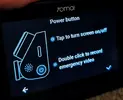
The power button. Do it also act like a event button ? i like event buttons, especially the ones you can find while dazed and confused.

IF ! It is a voice comand ( not a big fan ) wouldn’t save video be better.

Also i have " issues " with the X800 " reset camera " to make the camera point forward again, IMO it should be camera zero or capture forward, as i would assume the forward position is the 0 position.

Reset to me mean more serious stuff.


BTW: will this run on the 4G HW kit from the X800 ?
 
I wish they could replace the interior-facing cabin cam with a front-facing telephoto - in the same body style

Oh, and upgrade it to 2.5K from 1080p, please

One would think that sort of lens substitution would be quite simple to do in the manufacturing process, or I would think so anyway. I have no internal contacts with 70Mai, if I did, I would be brow-beating them over the telephoto. 🙂
 
Looking forward to your review. I don't understand why the indicator light on the left side of the T800 cannot be turned off. It's a bit too conspicuous at night。
Totally understand that, but matter of personal preference. I don't find it too bothersome, it's not like it's the giant red ring indicator light of say the 4K Omni haha
 
Only just saw that there's a double-tap to record emergency video, but depending where you mount the T800, hitting that button may not be that practical....

Yeah, mine is nearly all behind the rear view mirror.
 
Only just saw that there's a double-tap to record emergency video, but depending where you mount the T800, hitting that button may not be that practical....
Yeah, mine is nearly all behind the rear view mirror.
That's why I mentioned it. I have enough trouble finding the event button on a Viofo A129 or A139 if I'm not looking at the camera whilst driving.
 
Yeah, mine is nearly all behind the rear view mirror.
I have long arms but i'll probably dislocate my shoulder trying to punch any emergency recording video button on any dashcam, or my head will disappear out of view and i'll rear-end another car lmao
 
Bitrate Values, Wi-Fi transfer speeds and Resolution Settings for the 70mai 4K T800:


Front camera (recorded in 2160p HEVC 30fps HDR): 31.9 Mb/s
Interior cabin camera (recorded in 1080p HEVC 30fps HDR): 12.6 Mb/s
Rear camera (recorded in 2160p HEVC 30fps HDR): 28.7 Mb/s
(all recorded in three-channel configuration at maximum resolution settings)
Audio: AAC format recorded at 64kb/s at 16kHz resolution


Wi-Fi transfer speeds (using WiFi 6): 40MB/s, where file size for one-minute 4K clip is ~240MB


Video resolution settings: As seen in the screenshot below, when the 4K T800 is in two-channel mode (RC41 rear camera not connected), there is the additional option of 4K60fps recording available for the front camera (no HDR). In three-channel mode, this option disappears.

IMG_20250613_071205.webp


The 70mai 4K T800 also has a nice watermark that appears when you are recording a video in 4K resolution, denoted by the 4K logo next to the 70mai logo below.

Screenshot_2025-06-13-06-21-55-543_com.miui.mediaviewer-edit.webp
IMG_20250613_062109.webp
IMG_20251017_215911.webp
 
Last edited:
Out-of-Box Experience (OOBE) for the 70mai 4K T800:

Contained below is the complete show of screens for the setup process for the 70mai 4K T800. Quite the painless setup, which is concluded with the direction to download the APP from the users relevant Store.


IMG_20250614_080633.webp

IMG_20250614_080706.webp

IMG_20250614_082618.webp

IMG_20250614_082658.webp

IMG_20250614_082733.webp

IMG_20250614_083741.webp

IMG_20250614_083811.webp

IMG_20250614_083847.webp
 
Discovered a difference between T800 and A810plus, as the T800 lacks a 60fps option for its front camera resolution。
mmexport1749951998468.webp
 
Discovered a difference between T800 and A810plus, as the T800 lacks a 60fps option for its front camera resolution。View attachment 81354
That is because the A810 Plus has the imx662 for its rear sensor, the T800 with the imx678 doesn't get 60fps when connected in three-channel. Says in the manual somewhere 🙁
 
That is because the A810 Plus has the imx662 for its rear sensor, the T800 with the imx678 doesn't get 60fps when connected in three-channel. Says in the manual somewhere 🙁
Does the T800 have a 60fps option if the rear camera is turned off? In addition, through testing, the clarity of the front camera of the A810 Plus at night is not even as good as the old model A810. Could you please test if T800 also has the same problem。
 
Does the T800 have a 60fps option if the rear camera is turned off? In addition, through testing, the clarity of the front camera of the A810 Plus at night is not even as good as the old model A810. Could you please test if T800 also has the same problem。
It does have 60fps if rear cam is turned off Definitely.

Not sure will have to test to see how it is at night, firmware is more mature on the A810 compared to the Plus which is relatively new..
 
Addendum to Wi-Fi transfer speeds for the 70mai 4K T800:

70mai have clarified that they are using the SDIO 3.0 interface for internal WiFi transmission in the 4K T800, hence why I am starting file transfer speeds of 40MB/s and upwards.

The older 4K Omni X800 only uses USB 2.0 DpDm, which would see typical transfer speeds of only 20MB/s.

It appears we have a new WiFi 6 transfer speed winner across all the dashcam brands, great job 70mai! 🙂
 
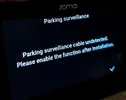
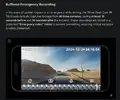
Features from previous 70mai models also make a welcome return here. Buffered emergency parking mode, Lumi Vision for parking mode to brighten very dimly-lit scenarios, time-lapse recording and battery voltage monitoring all make a return, along with support for their existing 4G parking surveillance kits, UP04/UP05.
Where did you get the information that the cam supports buffered parking mode? I can't read anything about it on the 70mai and kickstarter page.
There is only the information that it has a buffered emergency mode in driving mode. But that has nothing to do with parking mode.

Which 70mai models are supposed to support the buffered parking mode?
 

Attachments

  • Bildschirmfoto_20250617_001244.webp
    Bildschirmfoto_20250617_001244.webp
    73.5 KB · Views: 126
What explanations are there? The conversation is about an event while driving and while pressing the record button. What does this have to do with parking mode?

The creator of the post “Julian23” writes himself: When in parking mode, the T800 needs 1-2 seconds to start recording after an impact. So = There is no buffering parking mode. Recording doesn't start before the event, but only 1-2 seconds after the event. Buffered parking mode save moments before and after a detected event.
 
Does that suit your needs or not? A lot of dashcams work in the same way. So either buy a dashcam that fits your needs or not. Simple.
Yes, I am looking for a dashcam with buffered parking mode. That's why I'm here. Because it was falsely claimed here that this dashcam supports it.

Which is not true and should therefore be corrected. So that others don't mistakenly buy this dashcam because they think it supports buffered parking mode. Pretty simple.
 
Back
Top