A139 Firmware

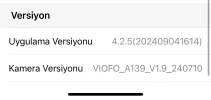
Updated firmware yesterday and i realised that, when I use the app and go settings, after that the notification is wrong: (video protected) it must be (recording started)

I also figured out that, sometimes dashcam looks working well with the leds. but not recording anything. Is that may about my samsung card?
 

Attachments

  • IMG_9202.webp
    IMG_9202.webp
    18.6 KB · Views: 99
Updated firmware yesterday and i realised that, when I use the app and go settings, after that the notification is wrong: (video protected) it must be (recording started)
Have you reset the camera after updating? If not, please reset to test. If the issue persists, would you mind update a video showing the issue for analysis? You can uplod it here: https://viofo.wetransfer.com/

I also figured out that, sometimes dashcam looks working well with the leds. but not recording anything. Is that may about my samsung card?
Deeply format the card on your PC with our GUI format tool to have a try. It does not help, it is better to change the recommended card to have a try.
 
I had exactly the same issue recently, and the camera didn't even report that it wasn’t recording, which eventually cost me in a hit-and-run on a parking lot.

Same firmware
 
Updated firmware yesterday and i realised that, when I use the app and go settings, after that the notification is wrong: (video protected) it must be (recording started)

I also figured out that, sometimes dashcam looks working well with the leds. but not recording anything. Is that may about my samsung card?
If you haven't updated the app recently, it may be worth doing so.

It is a good idea to reset the settings to default after a firmware update, using the option in the setup menu. (Not sure if that is what Viofo Support meant by a reset, or if they meant to press the reset button).
 
Have you reset the camera after updating? If not, please reset to test. If the issue persists, would you mind update a video showing the issue for analysis? You can uplod it here: https://viofo.wetransfer.com/


Deeply format the card on your PC with our GUI format tool to have a try. It does not help, it is better to change the recommended card to have a try.
Thanks for reply and support. You mean factory reset with using app?
 
Thanks for reply and support. You mean factory reset with using app?
Pause the recording by short press the REC button first, then long press the emergency button and wifi button at the same time for seconds to reset the camera.
 
Pause the recording by short press the REC button first, then long press the emergency button and wifi button at the same time for seconds to reset the camera.
I reset my camera and solved the voice notification problem. But I need time to find out if the fake recording problem is solved or not.

Off to the topic, under which heading can I submit suggestions and recommendations for the development of the camera? Because I have been using Viofo for 10 years and I want to support its further development.

For example, wouldn't it be nice if there was an option to disable the interior and rear cameras, which are not needed for longer parking recording, and to have the option to use only the front or only the rear camera?
 
@vvs49 @VIOFO-Support
Who knows maybe we have newest firmware or patch for A139 3CH / 2CH ?
Last is V1.9_20240710

P.S. Можна і Українською! Сам ДевОпс, можу перезібрати, сбілдити ящо б були на гіті)
 
@vvs49 @VIOFO-Support
Who knows maybe we have newest firmware or patch for A139 3CH / 2CH ?
Last is V1.9_20240710

P.S. Можна і Українською! Сам ДевОпс, можу перезібрати, сбілдити ящо б були на гіті)
There is no newer firmware version for A139.
 
Back
Top