BlackboxMyCar PowerCell 8 Test & Review PP

...It's almost worth the $25 to order another "spliced" cable and perform some destructive testing!
That sounds like something I would do just to satisfy my curiosity. :banghead:
 
There appears to be a mistake (or two) in the installation manual for the Powercell 8.

1. Why does it state to feed the PC8 with continuous power? A second diagram in the manual looks to be correct.
2. Why is the Thinkware Battery pack PN in the PC8 Manual?

I scanned thru this 7 page Thread but did not see it mentioned.


screenshot_97.png


screenshot_99.png
 
Last edited:
This post is in response to a concern from @Hack_man about his PC8 experiencing a possible malfunction of excessive self-discharge when his A229 Pro 2-CH Rear is turned off.
I’ve started a test to measure how much the PC8 will discharge when it is turned on, but when the dash cam is turned off.
Even though the camera is turned off it still draws approximately 0.1386 Watts = 11mA @ 12.6V.


Test Configuration / Preparation:
I fully charged the PC8 to 100% and let it “keep charging” for 3 hours before starting this test to let it stabilize.
At 2:00PM I turned off my power supply to enable LBR parking mode.
After the camera entered parking mode I long pressed the power button on the camera to turn it off.
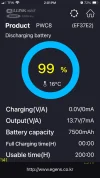
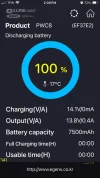
After the camera turned off the Cellink Neo APP reported the PC8 is discharging at 7mA @ 13.70 Volts.
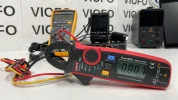
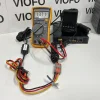
I confirmed this by measuring the voltage with my Fluke 115, and amperage with my UNI-T UT210E Pro.
After taking a screenshot of the Cellink Neo APP I disabled Bluetooth on my iPhone so it’s not connected to the PC8.
In 24 hours I will enable Bluetooth, and take another screenshot to document the reported battery life percentage.
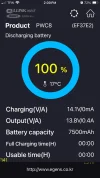
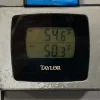
See attached photos, and screenshots.
 

Attachments

  • UT210E Pro .webp
    UT210E Pro .webp
    149.7 KB · Views: 120
  • 7mA Power Consumption - Turned Off .webp
    7mA Power Consumption - Turned Off .webp
    130 KB · Views: 117
  • 100% Full Charge 13.71 Volts .webp
    100% Full Charge 13.71 Volts .webp
    288.5 KB · Views: 132
  • Discharging - Camera Turned Off .webp
    Discharging - Camera Turned Off .webp
    55.2 KB · Views: 126
  • Charging - Normal Recording Mode .webp
    Charging - Normal Recording Mode .webp
    54.9 KB · Views: 109
  • 10-Day Forecast .webp
    10-Day Forecast .webp
    39.5 KB · Views: 114
  • Garage Temp .webp
    Garage Temp .webp
    161.2 KB · Views: 112
@Hack_man
Self Discharge Update:
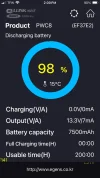
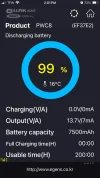
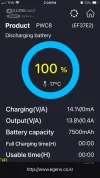
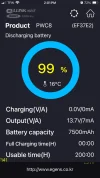
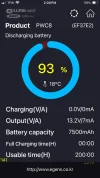
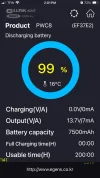
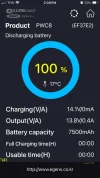
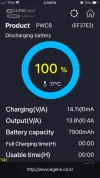
100% Start of test
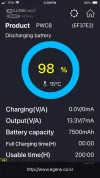
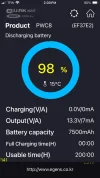
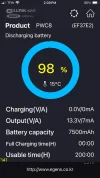
98% After 24 Hours
More updates coming at 24 hour intervals.
 

Attachments

  • 3.) After 24 Hours .webp
    3.) After 24 Hours .webp
    55.2 KB · Views: 118
  • 2.) 1 Second After Start Of Test .webp
    2.) 1 Second After Start Of Test .webp
    55.2 KB · Views: 110
  • 1.) Start Of Test .webp
    1.) Start Of Test .webp
    54.9 KB · Views: 119
@Panzer Platform
Thanks for the update, your preliminary results indicate my PC8 is problematic.
 
Last edited:
.
.

Test Configuration / Preparation:
I fully charged the PC8 to 100% and let it “keep charging” for 3 hours before starting this test to let it stabilize.
At 2:00PM I turned off my power supply to enable LBR parking mode.
After the camera entered parking mode I long pressed the power button on the camera to turn it off.
After the camera turned off the Cellink Neo APP reported the PC8 is discharging at 7mA @ 13.70 Volts.
I confirmed this by measuring the voltage with my Fluke 115, and amperage with my UNI-T UT210E Pro.
After taking a screenshot of the Cellink Neo APP I disabled Bluetooth on my iPhone so it’s not connected to the PC8.
In 24 hours I will enable Bluetooth, and take another screenshot to document the reported battery life percentage.
See attached photos, and screenshots.

Leaving the battery pack on-charge for 3 hours to 'stabilize' is not needed and is no benefit for testing purposes, and wastes 3 hours of your test time. Once the pack is fully charged, the BMS stops current flow; depending on the BMS it may leave the circuit open or it may test for a pre-programmed drop in voltage. If that is the case, it is sensing a natural decline, or one from defect, and it will close the circuit and do a pulse charge to restore to %100, or what ever charge level the BMS is set to. After about 30 minutes, most of these lithium batteries reach a resting charge voltage that is lower than the full charge voltage. You may charge at 14.2 but the resting voltage may be 13.5 as an example.

Once the pack is fully charged, the electrons have reached the one end of the cell where then need to be and the pack on the charger after that point does not 'stabilize' anything at all. Smart charges that can trickle charge and handle sulfation in AGM batteries are a slightly different story, but even then at some point once the AGM is charged, it is charged. A smart BMS will slow charge the lithium in order to preserve the chemistry of the cell or pack.

Achieving a 'stabilized' LIFEPO pack involves more than letting it stay on a charger after a full charge has been reached. First, the cells need to have a low internal resistance value and, that value is the same, or nearly the same in every cell in the pack. Second, the cells need to be configured in a way that charging and discharging is done via a balance harness, wiring, or internal board traces. Each cell during charging needs to be sampled for charge rate and capacity during charge. If there are 8 cells to a pack and 2 of the cells do not take a 'full charge', then the pack will not provide the power it is expected to, nor can it be said the pack is 'stabilized'.

As an example, if charging 8 cells and 2 cells are weak, a good BMS / balance charge will hold the charging on 6 of the cells and attempt to bring the other 2 cells up to reach the same level as the 6 cells. If that is not attainable the BMS follows its algorithm, reaches a pre-determined voltage and stops charging. A really good balance charger/ BMS will indicate those two bad cells, and their capacity in per cent.

One thought about the amp clamp you are using. Amp clamps work from sensing the field around the wire by using both sides of the jaws / clamp. If the wire is laying on one side only, you may get a reading that is slightly off. You could hold the wire in the center of the jaws / clamps and see if there is a different reading.

Knowledge is everything and any person doing this type of testing probably should ask EGEN what the IR of the cells are, the manufacturer of the cells, average age of cells when configured into the pack, is the charge a balance charge, does the BMS do any trickle charging and at what values does it do this.
 
@Hack_man
Self Discharge Update:
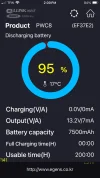
100% Start of test
98% After 24 Hours
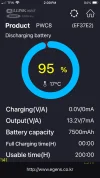
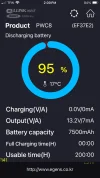
95% After 48 Hours
More 24 hour intervals updates coming.
 

Attachments

  • 1.) Start Of Test .webp
    1.) Start Of Test .webp
    54.9 KB · Views: 113
  • 2.) 1 Second After Start Of Test .webp
    2.) 1 Second After Start Of Test .webp
    55.2 KB · Views: 108
  • 3.) After 24 Hours .webp
    3.) After 24 Hours .webp
    55.2 KB · Views: 111
  • 4.) After 48 Hours .webp
    4.) After 48 Hours .webp
    54.9 KB · Views: 125
This confirms I definitely have a problem. I appreciate the updates and will be contacting BBMC about my defective PC8 today.

Your data looks similar to what I remember with mine during the first couple months of ownership.

I completely disconnected the HK4 and camera from the PC8 yesterday and it still dropped by about 8% in 24 hrs. My alternator is working harder just to charge the unloaded PC8. This is disappointing for such an expensive battery which is only 5 months old.

Below is my sorry discharge curve after 65 hours of testing (A229 Pro Camera OFF, 2 CH Rear, HK4 Cable)

screenshot_274.webp
 
Last edited:
Self Discharge Update:
100% Start of test
98% After 24 Hours
95% After 48 Hours
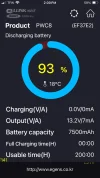
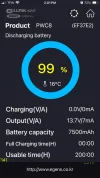
93% After 72 Hours
More 24 hour intervals updates coming.
 

Attachments

  • 5.) After 72 Hours .webp
    5.) After 72 Hours .webp
    55.1 KB · Views: 106
  • 4.) After 48 Hours .webp
    4.) After 48 Hours .webp
    54.9 KB · Views: 112
  • 3.) After 24 Hours .webp
    3.) After 24 Hours .webp
    55.2 KB · Views: 109
  • 2.) 1 Second After Start Of Test .webp
    2.) 1 Second After Start Of Test .webp
    55.2 KB · Views: 116
  • 1.) Start Of Test .webp
    1.) Start Of Test .webp
    54.9 KB · Views: 105
@Panzer Platform I contacted BBMC today and they recommended I perform a PC8 Reset.
They instructed me to remove power from the Vehicle Input connector and apply power to the EXT. Battery Connector for 30 seconds. I performed this reset procedure and will measure discharge rate again.

I did not notice a change in LED indicators when I performed this procedure. BBMC said it would force a Firmware reset in case there was a corruption causing the fast discharge.
 
Last edited:
I plotted the two curves for comparison

Panzer's PC8 is discharging at 0.09% per Hr
Hack_man's PC8 is discharging at 0.34% per Hr

screenshot_276.webp
 
It might be interesting to plot some voltages, just to see if the charge % is following the voltage. It is possible that the voltage curves for yours and PP's match and it is just the % that doesn't. Probably the voltage is dropping fast too, but if not then you have found where the problem is.
 
It might be interesting to plot some voltages, just to see if the charge % is following the voltage. It is possible that the voltage curves for yours and PP's match and it is just the % that doesn't. Probably the voltage is dropping fast too, but if not then you have found where the problem is.
Unfortunately I don't have Panzer's superior data collecting skills, so I did not record the PC8 output voltage 🙁
 
Self Discharge Update:
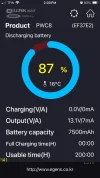
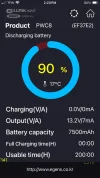
100% Start of test
98% After 24 Hours
95% After 48 Hours
93% After 72 Hours
90% After 96 Hours
87% After 120 Hours
 

Attachments

  • 7.) After 120 Hours .webp
    7.) After 120 Hours .webp
    54.4 KB · Views: 115
  • 6.) After 96 Hours .webp
    6.) After 96 Hours .webp
    54.8 KB · Views: 91
  • 5.) After 72 Hours .webp
    5.) After 72 Hours .webp
    55.1 KB · Views: 108
  • 4.) After 48 Hours .webp
    4.) After 48 Hours .webp
    54.9 KB · Views: 128
  • 3.) After 24 Hours .webp
    3.) After 24 Hours .webp
    55.2 KB · Views: 108
  • 2.) 1 Second After Start Of Test .webp
    2.) 1 Second After Start Of Test .webp
    55.2 KB · Views: 108
  • 1.) Start Of Test .webp
    1.) Start Of Test .webp
    54.9 KB · Views: 107
I wish my Battery looked this good

screenshot_284.webp
 
I wish my Battery looked this good

I plotted the two curves for comparison

Panzer's PC8 is discharging at 0.09% per Hr
Hack_man's PC8 is discharging at 0.34% per Hr

View attachment 77306
How old is your PC8?
The difference is huge.
Are the both test setup identical, i.e. dash cam and HK4 disconnected, WiFi and Bluetooth enabled, not sure what else is there ?
 
My PC8 is 6 months old.
Both setups had the A229 Pro powered off but connected by HK4 cable to PC8.
One difference is Panzer disabled bluetooth on his phone, I did not but don't think this would matter assuming my phone was out of range which it was. My WIFI was OFF and Panzer did not mention WIFI in his test setup.

I contacted BBMC and they requested I power off the PC8 and determine how much it discharges in a week. They are suggesting the Bluetooth and BMS are causing the discharge, which may be true, but #1 the discharge rate is much worse than it was 3 weeks ago and #2 the discharge rate I experienced in the past was very similar to what Panzer published (I don't have hard data but I was mentally keeping track). In other words, the discharge performance of my battery has clearly degraded recently.

I did not want to wait a week to complete the test BBMC recommended so I cut it short and will share the results soon.
 
Last edited:
6 months is a relatively new, so there is definitely something wrong with your PC8, I think it is better to replace it under warranty.
 
I’m writing a rough draft for my “VIOFO BP100 Dash Cam Battery Pack - Test & Review” and I just remembered Broseph from @BlackboxMyCar said we might be getting a “new” PowerCell 8


So exciting!
I wonder if any of my “Wishlist Improvements" from 2022 made it to the PowerCell 9000. lol


Anyone remember this gem?

 
Back
Top