ECOFLOW and Viofo

@GPak any Idea if DJI power stations are worth looking into?
DJI is a very good brand, I have their drone and I have only good things to say about it.

Based on the fairly detailed description and presentation on Amazon, it looks good, it is based on LFP cells, has all the necessary protections and a 5-year warranty.
However, to be a good battery for a dash cam, there are some operational features that need to be checked and verified:
- While it doesn't have a dedicated on/off button for the DC and USB ports, which is a good sign, we still need to verify if these ports will automatically turn on and supply power at any time when the DJI is turned on with the ignition, including from a completely discharged state.
-Need to verify that the DJI Power Station will stay on and not turn off automatically, given the very low power consumption of the dash cam while parked.

On the downside:
- It does not have an App, and some of the options and functional flexibility associated with it.
- It's quite expensive:
512Wh DJI Power 500 with all the necessary cables costs $450
512Wh River2 Max costs $300
572Wh River 3 Plus with expandable EB300 battery costs $370
 
Last edited:
DJI is a very good brand, I have their drone and I have only good things to say about it.

Based on the fairly detailed description and presentation on Amazon, it looks good, it is based on LFP cells, has all the necessary protections and a 5-year warranty.
However, to be a good battery for a dash cam, there are some operational features that need to be checked and verified:
- While it doesn't have a dedicated on/off button for the DC and USB ports, which is a good sign, we still need to verify if these ports will automatically turn on and supply power at any time when the DJI is turned on with the ignition, including from a completely discharged state.
-Need to verify that the DJI Power Station will stay on and not turn off automatically, given the very low power consumption of the dash cam while parked.

On the downside:
- It does not have an App, and some of the options and functional flexibility associated with it.
- It's quite expensive:
512Wh DJI Power 500 with all the necessary cables costs $450
512Wh River2 Max costs $300
572Wh River 3 Plus with expandable EB300 battery costs $370
Only reason I ask is because I'm looking for something with more power that would be useful for disaster's and the DJI Power 1000 (1024Wh) has been on sale for $379.

The DJI has two USB-C plugs and I'm looking at trying to power 2 seperate Viofo setups at the same time.


Maybe the Eco Delta series is what I should be looking at.
 
$379 is a great price for a 1024Wh DJI power station, just make sure it's new and not refurbished, and keep in mind that DC cables/adapters are not included in standard package and cost around $70.
The best price I could find was about $405 on AliExpress without the DC cables/adapters. (Delta3 Plus on AliExpress is $553)
On Amazon, the best price for a new 1024Wh DJI package with cables is $570 (I prefer buying expensive items on Amazon because of the ease of the return process)
The best Amazon price for a new Delta 3 Plus 1024Wh power station including cables is $616 (and it's expandable)

Honestly, I'm spoiled by the App’s functionality and additional options, and also with OTA firmware updates, and I personally wouldn't buy such a large power station without the App and WiFi/BT connectivity.

EDIT: Just noticed that the Delta 3 Plus has a dedicated USB on/off button, meaning you have to physically press the button to activate the USB ports, which is not acceptable for hands-free dash cam operation.
 
Last edited:
.....
The DJI has two USB-C plugs and I'm looking at trying to power 2 seperate Viofo setups at the same time.
.....
It is not necessary to have two USB-C ports to power two dash cams.
A single USB-C port is powerful enough to power two or more dash cams.
All you need to do is splice/split the bare end of the USB-C-15V cable into two or more branches, very simple.
 
Last edited:
Does anyone know if the Ecoflow River 2 (regular model) cig plug outlet can be used to power a Viofo dashcam? I will stick the cig-lighter plug from the dashcam into the cig-lighter outlet on the River 2.
 
Technically yes you can use the Cig port to power the dash cam but, and this is a big BUT, you have to physically press the 12VDC on/off button every time you start the Ecoflow River 2 with the ignition, so really NO, it is inconvenient and unacceptable to me to use the Cig port on the River 2.

Why use the DC Cig port when you can simply plug the viofo USB-A/C cable strait into the Ecoflow USB port?
Just make sure there is no power starvation for your specific Viofo dash cam.

If for whatever reason you still need to use the 12VDC Cig port, the River 3 has port memory, which eliminates the shortcomings of the River 2, except for the situation when the power station is completely dead.
 
Technically yes you can use the Cig port to power the dash cam but, and this is a big BUT, you have to physically press the 12VDC on/off button every time you start the Ecoflow River 2 with the ignition, so really NO, it is inconvenient and unacceptable to me to use the Cig port on the River 2.

Why use the DC Cig port when you can simply plug the viofo USB-A/C cable strait into the Ecoflow USB port?
Just make sure there is no power starvation for your specific Viofo dash cam.

If for whatever reason you still need to use the 12VDC Cig port, the River 3 has port memory, which eliminates the shortcomings of the River 2, except for the situation when the power station is completely dead.
Thanks GPAK. I will need to find the USB cables for my Viofo A129 Duo. Right now I just have the cig-lighter plug cable. I plan to use the A129 Duo for another purpose as the A139 3-Channel Plus is my main use dashcam which was hooked up to a P8 battery.
 
The 12v utility port on the EcoFlow is also much less power efficient than just using thenUSB-A port to power the camera, something on the order of about 25% difference in battery life for a dashcam.
 
The 12v utility port on the EcoFlow is also much less power efficient than just using thenUSB-A port to power the camera, something on the order of about 25% difference in battery life for a dashcam.
Thnaks for sharing that as I did not know. So, for sure I will not use the DC port for running my Viofo.
 
Ok, i over estimated the size of the difference, but it is a clear difference. I got 38.5 hours of parking mode out of my River2 USB-A port. Using the very same camera configuration, I got only 32.5 hrs out of the same River2 using the 12v utility port adapter to power the camera. 32.5/38.5 hrs = 85%, so using the utility port cost an extra 15% more power consumption.
 
Has anyone used the Extended River Plus battery? Is it worth adding.
 
I don't have it yet, just planing to get one, however based on the specs:
If you need a several days of parking, then yes, it will give you the capacity you need.
The River3 Plus has 286Wh, which is enough for about 54 hours or 2+ days, with the Viofo A229 Plus 2Ch LBR parking.
Depending on the extra battery, the EB300 or EB600, you can double and triple that to 4+ days and 6+ days of parking.

Additionally, the extra battery gives you a Bi-directional 140W USB-C port, which means you can charge it via the USB-C port, including the main unit.

Here in the US, the River3 Plus + EB300 combo costs $369 for 572Wh combined.
https://www.amazon.com/gp/B0DPW7T85G
 
Dumb question time. How do I put the Viofo A129 Duo into Parking Mode using the Ecoflow River 2? If I plug the USB plug into the River 2, the Viofo will think it's getting power and run the cam not in Parking Mode. Is it some special wiring? I mean, I may be OK to just run the A129 Duo when parked in full run mode but want to save power by running in Parking Mode (low Bit-rate).
 
You probably missed this video by @Vortex Radar that explains the process in detail:
It is important to use the special USB-C to 15V or 12V power cable, which is linked to the video on YT, (the regular USB-C cable will only output 5V), and of course you will need to use hardwire kit for the Viofo A129 Duo.

 
Last edited:
You probably missed this video by @Vortex Radar that explains the process in detail:
It is important to use the special USB-C to 15V or 12V power cable, which is linked to the video on YT, (the regular USB-C cable will only output 5V), and of course you will need to use hardwire kit for the Viofo A129 Duo.

Thanks. Oh, oh, it requires me to do some wiring which I'm a real novice at. I see wires that had to be stripped and then reconnected somehow. I would need to search out someone nearby to reconnect the wiring for me.

If I wanted to just run the A129 Duo in regular mode, not parking mode, how long would a River 2 run it for?
 
There's nothing complicated about doing a little wiring, especially if you're powering the River2 or River3 from a 12V ACC car cigarette lighter.
I recommend to go with River3.
In my opinion, it's no different than connecting to a dedicated battery, you'll just need to buy a relatively cheap, special USB-C-15V cable as linked above.

You can strip the wires with a utility knife and connect them to the HK wires using the following convenient connectors, without soldering, twisting or insulating:

https://www.amazon.com/gp/B0BZ5XHW23
or
https://www.amazon.com/gp/B08JHVF5C9

Of course, you can run the A129 in normal mode, just connect it to the River3/2 with the original USB-A cable that came with the dash cam, directly to the USB-A port on the River3/2.
Some Viofo dash cams will automatically switch to parking mode after 5 minutes of inactivity (not sure if the A129 has it), otherwise the normal recording power consumption is about 40% higher than LBR.
In this case, the River 3/2 should last about 32 hours.
 
Plus One on the Wago ... these are very nice connectors and allow you to rearrange wiring if you need to. The Wago can usually be found in big box store like Lowes and Home Depot.
 
First time poster. I read through this thread for ideas on how to install my first dash cam (thank you all for the experience and insight, by the way!). I have a Honda Pilot and got a Viofo A329 and an Ecoflow River 3 to power it via USB-A, as GPak and EricSan described.

Here is a critical lesson I learned after wasting many hours of work: if you're going to use a 5v USB-A port and bypass the harness voltage regulator, you can't have a long run to the battery! I put the River 3 in the storage area behind the rear seat, hardwired it to the 12v socket wiring, and used about 10' of 14 AWG wire to connect the HK4 harness to the battery's USB-A port in the back. After plugging everything in, the A329 turned on...then flickered and shut off. It turned back on once or twice by itself, then stopped turning on at all. This failure happened multiple times, after shutting off the car, battery, etc., and turning it all back on again.

I ended up re-wiring the runs to the battery twice and finally put the River 3 under the passenger seat, where I finally got the cables short enough that the voltage drop stops shutting off the camera. I was able to wire the 1' USB-A cable straight to the harness without any extension, and the camera works like a dream.

Just wanted to share my experience and hopefully save others the headache I had!
 
@euphonimaniac
Welcome to DCT! And Congratulations on a successful installation!

Yes, when going to 5V, the voltage drop can be an issue for these new power sensitive 4K multi-channel dash cams.
It is always a good idea to bench test before installing in a vehicle (ref. post #138)
Keep in mind that high summer temperatures can cause additional voltage drop, hopefully not enough to affect your installation.
Also make sure you convert the ACC signal to 5V so both the yellow and red wires get 5V.
 
@euphonimaniac
Welcome to DCT! And Congratulations on a successful installation!

Yes, when going to 5V, the voltage drop can be an issue for these new power sensitive 4K multi-channel dash cams.
It is always a good idea to bench test before installing in a vehicle (ref. post #138)
Keep in mind that high summer temperatures can cause additional voltage drop, hopefully not enough to affect your installation.
Also make sure you convert the ACC signal to 5V so both the yellow and red wires get 5V.
My pride got the better of me. I thought: "Surely I will save effort by just wiring it up and not wasting time on a bench test!" I should know better.

And apparently I spoke too soon in my previous post: it is not working perfectly. The camera stays powered on sometimes, but other times will reboot every 15-20 seconds. Also, it is stuck in parking mode, as if it does not see the ACC signal when the car turns on.

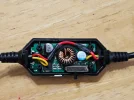
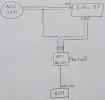
I believe the cause of both of these issues may lie in how I bypassed the HK4 voltage regulator. I only bypassed the 'power' wire because the ACC line is still 12v. Here's a photo of how I rewired it, as well as a diagram of my wiring. If I did something completely asinine here, I would be obliged if someone pointed it out to me. Thanks again!
 

Attachments

  • 20250330_144331.webp
    20250330_144331.webp
    306.5 KB · Views: 176
  • 20250330_144924.webp
    20250330_144924.webp
    170.9 KB · Views: 156
Back
Top