How to get parking mode to work?

cartyre

New Member
Joined
May 5, 2026
Messages
18
Reaction score
2
Location
Glasgow
Country
United Kingdom
Hello all

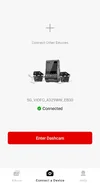
I have just had installed a Viofo A329S with a HK6 Hardwire kit.

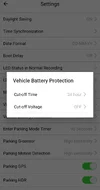
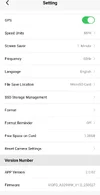
I wanted to know how I know if the parking mode was working. So I called Viofo and they instructed me to go to Vechicle Battery Protection - cut off Voltage and this would tell me what the voltage for parking mode was set to.
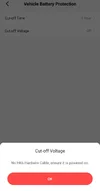
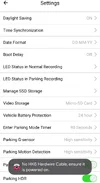
However, when I clicked on it, it said "No Bluetooth hardware Kit. Ensure it is powered on".

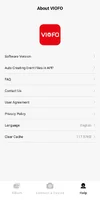
Also tried the same on the setting on the app..please see photo.

They then said that this means the hardwire kit is not on and not connected and parking mode wont work.

I went back to installers and he tested it and said it must be on as its getting power and he set voltage to 12v and nothing he can do.
But Viofo are saying its not installed correctly and parking mode is not active and they cant do anymore.
I've been in touch with two other garages that fit dash cams and they weren't any help and just said "ohh it wont work when you park as it will drain battery"...clearly they dont know Dash cams have parking mode sometimes.

I am still unsure if parking mode is active or not? How can I know? Should Cut off voltage say 12v that he set it too?

If anyone has a Viofo or an expert in this and even if not on the forum could maybe even talk me though this I am happy to send a PM with my number privately even as I am really needing some technical advice and cant get any from Viofo or from the installer.

Thanks all
 

Attachments

  • Screenshot_20260505_173758.webp
    Screenshot_20260505_173758.webp
    65.9 KB · Views: 9
  • Screenshot_20260505_173755.webp
    Screenshot_20260505_173755.webp
    40.1 KB · Views: 8
Welcome to the Forum.
Do you have parking mode enabled in your settings?
A329S goes into park mode after ignition off?
 
Last edited:
Welcome to the Forum.
Do you have parking mode enabled in your settings?
A329S goes into park mode after ignition off?

Thanks for the reply.

Theres no option on the camera or app to "Enable Parking Mode" as such, (that I can find) the closest is

"ENTER PARKING MODE TIMER

Off or 90 seconds"

It's on 90 seconds.

CUTT OF TIME
Set at
30 mins

PARKING MODE

Time laspe fps
Low birtate recoding
Auto event detection (turned on)

VECHICLE BATTERY PROTECTION

Cutting off voltage (this is set to off)

When I click on it to turn on, it says

No HK6 Hardwire Cable - Ensure it is powered on.

What do you suggest?
Wish there was someone who I could just speak to on the phone and sit in the car and go through it. Someone who is better than Viofo who had less idea than I did and I know nothing whatsoever about dash cams.
 
Welcome to the club @cartyre

1.) Delete APP from smartphone, and re-install.
2.) Perform factory reset / default setting on camera using on screen menu.
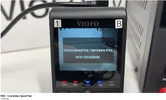
3.) After camera resets, and boots up watch LCD screen, and confirm you see;
“DISCOVERED HARDWIRE CABLE”
“HK6 XXXXXXXXX”
Like this;


4.) After that please take a screenshot of the camera firmware, and APP version, and let us know the make & model of your smartphone, and post it here.
-Chuck
 

Attachments

  • 1 .webp
    1 .webp
    60.7 KB · Views: 2
Ohh I did test is just now and an hour after the ignition has been off, its still got the lights on the front and is still recoding even after 30mins which is when its suppose to be cut off. I checked the clips too and its been recording for 40 mins after the ignition was turned off.
 
Ohh I did test is just now and an hour after the ignition has been off, its still got the lights on the front and is still recoding even after 30mins which is when its suppose to be cut off. I checked the clips too and its been recording for 40 mins after the ignition was turned off.
Either the HK6 is not connected correctly or the parking mode is not enabled.

Contact Chuck. I think he can help you over the phone.
 
It looks like VIOFO has a telephone number on the website.
They are closed for the holiday until tomorrow.
Not sure of the hours of operation.

Phone Service
+1 323 505 9898 (USA)
+1 587 870 0708 (Canada)
+1 323 609 9898 (Global)
 

Attachments

  • Screenshot 2026-05-05 12.03.56 PM.webp
    Screenshot 2026-05-05 12.03.56 PM.webp
    38.7 KB · Views: 0
Thanks. Chuck, can you maybe help me over the phone please?

I've sent you a PM with contact details.

Thanks
 
Ok I did exactly as you said in post 4.

DISCOVERED HARDWIRE CABLE Did not appear!!!

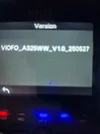
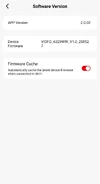
Also please see attaxhed photo of version.

My camera appears to be on constant record... I think. Unless set to come off. But sure I set it to 30 mins.
 

Attachments

  • 20260505_211129.webp
    20260505_211129.webp
    97 KB · Views: 8
Please update firmware to the newest version: V2.0_260104.
You can do it OTA with smartphone APP, or the traditional way.

Which remote cameras do you have?
1.) Rear
2.) IR Interior
3.) Waterproof Rear
4.) Telephoto

After you update the firmware do another factory reset / default settings.
 
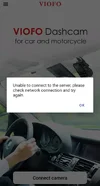
How do I update the Firmwear? When I click on it I get this message?
 

Attachments

  • Screenshot_20260505_230711.webp
    Screenshot_20260505_230711.webp
    58.1 KB · Views: 4
  • Screenshot_20260505_230716.webp
    Screenshot_20260505_230716.webp
    66.4 KB · Views: 4
Please answer this question.
It will determine which firmware you update to;

Which remote cameras do you have?
1.) Rear
2.) IR Interior
3.) Waterproof Rear
4.) Telephoto
 
Delete the "old" APP and install the "new" APP

iOS;

 
Just to be sure since I've seen this with another install.

Where do you have the power cable plugged in?

Please make sure that the power cable is plugged into the GPS mount and not to the side USB C port of the dash cam.
 
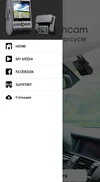
Ok I deleted that old app. Installed the new one which asked what dash cam I have which the other app didn't do that.

I still haven't been able to up the firmwear though it wouldn't let me, even on the new app when I clicked on firmwear it greyed it out but didn't give me an update option.

  • VIOFO A329S 4K 60FPS Dash Cam (front and rear / 2 channel)
  • VIOFO HK6 Hardwire Parking Mode Power Cable for A329S Series
  • SanDisk MAX Endurance 256GB memory card
Heres spme more pics if they maybe of use.

Kuya I have no idea what cables are plugged in where as I gave it to a expert dash cam installer to fit them. But looks like he's not an expert at all.
 

Attachments

  • Screenshot_20260505_232906_VIOFO Dashcam.webp
    Screenshot_20260505_232906_VIOFO Dashcam.webp
    18.6 KB · Views: 6
  • Screenshot_20260505_233155_VIOFO Dashcam.webp
    Screenshot_20260505_233155_VIOFO Dashcam.webp
    27.1 KB · Views: 6
  • Screenshot_20260505_233251_VIOFO Dashcam.webp
    Screenshot_20260505_233251_VIOFO Dashcam.webp
    30.1 KB · Views: 7
  • Screenshot_20260505_233258_VIOFO Dashcam.webp
    Screenshot_20260505_233258_VIOFO Dashcam.webp
    27.2 KB · Views: 7
  • Screenshot_20260505_233355_VIOFO Dashcam.webp
    Screenshot_20260505_233355_VIOFO Dashcam.webp
    39.9 KB · Views: 6
It definitely is weird that it's not picking up the HK6 at all even though it's getting power. I've installed a lot of them and I've yet to see this happen.

The only case where I've seen this, is with my setup but I have the HK6 with no voltage cutoff version paired to a 70mai battery pack. Parking mode still works(see photo)

For the power cable, you can reference the picture below. (Orientation does not matter as long as it's plugged into the GPS mount)
1000151108.webp


Image source: https://www.gamerevolution.com/review/984377-viofo-a329s-3-channel-4k-dash-cam-review

1000151110.webp
1000151111.webp


Edit: added photo of my setup.
 
Last edited:
Back
Top