How to get parking mode to work?

Thank you all so very much. Couldn't have done it without all your help. Really appreciated.

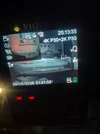
Parking mode all working fine. Just tested it in car.
 

Attachments

  • 20260509_015232.webp
    20260509_015232.webp
    67 KB · Views: 7
  • 20260509_014733.webp
    20260509_014733.webp
    89.1 KB · Views: 7
  • 20260509_014610.webp
    20260509_014610.webp
    93 KB · Views: 7
@cartyre it's time for you to open up your own dash cam store to compete with whoever "professionally" installed your camera.

Glad this journey had a happy ending and that you didn't give up. Props to you
 
Glad this journey had a happy ending and that you didn't give up. Props to you
That’s a good point.
If this was an Amazon review he would say the camera is defective, give 1 star, and return it for refund 🤣
 
Honestly the help from you guys was nothing short of sensational.
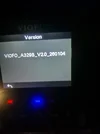
It was exhausting. I presumed that the dash cam installers store would have set everything up working for me. They did none of that. They did a very basic installation without following any of the instructions and didn't even do that correctly and didn't ensure it was working properly which it wasn't.
They said we don't do any of that!
Fair enough they didn't check firmwear was updated but atleasr ensure its working and installed correctly

I hope now its just a few smaller things to figure out like for instance.

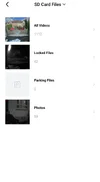
1) When left iver night in parking mode (it said parking mode started) I noticed that in my parking mode video section in the app there were zero parking mode videos? Why is that and how do I fix that? Please see attached
(Before we changed the firmwear there were parking mode videos)

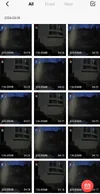
2) I also noticed it has recorded continously since last night. Whereas before we changed the firmwear there were only a few clips over night of movement.

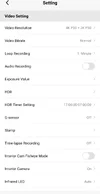
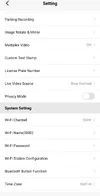
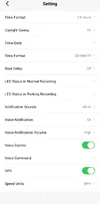
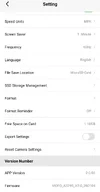
Ive attached all settings if anyone can help me figure out how to resolve this.

Thanks again all.
 

Attachments

  • Screenshot_20260509_131243_VIOFO Dashcam.webp
    Screenshot_20260509_131243_VIOFO Dashcam.webp
    9.7 KB · Views: 5
  • Screenshot_20260509_131249_VIOFO Dashcam.webp
    Screenshot_20260509_131249_VIOFO Dashcam.webp
    30 KB · Views: 6
  • Screenshot_20260509_131429_VIOFO Dashcam.webp
    Screenshot_20260509_131429_VIOFO Dashcam.webp
    84.6 KB · Views: 6
  • Screenshot_20260509_131449_VIOFO Dashcam.webp
    Screenshot_20260509_131449_VIOFO Dashcam.webp
    37.5 KB · Views: 6
  • Screenshot_20260509_131454_VIOFO Dashcam.webp
    Screenshot_20260509_131454_VIOFO Dashcam.webp
    40.4 KB · Views: 6
  • Screenshot_20260509_131459_VIOFO Dashcam.webp
    Screenshot_20260509_131459_VIOFO Dashcam.webp
    39.6 KB · Views: 6
  • Screenshot_20260509_131509_VIOFO Dashcam.webp
    Screenshot_20260509_131509_VIOFO Dashcam.webp
    40.4 KB · Views: 5
3) Ps whenever theres an impact ie a closed door in parking mode it makes a camera click noise like its taken a photo.? Why is that?
 
@cartyre you are now heading into the parking mode rabbit hole. You'll now have to decide what parking mode works for your driving and parking situation.

To answer you questions, you are currently using "Auto Event Detection" as your parking mode. In this mode the dash cam is simply waiting and watching for any motion and impacts to happen. If any is detected, it will save the previous 15 seconds before the motion or impact and the next 45 seconds to further capture what is happening.

This makes it seem like the dash cam is always recording when in fact it is simply waiting. This is why there are no videos but when you close the door which is an impact, the dash cam started recording and part of that process is also taking a photo. You will notice this taking a photo thing when a video gets locked/protected.

Also watch these videos please(and all the other videos you'll see related to Viofo parking mode or your A329S):


There are also plenty of threads discussing parking mode and all it's intricacies. And it seems like this will be another thread that shows that.
 
Both of these videos are excellent to watch. I did when I was new and learning. And still use them to refresh. But I do need to admit with Vortex I watch on youtube where the play speed can be adjusted to .85 and slow his instructions down just a bit for my slower brain processor.
The good thing you can watch, listen and learn (for me it was not one day) and then make your choices for your setup.
I use Low Impact Mode for the power saving and turn on the dash cam with the car's start button within 60 sec when I return to the car. This allows me to get in and not record a impact in doing so.
 
Please watch those videos for more information on setting the various parking mode options.

I call your attention to the "Cut-off Timer" and "Cut-off Voltage" settings having a dual purpose. They will behave one way when one of the "Normal Parking Modes" [Auto Event Detection, Time-Lapse, Low Bitrate] have been selected and they behave another way when you select a Hybrid parking configuration.

1778340829152.webp


Right now, you have selected a "Normal Parking Mode" of Auto Event Detection. Your current settings [Cut-off Timer = Off, Cut-off Voltage = 12.2V/24.4V] will result in the dash camera turning off when your vehicle's voltage level drops below 12.2V in parking mode. That's perfectly fine as long as that is what you want it to do.

The HK6 hardwire kit has a slide switch for its own hardware based low voltage cutoff feature. The HK6 will always turn off the power to the dash camera in parking mode when the vehicle's voltage level has dropped below the selected voltage level on the slide switch of the HK6 [no matter what parking mode has been selected]. If you decide to use the A329S optional feature of "Cut-off Voltage", the HK6 low voltage cut-off feature should be set to a lower voltage level than the one selected in the A329S settings. That's so the two low voltage cut-off features [A329S "Cut-off Voltage" and HK6 hardware based voltage cut-off] don't interfere with each other.

The A329S "Cut-off Voltage" feature has a limited number of setting options [voltage choices]. That's mainly due to it being intended as a way for the dash camera to switch from a normal recording mode to low power impact detection parking mode when you have selected one of the hybrid parking mode options.

This is where you need to do a bit of research regarding the various parking modes available to you with the A329S and decide what parking mode(s) is/are right for you. Is one of the "Normal Parking Modes" [Auto Event Detection, Time-Lapse, Low Bitrate] all that you need, or would you like to take advantage of Hybrid parking mode [operates in a "normal" parking mode until either the "Cut-off Timer" or the "Cut-off Voltage" feature have detected that it should switch to low power impact detection parking mode].

With that parking mode selection made, you need to examine the various A329S settings parking mode settings to implement your parking mode choice. Again, don't forget to make sure the HK6 low voltage cut-off setting is set correctly for your parking mode configuration.

This chart from the A329S user manual is a bit outdated since there are now several additional time-lapse options within the Hybrid parking mode list of available parking mode choices.
1778343717183.webp
 
Back
Top