Chuck McCoy
Well-Known Member
- Joined
- Jun 9, 2022
- Messages
- 4,714
- Reaction score
- 4,666
- Location
- California
- Country
- United States
- Dash Cam
- 2026 Minimum Spec: STARVIS 2 & HDR & Low Power Parking Mode

That’s a good point.Glad this journey had a happy ending and that you didn't give up. Props to you

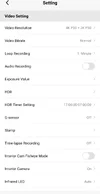
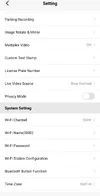
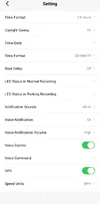
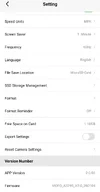

This is why it's important to understand that the "Cut-off Voltage" setting has two possible ways of operating. If you select a "Normal Parking Mode", the "Cut-off Voltage" setting will cause the dash camera to turn off when the voltage level to the HK6 goes below that selected value. That is a valid way to have this operate. Keep in mind, if you have selected a "Hybrid Parking Mode", what the "Cut-off Voltage" will cause to happen is that instead of the turning off the dash camera in that same situation, it will cause the A329S to transition from the original hybrid parking mode [Auto Event Detection, Time-Lapse, Low Bitrate] to low power impact detection.1) When RCG mentioned how my settings currently are " Off, Cut-off Voltage = 12.2V/24.4V] will result in the dash camera turning off when your vehicle's voltage level drops below 12.2V in parking mode"
No, it's not. As I mentioned before, the low voltage cut-off feature of the HK6 is always operational no matter what the parking mode settings are in the A329S.2) Isn't this the only option really to avoid getting a flat car battery?
The only way to regain full control of the dash camera is to have the ACC power in the vehicle [ignition switch on] so the dash camera resumes normal recording mode.3) Also how do I get to the menu and pause recoding when its on parking mode without turning off the camera and turning back on? as nothing works ie pressing the 3 lines button, the record button or the exclamation mark button.
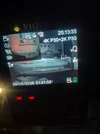
Yes, the exclamation mark sign on the screen means an impact was detected. If this is during normal recording mode and you believe the dash camera is too sensitive to impacts, you can adjust the "G-Sensor" sensitivity setting for normal recording mode.4) Is it normal to get that exclamation mark sign on the camera screen whenever an impact is detected.
If I recall correctly, the A329S will not notify on impacts within the first few minutes or the last few minutes of the parking mode. I just ran a quick low bitrate parking mode test. The dash camera entered low bitrate parking mode, 15-seconds later an impact took place and the photo sound was heard. I waited another 3-minutes and I then restored the ACC power. When the A329S returned to normal recording mode, it did not notify about that impact event. My original spreadsheet for parking mode tests does not include the "exclusion time" info. I don't have time right now to run a full test of that exclusion time period. Others may have more info on that behavior.5) How do I get around the issue of every time I get into the car after its been on parking mode and it alerts me to "impact detected while in parking mode" but its always doors closing etc...hiw do I know if there was a actual impact from say another car hitting into it while I was parked?
Thanks all
The only way to "always" get a buffered impact event recording with video/audio from before the impact event is to use one of the normal recording modes [Auto Event Detection, Time-Lapse, Low Bitrate]. Those parking modes are actively monitoring/recording so the have a data buffer to pull from or video already recorded that will contain the time before the impact event was detected.based on my settings on post 168 is there a way to make my parking mode last longer and to still ensure any impact is recorded 15 seconds before impact? I currently get about 15 hours with the current settings.
The Auto Event Detection [AED] parking mode will be triggered by motion or impact events. If there is sufficient motion detected, it will created buffered recordings for that triggering motion event. You already have the "Parking Motion Detection" sensitivity setting set to "Low Sensitivity". There is no "Off" option for that setting, so there's no way to make AED parking mode less sensitive to motion events.I noticed the parking mode folder from over night almost records continually ie rain a cars going past etc..only about a hour when it was triggered between 2am - 3am.
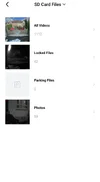
Going back to a screenshot you included in post 166, it looks like you only have front and rear camera video files. The A329S can support up to 3-channels. Each camera is a channel. Since you don't have the optional interior camera, the setting I mentioned won't help your situation.Thanks very helpful.
"If you have a 3-channel A329S [with an interior camera], you could use the setting to make the interior camera only active while in normal"
I have no idea if I have a 3-channel A329S.
I think the camera says "2 channel recoding starting" when I turn it on.
But the bottom line from what you said is that there is nothing I can do settings wise to keep buffering event recordings and to make my battery last longer. Correct? Yes?
"Normal Parking Mode" is a group of older/traditional parking modes available in a VIOFO dash camera. This term was used by VIOFO when discussing the "Cut-off Timer" and "Cut-off Voltage" settings in the user manual that I showed in a previous post.1) So the setting for parking mode currently is "Auto Event Detection" so am I correct in my thinking that I can switch "Auto Event Detection" to "Normal Parking Mode" which will extend the length of time parking mode is active due to it not using up as much battery? Correct?
2) Also "Nornal Parking Mode" still does buffering correct?
Yes, if I hear an impact event was triggered as I re-entered the car, then I'll ignore the warning. I believe there is logic in the firmware to ignore events within a specified period of time when the dash camera enters parking mode or exits parking mode. I'd have to do more testing on that logic using a recent firmware version. I won't be able to test that logic soon since my schedule for dash camera testing has several other products/tests already scheduled.3) For you personally whenever you get in your car and your camera tells you "Impact detected during Parking mode" what do you personally do? Knowing its most likley just you closing the car door?