LTO (Lithium Titanate Oxide) – The Ultimate Battery for Dash-Cam parking mode (DIY)

Just made an interesting realization about the purple anti-backflow diode board that I had originally installed in my LTO box. When the batteries start reaching their full capacity, the charger board doesn't ramp down gracefully with this diode between the charger and the battery. Earlier, I had reported that the current level at the end of charging seemed like a "random walk" that was all over the place. When I put my clamp meter on the wire, I got better data resolution - I presume my meter samples at a higher frequency than the BMS update. What the BMS reported as random swings in current was really a function of the precise timing when the BMS sampled the current flow. In actuality, the current starts bouncing up and down between full current charge and zero current charge as the battery gets full. It seems to start behaving as a "duty cycle" or pulse-width-modulation kind of thing instead of a steady and graceful decline in current until full charge is achieved. I figured this was a bit like torturing the batteries rather than treating them gently...

So, I swapped out the purple, dual-diode board that was on the hot leg between the charger and the battery pack for the smaller black board that I picked up a few weeks ago at the same time. This one needs a ground wire, but that's no big deal to wire up. Although I'm still testing, this one also seems to remain fairly cool (close to 10c temp rise at 8A) and only drops about 0.03v from the charger board with an 8A load. Best of all, the charging current now exhibits a smooth and gentle decline as the batteries approach full charge. I'm super excited about these performance characteristics!

https://www.aliexpress.us/item/3256803401816483.html
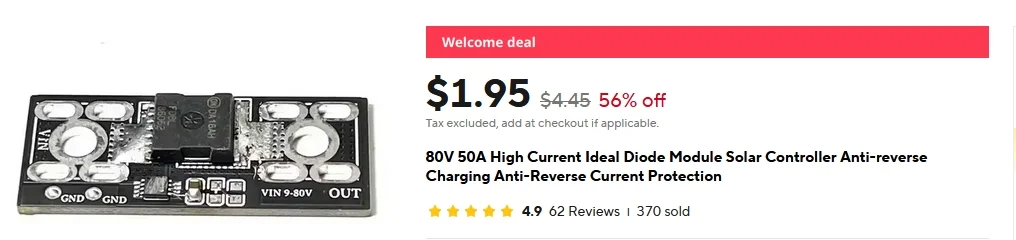
Better Diode.webp


The more I play around with charging my LTO battery box, the more I keep thinking I need to install a direct-to-battery power jack so I can plug in a car light bulb or something else that runs the battery down faster. It charges up nice and quickly, but takes waaaaay too long to run it down using just a dashcam when I'm trying to experiment with it 😉 (which is otherwise GREAT news for actual parking mode usage).

@GPak, which backflow diode did you end up using in your final config?
 
Last edited:
Not sure why the purple diode suddenly failed, maybe it was bad from the start, not so obvious but still?
Glad the black Diode worked.

In my son's LFP battery with the same 20A charger as yours, I used a 15A red diode, mostly due to space constraints in the box, it works fine with 7.5A charge rate.
https://www.amazon.com/gp/B07T558XTM

In my 5S LTO, I used a larger 25A charger that doesn't require a anti-backflow diode.

6S LTO still disassembled, waiting for box and other components needed to test it as a jump starter.
Most likely I will go with the same 25A charger.
Thought about solar input, which is easy to implement using 5th pin (middle one) on the time delay Relay, but MPPT charger is required.

For battery discharge and capacity testing I use this affordable but quite capable Electronic Load and am very happy with it.
 
I recently had a problem with my LTO battery box. I went out into the garage in the morning to find that my camera was still on and recording. I thought this was odd because I turn the battery off every night before going into the house. Apparently the night before it hadn't been turned off...

I was extra careful that night to make sure my battery pack was turned off before I went into the house. The interesting part is that I COULDN'T turn it off! It just wasn't happening. I tried several times and couldn't get it to cooperate. So I brought it into the house in order to do some additional checking. The app was behaving strangely, I couldn't make any changes to the settings at all, got a "Sending Failure" warning pop up on the app. I still couldn't turn it off and it wasn't actively charging anymore.

In order to make it work again, I had to pull ALL of the BMS (JK_BD4A8S4P) wire harnesses and isolate it from the batteries for a little while. I suppose this forced a cold-boot for the BMS. Its been behaving fine since I did this, but I was surprised to see this was a necessary step. I'm curious to see if this behavior returns any time soon. Just thought I'd share in the event anyone else runs into the same issue.
 
I guess, you turn off the battery with a BMS button.
Make sure the battery is not charging when you try to turn it off, i.e. there is no ACC delay, for example my ACC will stay on for a while until I open the door.

By the way, about a week ago another update for JK BMS/App was released, I hope that this is not the reason.
I installed the update, but I don't see any difference.
 

Attachments

  • IMG_7859.webp
    IMG_7859.webp
    46.2 KB · Views: 110
  • IMG_7860.webp
    IMG_7860.webp
    79.3 KB · Views: 104
Yes, I'm using the push button with the red LED ring-light to turn off the BMS. What is the rationale behind making sure it's not charging when I turn the BMS off? I've recently (and temporarily) changed my wiring scheme. I have an issue with an illuminated dash light that I have to back to the dealer for, so I've removed my direct to battery wiring for now. I don't want to hear the dealer's attempt to blame me, so for now I'm powering from the 12v utility outlet and have backed down the charge rate to 4A. The outlet shuts off either 3 mins after the ignition goes off, or when the doors are locked. So, the BMS is still charging when I power down using the button.

Should I use the app and turn off charging before using the button to power it down? I have to pull out the instruction sheet and have a look at it again...

I've also installed the JK app update - don't see any differences. I've not updated the firmware in the BMS itself, I think this requires some sort of USB cable that I don't have so the BMS can be connected directly to the computer.
 
I don't remember where I got this from, I think it doesn't even turn-off completely when charging.
I'll try to check it tomorrow.
By the way, all power stations don't turn-off when charging.

Alternatively you can turn-off both charging and discharging on the app's "Control" page, but you need to remember to turn it on next time, it not really convenient.

For me, the parking duration is 10 hours, and I simply would turn off the dash cam when I get home.
As for my wife, I can't ask her to manually control the dash cam or the battery, so I would set the parking duration to 3 hours (for shopping) and forget about it.
Of course the battery will self-discharge, but it will take more than a week without driving to fully discharge, so I don't care if the battery is on, unless the car is parked for a long time, in which case I can manually turn-off the battery.
 
Tested my 5S LTO to see if I can replicate your issue, and........

I can't turn off the BMS with the button while the battery is charging.
When I long pressing the button, I hear a long beep, the red LED ring around the button stays on, charging current briefly drops to around zero and then resumes, BT disconnects, sometime requiring to reload the app to reconnect, the dash cam stays on, but this may be due to bypass wiring.

If the battery is not charging (ignition/ACC off) and dash cam is in a parking mode, I can easily turn off the BMS/battery and the dash cam by long pressing the button.
I hear the same long beep, the red LED ring around the button goes out, and the dash cam turns-off.

Very similar to ecoflow R2/3 and other power stations.
 
Interesting results! I was able to repeat the "won't turn off" thing in the house with my SPMS power supply as well. I didn't try with the EcoFlow River2. Interesting that this is a universal behavior. I had exactly the same results as you with the JK BMS and a long press of the button: series of beeps, light stays on, charge current drops, app drops blue-tooth connection, camera stays on.

Now that I'm temporarily using the utility port in the trunk, the port is still active when I attempt to turn off the BMS/battery. With my previous hard wire connection, the relay turned off the charging voltage within 2-3s of turning off the car.
 
I think because of this behavior the BMS automatically turns on when charging with ignition starts.

Just today, another update for JK BMS/App was released, Version: V5.0.0
 
Perhaps my manual attempt to turn off the BMS while it was charging was setting up an internal logic conflict for the BMS... I'm thinking the primary difference between our two BMS examples is that mine is an older HW version (with logo silkscreening on the top cover) and yours is newer (no logo silkscreen), rather than the app versions. It would be nice to have some actual details on what changes with app versions.
 
Update must have been a big one to dictate a jump from v4.31 to v5.0
 
I updated to V5.0.0 but I don't see anything new/different.

By the way, I think your BMS version is newer (based on serial numbers).
I don't have the communication port (port switch) which I think was added later.

Although I figured out how to activate Smart Sleep, it's not really useful because the BMS won't wake up the next time I turn on the ignition and a manual button press is required.
 
I updated the app to v5.0.0 also and I don't see any differences. I wonder what they actually changed. I've not found any bugs in the app yet. Sounds like I'm not missing anything by not having the Smart Sleep function on mine.

Like many instances in life (choosing a product, making a new hire, whatever...), I find myself yearning for the product (or hire) that is a compilation of all of the best attributes from a variety of products/people. Why is this always so difficult??? 😉
 
I've recently done some more precise power consumption measurements for my Vantrue E360 3-ch camera. Turns out that this DIY LTO battery pack is pretty efficient!

The E360 3-ch camera, powered by the 12v to 5v regulator (which is built into my LTO battery pack) recording in LBR parking mode with the GPS unit attached lasted 53h and 55m with a 4.68w power draw. This works out to the camera plus the regulator consuming a total of 252Wh of power before the regulator shut down the camera when the batteries hit 11.8v. Beyond this point, there isn't much juice left in the batteries, the discharge curve is very steep at the end. I have thought about replacing the standard Viofo regulator with their new variant that does not have the low voltage cutoff function, but I'm not convinced that it would actually buy me much more usable power out of the battery pack. The LTO battery, assuming it has an actual capacity of 276Wh, means that the remaining 24Wh (276-252) of energy was consumed by the JK BMS over that same 54h period. This works out to a BMS power consumption of about 0.43w per hour (which is much better than I previously thought). 252Wh of usable capacity out of a theoretical maximum of 276Wh results in an overall efficiency of about 91% for the LTO pack. Pretty awesome!

A very similar power consumption test with my EcoFlow River 2 power station revealed a 38.5h runtime with the a similar camera configuration (no Vantrue 12v to 5v regulator- the camera was fed by the 5v USB-A outlet - which has its own regulator - and identical camera settings). 38.5h runtime for (slightly less than) 4.68w of power draw results in a (maximum) total power consumption of 180Wh before the River 2 shut down. That's an overall efficiency of 180Wh/256Wh or 70%. This is a good bit less efficient than the DIY LTO pack, but the EcoFlow unit has a lot more going on inside of it.
 
Keep checking their main webpage. These battery packs have been in stock at least twice before. I’m not sure what their source is, but they might show up again… maybe give them a call?
 
@GPak

Do you have a full updated build of materials (aside from batteries)? I took a look through the thread and components were upgraded/removed.

I think it's
  • batteries
  • Charger + BMS
  • UPS (optional)
  • XT60 connector with ACC direct to car battery
  • time-delay relay
 
Here is a good BoM and schematic diagram for the direct to battery hardwire:

https://dashcamtalk.com/forum/threa...reliable-for-battery-hookup.52539/post-635048

Here is a link the the larger Charger Board that @GPak used. If I built another battery, I’d use this larger one. It has higher current capacity and lower temp rise:

https://dashcamtalk.com/forum/threads/lto-lithium-titanate-oxide-–-the-ultimate-battery-for-dash-cam-parking-mode-diy.50484/post-626244

Your battery box definitely needs an anti backflow diode in it. This is a known good one:
https://www.aliexpress.us/item/3256803401816483.html

I used JiKong (JK) BMS model BD4A8S4P.
https://www.aliexpress.us/item/3256807166629452.html

Not sure if GPak has tested newer BMS units or not, I suspect he’s got a dozen of them laying around by now…
 
Last edited:
Back
Top