Parking Battery-Power Station, 3X capacity and 3X cheaper than dedicated options + extra functionality

I also think you can set EcoFlow to prevent from turning off at some time limit, or turn off "eco" mode @EricSan please confirm.
The EcoFlow River2 can be set to turn off after specified time periods when no power draw is detected (30m, 1h, 2h, 4h, 6h, 12h, 24h, or never). I have mine set to 30mins.

here in the UK, i use Anker cables to charge my S24 ultra at maximum speeds and other devices
i know the Eco flow is rated at 100W, so i would suggest getting like an Anker 100W cable to work
Do be careful to select a USB-C cable that is intended for high current charging. The challenge is finding one that can handle large current AND has more than two conductors. For my present testing purposes, I just picked up a cheap cable from WalMart and cut it in half to wire it up. I was very surprised to see just how thin the wires were. The red conductor (for +5v) and ground conductors are extremely thin (24g or 26g) and the other conductors are so thin than my wire stripper can’t strip it (smaller than 28g). I prepped these wires for connection by burning the insulation off with a match. I wouldn’t want to run any more than 5-10w through this cable.
 
FYI: Ecoflow River 2 can turn on DC 12V automatically by Automated tasks in Lab feature (mobile app).
 
Yes, but the EcoFlow will not turn off by itself with the 12v port turned on. Having the port turned on puts a draw on its battery, so the unit senses a draw and doesn't go to sleep.
 
That USB-C to XT60 cable looks decent. It's rated at 100w and it looks like the cable is sufficiently thick, but there is no way to tell what the conductor size is until you cut one of them...

I purchased an XT60 solar charging cable (on ebay from china) that was claimed to be 12g but turned out to be 16g instead. That's a pretty big difference. Check the reviews. Or buy two: one to use after cutting the first one to determine wide gauge.
 
Yes, but the EcoFlow will not turn off by itself with the 12v port turned on. Having the port turned on puts a draw on its battery, so the unit senses a draw and doesn't go to sleep.
In this case the discharging limit works for a small draw?
 
@EricSan @forcefed (and anyone else who has set up the River 2) - could you review this list of pros / cons of the River 2 vs dedicated dashcam batteries to make sure I've got it right?

I'm using the BlackboxMyCar PowerCell 8 as the comparison dashcam battery, as I think this is pretty representative of what's available.

Pros of River 2
- $239 USD for 256Wh; $0.93 USD per Wh (compared to $350 USD for 96 W; $3.64). [1]
- Can easily be used for non-dashcam needs.
- Can be taken inside to charge if required.

Cons of River 2
- Not rated for high temperatures; -10°C to 45°C (compared to -10°C - 70°C).
- Can't charge as fast via DC; max 100W (compared to 120W; DC 14.2V Max 8.5A).
- More complex wiring (need to split an ACC wire direct from fusebox or 12V outlet to camera, compared to a single cable going from car to PowerCell 8, then from PowerCell 8 to camera).
- Passthrough / low charge behaviour worse on River 2; needs to have minimum charge in order for camera to turn on, or need to have more complicated passthrough / relay wiring.

Misc
- PowerCell 8 can easily be extended by buying an extension battery, whereas River 2 can be extended by buying a larger capacity, or (more difficult) wiring in parallel.
- Both options have app based monitoring.

Have I got that all correct? Anything missing?

From my perspective, it's looking like the temperature ranges is going to be the main factor, as I'm in Sydney so internal car temperature could easily get up to 60-70 degrees (or higher).

[1] This compares listed capacities, rather than observed capacities. BlackboxMyCar lists a 24 hour runtime for a 4W 2CH dashcam, so it seems they are confident that their 96Wh is usable. If we assume the River 2 only has 192Wh usable (75% of listed capacity), then the $/Wh increases to $1.24, which is still nearly 1/3 of the dashcam battery price.
 
Your list above looks pretty good:

Add to your list of Cons:
Won't go to sleep if either 12v utility port or 120vac port is enabled. It does not matter if power is being drawn from these ports or not. Enabled = no sleep mode.

needs to have minimum charge in order for camera to turn on,
I am not sure what the above statement means. The EcoFlow turns on when it receives external power input.

From my perspective, it's looking like the temperature ranges is going to be the main factor, as I'm in Sydney so internal car temperature could easily get up to 60-70 degrees (or higher).
See the DIY LTO thread @GPak started. This gives you the ability to choose components based on temp rating 😉
 
In this case the discharging limit works for a small draw?
I'm not sure what you mean here. Can you provide a bit more detail/context so I can better understand what you are looking for?
 
I'm not sure what you mean here. Can you provide a bit more detail/context so I can better understand what you are looking for?
At discharging limit (0-30%) Ecoflow River 2 will stop discharging. Some FB users said it won't stop with power load < 25watts and will run out of juice
 
Ah, the settings that keep the battery from completely charging or completely discharging. I've never used them, so I can't comment on their behavior...
 
Add to your list of Cons:
Won't go to sleep if either 12v utility port or 120vac port is enabled. It does not matter if power is being drawn from these ports or not. Enabled = no sleep mode.
Thanks for flagging - does this just mean that the dashcam has to be powered by the USB ports? It sounded like it was simple to wire in a 12V USB-C cable.

I am not sure what the above statement means. The EcoFlow turns on when it receives external power input.
I think I was confused as to why a relay / bypass was needed in some of the wiring diagrams discussed earlier - is that only needed if operating the battery in sub-zero temperatures where it can't charge?

In normal temperatures, if the battery is completely flat and the car is turned on, does the dashcam get powered immediately or is there a delay?

See the DIY LTO thread @GPak started. This gives you the ability to choose components based on temp rating 😉
I'd love to be able to build my own, but I don't have the electrical skills or testing equipment, so it'd probably end up costing more than buying a dedicated dashcam
 
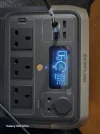
Usb c charging at home, with the new anker 120w charger and 100w cable
Not sure why it's not 100w
 

Attachments

  • 20240831_120647.webp
    20240831_120647.webp
    189.7 KB · Views: 121
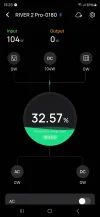
Looks like you can't charge the ecoflow river 2 pro via car or solar AND usb at the same time
 
Interesting
If I use the supplied car charger I get 104W charging, but does not work on solar charging

If I use my own made up cable which is not the xt60i-f cable I get 150w

The car cable supplied with ecoflow if xt60i-f and it's a thicker cable
 

Attachments

  • Screenshot_20240831_132302.webp
    Screenshot_20240831_132302.webp
    36.7 KB · Views: 107
The 89w instead of 100w for USB-C isn’t surprising. The difference is likely one of three things: the EcoFlow really can’t take 100w through that port, the power supply device isn’t capable of delivering a true 100w, or it is cable loss. Or some combination of the three - which seems most likely to me.

The EcoFlow 12v utility plug to XT60 cable is a true 14g wire, I measured it. The wire is physically arranged with concentric wiring: the +12v is in the center, surrounded by an insulator, which is then surrounded by a heavy, non braided outer conductor for ground, then there is the final outer sheath. This arrangement makes great sense, if the outer insulator gets pierced, there is no possibility of a short with a positive voltage live wire, since it lives in the middle of the bundle.

Edit: The EcoFlow 12v Utility plug to XT60 cable is 14g, not 12g (I made a typo). The above has been edited for correction.
 
Last edited:
does this just mean that the dashcam has to be powered by the USB ports?
That is how I wired my EcoFlow unit. My hand drawn wiring diagram is back a few pages. It worked great until temps exceeded 45c, then the USB output ports fried.

think I was confused as to why a relay / bypass was needed in some of the wiring diagrams discussed earlier - is that only needed if operating the battery in sub-zero temperatures where it can't charge?
Yes, if the battery is outside of its temp range or the battery pack fails, the relay bypasses the battery pack to run on car power while driving. Another bonus is that the power to operate the camera is not subtracted from the charge current while the engine is running, thus providing a slightly faster charge rate.
I don't have the electrical skills or testing equipment, so it'd probably end up costing more than buying a dedicated dashcam
It would probably still work out to your advantage, price wise. My LTO battery cost $255 in parts. I also used a $75 soldering station (a useful soldering iron can be had for $15), a $20 heat gun (for heat shrink tubing to cover wire crimp ends), and a $10 wire crimper to complete the project. All of this is still cheaper than a $300 dedicated parking battery. I’ve had these tools for more than a decade now, but I build MANY electronic projects. Some of them are on my web page here.

In the end, I have an excellent battery with more capacity than most commercial units, lower cost, and a robust battery chemistry (-30c to ~60-70c) that is not presently available on the retail market.

A skills gap is not as hard to overcome as you might think…. This is what forums are for😉
 
Are your ecoflow river 2 on the latest firmware?
What version are you guys on?

Thanks
 
My firmware for the EcoFlow River2 is v3.1.3.10 and the unit is reporting that this is the most recent version.
 
My firmware for the EcoFlow River2 is v3.1.3.10 and the unit is reporting that this is the most recent version.

Thanks
I heard one version (the previous one) has major issues
I can safely update mine now then
 
Back
Top