
You are using an out of date browser. It may not display this or other websites correctly.
You should upgrade or use an alternative browser.
You should upgrade or use an alternative browser.
Reviewing and Testing the Vantrue N4 Pro S
jsmith
Well-Known Member
OP
OP

EricSan
Well-Known Member
- Joined
- Dec 28, 2023
- Messages
- 1,410
- Reaction score
- 1,066
- Location
- Central PA
- Country
- United States
- Dash Cam
- There are ALWAYS user serviceable parts inside!
It does appear that the images of HDR alone vs PlatePix alone are being subject to different types of processing that are each distinct from the original image where both are turned off. I'll post another set of crops from these videos and see what those look like.It seems that HDR and Platepix are relatively independent units, and the official statement is not valid.
OP
OP
EricSan
Well-Known Member
- Joined
- Dec 28, 2023
- Messages
- 1,410
- Reaction score
- 1,066
- Location
- Central PA
- Country
- United States
- Dash Cam
- There are ALWAYS user serviceable parts inside!
The grocery store where I made those images closes around 9 or 10p (lights out, cars gone) so I think I'll need to go find a walmart parking lot or some other store that will be open after it's dark.Can you run a night test for me per the above?
I did experience something today while I was making videos that didn't go according to expectations. For a little while it wouldn't respond to voice commands to make images while I was working my way through the set of images I posted above. Hard to tell exactly what was going on becuase I was focused elsewhere. It's surprisingly difficult to make rotate through the settings and keep them all straight while doing screen caps from the videos. 😉I've encountered a bug on the N4 Pro S. I've had the camera + Wifi crash on me a few times. Going to generate a log to send to Vantrue. Have you experienced this?
jsmith
Well-Known Member
This makes sense since the camera is attempting to align multiple exposures, so the overlap won't be anywhere near precise until the car settles after the bump in the road. I suspect the video will be more clear (or at least settle more quickly) with HDR off.
It does for ssignage as it attempts to take multiple images, but everything has that look. See video. If you could please test night time that'd be great. I'll test HDR off today.

Hack_man
Well-Known Member
I tend not to use Wifi much, it's hard to sort thru lots of videos that way so I use the SD card. I'll play around with Wifi some more.
OP
OP
EricSan
Well-Known Member
- Joined
- Dec 28, 2023
- Messages
- 1,410
- Reaction score
- 1,066
- Location
- Central PA
- Country
- United States
- Dash Cam
- There are ALWAYS user serviceable parts inside!
I tend not to use Wifi much
I wonder if we're talking about the same thing or not. When I do video analysis, I pull the SD card and use my computer. When I'm changing settings, I tend to us the app via WiFi. The little hiccup that I thought I noticed was while going in and out of the menus through the app.
jsmith
Well-Known Member
I wonder if we're talking about the same thing or not. When I do video analysis, I pull the SD card and use my computer. When I'm changing settings, I tend to us the app via WiFi. The little hiccup that I thought I noticed was while going in and out of the menus through the app.
Trying to connect to camera, the Camera crashes and reboots. I'll get vantrue a log. They changed their app so I need to know how to generate one again.
OP
OP
EricSan
Well-Known Member
- Joined
- Dec 28, 2023
- Messages
- 1,410
- Reaction score
- 1,066
- Location
- Central PA
- Country
- United States
- Dash Cam
- There are ALWAYS user serviceable parts inside!
Here are some additional crops from the screen caps on the previous page. I can still see difference with just PlatePix vs just HDR. This level of detail and resolution is excellent. These are all stills. I'll try to capture some moving scenes next.
N4 Pro S 250% crop, HDR off, PlatePix off: I'm seeing some red bleeding above the sign, little bit of ghosting on the tree edge.

N4 Pro S 250% crop, HDR on, PlatePix off: Still some red bleed above the sign, more ghosting along tree edge. Letters are a bit more clean. Less noise around the sign.

N4 Pro S 250% crop, HDR off, PlatePix on: less red bleed above/around sign, least ghosting on edge of tree, white on black letters are cleanest, but not quite readable.
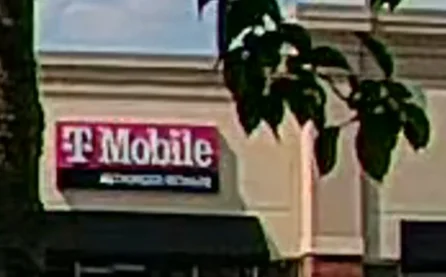
N4 Pro S 250% crop, HDR on, PlatePix on: less red bleed around sign, more ghosting on tree edge, white on black lettering smeary.

A139 Pro 250% crop, HDR on, red seems least saturated, letters least crisp, less color bleed, white on black letters smeared
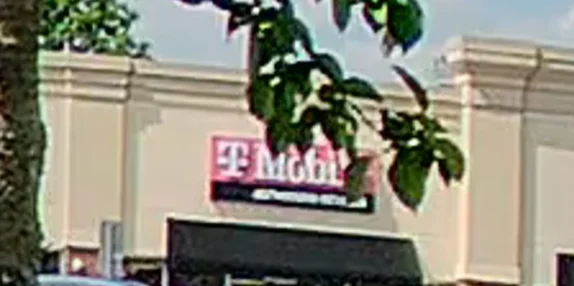
S1 Pro Max 250% crop, HDR on, PP on, bummer about the tree leaves... Poor planning on my part and I don't feel like going back to remake the above images and focus on a different sign. The part of the sign that is visible looks very amorphous...

N4 Pro S 250% crop, HDR off, PlatePix off: I'm seeing some red bleeding above the sign, little bit of ghosting on the tree edge.
N4 Pro S 250% crop, HDR on, PlatePix off: Still some red bleed above the sign, more ghosting along tree edge. Letters are a bit more clean. Less noise around the sign.
N4 Pro S 250% crop, HDR off, PlatePix on: less red bleed above/around sign, least ghosting on edge of tree, white on black letters are cleanest, but not quite readable.
N4 Pro S 250% crop, HDR on, PlatePix on: less red bleed around sign, more ghosting on tree edge, white on black lettering smeary.
A139 Pro 250% crop, HDR on, red seems least saturated, letters least crisp, less color bleed, white on black letters smeared
S1 Pro Max 250% crop, HDR on, PP on, bummer about the tree leaves... Poor planning on my part and I don't feel like going back to remake the above images and focus on a different sign. The part of the sign that is visible looks very amorphous...
Last edited:
Hack_man
Well-Known Member
I've played around with Wifi for a bit and have yet to see the camera crash while using Wifi (or not using it). I've bounced ON and OFF wifi a few times and no problems. I've only used it in the past to change a few settings here and there but no crashes.
Hack_man
Well-Known Member
I can't say I'm seeing a huge difference in text readability. I suspect that PlatePix shines more when the lighting conditions are challenging (too bright or too dim).Here are some additional crops from the screen caps on the previous page. I can still see difference with just PlatePix vs just HDR. This level of detail and resolution is excellent. These are all stills. I'll try to capture some moving scenes next.
N4 Pro S 250% crop, HDR off, PlatePix off: I'm seeing some red bleeding above the sign, little bit of ghosting on the tree edge.
View attachment 82984
N4 Pro S250% crop, HDR on, PlatePix off: Still some red bleed above the sign, more ghosting along tree edge. Letters are a bit more clean. Less noise around the sign.
View attachment 82985
N4 Pro S250% crop, HDR off, PlatePix on: less red bleed above/around sign, least ghosting on edge of tree, white on black letters are cleanest, but not quite readable.
View attachment 82986
N4 Pro S250% crop, HDR on, PlatePix on: less red bleed around sign, more ghosting on tree edge, white on black lettering smeary.
View attachment 82987
OP
OP
EricSan
Well-Known Member
- Joined
- Dec 28, 2023
- Messages
- 1,410
- Reaction score
- 1,066
- Location
- Central PA
- Country
- United States
- Dash Cam
- There are ALWAYS user serviceable parts inside!
Subtle differences for sure in this full sun situation while sitting still. Like all other things, the differences really emerge when you push the limits with challenging situations.
OP
OP
EricSan
Well-Known Member
- Joined
- Dec 28, 2023
- Messages
- 1,410
- Reaction score
- 1,066
- Location
- Central PA
- Country
- United States
- Dash Cam
- There are ALWAYS user serviceable parts inside!
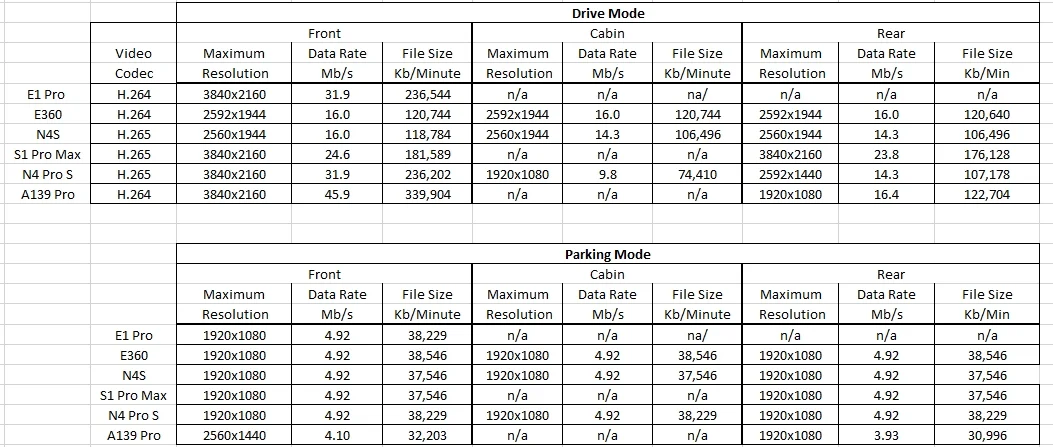
Here is my resolution, data rate, and file size table, updated for the N4 Pro S camera. This data comes from the MediaInfo app. I also corrected a few incorrect data rates, I had the decimal point in the wrong place (duh...)
Last edited:
Hack_man
Well-Known Member
It's probably just me not understanding some basic Dashcam terminology:
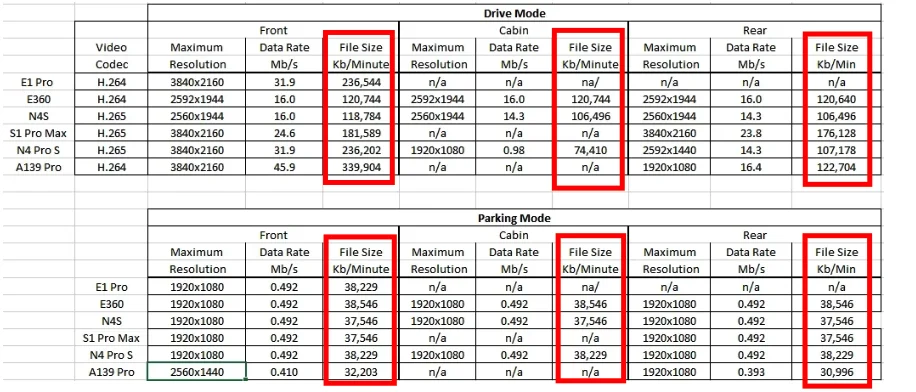
What are the File Size (Kb/Minute) values? Kb/Minute is not a unit for File Size thus my confusion.
My N4 Pro S Front Camera File size is 725.6 MB.
What are the File Size (Kb/Minute) values? Kb/Minute is not a unit for File Size thus my confusion.
My N4 Pro S Front Camera File size is 725.6 MB.
Last edited:
jsmith
Well-Known Member
It's probably just me not understanding some basic Dashcam terminology:
What are the File Size (Kb/Minute) values? Kb/Minute is not a unit for File Size thus my confusion.
My N4 Pro S Front Camera File size is 725.6 MB.
View attachment 83001
That's not you. Clearly a typo on Kilobytes / minute. He means MB / Minute.
Last edited:

TonyM
Well-Known Member
- Joined
- Jul 30, 2013
- Messages
- 6,726
- Reaction score
- 6,788
- Country
- United Kingdom
- Dash Cam
- Many dashcams over many years
Actually, I think it's KiloBytes per minute.That's not you. Clearly a typo on Kilobits / minute. He means MB / Minute.
Looking at some of my recent E1 Pro and S1 Pro Max videos they are 237,568KB and 182,272KB for 1-minute video files:
OP
OP
EricSan
Well-Known Member
- Joined
- Dec 28, 2023
- Messages
- 1,410
- Reaction score
- 1,066
- Location
- Central PA
- Country
- United States
- Dash Cam
- There are ALWAYS user serviceable parts inside!
No file size conversions applied, just read the file size data from windows explorer. Using the data from the E1 Pro: 236,544 Kb = 236Mb (roughly, depends on whether you divide by 1000 or 1024).
jsmith
Well-Known Member
Actually, I think it's KiloBytes per minute.
Looking at some of my recent E1 Pro and S1 Pro Max videos they are 237,568KB and 182,272KB for 1-minute video files:
View attachment 83011
Thats 237.568 Megabytes .
OP
OP
EricSan
Well-Known Member
- Joined
- Dec 28, 2023
- Messages
- 1,410
- Reaction score
- 1,066
- Location
- Central PA
- Country
- United States
- Dash Cam
- There are ALWAYS user serviceable parts inside!
Ah, I see what is going on here. In the table I provided above:
Mb/s = megaBITS per second
Kb/Minute = kiloBYTES per minute. I should have used a capital "B" for "KB/Minute."
Sorry for the confusion 🤣
Mb/s = megaBITS per second
Kb/Minute = kiloBYTES per minute. I should have used a capital "B" for "KB/Minute."
Sorry for the confusion 🤣
Last edited:
Hack_man
Well-Known Member
No problem we all learn from this. Dashcam's force you to learn a new kind of language.
My brain is overly wired for dashcam thinking - I was driving and noticed terrible speaker reflections in my windshield and my first instinct was to try to adjust the Dashcam CPL Filter 😳
My brain is overly wired for dashcam thinking - I was driving and noticed terrible speaker reflections in my windshield and my first instinct was to try to adjust the Dashcam CPL Filter 😳
Last edited: