Reviewing and Testing the Vantrue Nexus 5S

However the front camera isn't able to perform nearly as good as the N4S or N4 Pro S.

I'm having trouble reaching a clear conclusion about the front cameras of the N4S vs the N5S relative to one another. I've found some situations where the N5S is clearly ahead and other situations where it looks like the N4S is ahead. I'd call it closer to a tie at the moment. Comparing either to the N4 Pro S isn't quite fair as the first two use 2.5k sensors and the N4PS is a 4k sensor (but all have the exact same pixel size of 2um x 2um for gathering light).

I think the practical limit right now is just how much data can be stuffed through the processor chip. I think this is a situation that is waiting for faster and more capable processors. There aren't very many 4-channel dashcams at the moment and a quick look around shows that most (all?) of them currently record at combined resolutions that are LOWER than the Vantrue. There is good value to pushing the limits to move things forward.

Two more comparisons to make: 1) enable PlatePix on the N4S and 2) swap out the N4S for the N4PS and see what the night time comparisons look like between the N4PS and the N5S.
 
Last edited:
The angles that can be covered with the 4 cameras are good. Definitely won't miss much going around the car.
However the front camera isn't able to perform nearly as good as the N4S or N4 Pro S.
HDR would have been better instead of WDR.
But I guess with 4 channels, you will have limitations for now.

WDR is hardware based and HDR is software based, making me wonder if HDR could be added to the N5S.

I'm satisfied with image quality on N5S given it is 4 channels. Obviously, there's some tradeoff in quality and resolution, but having 4 channels gives the vehicle better coverage if say you are broadsided or someone damages the car (vandalism).
 
I am not sure if these features were present before I updated the firmware, or if they are new features that came with the recent firmware update. Either way, There are some interesting features for parking mode.

The first is a nice visual notification that there are collision mode recordings that should be examined. You only get this message the first time you turn on the camera after the impact has occurred. Subsequent power-on cycles do not display this message:
IMG_5982.webp


There is also a nice selection of how to invoke parking mode:
N5S Parking Mode Menu.webp


Entry/Exit mode provides several choices that I need to play with a bit more so I can learn more about their differences. I'm thinking at least one of these is to address the concerns that @TonyM raised when using the LTE module: closing the door after turning off the car would trigger an impact and a set of file uploads that were not necessary.
IMG_5979.webp
 
@Jeff_Vantrue: here is an idea that might introduce some useful flexibility for me and for others. For parking mode, there are various combinations of cameras that will be used for recording. There are six menu options spread across two menu pages, and all menu choices include the front camera. When I park at work, I park head-on with the front of the car pointed toward landscaping of one sort or another. It is largely the same when I run errands, I always park away from other cars along the edge of the parking lot. As a result, I don't have much need for parking mode that uses the front camera.

IMG_17133.webp


IMG_17135.webp


Instead of having six options for parking mode camera selections (shown above), would it be possible to have four check boxes, one for each camera? Then, everyone could just pick the cameras that are most relevant to their own situation. This would simplify the menu by reducing the choices from 6 to 4. Just an idea...
 
Here is a quick set of comparison images that I made tonight. In each of these, I'm sitting still at a traffic light. Overall exposure for each camera looks great. The N4S is the darkest (result of HDR + PlatePix), but only by a small amount. The A139 Pro is the brightest (by a small amount) but that is likely because I neglected to enable HDR. I have the timer set (to 7p), but since the sun is setting earlier as we head into Winter it hadn't turned on yet. I need to adjust the timer or just enable it all of the time, especially with a seasonal time change about to happen next week... D'oh!

N5S, WDR enabled, Polarizer installed:
N5S Traffic Light.webp


N4S, HDR enabled, PlatePix on, Polarizer installed. HDR + PlatePix seems to reduce the exposure by about 2/3 of a stop (0.6) and I haven't added exposure compensation in the menu.
N4S Traffic Light.webp


And the same scene from my A139 Pro, HDR in off (I need to adjust the timer that turns it on at 7p now that the sun sets earlier...)
A139P Traffic Light.webp
 
Last edited:
Here is another comparison as I was moving at about 13 mph past a row of parked cars. Each of these cameras struggled with plate capture.

N5S, WDR on, Polarizer installed:
N5S 7th Full Frame.webp


N4S, HDR enabled, PlatePix enabled, Polarizer installed:
N4S 7th Full Frame.webp


A139 Pro, HDR off, Polarizer installed:
A139P 7th Full Frame.webp


And here are the plate comparisons. I examined the videos frame by frame and selected the single best plate capture from each camera:
7th Plate Comparison.webp

Each camera struggled with plate capture in this setting. The extra resolution of the A139P (4k) over the N4S and N5S (both 2.5k) did not make much difference in detail capture this time around (maybe because HDR was off - I thought it was on). The plate actually reads "LZE 6163."
 
Last edited:
Here is another comparison as I was moving at about 13 mph past a parked car. Each of these cameras struggled with plate capture.

N5S, WDR on, Polarizer installed:
View attachment 86609

N4S, HDR enabled, PlatePix enabled, Polarizer installed:
View attachment 86610

A139 Pro, Polarizer installed:
View attachment 86611

And here are the plate comparisons. I examined the videos frame by frame and selected the single best plate capture from each camera:
View attachment 86612
Each camera struggled with plate capture in this setting. The extra resolution of the A139P (4k) over the N4S and N5S (both 2.5k) did not make much difference in detail capture this time around. The plate actually reads "LZE 6163."

The A139 Pro did the best. You can still somewhat read the numbers. First letter looks like an L and last a 3.. not that it would do much to assist with such limited readability.
 
It looks like the A139P captured the leading letters the best and the N4S captured the trailing numbers the best. I was surprised just how much each camera struggled at relatively low speed.

You can see some comparisons to another 4k camera in this thread.
 
Last edited:
It looks like the A139P captured the leading letter best and the N4S captured the trailing numbers the best. I was surprised just how much each camera struggled at relatively low speed.

You can see some comparisons to another 4k camera in this thread.

I don't have the A329T (wish Viofo included me)....But it seems the A329T didn't do any better in the test either. Cameras struggle with low light and I don't think that will be anything easily corrected in the near future. The car is moving and the exposure time to capture the plate simply isn't quick enough to generate a readable plate.
 
Night time recording is a challenging situation for sure! The newer Viofo was the only camera that produced a fully readable plate. I want to swap the N4S (2.5k) for the N4 Pro S (4k) and see how that one compares to the N5S (2.5k) in similar conditions. I should be able make this comparison later in the week.
 
Last edited:
@Jeff_Vantrue: here is an idea that might introduce some useful flexibility for me and for others. For parking mode, there are various combinations of cameras that will be used for recording. There are six menu options spread across two menu pages, and all menu choices include the front camera. When I park at work, I park head-on with the front of the car pointed toward landscaping of one sort or another. It is largely the same when I run errands, I always park away from other cars along the edge of the parking lot. As a result, I don't have much need for parking mode that uses the front camera.

View attachment 86536

View attachment 86537

Instead of having six options for parking mode camera selections (shown above), would it be possible to have four check boxes, one for each camera? Then, everyone could just pick the cameras that are most relevant to their own situation. This would simplify the menu by reducing the choices from 6 to 4. Just an idea...
Thank you so much for your thoughtful suggestion! It would indeed make the menu simpler and more flexible. However, the camera selection is currently tied to the resolution setup, and under the existing system architecture, the front camera must remain active for the system to function properly.
 
the front camera must remain active for the system to function properly.
I was wondering if this was the primary reason for the set of available options. Oh well. Thank you for providing that level of technical insight!
 
Last edited:
I remade some images last night, here are three captures along the same street as I was moving. This is the entire frame as captured by the N5S camera along with a few inserts of plate captures and zooms. The overall scene capture is quite good, it is easy to see areas on both sides of the car for quite some distance down the road. Given the time of night, the sky was indeed black (cloudy day beforehand). The camera that each zoom came from is labeled in the image. In all cases, I selected the single best frame from the video stream for comparison. This is a pretty challenging setting with high contrast and fairly large speed differential (moving at 20-25 mph vs parked car).

N5S and N4S are 2.5k main cameras, the N4 Pro S and the A139 Pro are 4k main cameras, so it is not surprising that they fared a bit better due to the extra resolution, but the N4S with HDR and PlatePix did a pretty good job for a lower resolution camera! The N4 Pro S did the best job overall, rendering an easily readable plate with great contrast, no doubt a function of the PlatePix function!

N5S main camera overall scene #1: HDR/WDR enabled for all cameras, polarizer lens installed on all cameras, PlatePix enabled for N4S and N4 Pro S.
N5S Full Frame #1 Insert.webp


N5S main camera overall scene #2: HDR/WDR enabled for all cameras, polarizer lens installed on all cameras, PlatePix enabled for N4S and N4 Pro S. Again, the overall scene is well-rendered in terms of overall exposure.
N5S Full Frame #2 Inserts.webp


N5S main camera overall scene #3: HDR/WDR enabled for all cameras, polarizer lens installed on all cameras, PlatePix enabled for N4S. This particular scene is a bit darker overall than the two previous images, I'm presuming the exposure for the N5S camera was influenced by the headlights and road reflection of the oncoming car.
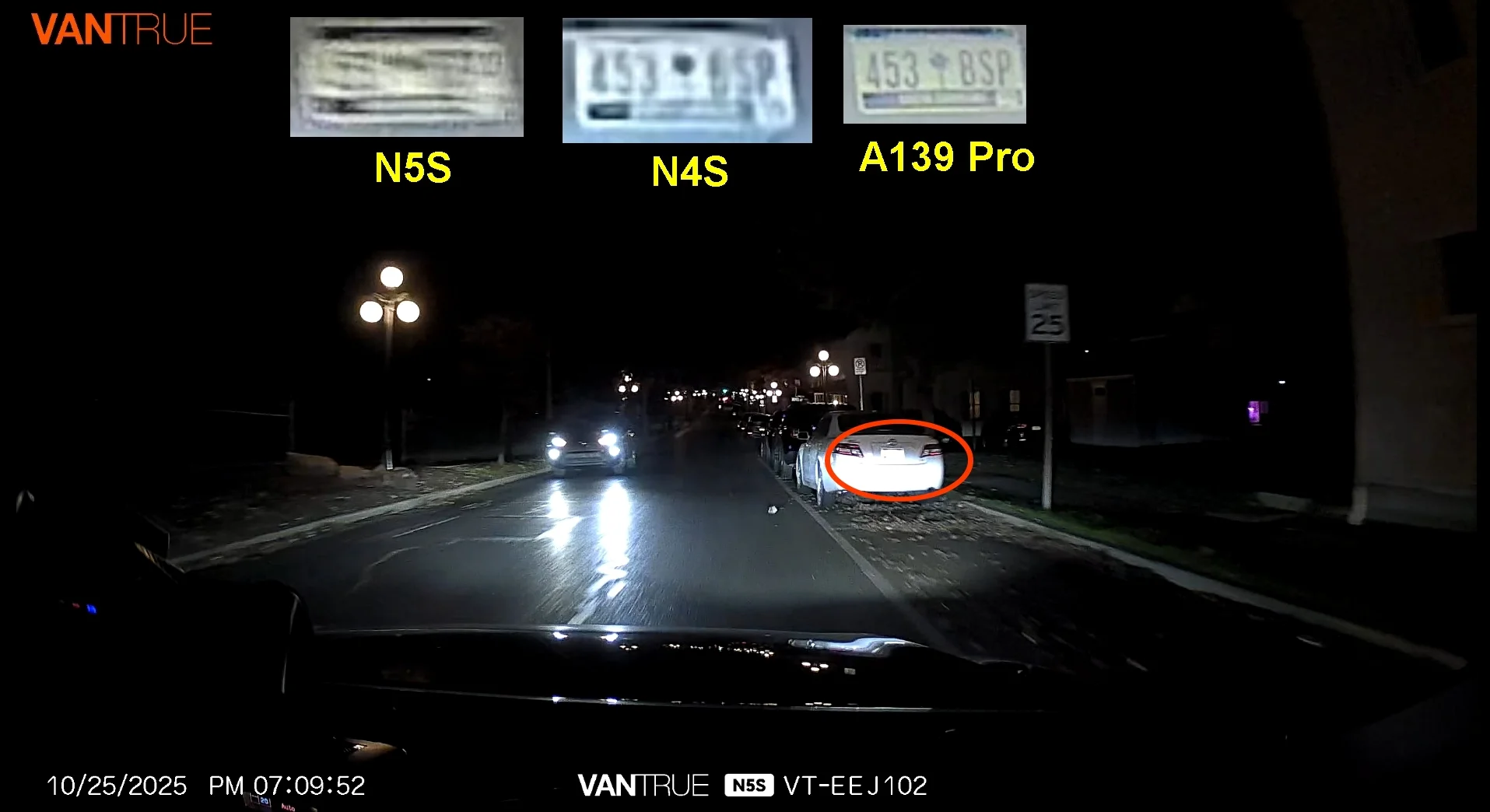
N5S Full Frame #3 Insert.webp


The N4 Pro S was not in my car for this last comparison directly above and the third car that I was targeting had moved by the time I looped around, so I don't have a direct comparison for the N4 Pro S (bummer). It's challenging to make comparisons while trying to manage the settings and swapping out multiple cameras. Presently, I have four cameras across my front windshield... Despite the lower resolution, the N4S (2.5k resolution) with PlatePix did an admirable job in this situation. The A139 Pro is a 4k camera, so it's rendering is a bit sharper than the other two due to higher resolution, but it also exhibits less contrast which could make reading the plate a bit more challenging in other situations.

It seems that the Wide Dynamic Range setting of the N5S lags behind the HDR function of the N4S (both cameras are 2.5k) for night time scenes. My earlier posts (Post #49 and Post #65 and Post #68) show an advantage for N5S's WDR over HDR of the N4S during bright sun of the mid afternoon. It's curious how each technology has it's "preferred" environment where it performs best. It seems cliche, but I keep thinking about that old phrase "There is such thing as a free lunch." There are tradeoffs everywhere, so it's up to you to determine which characteristics are important and fit your driving pattern.

The N5S is an excellent performer if you are looking 4 channel capability, as it provides a good view out the side windows from the front and rear interior cameras. This is especially well suited for parking mode at shopping centers or at work. The exteriors cameras, of course, do a great job capturing what they should in front of and behind the car. The N5S performs best during normal daytime driving, rendering plates and overall scene capture a bit better than the N4S. If you do very little night time driving and/or value the 360 degree video coverage, this is an excellent choice! If you are a night time commuter and don't need the 360 degree coverage for parking mode, the N4S or N4 Pro S could be a better choice for you.

And still one of my favorite features, with the most recent firmware updates, BOTH the N5S and the N4 Pro S cameras retain their original date stamps when copying files from the SD card to your computer, so finding the footage you are looking for is easier and more intuitive! Next, I want to play with some of the new menu options for parking mode that are intended to prevent false positives when you get back in the car at the end of the day.
 
Last edited:
@EricSan

I didn't expect the N5S would be a top performer at night. It loses resolution to accommodate 4 channels versus 3. The processor is insufficient to handle front HDR and the front resolution is 2k vs 4k. However, the tradeoff is all around coverage for those of us without a fixed window to put side cameras.

The N4S Pro and A139 did quite well. I imagine the the A329 would do even better.

I'd still recommend the N5S to anyone wanting 360 coverage without the ability to get it with side mounted cameras. It's the next best thing. Sadly, there's the tradeoff of plate readability to achieve better vantage points.
 
I think the N5S performance at night is a result relatively longer shutter speeds in a dark environment (WDR vs HDR) that makes plates harder to read. Resolution and bitrates from the N5S are identical to the N4S and other Vantrue 2.5k cameras. The clear advantage of the N5S is the 4th channel for additional interior/side coverage as you point out, and slightly better performance during daytime hours. You can find another set of images to compare to here.
 
I think the N5S performance at night is a result relatively longer shutter speeds in a dark environment (WDR vs HDR) that makes plates harder to read. Resolution and bitrates from the N5S are identical to the N4S and other Vantrue 2.5k cameras. The clear advantage of the N5S is the 4th channel for additional interior/side coverage as you point out, and slightly better performance during daytime hours. You can find another set of images to compare to here.

What IMX does the N5S and N4 Pro S use? Wendy stated that HDR wasn't possible on the N5S due to the choice of processor. I think if Vantrue ever does an N5 Pro S, we'd have a top of the line winner in all categories. Plate recognition at night is definitely the one shortcoming, but I can't give up that 360 coverage. To me, that's more likely to come on handy then a plate to the left or right of me that may be unreadable. Generally, if that plate is in front of me (not off to the side at an angle), the camera SHOULD be able to see it at night, due to the illumination from the headlights.
 
Last edited:
I'm not sure what image processing chip Vantrue uses in these models. It is also important to realize that what I am comparing here is likely the most challenging of situations: it is night time and the speed differential is about 25mph. On the highway, there generally isn't a consistent 25mph speed differential between you and all of the rest of the traffic, even at night, so real-life performance in a variety of settings is likely to be much better than what I have shown here. The N5S camera represents excellent performance given: a) this is a 4-channel system, b) it's a 2.5k sensor, and c) the above set of images is about as challenging as an environment gets.

After exploring each of these cameras over an extended period of time, I find myself wondering: "Which set of these features as most useful for my specific use case?" I think my answer varies over time 😉
 
I'm not sure what image processing chip Vantrue uses in these models. It is also important to realize that what I am comparing here is likely the most challenging of situations: it is night time and the speed differential is about 25mph. On the highway, there generally isn't a consistent 25mph speed differential between you and all of the rest of the traffic, even at night, so real-life performance in a variety of settings is likely to be much better than what I have shown here. The N5S camera represents excellent performance given: a) this is a 4-channel system, b) it's a 2.5k sensor, and c) the above set of images is about as challenging as an environment gets.

After exploring each of these cameras over an extended period of time, I find myself wondering: "Which set of these features as most useful for my specific use case?" I think my answer varies over time 😉

To which I reply, "My car looks like a Bank Protecting its Vault".....3 Active Dashcams running together at once! N5S Pro, A139 Pro, and E3 I'm testing LOL. Where one shortcoming arises, another takes over!
 
I'm looking through some old videos on my computer that I need to clear out and free up some HD space and I came across some rear camera highway footage as I was about to cross the George Washington Bridge about two months ago. I like these because they show a front plate capture from the N5S rear camera. Despite the rear camera on the N5S being a bit on the soft side compared to other Vantrue rear cameras, it still manages readable captures.

N5S Rear Camera: HDR enabled, no polarizer, moving at about 50mph. As you can see, this car is directly behind me in the same lane. Plate insert is a 300% zoom:
N5S Rear Camera Plate2.webp


And here is another capture from the N5S rear camera while moving at about 65mph, HDR enabled, no polarizer, but this time, the plate is from the car in the adjacent lane. The N5S still captured a readable plate:
N5S Rear Camera Plate1.webp
 
Last edited:
Here is another particularly interesting capture. Just after crossing the George Washington Bridge, the road goes through a series of underpasses. As you can see in the images below, this is a particularly challenging scene. The lower half of the image is mostly dark and the top half is bright from the daylight. The license plate of the car directly behind me is lit by my brake lights and it's quite readable. Without being illuminated by my brake lights, the plate is completely unreadable (not to mention nearly invisible).

N5S 2.5k Rear Camera, HDR on, no polarizer:
N5S Rear Camera Brake Lights.webp


And for comparison, here is the very same scene from the rear camera of my A139 Pro (1k resolution), no HDR, polarizer installed:
A139P Rear Camera Brakes.webp


Between the two images above, the N5S renders a much cleaner overall image and simultaneously does a better job controlling bloom around the high contrast areas, especially along the bottom edge of the underpass where it meets the concrete uprights on either side of the roadway.

And just to round out the comparison, here is the same scene as captured by the 4k rear camera of the S1 Pro Max camera, also with a polarizer installed. To the right of the red license plate zoom/crop insert is a second plate capture from just a few frames earlier when my brakes were not on. As you can see, the front plate is completely unreadable without the illumination from my rear brake lights.
S1PM Rear Camera Brakes.webp


This is an interesting set of images from three different cameras that feature different resolutions:
- The S1 Pro Max is a 4k rear camera that has a polarizer installed (I don't have any notes about HDR being enabled at the time or not). It also renders the brightest overall exposure in the foreground while still preserving details from the brightly lit background (this makes me think HDR is likely enabled).
- The N5S is a 2.5k rear camera with HDR that does not have a polarizer installed.
- The A139 Pro is a 1k rear camera that does not have HDR, but does have a polarizer installed.

And despite these differences, all three cameras render a very readable plate capture as long as the plate was illuminated by my rear brake lights. Without my brakes, no camera renders a readable plate.
 
Last edited:
Back
Top