
You are using an out of date browser. It may not display this or other websites correctly.
You should upgrade or use an alternative browser.
You should upgrade or use an alternative browser.
Something doesnt seem right, probable mem card?
- Thread starter Limeybastard
- Start date
Limeybastard
Active Member
- Joined
- Sep 5, 2016
- Messages
- 230
- Reaction score
- 56
- Location
- Shady Hills Massive, FL.
- Country
- United States
- Dash Cam
- Front A119 , Rear A119S v1
Neither, it was the one where someone had issue with the screen of the A119s staying on but not recording like my issue.
Limeybastard
Active Member
- Joined
- Sep 5, 2016
- Messages
- 230
- Reaction score
- 56
- Location
- Shady Hills Massive, FL.
- Country
- United States
- Dash Cam
- Front A119 , Rear A119S v1
Correct.Just to confirm you don't use the GPS mount and power is plugged directly into the side of the camera correct
Sent from my SM-T819Y using Tapatalk
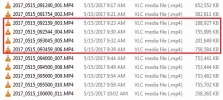
I just noticed this occurring on my A119S as well starting this weekend. This morning, noticed the red recording LED was not on while stopped at a light. Re-adjusted my cig power cable to ensure it was connected properly. Seemed to resume right after. I had already re-formatted the microSD card the night before. My recording duration is set to 5 minutes.
Attachments
Limeybastard
Active Member
- Joined
- Sep 5, 2016
- Messages
- 230
- Reaction score
- 56
- Location
- Shady Hills Massive, FL.
- Country
- United States
- Dash Cam
- Front A119 , Rear A119S v1
Can you emulate the issue perhaps by turning vehicle on so viofo powers on then turn vehicle off but keep accessory ignition on so that the viofo remains on. The fully turn vehicle on again, i believe its this that causes the issue to raise it's head.I just noticed this occurring on my A119S as well starting this weekend. This morning, noticed the red recording LED was not on while stopped at a light. Re-adjusted my cig power cable to ensure it was connected properly. Seemed to resume right after. I had already re-formatted the microSD card the night before. My recording duration is set to 5 minutes.
Sent from my SM-T819Y using Tapatalk

- Joined
- Feb 6, 2016
- Messages
- 4,524
- Reaction score
- 2,635
- Location
- New England
- Country
- United States
- Dash Cam
- Viofo, GitUp
The car adapter that comes with the A119/A119S is known to not fit well in certain cars 12V ports. I believe the adapter is a bit short in some ports, causing the tip to not make full contact with the base of the socket. Sounds like this could be your issue.I just noticed this occurring on my A119S as well starting this weekend. This morning, noticed the red recording LED was not on while stopped at a light. Re-adjusted my cig power cable to ensure it was connected properly. Seemed to resume right after. I had already re-formatted the microSD card the night before. My recording duration is set to 5 minutes.
Iceman888
New Member
- Joined
- Apr 26, 2017
- Messages
- 18
- Reaction score
- 10
- Location
- South Carolina
- Country
- United States
- Dash Cam
- A119S, also run a uniden r-3 RD
I had the same problem using the cigar plug with a power pack I use at my desk. The plug would not go in far enough due to fact the back of plug(at wire end) was too fat to go in deep enough to make contact. I filed down the plastic a bit and problem solved.
Limeybastard
Active Member
- Joined
- Sep 5, 2016
- Messages
- 230
- Reaction score
- 56
- Location
- Shady Hills Massive, FL.
- Country
- United States
- Dash Cam
- Front A119 , Rear A119S v1
I dont see how this can be a connection issue, since im not losing power or going into a loop cycle. Like i said earlier, the device powers up all the time, just on a couple of occasions so far it wont record and screen stays on but the red blinking indicating recording is not operational until i either A: press record or B: turn vehicle off then back on again.I had the same problem using the cigar plug with a power pack I use at my desk. The plug would not go in far enough due to fact the back of plug(at wire end) was too fat to go in deep enough to make contact. I filed down the plastic a bit and problem solved.
My front camera is hardwired as will be the rear one in question, after im happy it works correctly.
I cant be 100% sure but the times it behaved this way was - not recording but with screen staying ON, was when vehicle accessory power was ON but engine OFF then turning vehcile engine ON. Something perhaps causes the A119s and not the A119 to cease recording. Obviously a fluctuation of voltage occurs when turning key from position 2 accessory to RUN engine position 3. That's my hunch.
Only way to prove it is to perform this and observe ocurance.
I'm thinking i should read the link borik posted earlier on this thread.
Since another member harsh stated :
When switching from ACC or ON to Start/Ignition the A119S reboots whereas the SG9665GC keeps recording. If correctable via firmware, this could be looked into.
Which perhaps the issue.
Sent from my SM-T819Y using Tapatalk

- Joined
- Jan 27, 2013
- Messages
- 52,432
- Reaction score
- 30,335
- Location
- Sydney, Australia ~ Shenzhen, China
- Country
- Australia
- Dash Cam
- Too many ¯\_(ツ)_/¯
symptoms are more typical of a memory card problem
Limeybastard
Active Member
- Joined
- Sep 5, 2016
- Messages
- 230
- Reaction score
- 56
- Location
- Shady Hills Massive, FL.
- Country
- United States
- Dash Cam
- Front A119 , Rear A119S v1
I swapped the kingston 64gb from front to back , we'll see how it goes. The bsck A119s cam was using a Kingston 64gb also. But swapped them still and formatted within the camera.symptoms are more typical of a memory card problem
Sent from my SM-T819Y using Tapatalk
borik
Well-Known Member
- Joined
- Sep 26, 2016
- Messages
- 896
- Reaction score
- 362
- Country
- United States
- Dash Cam
- 2 A119's, A119 Pro
and this is one of the reasons I power up my cameras from a 3-port power bank, and one at a time, front cam first, when the screen saver (15sec) kicks in I power up the rear camera, and I verify the cameras started recording. I want to be 100% sure I'll have the video on both cameras. could be 😉 a life saving. 🙂I cant be 100% sure but the times it behaved this way was - not recording but with screen staying ON, was when vehicle accessory power was ON but engine OFF then turning vehcile engine ON. Something perhaps causes the A119s and not the A119 to cease recording. Obviously a fluctuation of voltage occurs when turning key from position 2 accessory to RUN engine position 3. That's my hunch.
one more thing: reload the firmware on your rear camera, just to be sure the firmware is fresh and undamaged. 🙂
Last edited:
Limeybastard
Active Member
- Joined
- Sep 5, 2016
- Messages
- 230
- Reaction score
- 56
- Location
- Shady Hills Massive, FL.
- Country
- United States
- Dash Cam
- Front A119 , Rear A119S v1
and this is one of the reasons I power up my cameras from a 3-port power bank, and one at a time, front cam first, when the screen saver (15sec) kicks in I power up the rear camera, and I verify the cameras started recording. I want to be 100% sure I'll have the video on both cameras. could be 😉 a life saving. 🙂
one more thing: reload the firmware on your rear camera, just to be sure the firmware is fresh and undamaged. 🙂
How do you select which cam comes on first? Sorry for the dumb question, also what is the powered USB bank you have?
My front camera is not connected to a 4 port USB hub located within under my center console, I had originally soldered the connections inside there to the 12v vehicle supply. I remember when I installed my A119 from 8 months ago, I used the dual cigar port USB plug it came with, I stripped it down and wrapped it in insulating tape, then soldered it to the 12 v vehicle supply, the front camera goes directly to the orginal modified dual cigar usb adaptor which in turn is soldered to vehicle 12 v supply, 12 v is supplied when key is on position 2 Accessory or when engine on. So far no issues with this setup. Although originally I wanted to just plug the A119 straight to the 4 port usb hub , but didnt. I was advised not to do it this way. Otherwise I would not have bothered using the supplied dual usb plug which I soldered to vehicles 12v system.
Basically think of the supplied cigar dual usb plug that comes with the camera. but torn apart and hard connected to the 12 v instead of being pushed into the vehicles socket . My intention was to feed the usb power wire from the rear camera to the 2nd spare usb slot that my existing camera is fed on.
As for making sure it is working, yes you are right. Hence why I found issue on day one of install and currently trying to address it. Now if the stupid user ( myself ) thought that the red led button glowing red was meant that it was recording then heaven forbid it was not! LOL Which in my case it was not double LOLz
Last edited:
borik
Well-Known Member
- Joined
- Sep 26, 2016
- Messages
- 896
- Reaction score
- 362
- Country
- United States
- Dash Cam
- 2 A119's, A119 Pro
I plug each USB end manually into a RAVPower 26.8A power bank's USB ports and each USB cable's end marked with the tape. I may connect both cams to a provided sig lighter adapter and into a car's sig socket which I have only one, so I got Bestek, which extended my USB / sockets number.How do you select which cam comes on first? Sorry for the dumb question, also what is the powered USB bank you have?
if I connect both cams using a provided cig lighter adapter and power them up (by starting the engine, for example), the front cam comes up first, and about 1-2-3 seconds later comes up the rear.
Last edited:
Limeybastard
Active Member
- Joined
- Sep 5, 2016
- Messages
- 230
- Reaction score
- 56
- Location
- Shady Hills Massive, FL.
- Country
- United States
- Dash Cam
- Front A119 , Rear A119S v1
Yeah, I think my rear comes on 1-2 seconds later than front.I plug each USB end manually into a RAVPower 26.8A power bank's USB ports and each USB cable's end marked with the tape. I may connect both cams to a provided sig lighter adapter and into a car's sig socket which I have only one, so I got Bestek, which extended my USB / sockets number.
if I connect both cams using a provided cig lighter adapter and power them up (by starting the engine, for example), the front cam comes up first, and about 1-2-3 seconds later comes up the rear.
borik
Well-Known Member
- Joined
- Sep 26, 2016
- Messages
- 896
- Reaction score
- 362
- Country
- United States
- Dash Cam
- 2 A119's, A119 Pro
that's how it looks like:Yeah, I think my rear comes on 1-2 seconds later than front.
Limeybastard
Active Member
- Joined
- Sep 5, 2016
- Messages
- 230
- Reaction score
- 56
- Location
- Shady Hills Massive, FL.
- Country
- United States
- Dash Cam
- Front A119 , Rear A119S v1
So basically you hard wired one of those lithium ion usb power banks ?that's how it looks like:
View attachment 30969
Sent from my SM-T819Y using Tapatalk
borik
Well-Known Member
- Joined
- Sep 26, 2016
- Messages
- 896
- Reaction score
- 362
- Country
- United States
- Dash Cam
- 2 A119's, A119 Pro
no, it's not hardwired, but I may connect it to a "Bestek" if I want and charge it during driving. I used 3M tape to "stick" it to a console side.
when I'm done with driving I take out the memory cards and take the power bank home for charging.
the power bank provides enough amperage to power up 2 A119's for 33 hours non-stop recording with about 25% amperage left, there is no need to charge it in a car.
when I'm done with driving I take out the memory cards and take the power bank home for charging.
the power bank provides enough amperage to power up 2 A119's for 33 hours non-stop recording with about 25% amperage left, there is no need to charge it in a car.
Limeybastard
Active Member
- Joined
- Sep 5, 2016
- Messages
- 230
- Reaction score
- 56
- Location
- Shady Hills Massive, FL.
- Country
- United States
- Dash Cam
- Front A119 , Rear A119S v1
Oh ok. So with this device attached to your vehicle you plug each camera in one at a time.no, it's not hardwired, but I may connect it to a "Bestek" if I want and charge it during driving. I used 3M tape to "stick" it to a console side.
when I'm done with driving I take out the memory cards and take the power bank home for charging.
the power bank provides enough amperage to power up 2 A119's for 33 hours non-stop recording with about 25% amperage left, there is no need to charge it in a car.
Sent from my SM-T819Y using Tapatalk
borik
Well-Known Member
- Joined
- Sep 26, 2016
- Messages
- 896
- Reaction score
- 362
- Country
- United States
- Dash Cam
- 2 A119's, A119 Pro
yes, just to be sure. I also avoid slamming the doors while the cameras recording. 🙂Oh ok. So with this device attached to your vehicle you plug each camera in one at a time.
Limeybastard
Active Member
- Joined
- Sep 5, 2016
- Messages
- 230
- Reaction score
- 56
- Location
- Shady Hills Massive, FL.
- Country
- United States
- Dash Cam
- Front A119 , Rear A119S v1
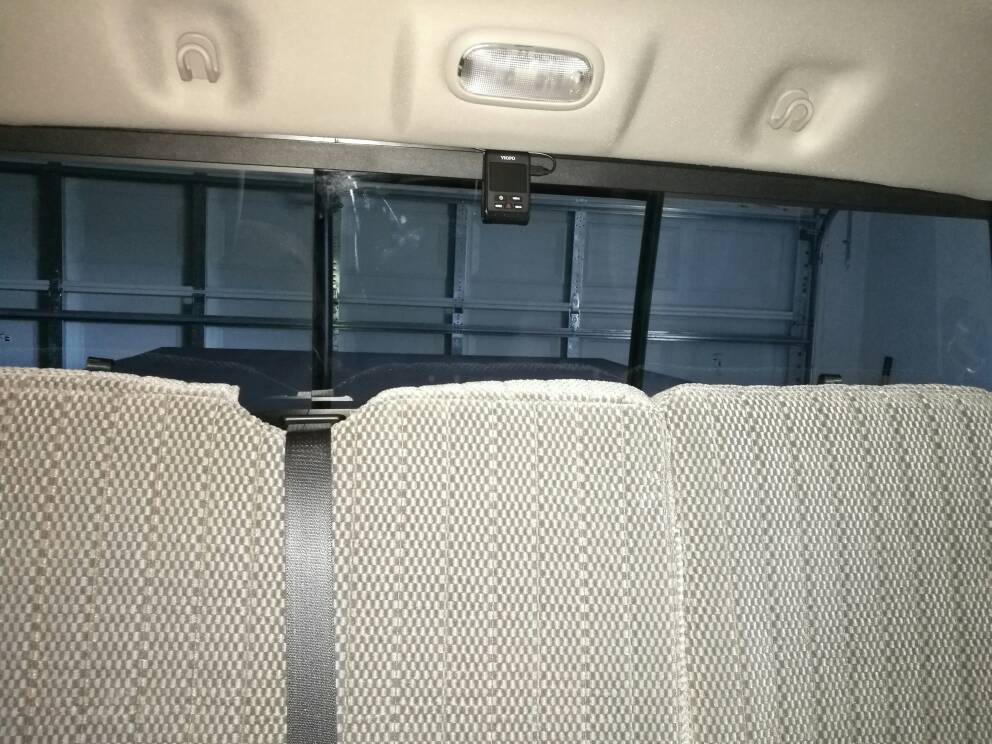
I couldn't wait any longer and just finished hardwiring the rear cam. Guess what? They both come on at same time.yes, just to be sure. I also avoid slamming the doors while the cameras recording. 🙂
I used my moddified dual usb cigar plug the viofo a119 came with merely connected it to the spare 2nd usb socket.

Sent from my SM-T819Y using Tapatalk