U3000pro + BAB95 parking delay issue

DashGuard

New Member
Joined
Apr 1, 2025
Messages
18
Reaction score
6
Location
Montreal
Country
Canada
Hey guys, I'm an installer having some issues with U3000pro (new) + BAB 95 (used brought over by customer from old vehicle - used to be paired with U3000).

All of the wiring was done by me and the settings were done by the customer. he is comfortable with the product and owned @Thinkware for many years.

ISSUE: Camera does not enter parking mode consistently. I've gone out twice to him to check the installation and when I test it, the system goes into parking mode around 30-45 second mark. He sent me screen shots of his app showing that the camera has not entered parking mode even though he's been home for a couple of hours. Issue seems to come up after a commute, rather than ignition cycle.

What I did during the installation;
  • Battery connected to constant power and ground
  • Green wire from the 6-pin connector connected to ignition-switched power (cig lighter front)
  • The original OBD2 plug was spliced into the red/yellow/black 6-pin output from the battery (ground wire to the OBD2 plug has been disconnected, others are still connected - plug does not light up)
  • The barrel connector (red/black) is also connected to the camera
Physically everything seems to be installed by the guidebook.

Would anyone have any advice? It's become a back and forth issue and I don't know the direction to take from here.

Thanks
 
What is the YEAR / MAKE / MODEL of the vehicle?

The original OBD2 plug was spliced into the red/yellow/black 6-pin output from the battery (ground wire to the OBD2 plug has been disconnected, others are still connected - plug does not light up)
This is where I get confused.
Do you mean you modified the vehicle's OEM OBD2 DLC (diagnostic link connector)?
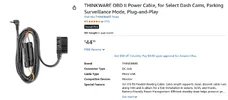
Or are you talking about the Thinkware OBD2 Power Cable, (see attached screenshot)?
The barrel connector (red/black) is also connected to the camera
This is also confusing, do you have any photos, or videos of this?

It's also possible the BAB-95 is defective.
-Chuck
 

Attachments

  • 1 .webp
    1 .webp
    83.3 KB · Views: 3
What is the YEAR / MAKE / MODEL of the vehicle?


This is where I get confused.
Do you mean you modified the vehicle's OEM OBD2 DLC (diagnostic link connector)?
Or are you talking about the Thinkware OBD2 Power Cable, (see attached screenshot)?

This is also confusing, do you have any photos, or videos of this?

It's also possible the BAB-95 is defective.
-Chuck
2024 Lincoln Corsair.

Cigarette lighter plug turns off with ignition off, confirmed by test light.

Ah, sorry. The obd2 parking cable that came with the u3000pro. I soldered battery output harness to the obd2 parking mode plug of the u3000pro, cut the ground wire going to the obd2 end so that it doesn't power on and conflict with battery output/communication. The customer does transfer cameras to newer vehicles often and I tried to leave it in tact as much as possible.

Red/black wire with barrel connector to the camera is the voltage reference signal to the camera for battery monitoring. When it goes into parking mode it announces battery voltage by the signal from this wire (best I can understand).

I do not have many good photos... Generally don't take many

Thanks Chuck
 
@DashGuard
Thank you for the confirmation.

I was confused why you’re involving Thinkware OBD2 Power Cable in this installation with BAB-95.
Usually BAB-95 would be connected to Hardwire Cable to power the camera.
But you said customer would like to remove camera, and use in a different vehicle with OBD2 Power Cable.

Obviously I have no idea what the malfunction is, but if I had to guess it would be OBD2 Power Cable is somehow interfering with parking mode enable / disable.
To confirm if my guess is correct I would remove OBD2 Power Cable from this install, and re-install / wire it in the conventional method, and see if it operates correctly.
Maybe even use a separate 6-Pin Output Cable with the standard Hardwire Cable to make things easier.

It’s still also possible the BAB-95 is defective.
-Chuck
 

Attachments

  • 2 .webp
    2 .webp
    112.1 KB · Views: 2
Last edited:
Thanks. Yes the attached picture is what I left in the loop. It is not plugged into anything (just confirming). I will go in two days again and cut the whole thing out.

The only other variable would be settings in the camera, he assured me that he knows what to set and adjust. He does know his way around the app well, I asked him a few questions and he was knowledgeable about it. I would still question if there would be a setting that would interfere? Blackvue have automatic parking mode switch over, would there be settings like that which would cause issues?
 
After you remove OBD2 Power Cable, and re-install with conventional method, maybe perform factory reset / default settings on dash cam.
Let customer configure all settings in APP, and then have him take screenshots of all settings.
If it malfunction again, at least you know what the settings were.
-Chuck
 
I've been using an iVolt Xtra BAB-95 battery pack with a U3000 for the past several years and the U3000 Pro for the past several months. I haven't encountered any problems as stated in this thread, but I have not tried to take the 3-wires dash camera power wires from the BAB-95 and splice them into a Thinkware OBD-II power cable with the Thinkware OBD-II power adapter still connected.

If you don't have the Thinkware 3-wire dash camera hardwiring cable to use to splice together with the 3-wires coming out of the 6-pin connector on the BAB-95, I can understand how you might want to use the 3-wire cable portion of the OBD-II power adapter, but leaving the OBD-II plug still connected I think is where this may be going off track. The red [ACC power] wire to the dash camera is used only for sensing non-zero voltage levels [non-zero = normal recording mode / zero = parking mode]. The cable that plugs into the dash camera must have all three wires connected for this to work correctly.

If you're going to use the 3-wire cable from the Thinkware OBD-II power adapter, simply cut the 3-wire cable off from the main Thinkware OBD-II power adapter. If you want the customer to be able to use the Thinkware OBD-II power adapter in the future, I would recommend putting the same electrical connectors on the end of the wires from the Thinkware OBD-II cable as you put on the 3-wires coming out of the BAB-95 6-pin connector. The customer can simply unplug the 3-wire cable with barrel connector from the BAB-95 and reconnect it to the Thinkware OBD-II power adapter [if needed in the future].

The three wires for the cable that plugs into the dash camera power port should be sourced from the same source/device. The red [ACC]/yellow [BAT]/black [GND] from the 6-pin BAB-95 connector should be connected to the same corresponding 3-wires in the cable going to the dash camera.

The other option is to simply purchase a Thinkware 3-wire hardwiring cable and leave the Thinkware OBD-II power adapter out of the situation completely.

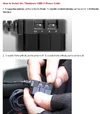
Thinkware Website: How to Install the iVolt Xtra Battery Pack
1777396885171.webp
 
I've been using an iVolt Xtra BAB-95 battery pack with a U3000 for the past several years and the U3000 Pro for the past several months. I haven't encountered any problems as stated in this thread, but I have not tried to take the 3-wires dash camera power wires from the BAB-95 and splice them into a Thinkware OBD-II power cable with the Thinkware OBD-II power adapter still connected.

If you don't have the Thinkware 3-wire dash camera hardwiring cable to use to splice together with the 3-wires coming out of the 6-pin connector on the BAB-95, I can understand how you might want to use the 3-wire cable portion of the OBD-II power adapter, but leaving the OBD-II plug still connected I think is where this may be going off track. The red [ACC power] wire to the dash camera is used only for sensing non-zero voltage levels [non-zero = normal recording mode / zero = parking mode]. The cable that plugs into the dash camera must have all three wires connected for this to work correctly.

If you're going to use the 3-wire cable from the Thinkware OBD-II power adapter, simply cut the 3-wire cable off from the main Thinkware OBD-II power adapter. If you want the customer to be able to use the Thinkware OBD-II power adapter in the future, I would recommend putting the same electrical connectors on the end of the wires from the Thinkware OBD-II cable as you put on the 3-wires coming out of the BAB-95 6-pin connector. The customer can simply unplug the 3-wire cable with barrel connector from the BAB-95 and reconnect it to the Thinkware OBD-II power adapter [if needed in the future].

The three wires for the cable that plugs into the dash camera power port should be sourced from the same source/device. The red [ACC]/yellow [BAT]/black [GND] from the 6-pin BAB-95 connector should be connected to the same corresponding 3-wires in the cable going to the dash camera.

The other option is to simply purchase a Thinkware 3-wire hardwiring cable and leave the Thinkware OBD-II power adapter out of the situation completely.

Thinkware Website: How to Install the iVolt Xtra Battery Pack
View attachment 91237
Thanks for a detailed reply. That's the current direction I'm headed in. Ground to the obd2 section is cut, it doesn't need sense to me how it would interfere... But as mentioned, that's the only odd thing I did. I'll let you guys know what comes of it 🙂
 
Back
Top