VIOFO A329 FIRMWARE

On the previous firmware, when playing video files with cameras at F_60 fps, they could suddenly stop.
The slider on the player runs, but the image is frozen!!
This one doesn't have that!!!
This is already a plus!!
It would be nice to reduce the stamp on the rear camera, after all it's 2K, but it looks like 1080P!!
Also let the user choose the functions on the Bluetooth remote!!
We are waiting for the official firmware on the VIOFO website!!
 
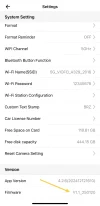
New firmware has been released on the official website V1.1_20250120
(it is completely identical to the one already posted earlier)

Change Log
1. Added: Turn on/off the parking mode by BTR200 remote
2. Added: Turn on/off Rear LED
3. Optimized: Audio quality
4. Optimized: SSD compatibility
5. Fixed: Other bugs

Format the SD card first and then download the bin file to the the card and power the camera with card inserted.

 
Last edited:
Is this now in the settings? Or from the Remote control (like #1 of the Changelog)?
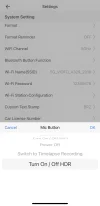
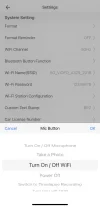
It's in the settings of the dashcam itself, not on the Viofo app (see photos below)

IMG_20250208_215014.webp


IMG_20250208_215033.webp
 
It's good to note (just found out since it was my first time) that updating firmware resets the dashcam back to factory state and the sd card will be erased & formatted after flashing it...
During the next firmware update, the DVR settings will remain yours and will not be reset to factory settings.
We have noticed this, the new final version will keep settings after the update.


I finally got around to updating my firmware. I went from version V1.0_241118 to flashing THIS BETA FIRMWARE which I believe is version V1.1_250120 according to this post.
According to @Karagandinez , my settings wouldnt've gone back to factory settings, but I had to re-set everything after flashing this firmware update.
Or is this a condition of only happening once you're above V1.0_241126 (context)?

I didn't include the "format.txt" file that was in the Google Drive -- worried that would force a format of the sdcard and/or the dashcam and its settings -- but in the instance below @5.0ALM also didn't have it included and didn't have settings "wiped".
This update doesn't wipe your settings, like v1.1 did.

Just wanted to share my experience, for reporting reasons or if others have the same experience; along with if there was some explanation...
CC: @viofo
 
I finally got around to updating my firmware. I went from version V1.0_241118 to flashing THIS BETA FIRMWARE which I believe is version V1.1_250120 according to this post.
According to @Karagandinez , my settings wouldnt've gone back to factory settings, but I had to re-set everything after flashing this firmware update.
Or is this a condition of only happening once you're above V1.0_241126 (context)?

I didn't include the "format.txt" file that was in the Google Drive -- worried that would force a format of the sdcard and/or the dashcam and its settings -- but in the instance below @5.0ALM also didn't have it included and didn't have settings "wiped".


Just wanted to share my experience, for reporting reasons or if others have the same experience; along with if there was some explanation...
CC: @viofo
The settings being deleted is pretty normal actually for firmware updates. It's a bit of a hassle but if I only have to change it every few months I'm not so bothered aye
 
The settings being deleted is pretty normal actually for firmware updates. It's a bit of a hassle but if I only have to change it every few months I'm not so bothered aye
That's fair....and I voiced as much in the past
What is the big deal with saving settings after updating firmware?
I enjoy putting all my settings back in to confirm & verify they are correct for the particular application.
It also familiarizes me with the user interface of the camera.
Am I weird?
I relate to this way of thinking... every time I update my smartphone and other electronics, I like to go through all the settings just to check if something more was added or changed; many times it's how I find out a feature was added. So I can understand that one might as well re-set the values/settings while going through them. But i also don't like the prospect of going through the trouble as I can get very finicky and it gets tedious (case-in-point; I synced my dashcam clock to an atomic one :wacky:)
but I was also bringing it up just to report/record that it didn't do as claimed or intended; as well as to relate if anyone else had the same experience...
 
That's fair....and I voiced as much in the past but I was also bringing it up just to report/record that it didn't do as claimed or intended; as well as to relate if anyone else had the same experience...
Firmware can be trippy at the best of times, so I'm not too bothered by having to input settings all over again, or not. Necessary evil perhaps at times
 
I finally got around to updating my firmware. I went from version V1.0_241118 to flashing THIS BETA FIRMWARE which I believe is version V1.1_250120 according to this post.
According to @Karagandinez , my settings wouldnt've gone back to factory settings, but I had to re-set everything after flashing this firmware update.
Or is this a condition of only happening once you're above V1.0_241126 (context)?

I didn't include the "format.txt" file that was in the Google Drive -- worried that would force a format of the sdcard and/or the dashcam and its settings -- but in the instance below @5.0ALM also didn't have it included and didn't have settings "wiped".


Just wanted to share my experience, for reporting reasons or if others have the same experience; along with if there was some explanation...
CC: @viofo
I had the firmware installed: V1.1_241227. When updating the firmware to version V1.1_250120, all settings in the A329 remained untouched.
On the memory card before the update there was only the firmware file.
 
On the menu - Switch to summer time, USA is always on regardless of the selected time zone!!
Can you fix it?
 
Hi, can anyone with BTR200 confirm if “Turn on/off the parking mode” is available after the firmware update.

I’ve update the firmware twice and reset the unit after each update and still don’t see this option on my A329, I have a A229Pro as well which after firmware update without even reset the option is enabled.

IMG_2146.webp
IMG_2145.webp
IMG_2143.webp
IMG_2146.webpIMG_2145.webpIMG_2143.webp
 
If I understood the translator correctly!!
Look in the menu, not in the application!
And why such huge screenshots? 😵
 
Hi, can anyone with BTR200 confirm if “Turn on/off the parking mode” is available after the firmware update.

I’ve update the firmware twice and reset the unit after each update and still don’t see this option on my A329, I have a A229Pro as well which after firmware update without even reset the option is enabled.

View attachment 79257View attachment 79258View attachment 79259View attachment 79257View attachment 79258View attachment 79259
Have you checked in the menu on the camera instead of the APP?
 
Does anyone confirm audio quality improved in the new fw?
And can anyone post latest video using latest fw please?
 
Does anyone confirm audio quality improved in the new fw?
And can anyone post latest video using latest fw please?
I think I saw slight improvements but it does still distort at higher volume with much bass.

If you don't have bass heavy music at higher volumes you won't notice any issues.
 
Have you checked in the menu on the camera instead of the APP?
Hi @VIOFO-Support, thank you. The option is indeed available in camera menu and it works. Is this something that’ll be fixed in future APP update?

And is there any plans to include option to auto disable parking recording based on gps location? Would be great to set home location(s) and prevent unnecessary battery drain when missing to turn off the parking mode.

IMG_2541.webp
 
What is the trick to upgrade the firmware?

A 2GB card has been formatted in-camera.
v1.1 .bin file copied to root of card.

View attachment 77005

With camera off, card inserted.
Camera powered on, and it just sat there with this on the screen:

View attachment 77006

After 6 minutes, I powered the camera down, and swapped the card back to my normal 256GB recording card.

Is it expecting the .bin file to be somewhere else?
If elsewhere, where?
I had a similar thing happen to me when I tried to use a 2GB card formatted in the camera, it got stuck on power up and didn't even show that status message you got. Just a black screen. The card works for storage, no matter whether formatted FAT32 or exFAT or in the camera or a Windows PC. It's just the firmware update doesn't work on a 2GB card and doesn't show a proper errror or warning.
 
Back
Top