VIOFO A329 FIRMWARE

Tried updating firmware to v1.1 but stuck on 10% for past 30 mins. Can viofo release a working firmware that would be great
 
Tried updating firmware to v1.1 but stuck on 10% for past 30 mins. Can viofo release a working firmware that would be great
This is not a widespread reported issue, and most users have installed that firmware version without issue (or at least this issue). I doubt it's VIOFO not releasing a "working firmware".

What have you done to troubleshoot it on your end?
What kind & type of card are you using? How did you format it (though if it started 10%, I imagine it's formatted at least correctly; so the inquiry is more to confirm)? Have you tried other cards? Did you try resetting to factory settings before updating the firmware? If VIOFO supplied checksum, I would have you check that; but have you tried redownloading the firmware file and using that different file? These types of steps and attempts (there is probably more you can try; these are just what pops up at the top of my head) would probably lead to more positive results than hoping VIOFO rework a firmware file and release it just for/to a small number of users (at this point, just you).
 
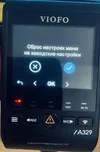
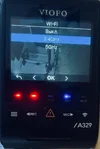
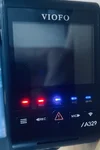
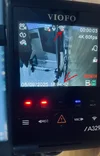
If you turn on WiFi, then after rebooting the DVR, the firmware does not turn on WiFi!!
Again, you need to turn it on manually!
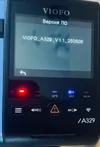
The wifi should be kept on with this firmware. Shall I have a screenshot of the firmware version on your camera? Have you reset the camera after updating?
 
The wifi should be kept on with this firmware. Shall I have a screenshot of the firmware version on your camera? Have you reset the camera after updating?
Yes, I did everything and even tried it by pressing the WiFi button!!
 

Attachments

  • 1.webp
    1.webp
    41.1 KB · Views: 129
  • 2.webp
    2.webp
    39 KB · Views: 138
  • 3.webp
    3.webp
    41.1 KB · Views: 137
  • 4.webp
    4.webp
    72.9 KB · Views: 128
  • 5.webp
    5.webp
    33.4 KB · Views: 136
  • 6.webp
    6.webp
    62.8 KB · Views: 134
Last edited:
The special firmware to keep wifi on for A329: https://we.tl/t-d15RqfdJHG
The firmware version: V1.1_250806

Hello,
I just got a A329 (+ rear camera RWC400) with firmware V1.xxxx and updated to your attached firmware version.

For my use case (installation in motor home) the always enabled station mode is mandatory.
The car is equiped with a router (GL.iNet Beryl AX), internet connection, several Raspberry PIs and around 20 other WIFI connected gadgets.
Everything is working fine and via Wireguard accessible, even the stream of the A329 if in station mode.

But over the last 2 days I encountered serveral problems with this firmware:
1. Like @vvs49 wrote, automatic station mode after boot/reboot is not working!
2. Sometimes the Cam does not connect to the WIFI of the router....normally it is connected to the 5Ghz network.
If I change it to the 2,4Ghz network it still does not connect.
Only if I change to a completely different network (e. g. mobile hotspot) it connects.
If afterwards I change back to the router's 5Ghz network it connects without problems again.
All other computers, tablets, cameras, etc. doesn't have any WIFI problems at all.
3. Sometimes the WIFI connection "freezes".
That means the Cam is still connected to the WIFI (according to Router) but I can not open the RSTP-Stream or send WIFI API commands.
Manual reconnect has to be done (what is not always possible, because motor home could be on a different place, e. g. "winter storage")
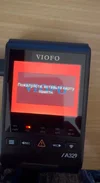
4. Sometimes the screen on the Cam just show a "pink" screen....sometimes only the VIOFO bootscreen (red with white "VIOFO" letters).
Reboots doesn't help, only factory reset.

Is it possible to provide us the correct version with "always enabled station mode"?
What could be the root cause for the problems #2 - #4 and how could it be fixed?

Thanks in advance!
 
Hello,
I just got a A329 (+ rear camera RWC400) with firmware V1.xxxx and updated to your attached firmware version.

For my use case (installation in motor home) the always enabled station mode is mandatory.
The car is equiped with a router (GL.iNet Beryl AX), internet connection, several Raspberry PIs and around 20 other WIFI connected gadgets.
Everything is working fine and via Wireguard accessible, even the stream of the A329 if in station mode.

But over the last 2 days I encountered serveral problems with this firmware:
1. Like @vvs49 wrote, automatic station mode after boot/reboot is not working!
2. Sometimes the Cam does not connect to the WIFI of the router....normally it is connected to the 5Ghz network.
If I change it to the 2,4Ghz network it still does not connect.
Only if I change to a completely different network (e. g. mobile hotspot) it connects.
If afterwards I change back to the router's 5Ghz network it connects without problems again.
All other computers, tablets, cameras, etc. doesn't have any WIFI problems at all.
3. Sometimes the WIFI connection "freezes".
That means the Cam is still connected to the WIFI (according to Router) but I can not open the RSTP-Stream or send WIFI API commands.
Manual reconnect has to be done (what is not always possible, because motor home could be on a different place, e. g. "winter storage")
4. Sometimes the screen on the Cam just show a "pink" screen....sometimes only the VIOFO bootscreen (red with white "VIOFO" letters).
Reboots doesn't help, only factory reset.

Is it possible to provide us the correct version with "always enabled station mode"?
What could be the root cause for the problems #2 - #4 and how could it be fixed?

Thanks in advance!
This is included in our engineering team to-do lists, please wait for several days.
 
Thank you very much for the updated firmware!

Please find attached my first experiences with this firmware:
1) WIFI is reactivated after Power-On again! Yes, even the WIFI Mode is restored, means if Station Mode was prior activated, it will again be activated after Reboot! Thanks!
2) After Updating and powering on I had to start once manually the Wifi Station mode. On the first time the Cam did not connect to the router, but after power off and on again, connection was established without problems.
So, it seams also this problem is prob. fixed as well! In my Setup I can remotely activate and deactivate constant power and ACC power....so If I do not have a "heartbeat" response from the Cam I can automatically re-powering the Cam and it seams to solve the problem with not connecting to the router.
3) I will try the same procedure for this problem....but I have to say that I encountered only once the "WIFI freeze" (Cam connected but without available communication).
4) Also the "pink" screen was not seen anymore....in the meantime I also switched to hard wiring via HK4 kit.

To summarize:
It seams to me that all my former problems were solved and I have now the Dashcam installed, which I can fully operate remotely (stream and settings) and have access to all recordings on the 2TB WD Red SN700 SSD.

Thank you!
 
This is not a widespread reported issue, and most users have installed that firmware version without issue (or at least this issue). I doubt it's VIOFO not releasing a "working firmware".

What have you done to troubleshoot it on your end?
What kind & type of card are you using? How did you format it (though if it started 10%, I imagine it's formatted at least correctly; so the inquiry is more to confirm)? Have you tried other cards? Did you try resetting to factory settings before updating the firmware? If VIOFO supplied checksum, I would have you check that; but have you tried redownloading the firmware file and using that different file? These types of steps and attempts (there is probably more you can try; these are just what pops up at the top of my head) would probably lead to more positive results than hoping VIOFO rework a firmware file and release it just for/to a small number of users (at this point, just you).

I own multiple Viofo dashcams (a119, 129, 229) and never had problems updating those firmware so I'm sure I know how to update them. I have tried 3 different micro sd cards and all do the same problem at 10%. If the file wasn't downloaded properly on my computer it would show up as an error and not completed download.
 
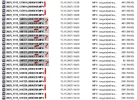
In firmware A329_V1.1_250923_WiFi, the file numbering is incorrect and doesn't depend on the drive!!
It's not critical, but it's very inconvenient!
 

Attachments

  • Numbering.webp
    Numbering.webp
    240 KB · Views: 121
I tried this firmware, and there are no errors in the video file names, everything is perfect!
The video quality is excellent, it holds the exposure and sun/shadow perfectly.

There's only a USB error, but it's not a big deal for me, since I use an SSD drive!
 
Back
Top