Viofo A329S Review

Hi.

The Viofo website clearly stated that the A329s uses Wifi 6. But when I received the A329s I ordered, the box says it's only capable of 2.4Ghz and 5Ghz. When I powered up the dashcam, I can only use 2.4Ghz and 5Ghz. Did Viofo advertise something that isn't true?
WiFi 6 operates on the 2.4Ghz and 5ghz bands. The A329S nor any other dashcam doesn't have WiFi 6E, which operates an additional 6Ghz band.

Confusing I know, but their documentation is correct.
 
Hi.

The Viofo website clearly stated that the A329s uses Wifi 6. But when I received the A329s I ordered, the box says it's only capable of 2.4Ghz and 5Ghz. When I powered up the dashcam, I can only use 2.4Ghz and 5Ghz. Did Viofo advertise something that isn't true?
WiFi 6 use 2.4Ghz & 5Ghz
It's improved speed over those bands.

I think you're misunderstanding it and thinking it should be 6Ghz.
That band was introduced in WiFi 6e routers


@Augustus beat me to it.
 
Hi.

The Viofo website clearly stated that the A329s uses Wifi 6. But when I received the A329s I ordered, the box says it's only capable of 2.4Ghz and 5Ghz. When I powered up the dashcam, I can only use 2.4Ghz and 5Ghz. Did Viofo advertise something that isn't true?
Use 5ghz and a phone that supports WiFi6.
 
WiFi 6 is 2.4Ghz & 5Ghz
It's improved speed over those bands.

I think you're misunderstanding it and thinking it should be 6Ghz.
That band was introduced in WiFi 6e routers


@Augustus beat me to it.
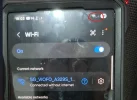
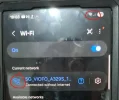
Nope. Here's where I'm coming from. I hope I'm just confused. When my phone is connected to my Wifi 6 router, This "6" appears above the Wifi icon to tell me that I'm connected to a Wifi 6 connection. When the same phone is connected to the A329S, that "6" isn't there.
 

Attachments

  • 1749293941878.webp
    1749293941878.webp
    89.7 KB · Views: 139
Use 5ghz and a phone that supports WiFi6.
When my phone is connected to a Wifi 6 router, The "6" appears above the wifi icon. When the same phone is connected to the A329s, the "6" is not there. (second photo).
 

Attachments

  • 1749294382794.webp
    1749294382794.webp
    82.9 KB · Views: 122
  • 1749294445452.webp
    1749294445452.webp
    66.4 KB · Views: 133
Nope. Here's where I'm coming from. I hope I'm just confused. When my phone is connected to my Wifi 6 router, This "6" appears above the Wifi icon to tell me that I'm connected to a Wifi 6 connection. When the same phone is connected to the A329S, that "6" isn't there.
The wifi6 icon only shows when connected to an actual router.

When using WiFi Direct, the WiFi 6 icon might not be visible because WiFi Direct establishes a direct, peer-to-peer connection between two devices, bypassing the need for a traditional router or access point and therefore, the WiFi 6 icon is not displayed.

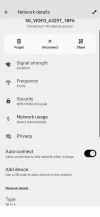
You can check by going into the WiFi setting when connected to the camera (click on the cog icon next to your WiFi name, then scroll down to 'type'.

As you can see on my A329T - it does show as a WiFi 6 connection.
 

Attachments

  • Screenshot_20250607-121432.webp
    Screenshot_20250607-121432.webp
    44 KB · Views: 143
Last edited:
The wifi6 icon only shows when connected to an actual router.

When using WiFi Direct, the WiFi 6 icon might not be visible because WiFi Direct establishes a direct, peer-to-peer connection between two devices, bypassing the need for a traditional router or access point and therefore, the WiFi 6 icon is not displayed.

You can check by going into the WiFi setting when connected to the camera (click on the cog icon next to your WiFi name, then scroll down to 'type'.

As you can see on my A329T - it does show as a WiFi 6 connection.
Is that an Android phone? So far, my S24 Ultra doesn't show which connection I'm using. But thank you. I'm glad to be proven wrong.
 
Is that an Android phone? So far, my S24 Ultra doesn't show which connection I'm using. But thank you. I'm glad to be proven wrong.
Yes Android (Sony Xperia 1VI)
 
Hi.

The Viofo website clearly stated that the A329s uses Wifi 6. But when I received the A329s I ordered, the box says it's only capable of 2.4Ghz and 5Ghz. When I powered up the dashcam, I can only use 2.4Ghz and 5Ghz. Did Viofo advertise something that isn't true?
Wifi 6 operates on the 2.4GHz and 5GHz radio bands, similar to WiFi 5. The differences are elsewhere.

To add to the confusion, there is a "WiFi 6E", which in addition to the 2.4GHz and 5GHz radio bands, also operates in on the 6GHz radio band, but the basic WiFi 6 doesn't.

I'm not sure how many of the WiFi 6 features are used by the A329, but it definitely has the fastest WiFi download speeds of any dashcam currently available, the Viofo advertising is accurate.
 
Wifi 6 operates on the 2.4GHz and 5GHz radio bands, similar to WiFi 5. The differences are elsewhere.

To add to the confusion, there is a "WiFi 6E", which in addition to the 2.4GHz and 5GHz radio bands, also operates in on the 6GHz radio band, but the basic WiFi 6 doesn't.

I'm not sure how many of the WiFi 6 features are used by the A329, but it definitely has the fastest WiFi download speeds of any dashcam currently available, the Viofo advertising is accurate.
Ya, I kinda' realized that after Danlat has shown me a screenshot of his phone. But yes, the download speed is super fast. Thank you.
 
The wifi6 icon only shows when connected to an actual router.
What is the difference between a dashcam hotspot and an actual router?

It doesn't have an internet connection... maybe the icon only shows when there is an internet connection?
 
What is the difference between a dashcam hotspot and an actual router?

It doesn't have an internet connection... maybe the icon only shows when there is an internet connection?
An internet connection has no bearing on Wifi6 or the icon.

There are 3 types of connection in the scenario in question;
1) Home or Office Router - has full protocol for DHCP and IP allocation
2) Dashcam hotspot (Viofo don't have this, BlackVue do, as an example. Multiple devices can connect to it and acts as a temporary router. All devices can communicate with each other on that network)
3) dashcam WiFi direct (which Viofo uses - only 1 direct peer to peer connection at a time. So only the 2 devices can communicate with each other. If a 3rd device is connected (most cases not possible), unlike a hotspot or router, they can not all communicate together, only the host and client - dashcam/phone. This doesn't require full protocol for DHCP and IP allocation as it's a single direct connection)

WiFi direct still has full speed capacity, without the extra protocol info needed for multiple devices, which is why the '6' doesn't trigger in WiFi direct connections
 
Last edited:
If you will do in Europe what is doing the guy from the left at 4:07 with the Nissan Primera, police will take your license plates.

Regarding the Wi-Fi 6 confusion, @viofo must make an article on their blog covering IoS and Android and avoid such false claims that Viofo is cheating.
 
If you will do in Europe what is doing the guy from the left at 4:07 with the Nissan Primera, police will take your license plates.
what was he doing? I see nothing in the video at 4:07
 
His plates are covered with some perspex (Poly(methyl methacrylate)) and this is disturbing the readability of the license plates. In EU you should use the plates like they are given to you by the police.
 
His plates are covered with some perspex (Poly(methyl methacrylate)) and this is disturbing the readability of the license plates. In EU you should use the plates like they are given to you by the police.

It is illegal in some States that I am aware of (probably all States actually) in the U.S., however, even in those States the law is not usually enforced unless the car is being pulled over for some other reason.

Also, having mud or dirt over your plates is forbidden, thought not always enforced. Often we will see where the rear license plate is placed higher on the vehicle if the vehicle is equipped with one of the chair lifts for handicap individuals, or bicycle racks, etc. so as to avoid police interaction.
 
His plates are covered with some perspex (Poly(methyl methacrylate)) and this is disturbing the readability of the license plates. In EU you should use the plates like they are given to you by the police.
I did see a lot of people with like a printed piece of paper over the plates. We could not even read it at all. We drove behind numerous vehicles in Las Vegas with no plates at all.

We are not sure what the deal was with that. I had a night time video where telephoto picked up someone driving with no license plate but i think i decided to delete it
 
  • Like
Reactions: Mtz
Do we have a software where we can zoom in parts of the video and/or play videos from all channels simultaneously? Playing videos of our dashcams just using Windows Media Player doesn't give all the details.
 
I did see a lot of people with like a printed piece of paper over the plates. We could not even read it at all. We drove behind numerous vehicles in Las Vegas with no plates at all.

We are not sure what the deal was with that. I had a night time video where telephoto picked up someone driving with no license plate but i think i decided to delete it

Temp tags are usually paper tags. Some States only require rear plates also, however, there should always be a rear plate. If no rear plate, the driver is almost guaranteed to be pulled over. Now, in some cases, the rear plate may be residing somewhere on the rear deck behind the rear screen. Usually, there are no, or few requirements as to placement, so long as the plate is visible and on the rear of the car, and the front if a front plate is required.

As I recall, in California, and maybe a few other States, there is a self adhesive, vinyl type plate that is designed to adhere, and conform to the front bumper of a car that has no manufacturer provision for a plate. These are usually, but not always, high end luxury and sports cars.
 
Back
Top