Are you using our new app " VIOFO Dashcam" ?. The OBD cannot support voltage readings since there is no bluetooth on it.@VIOFO-Support
Ok latest ios app and latest firmware.
While parked with the engine running i connect to the A329hdmi unit and enter the app.
I playback a parking file.
I attempt to play back the next one but the app don't respond to my press.
I exit the parking section and then enter the parking section and it will allow me to play another video but only one.
I have to exit the parking mode folder and enter it to be able to select another video.
An interesting feature is while playing back a video i can press the arrows that pop up when the screen is touched and i can watch the next video or the previous video which is a great feature.
View attachment 90062
While playing back the video the A329H decides to turn off wifi and go to parking mode!
This stops the play back obviously.
It won't respond to the verbal commands to turn on wifi probably because it is in parking mode.
After manually forcing it into wifi mode by pressing the wifi button on the unit i resume my video play backs.
After approx 4 minutes it drops wifi again.
Another test and ~4 minutes in and it again drops wifi.
I doubt the A329H and the app are actually handshaking to keep the connection alive and a hard coded timer tells it to dump the wifi and resume recording.
Needless to say it is annoying and I'm being restrained.
Also don't see any voltage readings while using the op100. ( i thought it was able to)
App 1.05.10
A329H fw v2.0_260127
View attachment 90061

You are using an out of date browser. It may not display this or other websites correctly.
You should upgrade or use an alternative browser.
You should upgrade or use an alternative browser.
VIOFO App Updates
- Thread starter rcg530
- Start date

LateralNW
Well-Known Member
- Joined
- Nov 7, 2016
- Messages
- 1,959
- Reaction score
- 1,220
- Country
- Australia
- Dash Cam
- VArious
YepAre you using our new app " VIOFO Dashcam" ?. The OBD cannot support voltage readings since there is no bluetooth on it.
The next video cannot be played by pressing the arrow because it is the last video already:@VIOFO-Support
Ok latest ios app and latest firmware.
While parked with the engine running i connect to the A329hdmi unit and enter the app.
I playback a parking file.
I attempt to play back the next one but the app don't respond to my press.
I exit the parking section and then enter the parking section and it will allow me to play another video but only one.
I have to exit the parking mode folder and enter it to be able to select another video.
An interesting feature is while playing back a video i can press the arrows that pop up when the screen is touched and i can watch the next video or the previous video which is a great feature.
View attachment 90062
There should be a reminding message when you press the icon to play back the next one?
LateralNW
Well-Known Member
- Joined
- Nov 7, 2016
- Messages
- 1,959
- Reaction score
- 1,220
- Country
- Australia
- Dash Cam
- VArious
Thanks for the reply.The next video cannot be played by pressing the arrow because it is the last video already:
View attachment 90074
There should be a reminding message when you press the icon to play back the next one?
I may have made my last post confusing because i mentioned a method that you can watch videos one after the other which could be a work around for some users.
The image i posted was a poor example because as you pointed out it is the last file.
The problem is when in this screen in the new app
1. Notice all images are greyed (which is a seperate issue)
2. Even though they are greyed out i can still play the file i press on however when i return to this screen to play the next file it doesn't respond to my press.
Item 2 is what i am talking about. You are unable to press for the next video to watch after a video has been played.
The work around i have used is to exit that screen and then return to the screen and it will then respond to pressing on the video you want to play. This workaround has to be done for each video you want to play
I hope that reduced the confusion.
I will create a video later today to show the problem.
Last edited:
You may upload a video showing the issue here for analysis:Thanks for the reply.
I may have made my last post confusing because i mentioned a method that you can watch videos one after the other which could be a work around for some users.
The image i posted was a poor example because as you pointed out it is the last file.
The problem is when in this screen in the new app
View attachment 90077
1. Notice all images are greyed (which is a seperate issue)
2. Even though they are greyed out i can still play the file i press on however when i return to this screen to play the next file it doesn't respond to my press.
Item 2 is what i am talking about. You are unable to press for the next video to watch after a video has been played.
The work around i have used is to exit that screen and then return to the screen and it will then respond to pressing on the video you want to play. This workaround has to be done for each video you want to play
I hope that reduced the confusion.
I will create a video later today to show the problem.
https://viofo.wetransfer.com/
Please advise me after uploading.
LateralNW
Well-Known Member
- Joined
- Nov 7, 2016
- Messages
- 1,959
- Reaction score
- 1,220
- Country
- Australia
- Dash Cam
- VArious
To help other understand what I was referring to I have uploaded it to my channel on youtube.You may upload a video showing the issue here for analysis:
https://viofo.wetransfer.com/
Please advise me after uploading.
Here it is on youtube.
And to follow that video I also have one that shows how the app disconnects from the phone after approximately 4 minutes. I'll have that ready soon.
LateralNW
Well-Known Member
- Joined
- Nov 7, 2016
- Messages
- 1,959
- Reaction score
- 1,220
- Country
- Australia
- Dash Cam
- VArious
@VIOFO-Support
Follow up video with the app timing out after 3 1/2 to 4 minimum.
Hope this is helping to diagnose and improve the Viofo app.
Follow up video with the app timing out after 3 1/2 to 4 minimum.
Hope this is helping to diagnose and improve the Viofo app.

DJ70
Active Member
- Joined
- Jun 5, 2021
- Messages
- 175
- Reaction score
- 53
- Location
- NW England
- Country
- United Kingdom
- Dash Cam
- Viofo A329T + SanDisk Extreme 1Tb || BlackVue DR900S-2Ch
@VIOFO-Support
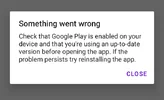
When opening the app.
Something did go wrong, but it has nothing to do with Google Play or the internet connection, everything is up to date & reinstalling this app doesn't stop it happening again.
No other apps are affected.
No pattern to it so replicating isn't possible, but every so often the same thing occurs, so it needs more than a suggestion to reinstall.
A second opening & it works.
OK it's not major, just that it should happen.
When opening the app.
Something did go wrong, but it has nothing to do with Google Play or the internet connection, everything is up to date & reinstalling this app doesn't stop it happening again.
No other apps are affected.
No pattern to it so replicating isn't possible, but every so often the same thing occurs, so it needs more than a suggestion to reinstall.
A second opening & it works.
OK it's not major, just that it should happen.
Attachments
There is no access to send you a PM. Would you mind downloading a log for analysis when the issue occurrs again? You can press and hold "about VIOFO" for two times to download a log.@VIOFO-Support
When opening the app.
Something did go wrong, but it has nothing to do with Google Play or the internet connection, everything is up to date & reinstalling this app doesn't stop it happening again.
No other apps are affected.
No pattern to it so replicating isn't possible, but every so often the same thing occurs, so it needs more than a suggestion to reinstall.
A second opening & it works.
OK it's not major, just that it should happen.
DJ70
Active Member
- Joined
- Jun 5, 2021
- Messages
- 175
- Reaction score
- 53
- Location
- NW England
- Country
- United Kingdom
- Dash Cam
- Viofo A329T + SanDisk Extreme 1Tb || BlackVue DR900S-2Ch
There is no access to send you a PM. Would you mind downloading a log for analysis when the issue occurrs again? You can press and hold "about VIOFO" for two times to download a log.
I don't understand what you mean by "press and hold about VIOFO for two times".
Where exactly do I press, and do I press it twice?
Please explain.

TonyM
Well-Known Member
- Joined
- Jul 30, 2013
- Messages
- 6,688
- Reaction score
- 6,737
- Country
- United Kingdom
- Dash Cam
- Many dashcams over many years
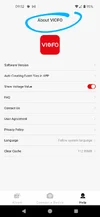
In the VIOFO app go to the Help tab, then press the "About VIOFO" text at the top of the screen for about two seconds. This will generate a log file.I don't understand what you mean by "press and hold about VIOFO for two times".
Where exactly do I press, and do I press it twice?
Please explain.
LateralNW
Well-Known Member
- Joined
- Nov 7, 2016
- Messages
- 1,959
- Reaction score
- 1,220
- Country
- Australia
- Dash Cam
- VArious
I don't understand what you mean by "press and hold about VIOFO for two times".
Where exactly do I press, and do I press it twice?
Please explain.
If @TonyM method doesn't work try this.
Tap on the "About Viofo" 5 times and you will be prompted to save text document.
It works this way with an iPhone 8 and the new version of Viofo 1.0.5.10
If you are using android with the new Viofo app version 2.0.02 TonyM's method will work.
DJ70
Active Member
- Joined
- Jun 5, 2021
- Messages
- 175
- Reaction score
- 53
- Location
- NW England
- Country
- United Kingdom
- Dash Cam
- Viofo A329T + SanDisk Extreme 1Tb || BlackVue DR900S-2Ch
Thanks to @TonyM & @LateralNW.
I'm using Android v 2.0.02 and it seems a combo of both methods worked for me.
I first held the "About VIOFO" for up to 5 seconds but nothing so, starting again, I tried tapping 5 times but again nothing. Around a minute elapsed between tries.
I then tapped 5 times and held, voila! The zip file appeared 🙂
Got there in the end.
I'm using Android v 2.0.02 and it seems a combo of both methods worked for me.
I first held the "About VIOFO" for up to 5 seconds but nothing so, starting again, I tried tapping 5 times but again nothing. Around a minute elapsed between tries.
I then tapped 5 times and held, voila! The zip file appeared 🙂
Got there in the end.
DJ70
Active Member
- Joined
- Jun 5, 2021
- Messages
- 175
- Reaction score
- 53
- Location
- NW England
- Country
- United Kingdom
- Dash Cam
- Viofo A329T + SanDisk Extreme 1Tb || BlackVue DR900S-2Ch
PM sent with log file.There is no access to send you a PM. Would you mind downloading a log for analysis when the issue occurrs again? You can press and hold "about VIOFO" for two times to download a log.