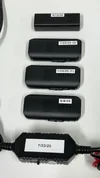
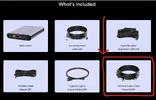
A few questions, the "Hardware output cable" that comes with the battery, is this just a HK-6 with a connector or is it another complete new hardwire cable?
BP100 Hardwire Output Cable is basically a new version of Hardwire Cable like the “old” HK4 & “new” HK6 except it has one job, and one job only.
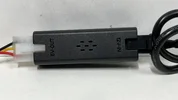
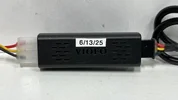
BP100 Hardwire Output Cable does not have Low Voltage Cut-Off circuity, or a Bluetooth Module.
It’s only purpose is to convert 12V to 5V, (see attached photos).
When using a dash cam battery pack you don’t want any interference of low voltage cut-off because you want to completely drain all available capacity out of the battery pack.
Based on my testing using a hardwire cable with no low voltage cut-off extended parking mode run times by 30 minutes to 2 hours depending on channel configuration.
Using a dash cam battery pack with an HK4 set to 11.8V is like buying a car with a 20 gallon fuel tank but you can only use 18 gallons, (bad example).
This is why I have been asking for a “5th” setting on HK4 & HK6 to completely disable the low voltage cut-off, (5th setting would be OFF)
Instead we have 3 different "public" hardwire cables, and 2 “secret” HK4 & HK6 models where the 12.4V setting has been modified to “OFF” for use with dash cam battery packs, (so confusing).
I did some preliminary testing on BP100 Hardwire Kit in my “HK6 Test & Review” thread here;
I’ve been testing / using the HK6 for a month now, and I’ve been posting tid bits in my A329S thread, but I haven’t been able to go full bore because my “newest” HK4 for contrast / comparison is 2 years old.
Ben
@SafeDriveSolutions was was telling me a while back the “modern” HK4’s have been upgraded to reduce parasitic current draw when the camera is powered down, or not even connected.
So I’ve been holding off on doing any meaningful power consumption testing until I got my hands a “current production” HK4.
Well the wait is over, and I have a feeling this is going to get in depth...
Here's a demo comparing power consumption of BP100 Hardwire Cable vs. HK6 during LPID (low power impact detection);
Also, what is the reason for battery packs having 3 wire charging? My cellink batteries just have 2 wires as you just have ACC off/on for charging the battery.
@SafeDriveSolutions can explain this better than I can.
Basically, most “newer” cars do not have a “high amperage” fuse that can be piggy-backed in the fuse box under the dash.
In these “newer” cars installing a dash cam battery pack means running the “high amperage” power wires directly to the starter battery, or power distribution block.
The “3rd” wire on these “new generation” dash cam battery packs gets connected to an ACC / ignition fuse in the fuse box just like a traditional dash cam hardwire kit simply to provide “ignition trigger signal” to tell the battery pack when to charge, (engine running), and when not to charge, (engine off).
There is “zero” amperage / current draw on this 3rd wire.
So basically it’s like a traditional 4-Post Automotive Relay built into the dash cam battery pack.
Another benefit is the 10-Second delay “soft-start”.
As soon as you turn the key / start the engine your Cellink Battery Pack will immediately start drawing max amperage, (around 10 Amps).
Sometimes this can cause weird things to happen with the car’s electrical / computer system because of the additional 10 Amp draw while the engine is cranking over.
The “newer” generation of dash cam battery packs provide pass-through power to immediately bootup the dash cam to start recording just like past generation models, except it waits 10 seconds for the car’s battery / electrical system to stabilize to “running voltage” around 14V after the “engine cranking event” that can drop system voltage as low as 9.6V before it starts charging the battery pack at full beans around 10-11 Amps, or more.
I assume you are going to test cold weather charging (It was -2 degree C this morning which made me think about it)
I did some preliminary cold weather charge protection tests, but now that we have retail version with official public firmware I want to re-perform these tests to provide accurate test data / results;