Xiaomi Yi Custom firmware with lastest revision

i've tried using custom firmwares and scripts for changing bitrates.
and both of them cause splitting issues for me..like the first recording file would be only seconds with 35mb
and the following files would be normal for time but with only 20mb for bitrate....
i've turned on the loop function since i use it as a dash cam..don't know if it causes the issue..
btw..the microsd i use is Kingston SDCA3...u3 with 90/80 MB speed..should be enough...

as for app issue, for me i just think it will be less effort for me if I can switch resolutions via scripts...
And yesterday i tried using "writeb" function to switch between 108060p and 72060p via script successfully.
Seem to solve my problem...🙂
 
Last edited:
Thats interesting, I've never heard of changing bitrates in that way. Does the yi make a sound when it starts recording a new file?
I have the 23L with 35mbits nodded firmware and it works great.

Oh so you wanted to change the standart resolution when using it as a dashcam. yes that makes sense before connecting it to the app ever time you get into the car
But why 720p?
 
actually i'm not familiar with code...😛
i just saw some people here using script with writeb function to recall certain resolutions that are cancelled at the newest firmware..
just not so sure whether it can work on switching resolutions among the existing ones~ so i decide to test it myself!

yes...using yi camera as a dash cam, connecting to app so often is so annoying to me..
but since i don't use it only as dash cam, sometimes i take daily life clips, too. So i need to switch resolutions a lot...

why 720p60? Because it doesn't seem to be a huge difference from 108060 when using as a dash cam...

btw...my yi is also 23L..it takes me much time and energy to make high bitrates work properly...
(1) with loop function on: The first file might be normal. But there seem to be random file error like lower bitrate of 20 or short files with only seconds.
(2) with loop function off: The same, without using app, i hit the shutter button to film directly. After few normal files, the camera will start a new file
automatically with lower bitrate of 20, 18, or even 12 mb. That means...if i hit the shutter button one time, within a 30 minute of shooting time, there will
be many .THL file...(even the size of file hasn't reached the limit of 2GB or 4GB yet.)

Could you share your using experience with me~ like the firmware, microsd..etc you are using!!

I'm kind of tired...thinking about just using the stock firmware and use the 1080 60p with 25mb
 
Hello guys, got a newbie question to ask here...
I've read all pages of this article~
and i've already known that if i want to change the bitrates of certain resolution..i should use scripts like writew etc.

and is it possible to switch among certain resolution through scripts instead of changing it from the app?
because i also suffered from video split problem no matter i use custom firmware or scripts...
i would like to avoid using app as possible as I can.

I once saw a reply here which said using the "writeb xxx" to set the resolutions at booting.
but if the resolutions i want to use, like 108060 to 72060, are already contained in the app
should i still use writeb function to switch between them during every boot??

Plz help me out!!
Take a look here for switching between every modes with button combination instead app..
 
Thanks, Fried! I will give a try tonight...and hope it solves my switching concern!!
 
I know maybe 720p and 1080p dosnt seem like a big difference when watching it on your pc, but when zooming on or stabilizing you are happy about every extra pixel you have

I would just sent back your camera maybe your mainbord has a flaw
 
I know maybe 720p and 1080p dosnt seem like a big difference when watching it on your pc, but when zooming on or stabilizing you are happy about every extra pixel you have

I would just sent back your camera maybe your mainbord has a flaw

Yes...i once doubted that it had something to do with the hardware flaw..
so just go back to stock firmware today without any modifications or scripts...try to see if there's still any file missing or splitting problem..!!
 
Woah slow down there 40-50 Mbits is a little to much for full HD @60fps
1. I don't know which camera model youk have, my 23L gets really warm with 35mbits.
2. Most SD cards will not be handle such high butrates.
3 Arquivos terá enorme e você cartão SD enche mais rápido, cópia e edição leva mais tempo
4. Why do you need the super high bitrates anyway?

In fact I value quite the quality of the video, even if this results in a heavy video! Hehe On the other issues you mentioned I will answer now:
1. The version of my Yi is the Z22, I believe it is a good chip that is it.
2. I already have a micro SD Samsung 32GB EVO Class 10, but I intend to get a 64GB, either Samsung or another with a reading rate and fast data, class 10!
3. As I said, I cherish the same quality videos to be heavy, so I already have this awareness
4. I often make many videos and the higher the bit rate, the higher the quality of filming and in dark conditions the camera can capture more light. But if the camera warm in the 40 / 50mbits I can still downgrade and use 35mbits.

Just like to know if anyone has tested this custom firmware I quoted?
 
No sry didn't test your firmware just have my custom one. Samsung class 10 should do fine, but some people bought chines cards which are not class 10 and can't handle such high framerates.
Higher bitrates does not mean more light!! It just means that your camera can capture more details but if your ISO and shutter are not setup correctly it's not going to help you much
Stick with the stock or use mine, I would not recomend going soo extreme
 
@ccdff , do you only use your custom firmware or you use it along with a script? If so, can you please post the script? I have a 22L version and I am not able to find a script that works.... Also, I have the same sd card as you have, the 32GB version and after using your custom firmware i was able to get 3 videos at 35mbps, 7 min each, and then a 4 secs or so at 40 mbps and all that came after was at 20 mbps. So I got the splitting problem. Please, can you help with this? Thanks!
 
So i've checked my cam version and in the android app i found that the version was something ending with 23, not L. The firmware was updated via android app 2 weeks ago.
Next, I have downloaded the file from the first page, made for 23 version and renamed the firmware.bin, put it in the root card, the camera started beeping for 30s and stops after. I have restarted the camera and the android app. All the settings were the same as before (wifi password, camera name, settings made by me for quality etc., n othing changed)
Next i've made a short video in ntsc at 2k high quality and it was shot at 27 mbps. Is it normal? How can i find if I have the stock or the custom firmware? Maybe my version is a L one, even if it is written in the app simple 23?
 
Just to see if I get it straight. When you guys speak about splitting videos we do not talk about 2gb/4gb various files that put together would make a whole video, right? Splitting means various video files with different bitrates? What script should I use to lower the bitrate to 25/30 mbps? I attach a picture with a test video, you can see exactly what's happening.... Thank you @ccdff!
Bitrate_trouble.jpg
 
Last edited:
@alfa147 if you go into your android app under the settings of your camera, which firmware do you see there ?

@criogix I think it would be better in your case to say scattering instead of splitting, since splitting is very normal in dashcam and even intended. I'm still wondering why your audio bitrate changed in your second clip. Do you have the emergency backup on ?
 
@ccdff No, no emergency backup on! I really don't get why it is impossible. I tried through script method also but the command isn't recognized....
 
@alfa147 if you go into your android app under the settings of your camera, which firmware do you see there ?

@criogix I think it would be better in your case to say scattering instead of splitting, since splitting is very normal in dashcam and even intended. I'm still wondering why your audio bitrate changed in your second clip. Do you have the emergency backup on ?

It is not a second clip, It is a part of the same video....all 3 toghether make 1.
 
@criogix yes yes I get that you recorded it all at once and the yi scattered it. Put you can't really combine it to one clip, because on big screens you'll see the difference. And it'll be very irritating when the quality changes randomly
 
@ccdff

1.2.13, the same as before the flashing, I think. Also the model is YDXJ_v23.
 
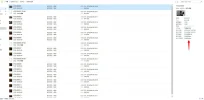
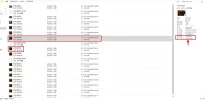
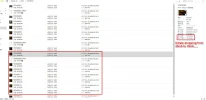
@ccdff hi~ I sent my yi camera back to the service center and got a new one today.
Without using custom firmware or any script, i just started recording at 1080 60p video at night with the loop function on.
I manually stop the recording at about 20:23 then started shooting again immediately.

And it turns out to be the same as my previous yi camera...the bitrate started to drop after the shooting began for 30 minutes.
The bitrate of the remain part is only about 15mb...

i kind of giving up on this....even without loop function on, the bit rate issue still remains......

Today, the engineer of service center didn't believe what i said about the bit rate issue until i showed him my microSD cards and the screenshots
Then he gave me a brand-new yi camera, which actually didn't help, either.
 

Attachments

  • 1.webp
    1.webp
    92.8 KB · Views: 100
  • 2.webp
    2.webp
    93.6 KB · Views: 102
  • 3.webp
    3.webp
    99.7 KB · Views: 95
Next i've made a short video in ntsc at 2k high quality and it was shot at 27 mbps. Is it normal?

yes sounds quite normal to me.

How can i find if I have the stock or the custom firmware?

Well if you updated over the app you have the stock firmware. But it's kind of weird that you have 27 m/bits. If you want to make sure you can flash a new firmware with a standard one from http://www.xiaoyi.com/update/sports

@punish1985 yes your problem is very weird 😳. Did you try recording at medium quality setting from the app check out if the scattering is still happening
 
Back
Top