Xiaomi Yi Custom firmware with lastest revision

@ccdff no, but i might have to try it today~ but i'm wondering if the medium quality meets the standard of me...
 
@punish1985 propably not I just want to see if it works then. My custom firmware only changes the Bitrate on the highest setting and leaves the others allone, maybe yours does too. What purpose do you use yi for?
 
@ccdff yes, so does the Fried's firmware! But no matter i use custom firmware or stock firmware, it all turns out the same. I said it before~ my main purpose is dash cam....but no matter what purposes, variable bitrates of the video will always annoy me..
 
@punish1985 yes changing bitrates are annoying 😡. but for a dashcam pixels will be more of a criteria then bitrates. Else I have no idea now whats wrong with your cam 😉
 
Thanks for your work, is there a way to backup the default firmware before flashing the custom one?
 
@zefs I don't think so, but I also didn't search for one. I would just download a new one from the yi website. Since there are no user settings stored on the firmware that should be no problem.
 
Found out possible reason for file spliting.

My card can handle 35mbit firmware mod, with no bitrate drops.
More that 35mbit, and spliting starts.

I inspected many of my files. Both CBR and VBR. And all of them have one common thing.
Crazy spike of bitrate in first second of every file.
Firmware 35mbit spike up to 48mbit (still my card did handle this).
But if you have slower card that normaly should do 35mbit . The spike kills you card in first second. That why some time you get very smal file with high bit rate .

Update: the bitrate spike happens with any bitrate setting. 35. 40. 50 and so on. So f you want to use lets say 50mbit the card should be able to handle up to 70mbit.

Im wating for 90mb/s write card. It will came in 2-3 days so i will then be able to confirm those findings.
 
Last edited:
@nCaine
no offense here...i guess many people suffering from file splitting issue here use fast enough microsd card already...
70 mb is only about 8-9 MB of writing speed...most genuine C10/UHS-I cards should handle it..

personally i use Kingston U3 SDCA3 (90/80 MB) and Sandisk extreme pro U3 microsd (95/90MB), splitting issues still happen from time to time.

Normally i use SDformatter for formation, yesterday I tried to use the "Full (Overwite)" way instead of the Quick formation before....
seemed to solve my splitting issues for now...i'm still observing..!!
 
@nCaine
no offense here...i guess many people suffering from file splitting issue here use fast enough microsd card already...
70 mb is only about 8-9 MB of writing speed...most genuine C10/UHS-I cards should handle it..

personally i use Kingston U3 SDCA3 (90/80 MB) and Sandisk extreme pro U3 microsd (95/90MB), splitting issues still happen from time to time.

Normally i use SDformatter for formation, yesterday I tried to use the "Full (Overwite)" way instead of the Quick formation before....
seemed to solve my splitting issues for now...i'm still observing..!!
No ofence taken. Im still learning all this. Can you explayn litle more in detail the format thing you did.
 
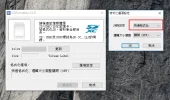
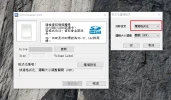
Okay, usually there are 3 types of format in the SD formatter software...
In the past I always choose "Quick" as in the first picture...but yesterday i just tried to use the "Full(Overwrite)" one as in the second picture.

Overwrite format takes more time...but i once heard from friends that it would help in resolving the "weird"situation of using.

One person in the forum here also suggested FULL format to the card..but i forgot in which post i saw it..@@

PS: sorry for the Chinese in the attach file, i try to download the English version of SD formatter, but they turn out to be Chinese one..hope you know what I mean!!
 

Attachments

  • Image 004.webp
    Image 004.webp
    57.9 KB · Views: 105
  • Image 005.webp
    Image 005.webp
    68.7 KB · Views: 99
Okay, usually there are 3 types of format in the SD formatter software...
In the past I always choose "Quick" as in the first picture...but yesterday i just tried to use the "Full(Overwrite)" one as in the second picture.

Overwrite format takes more time...but i once heard from friends that it would help in resolving the "weird"situation of using.

One person in the forum here also suggested FULL format to the card..but i forgot in which post i saw it..@@

PS: sorry for the Chinese in the attach file, i try to download the English version of SD formatter, but they turn out to be Chinese one..hope you know what I mean!!
Thx. Il try it when i have some time.
 
i usually use the onbord formatting tool of the yi which you can acces over the app. works everytime and I'm not getting any filr fracturing
 
i tried formatting through yi app, too...but still it went wrong like before.

After two days of normal using...today my device started to be weird again.....

I use it as a dash cam...the starting four files are normal for 5minutes and 35mb
but the following files became only few seconds of file with 18mb or even 8mb of birate............

i just give up on it! Just take my old SJ4000 out to use.....
 
Yeah, its another Unix thing. The SD card is identified by the camera's system as device d:
Here's a code snippet I grabbed from another script. Notice the paths to the target files.

Code:
#cleanup
#lu_util exec rm /tmp/fuse_d/DCIM/100MEDIA/*_thm.mp4

sleep 9

#disable sharpening. coring should contain only 256x10
t is2 -shp mode 0
t is2 -shp cor d:\coring.txt

#enable FTP server
lu_util exec '/tmp/fuse_d/ftp.sh'


Hi Rodher Rodriguez, if it possible to disable sharpening the 720p 120fps?
 
OK hi folks new to this forum. I have a Xiaomi Yi 23L action camera that has been sitting idle for some time. After charging the battery turning the camera on and activating the wifi, I couldn't see the wifi on my iPhone 6S using the latest app for the Apple Store.

It has worked perfectly before with my previous 5C iPhone. I tried everything I knew and couldn't get a connection. Then I read the forum and thought I'd try a custom firmware install to see if that would cure the issue. I downloaded it, moved it to the 16gb micro SD format to Fat32, renamed the file firmware.bin and inserted it into the camera as the instructions stated. When I turned the camera on all I get is a flashing blue light, it continues until the camera times out with a series of beeps.

Can someone shed some light on what the heck is going on with this thing?
 
I use your customized firmware on my 23L, very good quality, but the "lens distortion control" were gone. Is it possible to bring it back?

I also found the "lens distortion control" only work on 30fps on original firmware, any other fps are unable to do that.
 
Hey guys,
Unrelated to .13 firmware, but since .12 my 'live' preview on the iPhone Xiaomi App is super lagging. Like 10-15 seconds.A bit annoying. You guys know a fix?
Help Sir...
I have same problem as whisker
I'm a new here just bought z23L a couple days ago

im using this sandisk microsd 32GB 80Mb/s
using a firmware in first post .13
so laggy on my iphone

Many Thanks
 
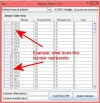
Does somebody know what the numbers represents in the first column (video speed and/or size?)
Example what do the numbers 2 and 14 represent?
What line number(s) do i have to change to get higher bitrate on 1920x1080 p @ 25 f/s.
Image11.webp
 
Last edited:
Hi!

Does anybody know how can I solve problem with file splitting? I installed Fried Firmware Base : 1.2.13 for 23L. I'm using Kingston Micro SD XC SDCX10/64GB and I can read that it has minimum 10MB/s transfer rate.
 
Hi!

Does anybody know how can I solve problem with file splitting? I installed Fried Firmware Base : 1.2.13 for 23L. I'm using Kingston Micro SD XC SDCX10/64GB and I can read that it has minimum 10MB/s transfer rate.
Bought new micro ad card and problem solved. Card: Kingston po.kar.micSD32GB UHS-I U3+ad.(SDCA3/32GB
 
Back
Top