Street Guardian SG9663DC (DC = Dual Channel)

At the moment we're still running 15mbit per channel, can probably do more without too much trouble but not trying to push things at this stage
 
At the moment we're still running 15mbit per channel, can probably do more without too much trouble but not trying to push things at this stage
Do you factor in what bitrate the average customer's PC can handle when choosing the output specification?
 
Do you factor in what bitrate the average customer's PC can handle when choosing the output specification?

that might start to become a consideration at higher bitrates, at these sorts of numbers it's ok for the majority, you'd find more PC's would struggle with a 1440p file at 10mbit than they would with a 1080p file at 20mbit, 1080p has had pretty good support for quite a while already, the higher res files are more of an issue for older hardware but we are sticking with 1080p for the moment anyway
 
Specifically for the 128GB

I think 128 Gb are what most people would want to use in a dual system, and those cards are also at the sweetest price / size point.
256Gb would be sweet too, but the price on those make them out of my league.

I do like the 2 Toshiba 128 Gb cards i have, and they are even the cheapest U3 cards on the Danish market, tho their write speed are in the lower end for U3 cards its still plenty for any dual channel dashcam.

The cards that will be bundled with SG products should also be fine, i am sure SG have looked at price / quality on those so they match their own product.
 
2017-06-11%2015-45-51_720.JPG


KMmHgYa.jpg

c076ff371390.png
 
Last edited:
Those cables are going to be rather noticeable in right-hand drive vehicles. In that respect - I prefer the cable outlet position on the GC at the top of the unit.
 
Is there a status LED in the rear camera unit to let you know that it has power, and whether it is recording etc?
 
Last edited:
If there's any issue with the rear camera, or the cable between the front and rear cameras, will the red led continue flashing (since it's still recording the front camera)? To put it another way, when the screen is turned off, how does the driver know whether just one or both cameras are operating correctly? With small kids or dogs in the back of the car, it's quite possible for the cable to the rear camera to be pulled out or snagged somewhere.

Note that I don't expect this to be fully worked out yet. Different status flash modes might be possible as the product develops. Just something to think about.
 
Is that a micro HDMI port for the rear camera?
 
If there's any issue with the rear camera, or the cable between the front and rear cameras, will the red led continue flashing (since it's still recording the front camera)? To put it another way, when the screen is turned off, how does the driver know whether just one or both cameras are operating correctly? With small kids or dogs in the back of the car, it's quite possible for the cable to the rear camera to be pulled out or snagged somewhere.

Note that I don't expect this to be fully worked out yet. Different status flash modes might be possible as the product develops. Just something to think about.
A very valid point. I have 2 RC cams in my car and the units in my central armrest so it's easy to check the cameras are working.

One issue I brought up with my cams was when the cards failed and needed formatting - there should be a constant beeping to make you aware they're not actually recording anymore. Is this going to be implemented here?
 
A very valid point. I have 2 RC cams in my car and the units in my central armrest so it's easy to check the cameras are working.

One issue I brought up with my cams was when the cards failed and needed formatting - there should be a constant beeping to make you aware they're not actually recording anymore. Is this going to be implemented here?

RC uses a Zoran chipset and beep errors aren't supported.

DC uses a NT96663 chipset and it does have support for beep errors when card is missing or recording is stopped. (So yes)
 
Is that a micro HDMI port for the rear camera?

NO ! that's a mini USB looking plug with more pins ( 10 i believe )
I was hoping for a HDMI out too, but seem like SG have skipped that option cuz i do believe its possible to have
 
That big ferrite choke is ugly. Any chance of some kind of cable management solution?

the ferrite choke is being moved further up the cable away from the camera, the guys only have hand made pieces at the moment

we're looking at some type of cable cover option but need to look closer at different installation scenarios first
 
Those cables are going to be rather noticeable in right-hand drive vehicles. In that respect - I prefer the cable outlet position on the GC at the top of the unit.

depends on the vehicle. personally even in a RHD car, i would still mount it to the left so that the SD card slot is easily accessible. plus with the tilt of the mirror, you'll have more room to mount it on the left.

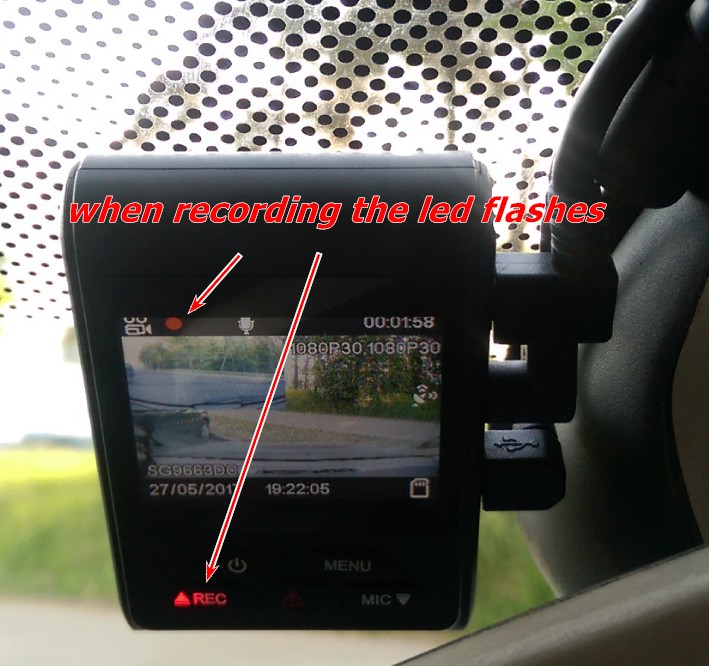
@alexsoll - does the REC button actually flash too, or is it on solid? in the A119, it's solid red while recording, and flashing fast when there's a problem or when not recording, and i think it's off completely while in the menus. personally i don't like flashing lights as they can be distracting, but then again, in the a119, the rec button light is so dim it's hard to see during the day.
 
If there's any issue with the rear camera, or the cable between the front and rear cameras, will the red led continue flashing (since it's still recording the front camera)? To put it another way, when the screen is turned off, how does the driver know whether just one or both cameras are operating correctly? With small kids or dogs in the back of the car, it's quite possible for the cable to the rear camera to be pulled out or snagged somewhere.

Note that I don't expect this to be fully worked out yet. Different status flash modes might be possible as the product develops. Just something to think about.

if the rear camera was plugged in but not operating the camera will start beeping, there's a startup process that does a check for this

also if you have a look in the photo Alexsoll posted above it might not be immediately obvious but top left quarter of the image is the rear view and to the right of that the OSD shows 1080p30, 1080p30, if the rear cam wasn't operational you'd only see a full front image and it would just show 1080p30 for resolution
 
depends on the vehicle. personally even in a RHD car, i would still mount it to the left so that the SD card slot is easily accessible. plus with the tilt of the mirror, you'll have more room to mount it on the left.

@alexsoll - does the REC button actually flash too, or is it on solid? in the A119, it's solid red while recording, and flashing fast when there's a problem or when not recording, and i think it's off completely while in the menus.

it slow flashes when recording
 
Back
Top