Vantrue E1 Pro testing and comparisons with VIOFO A229 Pro

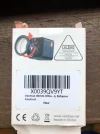
Wow now I understand. That is not obvious. The back of the box gives some indication.
I definitely see now that there are two stiff rings that rotate.
Rotate it while watching the live feed until the reflections are as little as possible and enjoy.
It should improve the image.
 
It would be helpful if Vantrue offered users some basic advice on how to install a CPL filter, especially since this one screws in so it is not going to be correctly aligned when first attached. There are two indents on the outer ring but it's not clear what they are for. I recall mine ended up at 45deg positions when the filter was oriented correctly to minimise reflections.
 
It would be helpful if Vantrue offered users some basic advice on how to install a CPL filter, especially since this one screws in so it is not going to be correctly aligned when first attached. There are two indents on the outer ring but it's not clear what they are for. I recall mine ended up at 45deg positions when the filter was oriented correctly to minimise reflections.
They don't make it clear for sure, that you have to turn it (at least for Vantrue) to minimise the reflections as you say. Viofo you don't have to cos it has the lines to show you the alignment. But they are a bit more fiddly for me compared to Vantrue.

Either way I tend to manually check anyways that reflections are minimised ...
 
Viofo you don't have to cos it has the lines to show you the alignment.
The lines are a good recommendation but in my experience I often had to slightly adjust to have the best effect.
 
i just buy e1pro today and use it with 229pro together
i think 229pro is more better tha e1po
Screenshot_20250306_210956_Video Player.webp
Screenshot_20250306_211052_Video Player.webp
2025_0306_152004_002830F.webp
20250306_152003_00003_N_A.webp
 
I agree with @TonyM it's not clear what the indents are for. The picture on the back of the box I think is maybe saying you need to orient it or maybe it's just saying screw it on? In any case I agree the instruction need to be much better.

What is physically happening when you rotate the filter which minimizes reflections? How does it even work?

tempImagelxJlV9.webp
 
Last edited:
  • Like
Reactions: bhb
i just buy e1pro today and use it with 229pro together
i think 229pro is more better tha e1po
I see you have PlatePIX turned on, do you also have HDR on for Vantrue? Do both have the CPL filter?
 
I think this video answers your questions.
It is not very accurate!

The word "circular" has nothing to do with the shape of the filter, Viofo sells CPLs that are rectangular in shape. "circular" refers to how the light is polarised when it leaves the filter.

It is also about photography, not dashcams.

For a dashcam, reflected light is always polarised horizontally, while the rest of the light is polarised in a random orientation, so reflections are blocked if you use a vertically polarised filter, while the rest of the light is only 50% blocked. For Viofo's rectangular CPLs, they only fit on the camera in the vertical orientation, so they are always correctly aligned, while with a circular CPL, you can mount it in any orientation, and then it needs adjusting so that it is aligned vertically. Viofo's circular CPLs have a mark showing which way up is vertical, you put that at the top, or the bottom for the Viofo A329, if you don't have that mark then you have to rotate it until it works best, and make a bit of a guess as to where exactly is best.
 
It is not very accurate!

The word "circular" has nothing to do with the shape of the filter, Viofo sells CPLs that are rectangular in shape. "circular" refers to how the light is polarised when it leaves the filter.

It is also about photography, not dashcams.

For a dashcam, reflected light is always polarised horizontally, while the rest of the light is polarised in a random orientation, so reflections are blocked if you use a vertically polarised filter, while the rest of the light is only 50% blocked. For Viofo's rectangular CPLs, they only fit on the camera in the vertical orientation, so they are always correctly aligned, while with a circular CPL, you can mount it in any orientation, and then it needs adjusting so that it is aligned vertically. Viofo's circular CPLs have a mark showing which way up is vertical, you put that at the top, or the bottom for the Viofo A329, if you don't have that mark then you have to rotate it until it works best, and make a bit of a guess as to where exactly is best.
Nigel, thanks for the explanation. After reading it I now understand that circular stands for how the light is polarised when it leaves the filter. I would like to add the following article:
 

Attachments

  • What is CPL, how does it work.webp
    What is CPL, how does it work.webp
    59.3 KB · Views: 144
Nigel, thanks for the explanation. After reading it I now understand that circular stands for how the light is polarised when it leaves the filter. I would like to add the following article:
That is quite a good explanation if you don't want to get scientific.

Circularly polarised light is a rather complex subject for most people, if you want to know more, try reading:

The Viofo diagram is drawn correctly with the grid lines vertical, that is how it should be installed. However I think in most of our CPLs, the blocked light is absorbed rather than reflected as in the diagram, that is why they look dark, but that is a minor point, some polariser filters do reflect.
 
  • Like
Reactions: bhb
Circularly polarised light is a rather complex subject for most people, if you want to know more, try reading:
Thanks again Nigel. Very interesting link, more than meets the eye😉
 
Circular polarization is needed for 3d glasses otherwise the screen would go dark in one eye or the other depending on how you tilted your head. RealD is circular while imax is not which is why you have to keep your head level for imax 3d.
 
I captured some video traveling 41 mph (66 kmh) in dim lighting/overcast sky.
Take a look at the colored Boxford sign on the right, it's not really legible with the E1 Pro but the A229 Pro looks good.
I may want to do more dim lighting tests. The time stamp is 1 hour too early on the Viofo because I forgot to adjust for DST.
I'm not sure why there is so much difference in the clarity of the sign, other images along the route I viewed are very similar in quality.

Vantrue E1 Pro.webp


Viofo A229 Pro.webp


A229 Pro.webp
E1 Pro.webp
 
I'm not sure why there is so much difference in the clarity of the sign, other images along the route I viewed are very similar in quality.
The E1 has probably run out of bitrate due to all the tree branches, no bitrate left for the sign.
The colours on the sign probably use extra bitrate, so it may partially be a localised bitrate issue for that sign.
The E1 has also used a slower exposure time, so has more motion blur, but I don't think that is the main issue.
 
The E1 has probably run out of bitrate due to all the tree branches, no bitrate left for the sign
It probably did.
I can notice slight blocking on my dashboard when driving in an area with a lot of trees.
 
I captured some video traveling 41 mph (66 kmh) in dim lighting/overcast sky.
Take a look at the colored Boxford sign on the right, it's not really legible with the E1 Pro but the A229 Pro looks good.
I may want to do more dim lighting tests. The time stamp is 1 hour too early on the Viofo because I forgot to adjust for DST.
I'm not sure why there is so much difference in the clarity of the sign, other images along the route I viewed are very similar in quality.


View attachment 78843 View attachment 78844
It looks like motion blur to me due to a slower exposure, and possibly HDR blur. Do you have HDR on during the day?

I can see what appears to be HDR double-exposure fringing along the edges of the trees at both sides of the frame on the E1 Pro.

1742808310558.webp
1742808345760.webp


1742808492628.webp
1742808520307.webp
 
HDR was OFF on both cameras.
Interesting idea that it's a local bitrate issue due to branches and colored sign.
But why would only one camera behave that way?
@Julian23 what is "blocking"?
I will try to get more footage on that route again. I agree it does look like motion blur.
 
HDR was OFF on both cameras.
Interesting idea that it's a local bitrate issue due to branches and colored sign.
But why would only one camera behave that way?
@Julian23 what is "blocking"?
I will try to get more footage on that route again. I agree it does look like motion blur.
If you take a look at the dashboard you will see what I mean. In this frame it is quite noticeable.

20250311_072603_05450_N_A.MP4_snapshot_00.34_[2025.03.24_16.39.31].webp


Two more examples:
First image the surface of the dashboard can be seen.
20250311_072603_05450_N_A.MP4_snapshot_00.07_[2025.03.24_16.37.58].webp


Here it does struggle:

20250311_072603_05450_N_A.MP4_snapshot_00.15_[2025.03.24_16.38.32].webp
 
HDR was OFF on both cameras.
Interesting idea that it's a local bitrate issue due to branches and colored sign.
But why would only one camera behave that way?
@Julian23 what is "blocking"?
I will try to get more footage on that route again. I agree it does look like motion blur.
Was HDR set to off via the HDR-Timer or manually?
Because it really looks that HDR might have been active.

I think there might be some kind of bug existing in the HDR-Timer for the E1 Pro.

A partner of us noticed that while doing his review for the E1 Pro (for the N2X as well). I was able to repilcate the error for the N2X (not for the E1 Pro) but I reported it to Vantrue.
They told us it would be prioritised and fixed with the next firmware-update for both models.
(I'm not sure if there really is a bug for the E1 Pro, but If so, for me thats positive because the results might still improve then)
But usually I have to say Vantrue is always very good and fast in bug-fixes from my expericene. 👍
 
Last edited:
Back
Top