VIOFO A329S - Testing/Review - RCG

So...is it two 4k videos at 8K size on a monitor, or is it two 8K videos on a monitor?
The first frame grab rcg530 posted is from an 8K width video file, it contains the images from two of the cameras, multiplexed side by side into a single video file. Guarantees synchronisation when watching, and when you transfer/store the file, you will never lose one of the views, no more having to download the front video file to the phone, then having to search for the matching rear, and likely choosing the wrong one for download! Both views are in the same video file.
 
Last edited:
Are you saying the new A329x does native 8K? If so, that would be a hardware advancement that would put VIOFO much ahead of many other manufacturers.

Or, are the two images being scaled to the 8K dimension?
 
Are you saying the new A329x does native 8K? If so, that would be a hardware advancement that would put VIOFO much ahead of many other manufacturers.

Or, are the two images being scaled to the 8K dimension?
When multiplexing 2-channels [front+rear or front+interior or telephoto] it creates a 7860x2160 30fps video with the front camera video on the left side and the second channel video on the right side scaled up to 2160p resolution.

Note: I added the white line separators for these screen shots:

1746040398885.webp


When multiplexing 3-channels [front + rear + interior or telephoto] it creates a 3840x3240 30fps video file with the front camera video on the top of the video and the two other camera feeds in the lower section with a side-by-side placement.

1746040419435.webp
 
I love to see that they're adding a multiplexer option without requiring additional hardware. I understand Thinkware's solution allows for up to 5 camera angles instead of 3 so it's not the same, but it's cool to see it offered natively in a 3CH setup too.
 
I love to see that they're adding a multiplexer option without requiring additional hardware. I understand Thinkware's solution allows for up to 5 camera angles instead of 3 so it's not the same, but it's cool to see it offered natively in a 3CH setup too.
Your latest Thinkware video shows them ending up with the rear view at 540 resolution, while Viofo's solution has it at 2160 resolution; that is quite a difference in image detail, and with Viofo's just being a setup menu option, while Thinkware's is a piece of hardware to purchase and plug in!
 
My review of the Thinkware MB-100 multiplexer from November 2022, shows the various manners in which the MB-100 will combine the up to 4 camera feeds into one 1080p video stream fed to the front camera over the rear camera connection port. Three of the four modes available for the MB-100 squash 1 or 2 of the input video feeds [changing the aspect ratio] to fit within the 1080p feed to the front camera. Only in the 4 camera mode does it maintain the original aspect ratio for each input camera, but it scales down all four feeds to 960x540 30fps.

 
Last edited:
Three of the four modes available for the MB-100 stretch 1 or 2 of the input video feeds to fill up the 1080p feed to the front camera.
Aren't the Thinkware cameras used with the multiplexer 1080 resolution, so they are never stretched to fit 1080? In the 2 channel stacked view, it looks like they are squashed to half height while remaining original width, so look a bit compressed?

Nice video explanation of it 🙂, it is a useful setup for some people, most people don't need great detail on the side views, just enough to see what has happened.

It is nice to have 2K on the rear though, and the Telephoto needs to be 2K or more otherwise it is a bit pointless, and Viofo's new interior view fisheye is so wide angle that it also needs to be 2K to have decent detail.

Thinkware has produced this to add extra channels, while Viofo's new feature, as far as you have shown it, does not add any extra channels. They are not really comparable features at the moment.
 
Aren't the Thinkware cameras used with the multiplexer 1080 resolution, so they are never stretched to fit 1080? In the 2 channel stacked view, it looks like they are squashed to half height while remaining original width, so look a bit compressed?
You're correct, I was writing my previous post when the auto repair shop called saying my other dash camera test car is finally ready for pickup. 🙂 My bad. I'll finally have a car that I can install the A329 and A329S and hopefully the A229 Pro into to get comparison footage.
 
I love to see that they're adding a multiplexer option without requiring additional hardware. I understand Thinkware's solution allows for up to 5 camera angles instead of 3 so it's not the same, but it's cool to see it offered natively in a 3CH setup too.
This feature is good for the future multiple channels model.
 
I love to see that they're adding a multiplexer option without requiring additional hardware.
Yes!
I think it will look really neat to have the 4K Front & 2K Telephoto side by side in the same video like this but better;
Also (2) two left & right side cameras side by side in the same video.


This feature is good for the future multiple channels model.
Yes please. lol

https://dashcamtalk.com/forum/threads/2025-dream-dash-cam-a159-5-ch-box.50994/
 

Attachments

  • (2) External Waterproof Rear - Tesla Side View .webp
    (2) External Waterproof Rear - Tesla Side View .webp
    14.6 KB · Views: 101
Yes!
I think it will look really neat to have the 4K Front & 2K Telephoto side by side in the same video like this but better;
This is the worst possible idea about the A329T multiplexing. Normally such option should be banned from the camera settings. Telephoto video should be never multiplexed as 2CH or even as 3CH.
Think more before asking.

Here is another multiplexed video.


Do not forget that this video is from a beta firmware. Because of this and not only, I unchecked all data about Viofo from the video.
CPL on front and telephoto.
The next firmware will have the rear camera at bottom right.

By the way:
Be prepared for hundreds of no-name dashcams invading the internet and claiming that they are 8K dashcams. This is the worst thing about the great idea of Viofo to multiplex the channels. When ShytCam will see this they will start to sell fake 8K dashcams, upscaling and multiplexing any resolution, any poor image. Average Joe will be doomed.

And the 3CH multiplexed resolution is 6K, not 8K.
 
Last edited:
This is the worst possible idea about the A329T multiplexing. Normally such option should be banned from the camera settings. Telephoto video should be never multiplexed as 2CH or even as 3CH.
I like the Front + Telephoto view, it is a good way to view the telephoto video, as long as I can view it at full resolution and decent bitrate.

And the 3CH multiplexed resolution is 6K, not 8K.
The 2nd frame grab that rcg530 posted above is from a 4K video file (3840 pixels width), with reduced resolution for the telephoto, which is not so good.

The multiplexing should be considered different from the viewing, it is about how the video is stored, so the width of the file is not so important.

How the video is viewed is up to the phone/PC app, which should be able to display the 8K Front+Telephoto video on a 4K display at full resolution, but only half of it at a time. To view the whole video at once, it needs to zoom out and not display at full resolution. If you have two 4K monitors on your device then it could put one camera view on each screen at full resolution. A single phone screen is probably too small to be worth displaying Front + Telephoto together, but it can have a button to simply switch views while playing, instead of having to stop playback, go back and open another video file to see the telephoto view, at which point you have lost your position within the file! The new app updates for phone and PC will be interesting...
 
One of the new features for the A329S/A329T is the new multiplexer feature. It allows you to combine the camera feeds into one video file.

From the A329S firmware you'll see this new video setting:

View attachment 79885View attachment 79886
When multiplexing 2-channels [front+rear or front+interior or telephoto] it creates a 7860x2160 30fps video with the front camera video on the left side and the second channel video on the right side scaled up to 2160p resolution.

When multiplexing 3-channels [front + rear + interior or telephoto] it creates a 3840x3240 30fps video file with the front camera video on the top of the video and the two other camera feeds in the lower section with a side-by-side placement.

The multiplexing should be considered different from the viewing, it is about how the video is stored, so the width of the file is not so important


When using the multiplex option to combine 2 or 3 channels into a single video file, does the camera save ONLY the multiplexed video, or does it also save the individual videos from each channel?
 
When using the multiplex option to combine 2 or 3 channels into a single video file, does the camera save ONLY the multiplexed video, or does it also save the individual videos from each channel?
I would say that it saves the individual videos, but saves them inside a single multiplexed video file.

It will not save two copies of each video, one in the multiplexed file and one in a normal single channel file, the memory card would not be able to cope!

There are a number of advantages, one being more efficient use of the memory card, only one file to deal with instead of, as many as Viofo has plans for! There will also be some disadvantages, that old Windows 95 computer is not going to play the multiplex video successfully! However, you don't need to keep the videos in the multiplexed file, you can extract them into individual files if that is what you need, you often need to undo the loop recording segmentation anyway. I assume that when Viofo adds some more channels, some of them may have to be multiplexed, similar to the Thinkware, currently with the 3 channel, it is only an option.
 
Last edited:
When using the multiplex option to combine 2 or 3 channels into a single video file, does the camera save ONLY the multiplexed video, or does it also save the individual videos from each channel?
It only creates the multiplexed video file as the front (F) video file.

Here's a sample of the first few video files created last Friday. It only created the (F)ront files when I had it configured to multiplex the front+rear videos.

1746105428767.webp
 
When multiplexing, the end name of the multiplexed file will always contain the F. I asked for M, but the reply was that this is not possible.
On the 3CH version of A329T for example, if you will multiplex front + rear, the resulted file will end with F and the separate file will end with T.

I like the Front + Telephoto view, it is a good way to view the telephoto video, as long as I can view it at full resolution and decent bitrate.
Of course it is nice to watch a multiplexed video but if your priorities are the legibility of the license plates then you should multiplex the front and rear and let the telephoto alone. When multiplexing also the telephoto channel there will be missing details compared to the telephoto video encoded separately. There are already difficulties to read the license plates and the reason for buying the telephoto camera is to solve some of these difficulties which are even bigger on USA style plates. If you will lose details when multiplexing also the telephoto camera those details are gone forever.

If you want to show some incident which includes front and rear, you can show the multiplexed video of front and rear with a general view and if more details are needed from the front you can show the telephoto video.

Why multiplexing front and rear and not telephoto and rear? Because there are more chances to read a license plate with the telephoto camera compared to the main 4K camera.

If you don't care about license plates legibility and consider the front 4K is enough and you like multiplexed videos instead of separate videos then save your money and buy only the A329S 2CH. I consider that a 2CH dashcam is more stable than a 3CH dashcam.
When using the multiplex option to combine 2 or 3 channels into a single video file, does the camera save ONLY the multiplexed video, or does it also save the individual videos from each channel?
As I wrote above, if you have a 3CH camera you can chose to let alone one of the secondary cameras. But any of the multiplexed channels will be not available as separate videos. It is almost too much for the camera, with this multiplexing stuff and saving 2-3 video streams on the card or SSD, adding more stress will make the things worse.

Now, based on what I wrote above about the license plates legibility, just imagine how strange is my request that for the A329S 3CH camera to be an option to record Interior + Rear and the 4K front as separate video. It is strange, but more useful for you compared to any other multiplex combination.
My priorities will be always license plates legibility.

How the video is viewed is up to the phone/PC app, which should be able to display the 8K Front+Telephoto video on a 4K display at full resolution, but only half of it at a time. To view the whole video at once, it needs to zoom out and not display at full resolution.
I don't know exactly what do you want to say, but if you are thinking to crop some video channels just to obtain the 16:9 format for the multiplexed video, it is not a good idea. A better proposal can be to cut the video channels to avoid downsizing.

But from my experience many people just don't like their video to be cropped. They just don't want the 21:9 resolutions (which should be the standard for all dashcams) because they are afraid that they will be the first car at some intersection with traffic lights and because of the cropped image they will miss the traffic light from the video. I consider such fear to be stupid because there are too small chances the traffic light to be recorded by a dashcam with 21:9 aspect ratio. More than that, some stupid are recording as 4:3 because they think that more image is better quality.

Now think about this people and tell them that you want to cut top and bottom to obtain a better quality of the video or a nice 16:9 format.

The same people who don't want to use the 21:9 format are pointing the camera to record the sky and in this way to avoid their car motor hood or dashboard to be included in the video frame. They prefer to damage the video quality by destroying the brightness balance instead to do the right things by using the 21:9 resolution and let some part of the dashboard to be included in the video frame.

I hope people with many viewers and talent like @Vortex Radar to create some educational video about this situation with sky-road, motor hood, dashboard and why the 21:9 resolution should be used and teach the people what is the best for them. If nobody will teach them they will act only based on instincts. And they will keep flooding the internet that the quality of their videos are not so good as seen at other peoples videos.
 
Last edited:
.
.
I hope people with many viewers and talent like @Vortex Radar to create some educational video about this situation with sky-road, motor hood, dashboard and why the 21:9 resolution should be used and teach the people what is the best for them. If nobody will teach them they will act only based on instincts. And they will keep flooding the internet that the quality of their videos are not so good as seen at other peoples videos.

Agreed. It is hard to beat the video quality and information that @Vortex Radar provides. His vids are always worth the watch.
 
Thanks guys, I appreciate the kind words. I can appreciate the argument for 21:9 over 16:9 and I feel like there's more value there than 4:3, but admittedly I still prefer 16:9 by default given that I spend so much time making YouTube videos and that's the aspect ratio I otherwise run on all my other cameras too, lol. That said, it might be worth taking a second look into given how manufacturers may approach combining multiple video feeds for multiplexed solutions.
 
So, if the channels are 'multiplexed' they are baked into a single video file. The only way to extract a single channel from that file at a later date is to crop using a video editor?

I'm not saying this is a bad thing. I can see why it might appeal to some people.
 
Last edited:
Yes, you are right, about the cropping from the multiplexed file. But that crop will never contain so much information like in the single encoded file. One of the most important parameter of a video is the Bits/(Pixel*Frame) value which reflects the amount of bitrate used to encode a video. Unfortunately this parameter is ignored by almost everybody when analysing a video. 20 years ago, when encoding XViD videos, the best value should be somewhere between 0.220 and 0.260. Such a value was considered safe to obtain a good video quality with a reasonable small file size which means lower bitrate. Of course you ca waste anytime the bitrate and ignore that Bits/(Pixel*Frame) by encoding at very high bitrates. In this way you can obtain a 1 minute video of 2GB size with the best quality but such a quality you can obtain also with a 700MB size if the Bits/(Pixel*Frame) is at the correct value.
Even the H264 is much more efficient than XViD we should consider to not go too low under 0.200
Choosing the max bitrate in camera settings, you can have for example:
2CH Multiplexed video has: Bits/(Pixel*Frame) = 0.125
3CH Multiplexed video has: Bits/(Pixel*Frame) = 0.175
1CH 4K 21:9 front video has: Bits/(Pixel*Frame) = 0.245
1CH 4K 16:9 front video has: Bits/(Pixel*Frame) = 0.175
As you can see the best value for Bits/(Pixel*Frame) is the 21:9 format, one more reason for @Vortex Radar to start using 21:9.

The best solution which is valid only in theory should be a multiplexed video file which contains all 3 video channels as separate streams but the player or the video editor or YouTube should read some information from the header of that multiplexed file and show all 3 videos in one window playback in the same way we are watching the multiplexed video created by the dashcam.
In this way the original video quality is untouched and you can extract any video channel anytime.
I was looking a little into this problem but even I can multiplex the 3 separate channels in one MKV file, for example, I couldn't find a way to play them as Picture in Picture. All 3 videos are there but I can chose to play only one a time with a PC player like MPC-BE or VLC. There are some discussions about ffmpeg and filtercomplex but I think this is too much to put the user to learn how to use command lines just to watch a video.

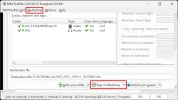
By the way, in my little video experience Multiplexing means when you add multiple streams in one container. For example you can create a MKV file with multiple video, audio, subtitles, chapters, etc. All those files are multiplexed in the container named MKV.
Here is a screenshot from MKVToolnix and see the Multiplexing buttons. MKVToolnix it is not encoding the video it is just creating a MKV container with multiple streams, the video and audio is untouched, original quality.

Multiplexer.webp

But I accept that the Multiplex name is a good one and I expect that people will understand that multiplexing means combining 2-3 videos in one video and they can not extract any separate channel from the multiplexed video created by the dashcam. You can edit, crop, but not extract.
 
Last edited:
Back
Top