
You are using an out of date browser. It may not display this or other websites correctly.
You should upgrade or use an alternative browser.
You should upgrade or use an alternative browser.
70mai 4K T800 (unboxing & impressions) (Sony Starvis 2 IMX678, GC2093, Wi-Fi 6/GPS, Novatek NT98530, 4K front / 4K rear / 1080p int, HDR all channels)
- Thread starter Augustus
- Start date

OP
OP

Augustus
Well-Known Member
- Joined
- Aug 19, 2016
- Messages
- 4,259
- Reaction score
- 2,729
- Location
- Perth, Australia
- Country
- Australia
- Dash Cam
- Viofo, Vantrue, 70mai, Wolfbox
There has been some more updates to the 70mai APP in the Google Play Store:

 play.google.com
The latest version is now 3.12.0 and brings the following improvements:
- Support for new device M310 Plus 3K, S410, M800
- Improved device binding/connection experience
- Added App unit of measurement settings
- Added App language settings
- Fixed some translation issues
- Fixed other known issues

70mai - Apps on Google Play
70mai App is a mobile phone software used with 70mai Smart Dash Cam.
The latest version is now 3.12.0 and brings the following improvements:
- Support for new device M310 Plus 3K, S410, M800
- Improved device binding/connection experience
- Added App unit of measurement settings
- Added App language settings
- Fixed some translation issues
- Fixed other known issues
OP
OP
Augustus
Well-Known Member
- Joined
- Aug 19, 2016
- Messages
- 4,259
- Reaction score
- 2,729
- Location
- Perth, Australia
- Country
- Australia
- Dash Cam
- Viofo, Vantrue, 70mai, Wolfbox
Front Camera Defogging Mode + Rear Camera Transparent Mode for 70mai 4K T800:
Something I haven't seen before in any 70mai dashcam (or any other brand's dashcam for that matter), are the options for front cam defogging and rear cam transparency. This uses 70mai's proprietary image processing algorithms to improve the image quality from the dashcam. For the front camera, this is stated to assist in foggy, hazy and dusty conditions. For the rear camera, this assists when the rear windscreen is tinted.
I have included screen captures below from the 70mai T800 to show what these settings can do. To my eyes, the Front Camera Defogging Mode looks to make the image more contrasty by darkening the blacks, as you can see with the rear windscreen of the ute on the left, and the small Toyota hatchback in front of the tree.
I could not discern a visible difference (in the daytime) between having the Rear Camera Transparent Mode turned on. In the night time however, it performed the same as the Front Camera Defogging Mode in again making the image more contrast-laden, as you can see below. My vehicle has quite a dark rear windscreen tint, so this can be noticed quite visibly.
Front Camera Defogging Mode (off):

Front Camera Defogging Mode (on):

Rear Camera Transparent Mode (off):
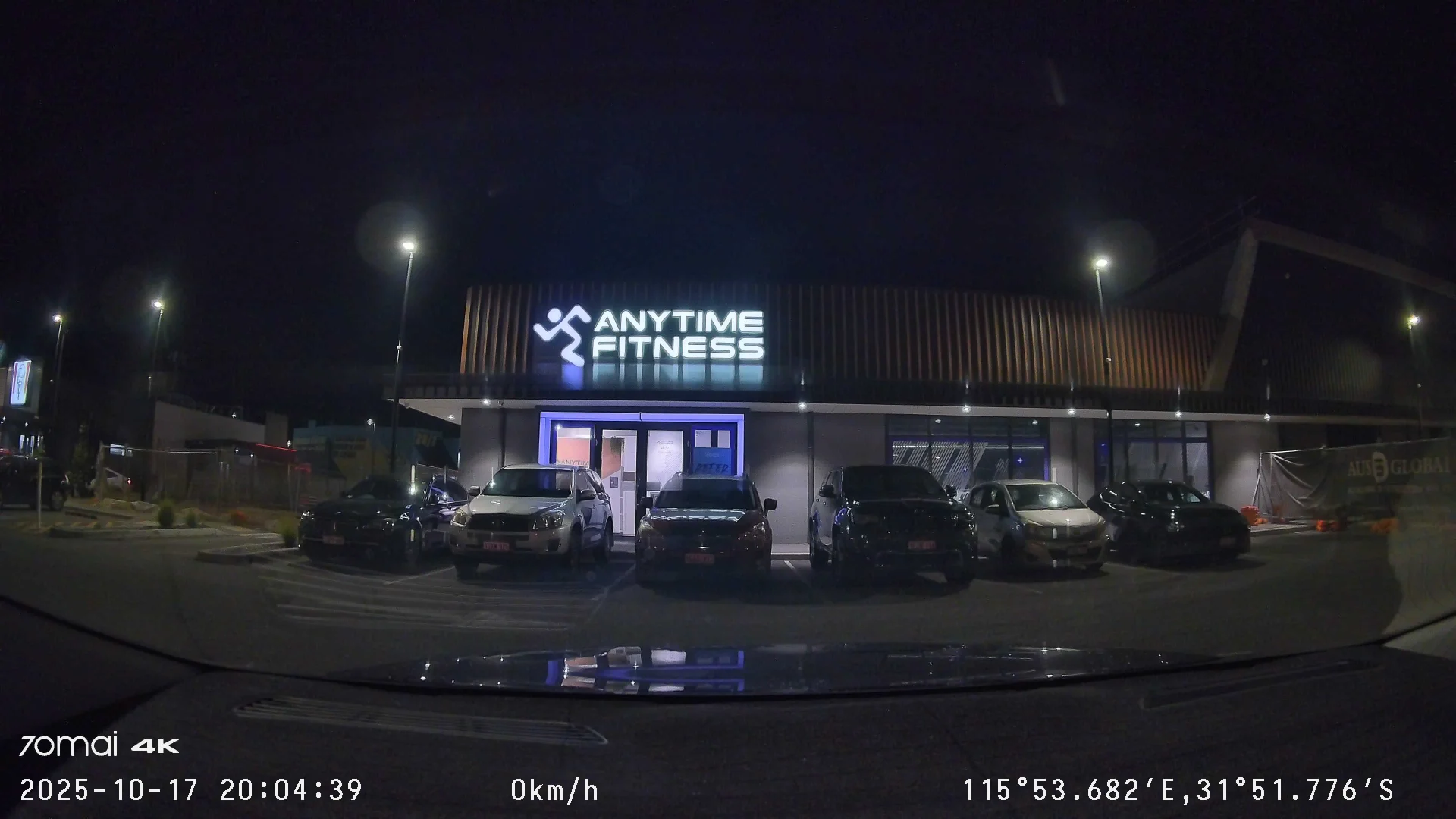
Rear Camera Transparent Mode (on):

Something I haven't seen before in any 70mai dashcam (or any other brand's dashcam for that matter), are the options for front cam defogging and rear cam transparency. This uses 70mai's proprietary image processing algorithms to improve the image quality from the dashcam. For the front camera, this is stated to assist in foggy, hazy and dusty conditions. For the rear camera, this assists when the rear windscreen is tinted.
I have included screen captures below from the 70mai T800 to show what these settings can do. To my eyes, the Front Camera Defogging Mode looks to make the image more contrasty by darkening the blacks, as you can see with the rear windscreen of the ute on the left, and the small Toyota hatchback in front of the tree.
I could not discern a visible difference (in the daytime) between having the Rear Camera Transparent Mode turned on. In the night time however, it performed the same as the Front Camera Defogging Mode in again making the image more contrast-laden, as you can see below. My vehicle has quite a dark rear windscreen tint, so this can be noticed quite visibly.
Front Camera Defogging Mode (off):
Front Camera Defogging Mode (on):
Rear Camera Transparent Mode (off):
Rear Camera Transparent Mode (on):
Last edited:
OP
OP
Augustus
Well-Known Member
- Joined
- Aug 19, 2016
- Messages
- 4,259
- Reaction score
- 2,729
- Location
- Perth, Australia
- Country
- Australia
- Dash Cam
- Viofo, Vantrue, 70mai, Wolfbox
My full review on the 70mai 4K T800 is now available here: https://dashcamtalk.com/forum/threa...-three-channel-front-and-rear-4k-beast.57020/
Teosamuel4
New Member
How does the t800 compare to the x800?
OP
OP
Augustus
Well-Known Member
- Joined
- Aug 19, 2016
- Messages
- 4,259
- Reaction score
- 2,729
- Location
- Perth, Australia
- Country
- Australia
- Dash Cam
- Viofo, Vantrue, 70mai, Wolfbox
I'm glad you asked, I have my findings and thoughts written up on the X800 here:How does the t800 compare to the x800?

I have spent several weeks with 70mai's latest release, the 4K Omni, and have formulated my verdict on this dashcam. Does 70mai have a strong product on their hands, with their unique approach to 360-degree coverage? I'll try my best to answer these questions below.
70mai 4K Omni (Sony Starvis 2 IMX678/IMX662, Wi-Fi 6, 4K60 + HDR both channels)
--------------------------------------------------------------------------------
Firmware: v1.2.96ww. The firmware version loaded from the factory onto the device was v1.0.78ww, and during the testing period...
70mai 4K Omni (Sony Starvis 2 IMX678/IMX662, Wi-Fi 6, 4K60 + HDR both channels)
--------------------------------------------------------------------------------
Firmware: v1.2.96ww. The firmware version loaded from the factory onto the device was v1.0.78ww, and during the testing period...


We're back at it again in 2025 with the first of many upcoming releases from 70mai, the 4K Omni (known as the X800 in the Chinese market). Would like to extend a thank you to 70mai for giving me the opportunity once again to test-drive their latest and greatest. This year, we get quite a big upgrade to the front with the Sony Starvis 2 IMX678 F1.7 aperture sensor, and 4K60fps recording enabled by the NT98530 chipset (only in single-channel mode though)! The rear camera sensor RC14 also sees some love this year with the move (finally) to the Starvis 2 IMX662 sensor, which is a first for...
OP
OP
Augustus
Well-Known Member
- Joined
- Aug 19, 2016
- Messages
- 4,259
- Reaction score
- 2,729
- Location
- Perth, Australia
- Country
- Australia
- Dash Cam
- Viofo, Vantrue, 70mai, Wolfbox
Just a quick post to show the capabilities of the 4K T800 at night in its parking mode, with what 70mai calls Lumi Vision.
First photo is recording whilst in normal driving mode with the vehicle engine running, the second photo whilst parking surveillance mode is enabled.
Not a bad result to bring in much more light.
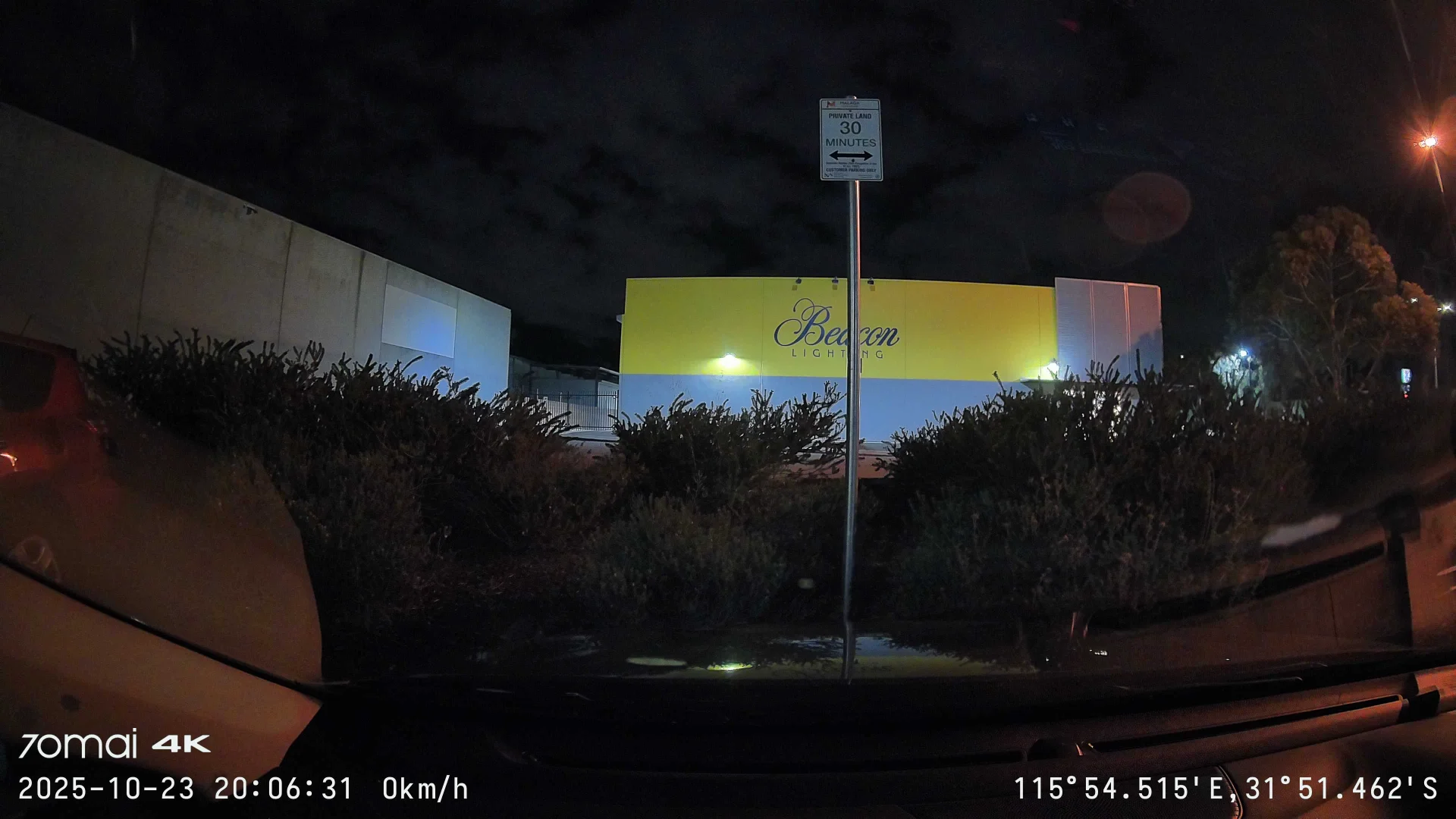

First photo is recording whilst in normal driving mode with the vehicle engine running, the second photo whilst parking surveillance mode is enabled.
Not a bad result to bring in much more light.
OP
OP
Augustus
Well-Known Member
- Joined
- Aug 19, 2016
- Messages
- 4,259
- Reaction score
- 2,729
- Location
- Perth, Australia
- Country
- Australia
- Dash Cam
- Viofo, Vantrue, 70mai, Wolfbox
Motion Detection response times of the 4K T800 (phase detection autofocus):
There are quite a few options available to the end-user in terms of sensitivity, for both Motion Detection and Collision Detection. This is not the most scientific test, but I timed these responses in the mid-afternoon sunlight in a sunny exposed carpark, initially standing to the side of my vehicle behind the camera, and then stepping immediately out in front of it. I stopped the timer when the green ring-indicator light of the 4K T800 turned on. The results are the average of three-timed runs for each setting.
Motion Detection:
Ultra-high: 9.02 seconds
High: 15.98 seconds
Medium: 26.08 seconds
Low: 42.91 seconds
As you can see, there can be quite a broad difference in range between the settings. The only setting that warned of excessive power consumption was the Ultra-high in Motion Detection mode.
I should also note that I did try other movements where I moved from right to left in front of the 4K T800, and it reacted faster when I looked directly at the camera than what I did not.
As the NT98530 chipset has native support for PDAF (phase detection autofocus) and scene detection, I suspect that this is being used here in the 4K T800 along with some element of facial recognition.
There are quite a few options available to the end-user in terms of sensitivity, for both Motion Detection and Collision Detection. This is not the most scientific test, but I timed these responses in the mid-afternoon sunlight in a sunny exposed carpark, initially standing to the side of my vehicle behind the camera, and then stepping immediately out in front of it. I stopped the timer when the green ring-indicator light of the 4K T800 turned on. The results are the average of three-timed runs for each setting.
Motion Detection:
Ultra-high: 9.02 seconds
High: 15.98 seconds
Medium: 26.08 seconds
Low: 42.91 seconds
As you can see, there can be quite a broad difference in range between the settings. The only setting that warned of excessive power consumption was the Ultra-high in Motion Detection mode.
I should also note that I did try other movements where I moved from right to left in front of the 4K T800, and it reacted faster when I looked directly at the camera than what I did not.
As the NT98530 chipset has native support for PDAF (phase detection autofocus) and scene detection, I suspect that this is being used here in the 4K T800 along with some element of facial recognition.
OP
OP
Augustus
Well-Known Member
- Joined
- Aug 19, 2016
- Messages
- 4,259
- Reaction score
- 2,729
- Location
- Perth, Australia
- Country
- Australia
- Dash Cam
- Viofo, Vantrue, 70mai, Wolfbox
There has been some more updates to the 70mai APP in the Google Play Store:
play.google.com
The latest version is now 3.13.0 (revised changelog below) and brings the following improvements:
- Support for new device A810S, T800E, M310 Plus 2K
- Added GPS time synchronisation UI for A500S
- Fixed an issue where some A800SE overseas users might encounter video RS merge failures when saving videos to local albums
- Fixed an issue where time-lapse videos from the 2500 series might not display footage from the extended camera in the album
- Fixed a rare crash issue in the local album video list
- Improved connection stability and resolved certain connection anomalies
- Corrected translation inconsistencies in some interface languages
- Fixed other known bugs and optimised overall performance
70mai - Apps on Google Play
70mai App is a mobile phone software used with 70mai Smart Dash Cam.
The latest version is now 3.13.0 (revised changelog below) and brings the following improvements:
- Support for new device A810S, T800E, M310 Plus 2K
- Added GPS time synchronisation UI for A500S
- Fixed an issue where some A800SE overseas users might encounter video RS merge failures when saving videos to local albums
- Fixed an issue where time-lapse videos from the 2500 series might not display footage from the extended camera in the album
- Fixed a rare crash issue in the local album video list
- Improved connection stability and resolved certain connection anomalies
- Corrected translation inconsistencies in some interface languages
- Fixed other known bugs and optimised overall performance
OP
OP
Augustus
Well-Known Member
- Joined
- Aug 19, 2016
- Messages
- 4,259
- Reaction score
- 2,729
- Location
- Perth, Australia
- Country
- Australia
- Dash Cam
- Viofo, Vantrue, 70mai, Wolfbox
Heat Testing: 70mai 4K T800 + 70mai UP04 4G Hardwire Kit
The 70mai 4K T800 on show here is recording at its highest native resolution of 4K, 30 frames per second in three-channel configuration. Please keep in mind that this is a tough test as this dashcam is exposed to operating conditions that stresses it to its limits. Firmware version: 1.2.136ww. Tested with it's respective stock power supply.
In all instances, the ambient car cabin temperatures (with air-conditioning set to lowest setting without car driver/passengers feeling hot) is 32.7 degrees Celsius. 70mai 4K T800 installed to left of rear-view mirror
28th October 2025:
Scenario: parked in stationary car mid-afternoon for approximately 30 minutes directly facing sun
Exhibited behaviour: 70mai 4K T800 did not shut-down, display was dimmed as per screensaver time-out
Outside stated weather bureau temperature: 34.3 degrees Celsius
Dashboard recorded temperature: 57.3 degrees Celsius
70mai 4K T800 (top of camera above LCD on ventilation grilles row): 68.7 degrees Celsius
70mai 4K T800 (LCD screen itself): 65.9 degrees Celsius
70mai 4K T800 (underside of camera on ventilation grilles): 65.7 degrees Celsius
70mai 4K T800(directly at microSD slot location on left side): 72.6 degrees Celsius
UP04 (directly at nano-SIM card slot location): 59.8 degrees Celsius
UP04 (underside of unit at 70mai logo location): 60.1 degrees Celsius
The 70mai 4K T800 on show here is recording at its highest native resolution of 4K, 30 frames per second in three-channel configuration. Please keep in mind that this is a tough test as this dashcam is exposed to operating conditions that stresses it to its limits. Firmware version: 1.2.136ww. Tested with it's respective stock power supply.
In all instances, the ambient car cabin temperatures (with air-conditioning set to lowest setting without car driver/passengers feeling hot) is 32.7 degrees Celsius. 70mai 4K T800 installed to left of rear-view mirror
28th October 2025:
Scenario: parked in stationary car mid-afternoon for approximately 30 minutes directly facing sun
Exhibited behaviour: 70mai 4K T800 did not shut-down, display was dimmed as per screensaver time-out
Outside stated weather bureau temperature: 34.3 degrees Celsius
Dashboard recorded temperature: 57.3 degrees Celsius
70mai 4K T800 (top of camera above LCD on ventilation grilles row): 68.7 degrees Celsius
70mai 4K T800 (LCD screen itself): 65.9 degrees Celsius
70mai 4K T800 (underside of camera on ventilation grilles): 65.7 degrees Celsius
70mai 4K T800(directly at microSD slot location on left side): 72.6 degrees Celsius
UP04 (directly at nano-SIM card slot location): 59.8 degrees Celsius
UP04 (underside of unit at 70mai logo location): 60.1 degrees Celsius
Last edited:
OP
OP
Augustus
Well-Known Member
- Joined
- Aug 19, 2016
- Messages
- 4,259
- Reaction score
- 2,729
- Location
- Perth, Australia
- Country
- Australia
- Dash Cam
- Viofo, Vantrue, 70mai, Wolfbox
There has been a firmware update for the 70mai 4K T800, taking it from version 1.2.136ww to 1.3.145ww.
Changelog as follows:
- optimise system performance
- adjust some translations
- fixed other known issues

Changelog as follows:
- optimise system performance
- adjust some translations
- fixed other known issues
OP
OP
Augustus
Well-Known Member
- Joined
- Aug 19, 2016
- Messages
- 4,259
- Reaction score
- 2,729
- Location
- Perth, Australia
- Country
- Australia
- Dash Cam
- Viofo, Vantrue, 70mai, Wolfbox
Detailed changelog has now been published for the latest 1.3.145ww firmware update for the 70mai 4K T800:
- fixed the issue of frequent SD card formatting prompts
- changed the Arabic device name in the overseas version to 70mai Dash Cam 4K T800
- changed the Italian and Filipino device names
- added logic for deleting small streams upon power-on scanning. Fixed the issue of small streams not being deleted in a loop
- fixed the issue of the first frame of time-lapse and parking monitoring appearing bluish or yellowish
- fixed other issues that could be reproduced during testing
- fixed the issue of frequent SD card formatting prompts
- changed the Arabic device name in the overseas version to 70mai Dash Cam 4K T800
- changed the Italian and Filipino device names
- added logic for deleting small streams upon power-on scanning. Fixed the issue of small streams not being deleted in a loop
- fixed the issue of the first frame of time-lapse and parking monitoring appearing bluish or yellowish
- fixed other issues that could be reproduced during testing

Vortex Radar
Well-Known Member
- Joined
- Mar 26, 2014
- Messages
- 1,603
- Reaction score
- 2,793
- Location
- Seattle, Washington
- Country
- United States
Yikes. Those are not great times at all. I'm playing with one right now and was wondering if something was broken or not set up properly, given how long it can take to wake up and start recording.Motion Detection response times of the 4K T800 (phase detection autofocus):
There are quite a few options available to the end-user in terms of sensitivity, for both Motion Detection and Collision Detection. This is not the most scientific test, but I timed these responses in the mid-afternoon sunlight in a sunny exposed carpark, initially standing to the side of my vehicle behind the camera, and then stepping immediately out in front of it. I stopped the timer when the green ring-indicator light of the 4K T800 turned on. The results are the average of three-timed runs for each setting.
Motion Detection:
Ultra-high: 9.02 seconds
High: 15.98 seconds
Medium: 26.08 seconds
Low: 42.91 seconds
As you can see, there can be quite a broad difference in range between the settings. The only setting that warned of excessive power consumption was the Ultra-high in Motion Detection mode.
I should also note that I did try other movements where I moved from right to left in front of the 4K T800, and it reacted faster when I looked directly at the camera than what I did not.
As the NT98530 chipset has native support for PDAF (phase detection autofocus) and scene detection, I suspect that this is being used here in the 4K T800 along with some element of facial recognition.
Are you able to get the motion detection to trigger on the interior cam? I understand it works on the front, but not the rear. I'm testing covering the front and rear cams and moving around behind the interior cam, even looking right at the cam, but I can't get it to wake up and start recording, even in the ultra-high motion detection. So I presume it's for the front cam only?
OP
OP
Augustus
Well-Known Member
- Joined
- Aug 19, 2016
- Messages
- 4,259
- Reaction score
- 2,729
- Location
- Perth, Australia
- Country
- Australia
- Dash Cam
- Viofo, Vantrue, 70mai, Wolfbox
I can't get the interior cam to wake either, I'm pretty sure it's just motion detection on the front camera only.Yikes. Those are not great times at all. I'm playing with one right now and was wondering if something was broken or not set up properly, given how long it can take to wake up and start recording.
Are you able to get the motion detection to trigger on the interior cam? I understand it works on the front, but not the rear. I'm testing covering the front and rear cams and moving around behind the interior cam, even looking right at the cam, but I can't get it to wake up and start recording, even in the ultra-high motion detection. So I presume it's for the front cam only?
I'm glad it's not only me that's getting the high timer values for the motion detection. I had to do a double take when I was testing, because they were worse results than the 4K Omni. Which is the same chipset, so you would think they would be roughly similar? I like that 70mai has the most polished app and cloud integration (to me at least), but they are lacking in some features and final polish.
They tell me better detection and other parking features are coming in future firmware updates, as well as new UP04/UP05 next year. More akin to the ultra low impact detection we are seeing in the latest Viofo and Vueroid. Whether that transpires or not, or it comes to their 2026 models remains to be seen.....
OP
OP
Augustus
Well-Known Member
- Joined
- Aug 19, 2016
- Messages
- 4,259
- Reaction score
- 2,729
- Location
- Perth, Australia
- Country
- Australia
- Dash Cam
- Viofo, Vantrue, 70mai, Wolfbox
There has been some more updates to the 70mai APP in the Google Play Store:
play.google.com
The latest version is now 3.14.0 and brings the following improvements:
- Support for new device T400
- Support for message filtering and deletion in the Message Centre and Alert Centre
- Support for device model search when adding a device
- The minimum supported version of the app has been adjusted to Android 7.0
- Fixed some translation issues
- Fixed other known issues
70mai - Apps on Google Play
70mai App is a mobile phone software used with 70mai Smart Dash Cam.
The latest version is now 3.14.0 and brings the following improvements:
- Support for new device T400
- Support for message filtering and deletion in the Message Centre and Alert Centre
- Support for device model search when adding a device
- The minimum supported version of the app has been adjusted to Android 7.0
- Fixed some translation issues
- Fixed other known issues
OP
OP
Augustus
Well-Known Member
- Joined
- Aug 19, 2016
- Messages
- 4,259
- Reaction score
- 2,729
- Location
- Perth, Australia
- Country
- Australia
- Dash Cam
- Viofo, Vantrue, 70mai, Wolfbox
70mai 4G Standard and Premium Plans launched
Today 70mai has launched subscription plans for it's 4G Hardwire Kit-enabled surveillance-supported dashcams. More details here: https://dashcamtalk.com/forum/threads/70mai-4g-subscription-plans-launched.59274/
Today 70mai has launched subscription plans for it's 4G Hardwire Kit-enabled surveillance-supported dashcams. More details here: https://dashcamtalk.com/forum/threads/70mai-4g-subscription-plans-launched.59274/

DonBris
New Member
HI All, New to the forum and have just had my T800 delivered. I will be getting it installed once the battery arrives. I also have the 4G kit and was wondering where you people are installing those within the car. I live in a hot climate and park out side 8 hours a day so not sure if it should go on the dash area or not.
OP
OP
Augustus
Well-Known Member
- Joined
- Aug 19, 2016
- Messages
- 4,259
- Reaction score
- 2,729
- Location
- Perth, Australia
- Country
- Australia
- Dash Cam
- Viofo, Vantrue, 70mai, Wolfbox
I think most people and what 70mai recommend is that people install it on the dashboard area in the corner. However, I have mine installed on the top left corner of my windscreen.HI All, New to the forum and have just had my T800 delivered. I will be getting it installed once the battery arrives. I also have the 4G kit and was wondering where you people are installing those within the car. I live in a hot climate and park out side 8 hours a day so not sure if it should go on the dash area or not.
The problem I've had is that in a hot climate, my install location isn't the best so it ends up melting some of the adhesive off, and then the UP04 main unit falls off and hangs there. I realise that it's because I don't have the unit installed facing up (where the adhesive isn't directly facing the sun). But still wish the adhesive was of a stronger type, like it is with their dashcams.
It's something that afaik they won't change for this generation, but for next generation they may or may not have a stronger adhesive put in. But for now it isn't. So even with our Aussie heat, I'd probably still just install it in the corner on the dashboard itself.
DonBris
New Member
Thanks for the info Augustus. I have seen you a private message with a localised question. If you don't mind
OP
OP
Augustus
Well-Known Member
- Joined
- Aug 19, 2016
- Messages
- 4,259
- Reaction score
- 2,729
- Location
- Perth, Australia
- Country
- Australia
- Dash Cam
- Viofo, Vantrue, 70mai, Wolfbox
There has been a firmware update for the 70mai 4K T800, taking it from version 1.3.145ww to 1.4.150ww.
Changelog as follows:
- optimise the image quality of the front camera in complex scenarios
- optimised SD card compatibility and implemented a new SD card logic
- adapt to the flickering issue caused by DMS in some vehicle models
- fixed the issue where ACC jitter would trigger parking mode while driving
- fixed the missing indicator light issue when setting collision detection and motion detection directly via APP Bluetooth
- fixed other known issues

Changelog as follows:
- optimise the image quality of the front camera in complex scenarios
- optimised SD card compatibility and implemented a new SD card logic
- adapt to the flickering issue caused by DMS in some vehicle models
- fixed the issue where ACC jitter would trigger parking mode while driving
- fixed the missing indicator light issue when setting collision detection and motion detection directly via APP Bluetooth
- fixed other known issues
Last edited: