
You are using an out of date browser. It may not display this or other websites correctly.
You should upgrade or use an alternative browser.
You should upgrade or use an alternative browser.
Dashcam Viewer for Mac and Windows
- Thread starter traveler
- Start date

Michael23
Active Member
- Joined
- Jan 19, 2021
- Messages
- 148
- Reaction score
- 61
- Location
- N.S.W.
- Country
- Australia
- Dash Cam
- AZDOME GS63H, SENEO Super 1296P HD,
Hi,
I think the only way to terminate the installation process is to shut the program down & start again with fewer videos.
Not too sure though.
Maybe create another folder or 2 & split your videos by date etc., etc...
I think the only way to terminate the installation process is to shut the program down & start again with fewer videos.
Not too sure though.
Maybe create another folder or 2 & split your videos by date etc., etc...

Kremmen
Well-Known Member
- Joined
- Sep 14, 2017
- Messages
- 3,274
- Reaction score
- 1,773
- Location
- Reading
- Country
- United Kingdom
- Dash Cam
- 2 x Viofo A119 V3
Good point about video folders
I have all my saved footage in dated folders (yyyy mm dd) so as well as being sorted, easy to find.
When I select the folder my average number of files it tries to load for me is about 30 x 3 minute ones which takes seconds
On the occasions I do longer trips I subdivide into (yyyy mm dd, a to b, b to a, etc)
I have all my saved footage in dated folders (yyyy mm dd) so as well as being sorted, easy to find.
When I select the folder my average number of files it tries to load for me is about 30 x 3 minute ones which takes seconds
On the occasions I do longer trips I subdivide into (yyyy mm dd, a to b, b to a, etc)
Last edited:

LateralNW
Well-Known Member
- Joined
- Nov 7, 2016
- Messages
- 1,979
- Reaction score
- 1,233
- Country
- Australia
- Dash Cam
- VArious
Hi,
I think the only way to terminate the installation process is to shut the program down & start again with fewer videos.
Not too sure though.
Maybe create another folder or 2 & split your videos by date etc., etc...
Yeah i do all of that.
The problem is that this particular folder has 127... files and once it started it would not let me exit the process.
You can't shut the program down while it is reading the files nothing responds.
Using task manager to kill the app does kill the app but when it is restarted it restarts loading the previous 127... files from the start!
I tried many different ways at stopping it.
In frustration I had to leave it to finish it processing the files.
I don't know how long it took because i threw in the towel eg I gave up.
A simple cancel button would solve this.
These files where 1 minute files.
Michael23
Active Member
- Joined
- Jan 19, 2021
- Messages
- 148
- Reaction score
- 61
- Location
- N.S.W.
- Country
- Australia
- Dash Cam
- AZDOME GS63H, SENEO Super 1296P HD,
Hi,
The other avenue to explore is to ask John....How to stop the large number of files from loading & if a "CANCEL" or "STOP" button can be installed.
The other avenue to explore is to ask John....How to stop the large number of files from loading & if a "CANCEL" or "STOP" button can be installed.
DesertBike
Active Member
- Joined
- Jun 27, 2018
- Messages
- 325
- Reaction score
- 171
- Country
- United States
@traveler I just purchased an upgrade to the Pro version of DV. Wasn't paying attention, and didn't realize there was one, but it addresses my biggest problem with regular DV - the number-of-files limit.
I generally use 256 GB microSD cards in my dashcams, all of which are 2-camera and set up for 3-minute clips, so it's common to have >600 video files.
The addition of OSMAnd+ maps will be welcome also.
More than that, I'm happy to contribute to your ongoing development and maintenance costs. DV/DV Plus/DV Pro is a great product, and I appreciate the frequent updates, & interaction here on the forum.
I generally use 256 GB microSD cards in my dashcams, all of which are 2-camera and set up for 3-minute clips, so it's common to have >600 video files.
The addition of OSMAnd+ maps will be welcome also.
More than that, I'm happy to contribute to your ongoing development and maintenance costs. DV/DV Plus/DV Pro is a great product, and I appreciate the frequent updates, & interaction here on the forum.
Privateer
Active Member
- Joined
- Nov 27, 2019
- Messages
- 140
- Reaction score
- 83
- Location
- Oxfordshire
- Country
- United Kingdom
- Dash Cam
- RoadHawk DC3 (x1), RoadHawk HD2 (x3)
I run an old MacBook Pro (2015, 2.5 GHz Quad-Core Intel Core i7, 16 GB 1600 MHz DDR3)
DCV would happily process 300+ one-minute files, but I had to leave it to process for a while.
Try saving three-minute files or even longer to reduce the uber of files. I now record in three-minute files.
I don't drive too many miles a year; keep all dashcam footage from the front dashcam:
Here's the format of the files. Which shows the year and month, plus the days, front or rear; it's a Vifo A119 v3, 001 is the individual dashcam, and SD01 is the SD card. If there's a problem, I can see which card and dashcam were used.
2024-01 Jan
01-09 Front A119-001 SD01
Regards,
Robert.
DCV would happily process 300+ one-minute files, but I had to leave it to process for a while.
Try saving three-minute files or even longer to reduce the uber of files. I now record in three-minute files.
I don't drive too many miles a year; keep all dashcam footage from the front dashcam:
Here's the format of the files. Which shows the year and month, plus the days, front or rear; it's a Vifo A119 v3, 001 is the individual dashcam, and SD01 is the SD card. If there's a problem, I can see which card and dashcam were used.
2024-01 Jan
01-09 Front A119-001 SD01
Regards,
Robert.
OP
OP

- Joined
- Jan 17, 2014
- Messages
- 564
- Reaction score
- 1,029
- Location
- Orange County, CA
- Country
- United States
- Dash Cam
- Viofo A119V2, SG9665GC, SG9663DCPro + many more
Dashcam Viewer v3.9.6 Released
Dashcam Viewer v3.9.6 was released today for both Mac and Windows.
New Camera Supports:

Dashcam Viewer and Dashcam Viewer PRO are PC/Mac applications that allow you to play your dashcam’s videos while simultaneously viewing your vehicle’s location on a map. There are many other features in the software which are detailed on our website (http://dashcamviewer.com). The free version is fully-functional and allows the loading of up to 2 videos at a time.
PS - Thanks, thread-mates, for your recent comments, suggestions, observations and useful feedback. Still going through them. I agree that there needs to be a more effective method Canceling the file loa process. I'll be looking into it.
Dashcam Viewer v3.9.6 was released today for both Mac and Windows.
New Camera Supports:
- Added support for Thinkware U3000 Dual Channel (shown below)
- Added support for LAMAX S9 Dual Channel
- Improved support for RoadHawk HD dashcam in which the GPS data contains bad timestamps ( <-- @Privateer this one's for you! 😉 )

Dashcam Viewer and Dashcam Viewer PRO are PC/Mac applications that allow you to play your dashcam’s videos while simultaneously viewing your vehicle’s location on a map. There are many other features in the software which are detailed on our website (http://dashcamviewer.com). The free version is fully-functional and allows the loading of up to 2 videos at a time.
PS - Thanks, thread-mates, for your recent comments, suggestions, observations and useful feedback. Still going through them. I agree that there needs to be a more effective method Canceling the file loa process. I'll be looking into it.
Privateer
Active Member
- Joined
- Nov 27, 2019
- Messages
- 140
- Reaction score
- 83
- Location
- Oxfordshire
- Country
- United Kingdom
- Dash Cam
- RoadHawk DC3 (x1), RoadHawk HD2 (x3)
@traveler,
However, I still can't see the GPS data (speed, location on the map, etc); what am I doing wrong? Is there a setting I need to change in DCV?
Regards,
Robert.
Many thanks for doing this; it's very much appreciated. 👍🙂Improved support for RoadHawk HD dashcam in which the GPS data contains bad timestamps ( <-- @Privateer this one's for you! 😉 )
However, I still can't see the GPS data (speed, location on the map, etc); what am I doing wrong? Is there a setting I need to change in DCV?
Regards,
Robert.
OP
OP
- Joined
- Jan 17, 2014
- Messages
- 564
- Reaction score
- 1,029
- Location
- Orange County, CA
- Country
- United States
- Dash Cam
- Viofo A119V2, SG9665GC, SG9663DCPro + many more
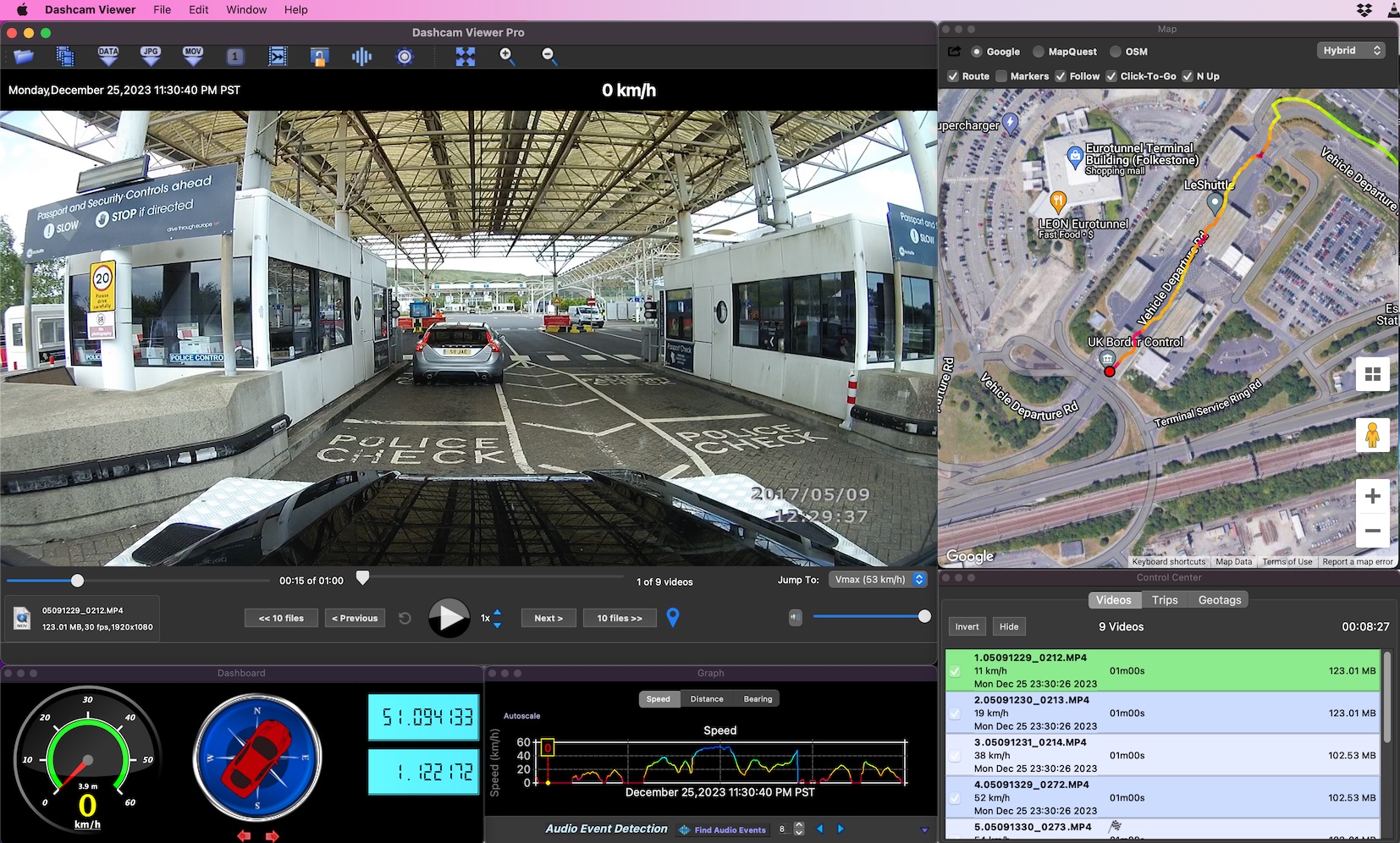
@Privateer Here's what I see in Dashcam Viewer v3.9.6 when I load the set of test files you sent me. All looks good:
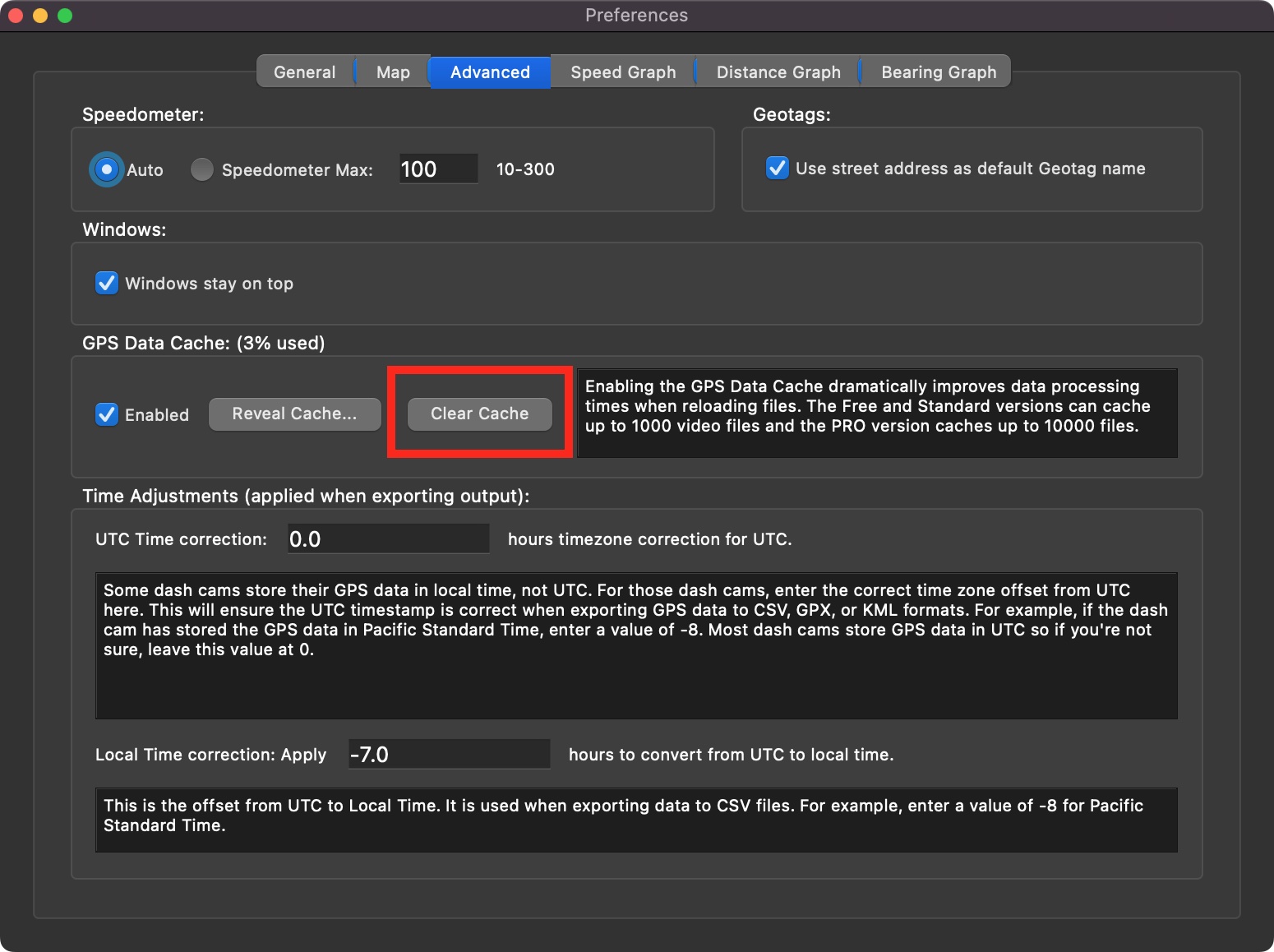
Your issue is probably related to caching of "bad" data for previous file loads. Try clearing the cache then reloading your video files. You can do this via the Advanced settings tab:
If you're still having trouble displaying the GPS data, please try the hard-reset procedure and see if it fixes the problem.
- John
Your issue is probably related to caching of "bad" data for previous file loads. Try clearing the cache then reloading your video files. You can do this via the Advanced settings tab:
If you're still having trouble displaying the GPS data, please try the hard-reset procedure and see if it fixes the problem.
- John
suji_modern
New Member
Drive recorder viewer 3.95-3.96ドライブレコーダービューア 3.95
vantrue E1 のデータでGPS データが読めません。
vantrue playerでは問題なく読み込めます。
I can't read GPS data with vantrue E1 data.
It can be loaded with vantrue player without any problem.
LateralNW
Well-Known Member
- Joined
- Nov 7, 2016
- Messages
- 1,979
- Reaction score
- 1,233
- Country
- Australia
- Dash Cam
- VArious
Uninstall and reinstall after a reboot.Drive recorder viewer 3.95-3.96
I can't read GPS data with vantrue E1 data.
It can be loaded with vantrue player without any problem.
This worked for me with the N5.
suji_modern
New Member
thank you for the advice.Uninstall and reinstall after a reboot.
This worked for me with the N5.
Reinstalling did not improve it.
There seems to be an error with the GPS data in dash cam player, but vantrue player can read it, so it doesn't seem to be a malfunction on the drive recorder side.
suji_modern
New Member
thank you for the advice.
Reinstalling did not improve it.
There seems to be an error with the GPS data in dash cam player, but vantrue player can read it, so it doesn't seem to be a malfunction on the drive recorder side.
In dash cam player, an error like the image appears.
OP
OP
- Joined
- Jan 17, 2014
- Messages
- 564
- Reaction score
- 1,029
- Location
- Orange County, CA
- Country
- United States
- Dash Cam
- Viofo A119V2, SG9665GC, SG9663DCPro + many more
@suji_modern Sorry for the trouble. It could be a change in data format due to newer firmware. Send me one of your raw video files and I'll take a look. You can send me large files using https://wetransfer.com. Thanks!
- John
- John
suji_modern
New Member
@traveler@suji_modern Sorry for the trouble. It could be a change in data format due to newer firmware. Send me one of your raw video files and I'll take a look. You can send me large files using https://wetransfer.com. Thanks!
- John
Video file uploaded
You can download it from this address.
Please verify.

GigaFile(ギガファイル)便
無料大容量 ファイル転送サービス GigaFile(ギガファイル)便!「3日~100日」選べる7種類のファイルの保持期限に加え、1ファイル300Gまでアップロード、共有可能!もちろん容量無制限でアンチウイルス装備。会員登録も不要です。
LateralNW
Well-Known Member
- Joined
- Nov 7, 2016
- Messages
- 1,979
- Reaction score
- 1,233
- Country
- Australia
- Dash Cam
- VArious
@travelerView attachment 70503
In dash cam player, an error like the image appears.
I have the same problem using the Vantrue N5. I have loaded 300 files and none have any GPS info showing however the video shows the speed of the car. ( I don' t have co-ordinates enabled.)
The Vantrue Nexus 5 Model N5 has had a couple of firmware updates and is currently at VT-ECK141
suji_modern
New Member
Were you able to download the video file?@traveler
Video file uploaded
You can download it from this address.
Please verify.
GigaFile(ギガファイル)便
無料大容量 ファイル転送サービス GigaFile(ギガファイル)便!「3日~100日」選べる7種類のファイルの保持期限に加え、1ファイル300Gまでアップロード、共有可能!もちろん容量無制限でアンチウイルス装備。会員登録も不要です。100.gigafile.nu
If you need multiple video files, upload additional files
OP
OP
- Joined
- Jan 17, 2014
- Messages
- 564
- Reaction score
- 1,029
- Location
- Orange County, CA
- Country
- United States
- Dash Cam
- Viofo A119V2, SG9665GC, SG9663DCPro + many more
@suji_modern Please use https://wetransfer.com to send me a pair of front/rear videos. See FAQ question #1 for details. Thanks!
suji_modern
New Member
@traveler@suji_modern Please use https://wetransfer.com to send me a pair of front/rear videos. See FAQ question #1 for details. Thanks!
I have uploaded the video file.
Thank you for your verification.
vantrue_e1_gps
3 files sent via WeTransfer, the simplest way to send your files around the world