ECOFLOW and Viofo

I suspect the voltage drop only happens when some "real" current flows through the diodes.
Bummer, now that you've mentioned this, I remember reaching a similar conclusion years ago working on another project: There needs to be actual current flow for the voltage drop to be realized.

I'm wondering if the diagram that @GPak posted for the R2 would work, but use the USB-C output with a 12v cable and bypass the need for the 12v to 5v regulator that is shown in the diagram. This might simplify things for you.

 
but use the USB-C output with a 12v cable and bypass the need for the 12v to 5v regulator that is shown in the diagram. This might simplify things for you.

The dash cam i am using is Thinkware U3000. It directly takes 12 V as input so 12 to 5 V regulator is not needed.
Either I can use the 12 volt socket or I would need to use special USB C to 12 volt cable.
 
The R2 will not shut down if the 12v utility port is enabled. I haven’t tested the USB-C port and the auto shut down function, perhaps @GPak has tested this port for shut down when your camera is off.
 
The R2 will not shut down if the 12v utility port is enabled. I haven’t tested the USB-C port and the auto shut down function, perhaps @GPak has tested this port for shut down when your camera is off.
Auto time out is not working with 12VDC enabled and it is also not working with USB-C/15V cable
(cable is requesting 15V and port is sensing it assuming something is connected even so there is no current draw)

Timeout is working with USB-A ports strait or with USB-A/12V converter if there is no power draw.
 
Last edited:
So the diodes arrived and it didn't work. The diodes passed through the 0.9 volt phantom voltage as is. I suspect the voltage drop only happens when some "real" current flows through the diodes.
Anyway I am completely changing my approach for using River 2 with for the dash cam.
Plan:
1. Ditch the hardwiring cable and connect the dash cam using the provided OBD2 cable.
2. Use my spare Optimate TM500 DC to DC trickle charger to trickle charge my car battery using River 2's 12 volt DC outlet (or USB C to 12 V cable). Max charging current is limited to 2 amps and in battery maintenance mode it would be even less.
3. River 2 would get charged via the cigarette socket. And River 2 will continuously trickle charge the car battery keeping it topped up (and in directly keep powering the dash cam.)
4. Set dashcam switch off voltage to a high voltage e.g. 12.8 volts so that in the rare care that River 2 gets fully discharged, car battery is safe.
I will probably be using an obd2 splitter to connect the dash cam and the trickle charger together to the OBD2 port.
Based on what I have read, OBD2 port supports 4 to 6 amps easily. The max current that will pass through the OBD2 port in this setup will be 2 amps (trickle charger) + 0.5 amp (Dash cam) and normally it should be much less.
Hopefully this setup will prolong my main car battery life as well.

This sounds a bit complicated, and personally I'm not a big fan of using the car battery, OBD2 or even fuse box.
Per specs, the TM500 will charge a car battery at 2A or about 25W, so it could drain the R3 pretty quickly, definitely overnight.
It could work, but I think manual control, switching the 12VDC on and off, and proper timing, would be critical in this case.

If you still have the previous setup, it might be worth considering getting ACC signal from another source, like the fuse box, assuming there's no phantom voltage there.

I also recorded a video of another possible solution, I think the video is easier to understand than trying to explain in a long post.
Here is a link for ferrites I used: https://www.amazon.com/gp/B01E6PLXZ0

 
Last edited:
This sounds a bit complicated, and personally I'm not a big fan of using the car battery, OBD2 or even fuse box.
Per specs, the TM500 will charge a car battery at 2A or about 25W, so it could drain the R3 pretty quickly, definitely overnight.
It could work, but I think manual control, switching the 12VDC on and off, and proper timing, would be critical in this case.

If you still have the previous setup, it might be worth considering getting ACC signal from another source, like the fuse box, assuming there's no phantom voltage there.

I also recorded a video of another possible solution, I think the video is easier to understand than trying to explain in a long post.
Here is a link for ferrites I used: https://www.amazon.com/gp/B01E6PLXZ0

Firstly, huge thanks for taking out the time to explain it is such detail. Very helpful!

I will order the ferrites and try out this option.

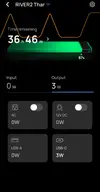
Meanwhile you are right, the TM500 does consume about 35 watts while trying to trickle charge the car battery. However once the car battery is nearly charged, it goes into top up mode where it sends pulses of 200 ma to top up the battery (shows up as 4 watts on ecoflow river 2). Once car battery is fully topped up, it switches to maintenance mode where it goes to sleep and wakes up every 30 minutes to check if trickle charge is needed and sleeps again.
It used about 5% of Ecoflow's capacity to top up before going into maintenance mode so it doesn't drain the Ecoflow unless your main battery was very low.
 
Last edited:
It looks like the TM500 is actually smart and much more capable than I originally thought.
So your latest idea of maintaining the car battery fully charged with River2 makes sense.

In fact, this is a completely new concept of using a Power Station for the Dashcam parking mode!
 
It looks like the TM500 is actually smart and much more capable than I originally thought.
So your latest idea of maintaining the car battery fully charged with River2 makes sense.

In fact, this is a completely new concept of using a Power Station for the Dashcam parking mode!
I have been using it for the last few days and it seems to work well.

I also have a 4G sim based wifi router attached to river 2 permanently to get remote alerts from Thinkware (and have the ability to monitor River 2 remotely.)

Since I am using thinkware U3000 in radar mode, it's consumption during parking mode is an order of magnitude lower than others. I have limited my River 2 to charge from the cigarette socket at 4 amps and my daily commute of about 20-25 minutes is sufficient to keep river 2 and car battery fully topped up.

Plus having the Car battery fully topped up at all times should help prolong it's life.

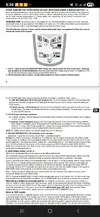
Screenshots: a) Section from TM500 User manual b) 200 ma pulse trickle charging in action (I am using USB C to 12 volt converter for TM500 input)

Note: I set River 2 to charge upto 90%.
 

Attachments

  • Screenshot_20250617_183815_OneDrive.webp
    Screenshot_20250617_183815_OneDrive.webp
    275.3 KB · Views: 127
  • Screenshot_20250617_190159.webp
    Screenshot_20250617_190159.webp
    34.3 KB · Views: 117
Last edited:
River3 - "Battery Charging High Temperature Protection" (Device Error Code 11) tripped at 53°C (127.4°F).

Today's high was 34°C (93°F)
Jeep parked in direct sunlight for about 4 hours (12:30pm to 4:30pm)
The cabin temperature was 58.2°C (136.8°F) and the River3 temperature in the back of my Jeep was 52°C (125.6°F)

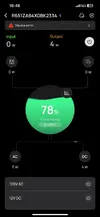
When I drove home, the R3 was charging fine at 8A, 90W. (see attached images 52C_*)
However, halfway through it reached 53°C (127.4°F) and the "Battery Charging High Temperature Protection" tripped. (see attached images 53C_*).

Note that this is a charging protection, so R3 stopped charging but continued to power the dash cams without interruption!

So, we now know that the 8A charging limit is 52°C (125.6°F).

I will continue testing the River3 to see if this limit is the same for 6A and 4A charging currents.
Also is there high temperature protection when discharging? (I hope not).
 

Attachments

  • 52C_1.webp
    52C_1.webp
    48.6 KB · Views: 143
  • 52C_2.webp
    52C_2.webp
    1.2 MB · Views: 129
  • 52C_3.webp
    52C_3.webp
    26.7 KB · Views: 146
  • 52C_4.webp
    52C_4.webp
    21.1 KB · Views: 128
  • 53C_1.webp
    53C_1.webp
    27.1 KB · Views: 129
  • 53C_2.webp
    53C_2.webp
    21.1 KB · Views: 122
  • 53C_3.webp
    53C_3.webp
    41 KB · Views: 141
Last edited:
Nice! It looks like you're getting more detailed data than I was able to get when my son's River2 failed. Overall temps were about the same: a few days in a row with temps in the 95-97F range with the EcoFlow sitting in a dark blue vehicle in the full midday sun. I think the failure that happened was related to the USB-A discharge circuitry. After the USB ports failed, I could still charge and discharge the unit and power things through the AC outlets an the 12v utility port. There might have been a high temp warning, but I never saw it. If that functionality exists in the River2, it would have happened on the drive home.

I'm presuming the 5v output regulators fried. That's the next test for the River3: Is the thermal sensor able to protect the USB voltage regulators? It seems like they are primarily intended to protect the batteries during charging.
 
Welcome to DCT @ankurthakurofficial !
And thanks for sharing your findings.
A well written post describing the hardware, the problem, the cause and possible solution, I can feel the handwriting of a fellow engineer. :happy:

At first I thought maybe your River 2 was faulty, so I checked my River2, River3 and River3Plus XT60 input terminals and here are the results:
River2 = 1.0V, River3 = 1.3V and River3 Plus = 0V (XT60i connector)
I then shorted these terminals through a multimeter to check if there was any current and there was none.
It appears that this phantom voltage on the XT60 input terminals is not creating any real reverse current.
However, it is apparently enough for the Thinkware dash cam and/or hardwire cable to detect it.
For Viofo dash cams this phantom voltage does not cause any issues with switching to parking.

Your solution using diodes on the Thinkware ACC input might work, but I'm not sure how much voltage drop you'll get if there's virtually no current flowing.
Please keep us posted with the result.

Another solution would be to install a reverse current protection diode on the River2 input, but that would require a more powerful diode, similar to what we discussed in DIY LTO Battery thread and I tested in Posts # 184, 192, 195:

https://dashcamtalk.com/forum/threads/lto-lithium-titanate-oxide-–-the-ultimate-battery-for-dash-cam-parking-mode-diy.50484/post-626430

Hi all. After googling around for days I finally bumped into my perfect solution, thanks to this thread and all the efforts Gpak and others have put in to it. I have a cabriolet in a public garage and therefore a requirement to have a dashcam in park mode for as long as possible (preferably 30 days+) on 1 battery. My (proposed) setup:
1. Thinkware U3000 with radar (using 12volt)
2. River 2 or 3 battery
3. Wire schema as proposed by Gpak via 10A cigarette outlet, whereby I use a split to connect the outlet to the battery as well as to the dashcam for the ACC connection (for triggering the park modus).

I have a couple of questions, hopefully you are able to help me.
1. @ankurthakurofficial : I am very curious to hear how long your standbye time would be in radar mode only without motion detection. Would you be so kind to share an indication with me?
2. @GPak : If I want an easy to use solution that works straight from the box, am I right I should order the River3Plus since it has 0V and hence: the ACC on/of will probably work without any modifications then?
3. @GPak: do you perhaps know if it would be possible to somehow make the time-out function work with the river3plus given the circumstance that the U3000 needs 12V? Do you know how?
4. UPS of <10ms or <20ms (does not really matter for dashcams I guess?

Hopefully you are able to help me out, I will definitely share my results with you.
 
Hi all. After googling around for days I finally bumped into my perfect solution, thanks to this thread and all the efforts Gpak and others have put in to it. I have a cabriolet in a public garage and therefore a requirement to have a dashcam in park mode for as long as possible (preferably 30 days+) on 1 battery. My (proposed) setup:
1. Thinkware U3000 with radar (using 12volt)
2. River 2 or 3 battery
3. Wire schema as proposed by Gpak via 10A cigarette outlet, whereby I use a split to connect the outlet to the battery as well as to the dashcam for the ACC connection (for triggering the park modus).
Welcom to DCT @BurnJ !

The River2/3/Plus has a regulated DC and USB output, WiFi and Bluetooth, BMS, LEDs, etc.
All of this requires power, resulting in a self-discharge of about 1-2W.
So if you disable the timeout, the River3 will theoretically self-discharge to 0% in about a week, although I haven't specifically tested this.
Therefore for 30 days of parking, you'll need a much bigger power station, perhaps around 1200-1500Wh.
2. @GPak : If I want an easy to use solution that works straight from the box, am I right I should order the River3Plus since it has 0V and hence: the ACC on/of will probably work without any modifications then?
I just rechecked the River3 Plus to verify 0V on the XT60I input port, but this time it measured 3.9V!
I am not sure why the difference? Maybe the R3 Plus was off the first time I measured it, and I didn't notice?
Based on this, I updated my previous post to show 3.9V, and sorry for the confusion.
However, it is still a phantom voltage with no current.

I then tested several reverse current protection diodes, and most of them did not completely block this phantom voltage with no current, except for the 50A diode linked and recommended by EricSan:
https://www.aliexpress.us/item/3256803210621611.html

So in order to use any Ecoflow River directly with the U3000 DVR, you will need to use the diode mentioned above or use another clean ACC power source such as a fuse box or another ACC powered port if available
3. @GPak: do you perhaps know if it would be possible to somehow make the time-out function work with the river3plus given the circumstance that the U3000 needs 12V? Do you know how?
The time-out works with USB-A port strait or using USB-A/12V converter cable similar to this:
https://www.amazon.com/gp/B0C1C848DD
Be sure to test these 5V to 12V converters before installing them in your vehicle to ensure there is no power/voltage starvation when used with the U3000.
4. UPS of <10ms or <20ms (does not really matter for dashcams I guess?
Hopefully you are able to help me out, I will definitely share my results with you.
The UPS function only works with AC input, so it is useless for dashcams, and River2/3 AC output should be disabled at all times to minimize self-discharge.
 
Thanks a lot for your help Gpak. It's not that I do not want to use the time-out. It's more that I am just concerned the time-out will never be enabled (even when using your recommended 5V-12V converter) because the U3000 radar will continuously use/need a little bit of power. The only way I can think of to solve this, is to put a smaller "day battery" in between and charge that battery daily on a schedule with the main battery. The man battery can then be in time-out except for the period it has to charge the extended battery. Do you perhaps know if such a setup can be achieved with the Ecoflow River 3 Max with additional extended battery?
 
Using a 10mA resolution electronic load, I tested the River3 Plus with a USB-A/12V converter cable to determine the minimum current draw that the R3 Plus would recognize to prevent it from time-out.
The minimum current draw recognized by R3 Plus is 130mA, which is equivalent to 1.56W at 12V output.

-So if the dash cam draws less than 130mA, then the R3 time-out can be used to control the parking duration (30min, 1h, 2h, 4h, 6h, 12h, 24h, never)
Note that the time-out might re-set after each recording event triggered by radar motion detection, although this need to be tested!
-Alternatively, you can disable the time-out entirely (set to never), and control the parking duration directly by the dash cam (an existing setting for the Viofo, not sure about U3000).

As for the additional “day battery” – I think it is an unnecessarily complicated and high maintenance setup.
It might work, but I personally prefer the “set it and forget it“ concept.
 
Last edited:
Thanks a lot Gpak. Interesting. The Thinkware U3000 uses around 16mA/0.22 watt in park mode with only the radar activated, so according to your measure it should NOT go out of time-out mode. Good news! I will buy the equipment and let you know the outcome in practice!
 
Just wanted to make sure you are aware of the limitations of the USB-A port (voltage drop) as shown in post #185.
USB-A to 12V converters require some power to run, farther contributing to USB-A port voltage drop.
Also, converters may drop the 12V output voltage even faster due to the voltage drop on the USB-A port and overheat.

There are many different USB-A to 12V converters, finding the good/efficient one is going to be a challenge, the link that I provided is for reference only, I have not tested it, that is why I said "similar".

If you are going to use the U3000 in single-channel mode, then I think the USB-A to 12V converter will work, dual-channel is questionable, and three-channel is probably not going to work.

I recommend a USB-C to 15V or 12V converter cable, but unfortunately the time-out feature does not work with USB-C converters.
 
How is everyone mounting the Ecoflow in the car?
 
How is everyone mounting the Ecoflow in the car?


my old car was simple. i had 4 lashing points under the carpet. so i used a ratchet strap to tie it down on one of them

my new car has nothing 🙁

at the moment im using the back of the seat hooks that you use for the child seats, just a bungee cord round the front with 2 empty plugs plugged in to i don't damage the USB sockets
i will be putting Velco (heavy duty ones) underneath in September when my new alarm is fitted
 
How is everyone mounting the Ecoflow in the car?
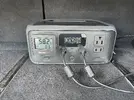
The River 3 is currently in my trunk, attached to the carpet with two 3-inch wide Velcro strips.
The attachment turned out to be very strong, and it takes a lot of force and effort to pry the R3 off the carpet.
 
Back
Top