Mobius Maxi 4K Action Camera / Dashcam

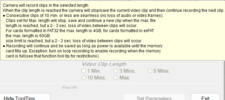
I'm not clear why you are shooting 1920 x 1080 (1080p) 30fps of a 4K camera at medium quality. I'm sure you have your reasons.

The first thing I would try is a different memory card perhaps at least 64 GB or even 128 GB and use something other than the EVO PLus. The Maxi 4K may not like the Samsing EVO PLUS. This may be more than you need but it "may" fix your problem.

Then I would try different settings. Have you tried shooting at different resolutions? You should. See what happens. Try the default 4K the camera was built for, for example, and then other resolutions. Same with video quality. Troubleshooting is a process of elimination, so try one step at a time and then change the next parameter.

okay. I have 64gb's available. This was not an issue last time I used the cams the prior weekend. Same cards in the cameras. Also, the resolutions all match each other at the 1920x1080 (1080p) 30fps. The three cams all end up at the same use and free space this way. The video software likes all resolutions to be same. The extra resolution of the Max would be nice, but the vids are quite acceptable and the file sizes of each race pretty easy to work with.
 
It's file system limitation.
FAT32 file system allows to store files up to ~4GB.

You can format the card to "exFAT" file system which stands for extended FAT and allows to store files larger then 4GB.

The Mobius supports only those 2 file formats.

I recommand using "sd format" or "minitool partition magic" software. It's free.

Edit: the MM4K built in format may format cards larger than 32GB to exFAT but I'm not sure, need to check documentation.
 
okay. I have 64gb's available. This was not an issue last time I used the cams the prior weekend. Same cards in the cameras. Also, the resolutions all match each other at the 1920x1080 (1080p) 30fps. The three cams all end up at the same use and free space this way. The video software likes all resolutions to be same. The extra resolution of the Max would be nice, but the vids are quite acceptable and the file sizes of each race pretty easy to work with.

You asked for some advice so I offered a couple of troubleshooting ideas such as trying the default resolution as a test to see if anything changes with your issue. I wasn't suggesting you necessarily leave it at 4K if you wanted to shoot at 1080p.
Also the Samsung EVO Plus is not known to be a good match for the Maxi 4K so I suggested changing that too. 64 GB or higher would also be a better match for your camera.

Unless you are willing to do some methodical troubleshooting steps you will not likely figure out what your problem is.
 
It's file system limitation.
FAT32 file system allows to store files up to ~4GB.

You can format the card to "exFAT" file system which stands for extended FAT and allows to store files larger then 4GB.
👍

1694002552014.webp
 
New member here. I hope this is the right forum for this. I just bought a Mobius Maxi 4k for a motorcycle dash cam application and have run into problems and I'm trying to figure out how the rest of you are powering this thing. I've been in communication with Peter at Mobius to work though this. My new moto has a built-in USB-C port, and since the Maxi 4k says it has a "USB-C interface" I thought I could just power it directly from the port and I'd be good. But this is not true. The port on the camera does not use the full C wiring, and it has no idea what to do with itself with a C-to-C cable. I assume the rest of you are using USB-A ports from, say, a 12V cig lighter charger, plus an A-to-C cable? Is this common knowledge? The owner's manual has some info on this, but who the heck reads the manual BEFORE buying the camera? Anyway, I cannot make this work on my bike without abandoning the USB-C port and wiring the camera in some other way, which is frustrating. Some help would be appreciated, and maybe others can use this as a cautionary tale. The USB-C port on this camera is C only in form factor. There is zero USB-C functionality built in. I cannot get a C-to-C cable of any variety to work with the camera - either with a PC, or with a car charger. I couldn't find any mention of this in the forum but maybe I just missed it.
 
Yo.
I found out about it in a similar way when I used usb-c charger in my car.
The usb-c connection does not provide voltage unconditionally like type A does.

I think the easiest solution is to use C-> A + A->C cables.

The type A cable should have the required hardware in it to require 5v from the charger (otherwise nothing that you plug in to the A side will work).

Or use a battery version and charge it.


I also found out the vibration from the motorcycle causes waves in the footage.
I eventually mounted it on the helmet (battery version).
 
Yo.
I found out about it in a similar way when I used usb-c charger in my car.
The usb-c connection does not provide voltage unconditionally like type A does.

I think the easiest solution is to use C-> A + A->C cables.

The type A cable should have the required hardware in it to require 5v from the charger (otherwise nothing that you plug in to the A side will work).

Or use a battery version and charge it.


I also found out the vibration from the motorcycle causes waves in the footage.
I eventually mounted it on the helmet (battery version).
Hey thanks for the quick reply. I'm glad I'm not the only one who struggled with this. So I tried the Mobius-supplied C to A cable with their A to C adapter, and it won't work on my bike because apparently the port has some communication capability (not sure what for, exactly--the owner's manual doesn't say). Anyway, the camera connects and thinks I've just plugged it into a host and goes into storage device / webcam mode. I do not see a way around this. I think I'm down to adding more wiring, which I didn't want to do. The bike is new, and under warranty. My hope for an easy solution is dying. I may send it back and go with a helmet mount.
 
As far as I remember the camera enters "pc mode" because the data wires are connected.

You can try mutilating one of the usb cables to short the data pins. Shorting the data pins will tell the camera its plugged into charging only device.
 
That's interesting. They sell data-blocking USB cables that have the pins disabled. I will look into that.
 
it won't work on my bike because apparently the port has some communication capability (not sure what for, exactly--the owner's manual doesn't say).

This is the normal and anticipated behavior when using a data cable. When connecting the camera with a "data cable", it is seen as a "volume" (basically as a hard drive or card reader) when connected to a device like a computer or a smartphone.
You probably need to find a USB-C "power cable" that does not have the data connections or modify an existing data cable.

Some years back, I had the same issue with an aftermarket cable I was using to hook a Mobius 1 camera up to a power bank because the bank thought the camera was a hard drive. I carefully split the cable open with an Xacto knife and cut the data cables, leaving the power cables intact and then resealed the sheathing with electrical tape. This solved the problem.

I don't know if the pin-out diagrams are available for the Maxi 4K nor am I yet familiar with how the wiring inside a USB C cable works as I have never cut one open before, but the following images from a traditional USB-A to Mini-B cable show how this works and this will explain the concept. I think the color coding may likely be the same on a USB - C cable.

USBpinouts.png


mobius-pin-outs.jpg
 
Last edited:
Thanks! I just ordered a USB-C to C data blocking cable that shows it has only the two power wires connected. It should arrive in a few days.
 
Great, that's exactly what you need. Should resolve your problems.
I got a reply from Peter @ Mobius; I'll repost here in case someone finds it useful: "I am not sure if you got one of our Mobius 1 cameras. We built TV out in the Mini USB port from beginning. Our upgraded models all have TV out, and even more features, as requested by the users. Many users suggest we should use USB C, and we used USB C in the Maxi 4K camera for more extra pins. The camera supports USB2.0, and it only needs DC, GND, D+, and D- four pins. We used the other pins for other features. We did not alter the pins of DC, GND, D+, and D-. The standard Type A to Type C USB2.0 USB cables should work. C to C cables normally has detective pins (to check if it's USB3.0 or above, or detecting voltage level for something like DP charger), we don't have corresponding pins, they stop providing connection."
 
It's still not clear to me what you need to make this work with the C-port on your bike. Hopefully the USB-C to C data blocking cable you ordered will work for you.

Another unrelated consideration you need to check into is the current output of your bike's USB-C port. Many vehicles including some bikes have a USB port that outputs only 500 mAh, but the camera requires a minimum of 1000 mAh (or more). Many people on the forum have reported issues when they try to use their vehicle's USB ports and the lower current level turns out to be the problem. Many newer vehicles seem to come with higher amperage USB ports than previous models so you may be fine but I wanted to make you aware of this potential problem.

If all else fails, you may want to consider a power bank to run the camera. You'd just need to secure it somewhere and charge it now and again.
 
Hello, would anyone have a reading of the internal memory of the MM4K to program my bricked camera with a CH341? Thank you
 

Attachments

  • IMG_20240708_210648.webp
    IMG_20240708_210648.webp
    316.2 KB · Views: 154
Back
Top