Reviewing and Testing the new Vantrue N4S Dashcam

EricSan

Well-Known Member
Joined
Dec 28, 2023
Messages
1,408
Reaction score
1,065
Location
Central PA
Country
United States
Dash Cam
There are ALWAYS user serviceable parts inside!
I recently received a very kind invitation from Wendy at Vantrue to review their brand new Nexus 4S Dashcam. A big "Thank you!" to Wendy, Jeff, and the Vantrue team for sending me this camera to review. It arrived in the mail earlier today.

My other Vantrue dashcam reviews can be found here: E360, E1 Pro, N4S, S1 Pro Max, N4 Pro S, N5S
Vantrue Power (non-dashcam) Product Reviews: T800 Compressed Air Duster, TS2 Thermal Camera for iOS/Android

Features:
- 3-channel HDR Clear Recording
- Triple STARVIS 2 IMX675 CMOS Sensor
- Exclusive PlatePix™ Technology
- Compatible with LTE Module
- IP67 Water-resistance (for the rear camera)
- 10s Pre-Recording Buffered Motion Detection
- 5GHz WiFi & Free App
- Smart Voice Control
- 24/7 Parking Mode
- Built In Dual-Sys. GPS Logger

Voice Commands:
- Take Photo
- Video Start
- Turn On Audio
- Turn Off Audio
- Turn On Screen
- Turn Off Screen
- Turn On WiFi
- Turn Off WiFi
- Lock Video
- Show Front Camera
- Show Rear Camera
- Inside Video On
- Back to Homepage
I have verified that all of the voice commands work as expected.

Maximum Resolutions Are as Follows:
- Front camera only: 2592x1944P 30FPS, 16.0Mb/s
- Front + Cabin Cameras: 2592x1944P + 2592x1944P 30FPS, both 16.0 Mb/s
- Front + Cabin + Rear Cameras: 2592x1944P (16.0 Mb/s) + 2592x1440P (14.3 Mb/s) + 2592x1440P (14.3 Mb/s), all 30 FPS

Given the above specs, I assume the performance of the N4S camera will be a mix of the resolution and MPG engine from the innovative E360 and the new PlatePix technology from the excellent E1 Pro.

Camera angles:
- 158 degree angle front camera
- 160 degree cabin camera
- 160 degree rear camera

There is support for 32GB-1TB micro SD cards as well as for the LTE module (each available separately).

Nexus 4 S Manual and Firmware Download page:

Like other Vantrue dashcams, the Nexus 4S uses super capacitors that provide 3-4 seconds of runtime after power is removed from the camera.

As with other Vantrue cameras that I previously reviewed , the packaging materials are excellent. Good thing, too! This time around, my shipping box was damaged upon arrival. The damage was sufficient to make it through the shipping box and into the product packaging as well. More on this later.
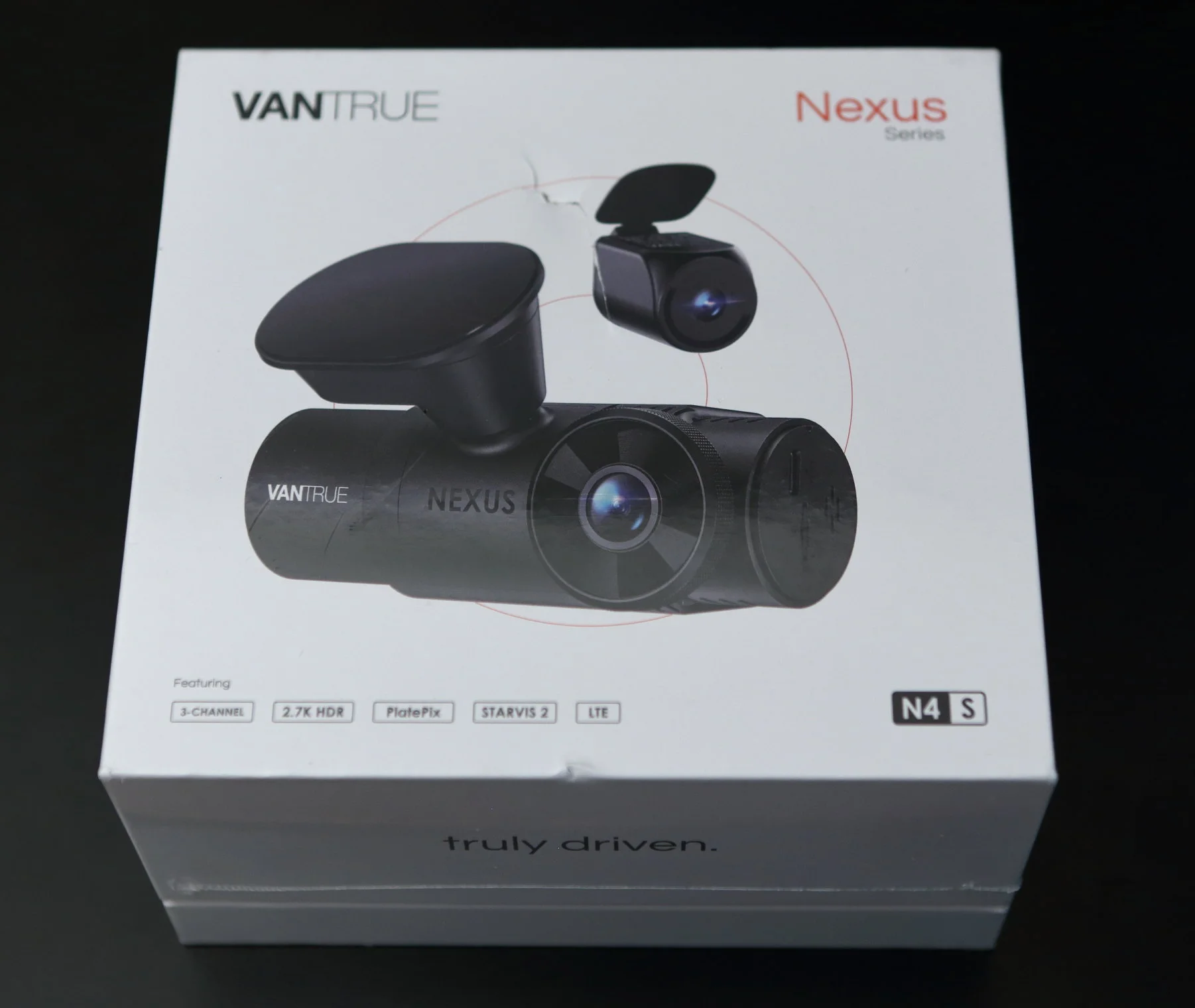
IMG_14891.webp


The usual foam inserts hold everything snugly inside the box:
IMG_14894.webp


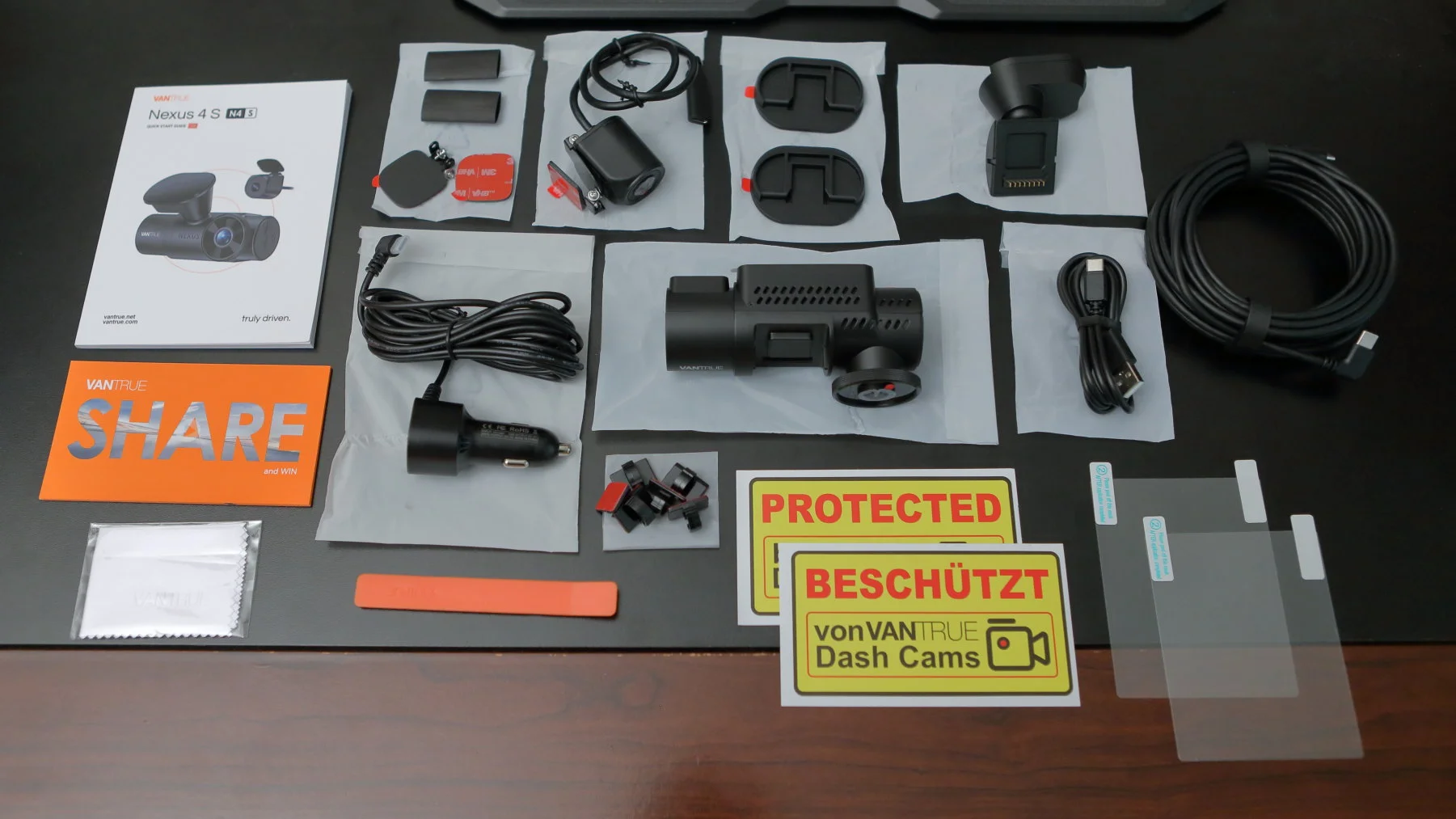
Below is everything that is included in the Nexus 4S box:
IMG_14907.webp
 
Last edited:
Here is an image of the shipping box as it arrived at my house earlier today. Looks like something heavy with a sharp edge was dropped on the box. Whatever it was made it through two separate layers of corrugated cardboard...

IMG_14889.webp


...and then all of the way through the product box as well. Here is the inside of the product box:
IMG_14892.webp


Fortunately, the next layer inside the box was the user manual, which showed no signs of impact at all. Great job, Vantrue!
IMG_14893.webp


This illustrates the value of sturdy product packaging. There is no accounting for what happens once the product gets shipped... In this case, all is well.
 
This is the main camera module for the Nexus 4S. The dent in the front is the magnetic mounting location for the GPS/windshield mount. You can also see the trademark Vantrue bulls-eye lens. This lens is exactly the same size as the lens on the E1 Pro camera, so the same circular polarizer will fit fine. Also obvious are lots of ventilation holes on the top.

IMG_14899.webp


The rear of the camera features the orange on/off push button switch on the left, a wide aspect ratio screen in the middle, and the cabin camera on the right. The symbols on the orange on/off switch are illuminated for easy access during night driving. This is a nice touch! A quick press of the power button makes an image and locks the current video whereas a long press turns the camera off.
IMG_14900.webp


This is the left side of the camera. You can see the USB port that powers the rear camera, the micro SD slot, a recessed reset button (that I've never had to use on any of my Vantrue cameras) and what I'm guessing is the speaker behind the four vertical slots. I do appreciate the vertical alignment of the USB-C slot to orient the cable toward the headliner, but I would appreciate more if all of the USB cables attached to the same general area on the camera to keep cable clutter a bit more neat when the camera is installed.
IMG_14901.webp


Below is the right side of the camera that contains the cabin camera and, of course, the camera model.
IMG_14902.webp


Here is the bottom of the camera, which features four buttons (the screen is not a touch screen).
The button on the left toggles record mode with a quick press and turns the screen on/off with a long press.
The second button toggles the microphone on/off with a quick press and toggles parking mode with a long press.
The third button switches among the active camera combinations with a quick press.
The fourth button activates the menu with a short press and toggles WiFi mode with a long press.

These buttons also serve as menu navigation. You can also see lots of ventilation holes, the microphone, and the serial number that I blurred.
IMG_14903.webp


The top of the camera features lots more ventilation holes to help keep the circuitry cool.
IMG_14904.webp


And finally, here is the screen that faces the cabin. Compared to the E1 Pro and the E360, the screen on the N4S is pretty large, measuring 40mm wide by 30mm high.
IMG_14912.webp


The cabin camera on the right has four IR LEDs built in, one in each corner around the lens. These can be controlled with the app and can be set to AUTO, ON, or OFF. It's funny to see how much dust there is when you shine a bright light on things for a closeup image 😉
IMG_14941.webp
 
Last edited:
The windshield mount houses the GPS unit and also has the USB-C power input adapter. It features a magnetic mounting plate that holds the camera VERY firmly. It's so firm that it took me a while to figure out how to disengage it from the camera again! Turns out, you just pull it straight out from the camera...

IMG_14916.webp


There is a fair degree of movement available in the swivel clip. Here is an image with the mount swiveled as far down as possible.
IMG_14919.webp


And this time swiveled up as far as possible:
IMG_14920.webp


The mount will also swivel left and right, which I REALLY appreciate because it seems that no matter how hard I try, I never get my Viofo camera quite level with the road when I install it. If the windshield of your car is very vertical or very slanted, you might not be able to angle the camera enough to get a level view of the road. I'll do an installation in the next day or two to see how things go.

You can also rotate the cabin camera up or down by a fair amount. Here are two images with the cabin camera tilted to its extremes. This first image is with the cabin camera tilted fully upward, about 45 degrees...
IMG_14921.webp


...and then fully downward by another 45 degrees, for a total of 90 degrees of movement.
IMG_14922.webp
 
Last edited:
Here is the rear window camera. It is new design that allows mounting either inside the rear window or, due to its IP67 water resistance, it can be mounted on an external surface of your vehicle. The built in cord for the rear camera is ~50cm/20in long and features a USB-C female connector.
IMG_14898.webp


Here is another view of the unique mounting bracket for the rear camera. There are two hinges and each has a full 180 degrees of movement to it, so you can mount the rear camera on virtually any surface with any orientation. There is even a menu setting that allows you to flip the image before it gets recorded.
IMG_14915.webp


The rear camera bracket folds up completely flat on top of the camera and opens up nearly completely flat as well. Here is a side view.
IMG_14930.webp


It does not appear that the rear camera will accept a circular polarizer:
IMG_14931.webp


IMG_14917.webp


Here is a better view of the USB-C female plug. If you are mounting this on an exterior surface of your car, you'll need to undo a trim piece and run the wire under the trim. The USB-C connector is fairly large.
IMG_14936.webp


IMG_14935.webp

One of the little pouches contains an additional mounting plate for the rear camera and it comes with a pad of 3M VHB already attached, plus one spare adhesive pad. Both pads have a nice little pull tab as you can see. It is difficult to overstate the value of those little pull tabs. If you've ever cut and placed your own VHB, you've no doubt struggled with separating this stuff like I have. It's infuriating, hence my appreciation for the pull tab!! There are also a spare set of mounting screws and two lengths of shrink wrap if you choose to install the rear camera on the outside of you car (it has IP67 water resistance).
IMG_14897.webp
 
Last edited:
Like the E360 Pro camera, the N4S windshield mount comes with TWO detachable clips that stay put on the windshield, enabling you to easily move the N4S between two different cars with ease. As is customary, 3M VHB has already been applied and comes with a handy pull tab for easy installation. While they look similar, the clip that mounts to the windshield for the N4S is slightly different from the adhesive windshield mounts for the E360 camera.

The windshield mounting plate (on the left in the image below) for the N4S camera is highly similar to, but slightly more rounded than the one from the E360. The N4S mount will "click" into place for both the N4S and the E360 GPS mounts. However, the windshield mounting plate from the E360 fits the N4S GPS mount, but won't click/lock into place.

Also, I appreciate that Vantrue changed the 3M adhesive for the windshield mount from light grey to BLACK. This blends in better and provides a cleaner look from the outside of the car.

IMG_14905.webp


The utility outlet power cord is a new design. The power adapter that came with the E1 Pro and the E360 had a removable tip that revealed a replaceable fuse. This newer utility plug does not appear to have a tip that unscrews, though I am told there is indeed a fuse inside. I need to ask how to access the fuse because it's not obvious...

You can also see the current ratings of 2A for the USB-A port and 3A for the USB-C cable that plugs into the camera's GPS unit. The USB-C cable measures 11.5 feet, so it has plenty of reach.
IMG_14910.webp


There is still the nice green LED to show that adapter is indeed receiving power.
IMG_14911.webp


Placing the "original" utility plug from the E1 Pro (which is identical to the one that shipped with the E360) next to the "new" utility plug that shipped with the N4S, some additional physical differences emerge. The image below highlights these difference. The new plug features a slightly tapered barrel shape - it is more narrow at the tip than at the base where the wire attaches. This new plug is also more narrow than the original plug by a small, but meaningful, amount. Further, the electrical spring tabs on the new barrel are more narrow by more than one full mm. The end result is that the newer utility plug does not fit as snugly or as securely into the utility port. When I insert the older, original plug, it goes in and stays in, exactly where I put it. It requires a bit of force both insert and remove it from the utility port. When I insert the newer plug that came with the N4S camera, it is much more loose in the socket and when I fully seat it, the spring loaded tip pushes it back out a little bit. This could be a problem if the utility plug wiggles itself loose due to vibrations in the car that result in the camera losing power and shutting down. You might not necessarily notice this as you are driving and have the radio on.

IMG_14932 Meas.webp


Needless to say, I prefer the original design because it seats itself much more securely in my car's utility port.
 
Last edited:
The last divider box contains some adhesive windshield clips to keep the wires in place for those that don't want to play with removing A-pillar pieces, the now familiar 1m/3.3foot USB-A to USB-C power cable, a 20-foot USB-C cable that connects the front camera to the rear camera, and an orange plastic crow bar for lifting vehicle trim pieces and/or tucking wires into hard to reach places.
IMG_14906.webp
 
And finally, here are some family portraits featuring the E360 (left), the new N4S, and the E1 Pro (right) so you can get a sense of their relative sizes:
IMG_14925.webp


IMG_14927.webp


I think I mentioned this above, but the forward lens on the N4S and the E1 Pro are identical in size, so the 40mm Vantrue circular polarizer will fit both of them.
IMG_14928.webp


Special and sincere thanks, again, to @Jeff_Vantrue and the rest of the Vantrue team for being so very generous and sharing their cameras with forum members and for trusting me with another evaluation!

Before installing this one in my car (I need a hardwire kit and a polarizer lens), I'll do some power measurements. I just altered my DIY LTO parking battery to add a 12-15v output so I can connect the hardwire kit and see how the transitions into and out of parking mode go.
 
Last edited:
The utility outlet power cord looks like a new design. The power adapter that came with the E1 Pro and the E360 had a removable tip that revealed a replaceable fuse. This newer utility plug does not seem to have a fuse. I'm wondering if there is an auto-reset linkage inside or if there is just no fuse this time around? You can also see the current ratings of 2A for the USB-A port and 3A for the USB-C cable that plugs into the camera's GPS unit. The USB-C cable measures 11.5 feet, so it has plenty of reach.
There is indeed a fuse inside.
 
Did you test out the N4S with a Modem / LTE connectivity?

I am being mailed this camera and will test out the LTE Capabilities once I receive it.

Great closeup photos! How's video quality on the N4S?
 
I don't have the modem/LTE module. I'll do a temp install in the car until the hardwire kit arrives so I can make some videos and images within the next few days.
 
So here are some early results of looking at stills from the N4S camera and a few comparisons to my Viofo 139Pro camera. I'm clearly not as sophisticated as some others are here, so my first set of comparisons uses screen caps from a notebook computer with display resolution that is less than the resolution captured by the cameras.

This first set of images compares frames from the Viofo A139Pro and the Vantrue N4S, both while I was sitting waiting to make a turn. Traffic is passing by at about 40-45mph. Note the nice freeze frame (crisp, clear details) from the N4S. The Viofo image is rather blurry in comparison. It's curious to note that the Viofo image is brighter, but has a polarizer installed.

This one is from the Vantrue N4S set to 2592x1944 (its highest resolution), HDR on, PlatePix on, no polarizer:
N4S Passing Red Truck.webp


This one is a similar capture from the Viofo A130Pro set to 3480x1600 resolution with HRD on and a circular polarizer installed:
Viofo Passing Red Truck.webp


Next up is a crop of a license plate as I drove by. The first image is the full frame from the N4S (HDR and PlatePix both on, no polarizer):
N4S Pickup Truck Full Frame.webp


From this same image, here is a 100% of just the license plate from each camera. I was moving at about 15-20 MPH at the time. The crop from the N4S is much easier to read and features much less motion blur:

N4S (HDR on, PlatePix on, no polarizer):
N4S Pickup Truck Plate Crop.webp


And the same crop from my Viofo A139Pro (HDR on, polarizer installed):
Viofo Pickup Truck Plate Crop.webp


Here is another comparison crop of the car in front of me while both of us were stopped at a traffic light. Overall contrast and plate readability are much nicer with the N4S.

N4S (HDR on, PlatePix on, no polarizer):
N4S Blue Subaru at BN crop.webp


And the same crop from my Viofo A139Pro (HDR on, polarizer installed):
Viofo Blue Subaru at BN Crop.webp
 
Last edited:
I need a little bit of help interpreting the next comparison because I'm not exactly sure what is going on with the aspect ratio of the playback. To set the stage, I'm using my laptop computer that has a maximum screen resolution of 1920x1200 (less than the resolution of either camera that I'm using right now).

This first image is from the N4S with resolution set to 2592x1440 resolution and displayed in VLC player with its "Original" 16:9 aspect ratio:
N4S 2592x1440 Original AR.webp


However, when I change the N4S resolution to its maximum setting of 2592x1944, I get a horizontally squished image upon playback that does not look natural in VLC player with its "Original" 4:3 aspect ratio:
N4S 2542x1944 Original AR.webp


In order to see the 2542x1944 higher resolution image without it looking like it's been put in a vice and squeezed, I changed VLC Player to display the video with a 16:9 aspect ratio. This is what I get then, which looks closer to "normal" to me, but still not quite right...

Until I figure this out, I'm likely to use 1440P resolution because it seems more easily readable.

N4S 2592x1944 16x9AR.webp


At first, I thought this was an artifact of my laptop's display resolution, so I switched to using my desktop computer with a native screen resolution of approx 2500 by 1400. When I compare the two videos there, I see the very same results. It doesn't matter if I use VLC or the Vantrue player.

Any insights on why the horizontally-squished-appearance of 2592x1944 resolution image? Technically, it's displayed correctly with a 4:3 aspect ratio, but the image doesn't look right to my eye and details aren't any more sharp...
 
Last edited:
The reason that I made the comparison images above is because I was curious about how the N4S handled the difference between its highest and next-highest vertical resolutions.

The Viofo A139A's two highest vertical resolutions are 2160P and 1600P. When I select 2160P, I tend to get lots of footage of the sky (which I don't need) and lots of footage of my dashboard (don't really need that either). So, switching to 1600P essentially crops the top and bottom of the Viofo image, making it look letterboxed.

Here is the same image as above from the A139 Pro with 3480x1600 resolution:
Viofo 3480x1600 Crosswalk.webp
 
Overall impressions so far are very positive! Image quality is, as I expected, excellent and will improve when dash reflections are removed with a circular polarizer. The N4S produces noticeably more sharp images than my Viofo with more contrast and better frame-to-frame clarity. Videos are clear and smooth, I see no evidence of dropped/duplicated frames in any of my recordings so far. I need to move the N4S to another car to compare image quality to the excellent E1 Pro.

So far, my running list of things that I don't like as much is as follows:
1) The USB-C power input on the GPS unit and the USB-C connection to the rear camera are on opposite ends of the camera. Having wires sticking out on opposite sides makes the install look a little more cluttered than it would if all of the cables came out the same side of the camera.
2) The new utility port power adapter does not grip the utility outlet as firmly as its predecessor. So far, I've tried it in three different cars (Ford, Toyota, and Volvo) as well as my EcoFlow River 2 power station. In all cases, the spring loaded tip pushes the barrel back out of the socket more than I'd like it to.
 
Last edited:
Here are a few comparisons of resolution, bit rates, and file sizes for maximum resolution files in drive mode:

Viofo A139Pro Front Camera: 3840x1600 resolution, 30FPS, 45.9 mb/s, 1,019,730kB per 3mins of record time
Viofo A139Pro Rear Camera: 1920x1080 resolution, 30FPS, 16.4 mb/s, 369,119kB per 3mins of record time

Vantrue E1 Pro: 3840x2160 resolution, 30FPS, 31.9 mb/s, 473,088kB per 2mins of record time

Vantrue E360 Front Camera: 2592x1944 resolution, 30FPS, 16.0mb/s, 358,436kB per 3mins of record time
Vantrue E360 Rear Camera: 2592x1944 resolution, 30FPS, 17.3mb/s, 387,024kB per 3mins of record time

Vantrue N4S Front Camera: 2592x1944 resolution, 30FPS, 16.0mb/s, 356,352kB per 3mins of record time
Vantrue N4S Rear Camera: 2560x1440 resolution, 30FPS, 14.3mb/s, 317,440kB per 3mins of record time

Here is some data from parking mode:
N4S Parking Mode Bitrate: All 3 cameras set to low bit rate
Each camera: 1920x1080 15fps, 4,915kb/s, 3min video = 112,640kb

A139Pro Parking Mode Bitrate:
Front: 4,092kb/s, 2560x1440 at 30fps = 96,621kb
Rear: 3,932kb/s, 1920x1080 at 30fps = 93,000kb

Judging by file sizes, it looks like the E360 and the N4S cameras share the same or very similar image processing algorithm/specs along with the same sensor.
 
Last edited:
@EricSan

Try disabling HDR in the daytime on the A139 Pro. It is meant for night video which is why the Auto setting picks those hours.

I surmise some of the motion blur may be related to HDR enabled, as HDR tries to capture multiple images of objects to enhance license plate readability.
 
Try disabling HDR in the daytime on the A139 Pro.

Gotcha! Here is another comparison between the Viofo and Vantrue, both with the HDR feature disabled. The advantage is still clearly in Vantrue's favor. The freeze frame of the wheels is nearly perfect and the "Patriot" logo is sharp and clear with the N4S. Both are blurry with the Viofo. Overall exposure on the Vantrue is a bit better (though tending toward under exposure) than the Viofo (which tends toward over exposure). Both have exposure compensation adjustments that can be tweaked in the app. This car is passing by at about 30-35mph.

Vantrue N4S PlatePix on, HDR off, no polarizer:
Vantrue N4S PlatePix on HDR off.webp


Viofo A139Pro, HDR off, polarizer installed:
Viofo A139Pro HDR Off.webp
 
Last edited:
Like the E360 dashcam, the N4S features 6-digit GPS location data that is overlaid on the recorded video. Six digit GPS data translates into 11.1cm resolution, or about 4.5 inches. That's pretty precise location data!
 
Back
Top