
You are using an out of date browser. It may not display this or other websites correctly.
You should upgrade or use an alternative browser.
You should upgrade or use an alternative browser.
Reviewing and Testing the Vantrue S1 Pro Max
- Thread starter EricSan
- Start date

gse
Well-Known Member
- Joined
- Oct 22, 2013
- Messages
- 836
- Reaction score
- 1,001
- Country
- Russian Federation
- Dash Cam
- Viofo A329S
If you try this method, set your camera to 50% sky and 50% road and see if the exposure changes. Right now, the sky is 80%.The main issue I see is the rear camera of the S1 Pro gets very dark in certain lighting. The Front camera of the S1 Pro Max isn't too bad under default settings.
jsmith
Well-Known Member
@EricSan
The main issue I see is the rear camera of the S1 Pro gets very dark in certain lighting. The Front camera of the S1 Pro Max isn't too bad under default settings.
View attachment 82627
Weird cause other cameras I have with similar views aren't that dark. I can lower the camera downward some, but I'm not sure how much it'll help. Others point out the S1 Pro Max footage is also dark.
OP
OP

EricSan
Well-Known Member
- Joined
- Dec 28, 2023
- Messages
- 1,408
- Reaction score
- 1,066
- Location
- Central PA
- Country
- United States
- Dash Cam
- There are ALWAYS user serviceable parts inside!
I am seeing some situations where the S1PM rear camera looks overly contrasty, but it is not all of the time suggesting the HDR algorithm might need some tweaking. In addition, adjusting your camera down so the frame contains more dark dash and less bright sky as @gse suggests will also help.
@Jeff_Vantrue
What would be ideal is a setting for reduced vertical resolution, cropping about 200-300 lines from the top (useless bright sky) and bottom (useless back dash) of the image, focusing on the critical middle band that contains road traffic.
@Jeff_Vantrue
What would be ideal is a setting for reduced vertical resolution, cropping about 200-300 lines from the top (useless bright sky) and bottom (useless back dash) of the image, focusing on the critical middle band that contains road traffic.
jsmith
Well-Known Member
Moved rear camera downward. Vibration is still issue but we'll see how the lighting goes with it facing more the interior / trunk and less of the sky.

kamkar
Well-Known Member
- Joined
- Oct 11, 2013
- Messages
- 36,100
- Reaction score
- 20,048
- Country
- Denmark
- Dash Cam
- +1 decade, many dashcams
I remember, back in the day you had a choice in the metering of dashcams, or some at least.
I also have this on my 4K digital scope for the nighttime pew pew stick
I also have this on my 4K digital scope for the nighttime pew pew stick
OP
OP
EricSan
Well-Known Member
- Joined
- Dec 28, 2023
- Messages
- 1,408
- Reaction score
- 1,066
- Location
- Central PA
- Country
- United States
- Dash Cam
- There are ALWAYS user serviceable parts inside!
Here is a still from last night's drive. It's about 9:45p, so the sun has set quite a while ago and it's dark. I am in the middle lane, moving at 75mph, passing a truck that is in the right lane.
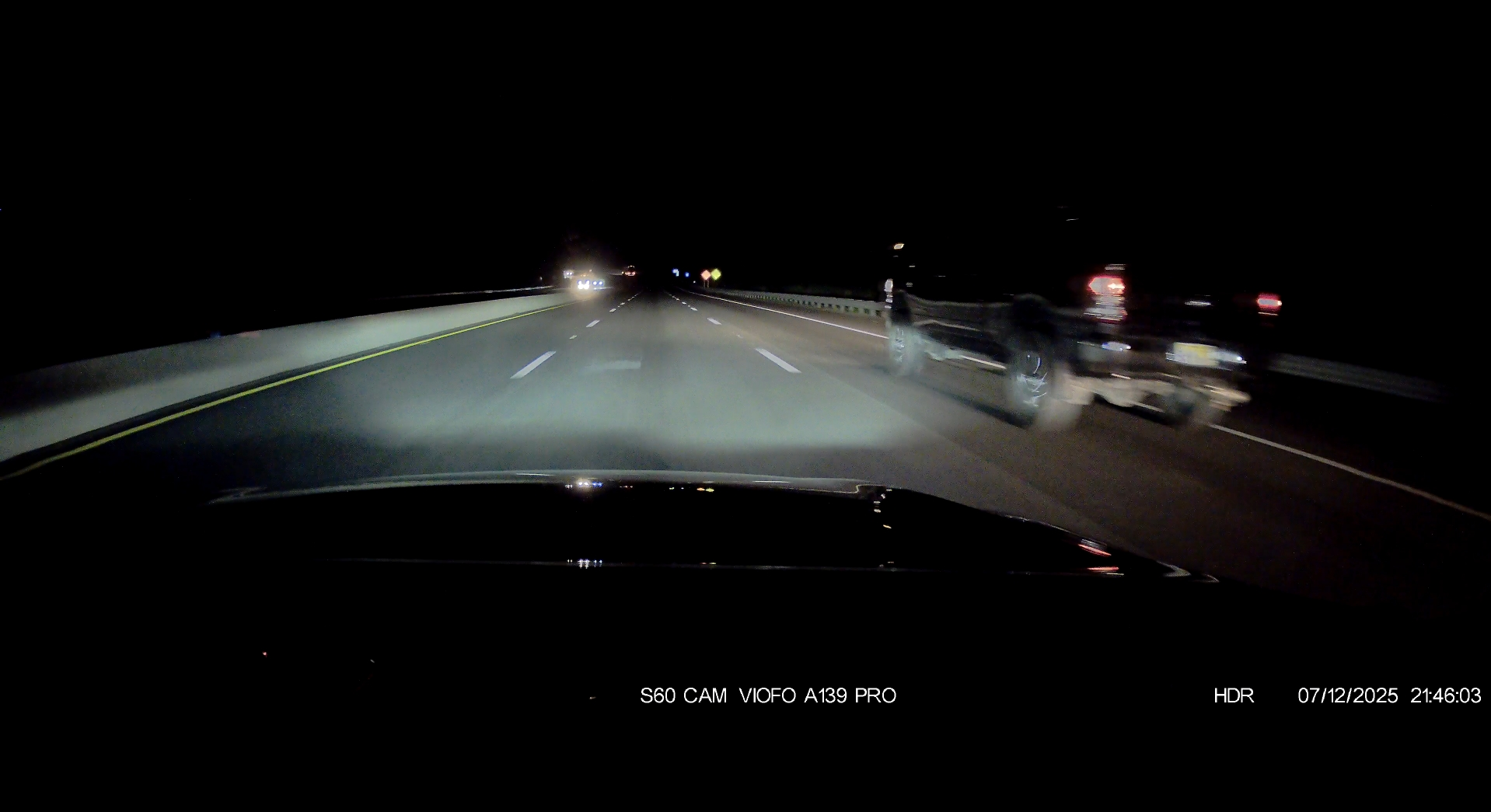
And here are the closeup images, zoomed 200% from each of the three cameras that are in my car. HDR is off and PlatePix is enabled on the two Vantrue cameras. Given past discussions, it is unclear whether PlatePix is functioning because HDR is off. None of these images are useful for identification. It might be interesting to repeat this with HDR enabled to see what happens.
Viofo A139 Pro:

Vantrue N4S renders the best image, but still a clear miss.

Vantrue S1 Pro Max:

And here are the closeup images, zoomed 200% from each of the three cameras that are in my car. HDR is off and PlatePix is enabled on the two Vantrue cameras. Given past discussions, it is unclear whether PlatePix is functioning because HDR is off. None of these images are useful for identification. It might be interesting to repeat this with HDR enabled to see what happens.
Viofo A139 Pro:
Vantrue N4S renders the best image, but still a clear miss.
Vantrue S1 Pro Max:
kamkar
Well-Known Member
- Joined
- Oct 11, 2013
- Messages
- 36,100
- Reaction score
- 20,048
- Country
- Denmark
- Dash Cam
- +1 decade, many dashcams
Amazed you are not getting better results on a same direction target, and you not going hyper speed passing it. And even if there look to be no HDR in there just motion blur.
My experience with on oncoming cars and plate capture are also flaky with latest 70mai systems and E1 PRO
Even stranger some times on a oncoming plate, the botton 1/2 - 2/3 " i can see razor sharp in the image, or should i say it appear to be razor sharp CUZ that part of a plate dont really have any writing ASO on it, but the rest of it is not there, making me wonder how the hell the system manage to pull that off.
My experience with on oncoming cars and plate capture are also flaky with latest 70mai systems and E1 PRO
Even stranger some times on a oncoming plate, the botton 1/2 - 2/3 " i can see razor sharp in the image, or should i say it appear to be razor sharp CUZ that part of a plate dont really have any writing ASO on it, but the rest of it is not there, making me wonder how the hell the system manage to pull that off.
OP
OP
EricSan
Well-Known Member
- Joined
- Dec 28, 2023
- Messages
- 1,408
- Reaction score
- 1,066
- Location
- Central PA
- Country
- United States
- Dash Cam
- There are ALWAYS user serviceable parts inside!
Yeah, I was surprised that none of the images were readable… the difference in speed couldn’t have been more than 5-7 mph. There was a car following the truck, so there were my lights, plus the lights of the other car.
jsmith
Well-Known Member
Here is a still from last night's drive. It's about 9:45p, so the sun has set quite a while ago and it's dark. I am in the middle lane, moving at 75mph, passing a truck that is in the right lane.
View attachment 82657
And here are the closeup images, zoomed 200% from each of the three cameras that are in my car. HDR is off and PlatePix is enabled on the two Vantrue cameras. Given past discussions, it is unclear whether PlatePix is functioning because HDR is off. None of these images are useful for identification. It might be interesting to repeat this with HDR enabled to see what happens.
Viofo A139 Pro:
View attachment 82658
Vantrue N4S renders the best image, but still a clear miss.
View attachment 82659
Vantrue S1 Pro Max:
View attachment 82660
Sadly this is pretty typical of night shots I've looked at with the A139 Pro and other cameras at night. Lighting sucks and unless a vehicle is on top of you, it's pretty much game over on getting clear images.
Do make sure your windshield is clean, that might help a little if you haven't cleaned lately.
Last edited:
jsmith
Well-Known Member
Vantrue suggested using a 3M Pad where you see the white line to lessen vibrations. I am going to test this suggestion and see if the road vibrations disappear.


TonyM
Well-Known Member
- Joined
- Jul 30, 2013
- Messages
- 6,710
- Reaction score
- 6,762
- Country
- United Kingdom
- Dash Cam
- Many dashcams over many years
That's a good idea if we don't need to use the rear hinge. I'll try that later this week.Vantrue suggested using a 3M Pad where you see the white line to lessen vibrations. I am going to test this suggestion and see if the road vibrations disappear.
View attachment 82670
TonyM
Well-Known Member
- Joined
- Jul 30, 2013
- Messages
- 6,710
- Reaction score
- 6,762
- Country
- United Kingdom
- Dash Cam
- Many dashcams over many years
@EricSan what startup times are you getting in quick start collision detection mode? I read in post #19 that you observed ~2s in quick start and ~10s in power saving mode.
I was doing some testing this morning with the LTE module and noticed the startup time was around 10-12 seconds. I checked - I have quick start enabled. I'm on FW version VT-EEF243.
I was doing some testing this morning with the LTE module and noticed the startup time was around 10-12 seconds. I checked - I have quick start enabled. I'm on FW version VT-EEF243.
OP
OP
EricSan
Well-Known Member
- Joined
- Dec 28, 2023
- Messages
- 1,408
- Reaction score
- 1,066
- Location
- Central PA
- Country
- United States
- Dash Cam
- There are ALWAYS user serviceable parts inside!
@TonyM - we are both using the same firmware VT-EEF243. When I did my tests, I had both cameras connected (no LTE), waited for it to go to sleep, then flicked it with my finger. The wake up times were pretty consistent at just over 2s and about 10s. I wonder if the wake up times vary with and without LTE connected.
OP
OP
EricSan
Well-Known Member
- Joined
- Dec 28, 2023
- Messages
- 1,408
- Reaction score
- 1,066
- Location
- Central PA
- Country
- United States
- Dash Cam
- There are ALWAYS user serviceable parts inside!
I'll also add that the S1PM collision detection sensor is VERY sensitive, even when turned down. It is more sensitive than the other Vantrue cameras and more sensitive than my Viofo camera.
It would be nice if it could use the anti-shake algorithm of sports cameras。Vantrue suggested using a 3M Pad where you see the white line to lessen vibrations. I am going to test this suggestion and see if the road vibrations disappear.
View attachment 82670
jsmith
Well-Known Member
It would be nice if it could use the anti-shake algorithm of sports cameras。
Arm extension isn't sturdy enough to deal with bumps. If you have a tight seal on the headliner, you could insert camera there. Otherwise, you will find it is wobbly while driving.
TonyM
Well-Known Member
- Joined
- Jul 30, 2013
- Messages
- 6,710
- Reaction score
- 6,762
- Country
- United Kingdom
- Dash Cam
- Many dashcams over many years
Today I added a layer of VHB in the hinged mount as suggested by Vantrue. I did a before/after test run and can confirm that the vibrations were reduced, but not completely.Vantrue suggested using a 3M Pad where you see the white line to lessen vibrations. I am going to test this suggestion and see if the road vibrations disappear.
I think I can reduce the vibrations further with better management of the cable - adding more clips to hold it in place so that the cable does not pull on the camera.
I may add a before/after comparison video later if I have time....(TBC)
jsmith
Well-Known Member
Today I added a layer of VHB in the hinged mount as suggested by Vantrue. I did a before/after test run and can confirm that the vibrations were reduced, but not completely.
View attachment 82702 View attachment 82701
I think I can reduce the vibrations further with better management of the cable - adding more clips to hold it in place so that the cable does not pull on the camera.
I may add a before/after comparison video later if I have time....(TBC)
I have yet to test this out.
Can you please post a rear video of how it looks in image #2

Julian23
Well-Known Member
- Joined
- Nov 16, 2016
- Messages
- 1,315
- Reaction score
- 1,914
- Country
- Germany
- Dash Cam
- Several brands :)
What if you put a small piece of 3m tape from the camera to the plastic trim above it?Today I added a layer of VHB in the hinged mount as suggested by Vantrue. I did a before/after test run and can confirm that the vibrations were reduced, but not completely.
View attachment 82702 View attachment 82701
I think I can reduce the vibrations further with better management of the cable - adding more clips to hold it in place so that the cable does not pull on the camera.
I may add a before/after comparison video later if I have time....(TBC)
If the gap is too big just put 2 or 3 pieces on top of each other.
Just a thought I had.