V2.0 Firmware for Public Testing

Parking Mode setting(s) out of sync between camera running Firmware 2.0 and the Beta version of the iOS app.

First off, I really like the new 2.0 firmware and the new Viofo App. I know they're both still Beta and may have a few issues, but seem like a significant improvement. So many thanks.

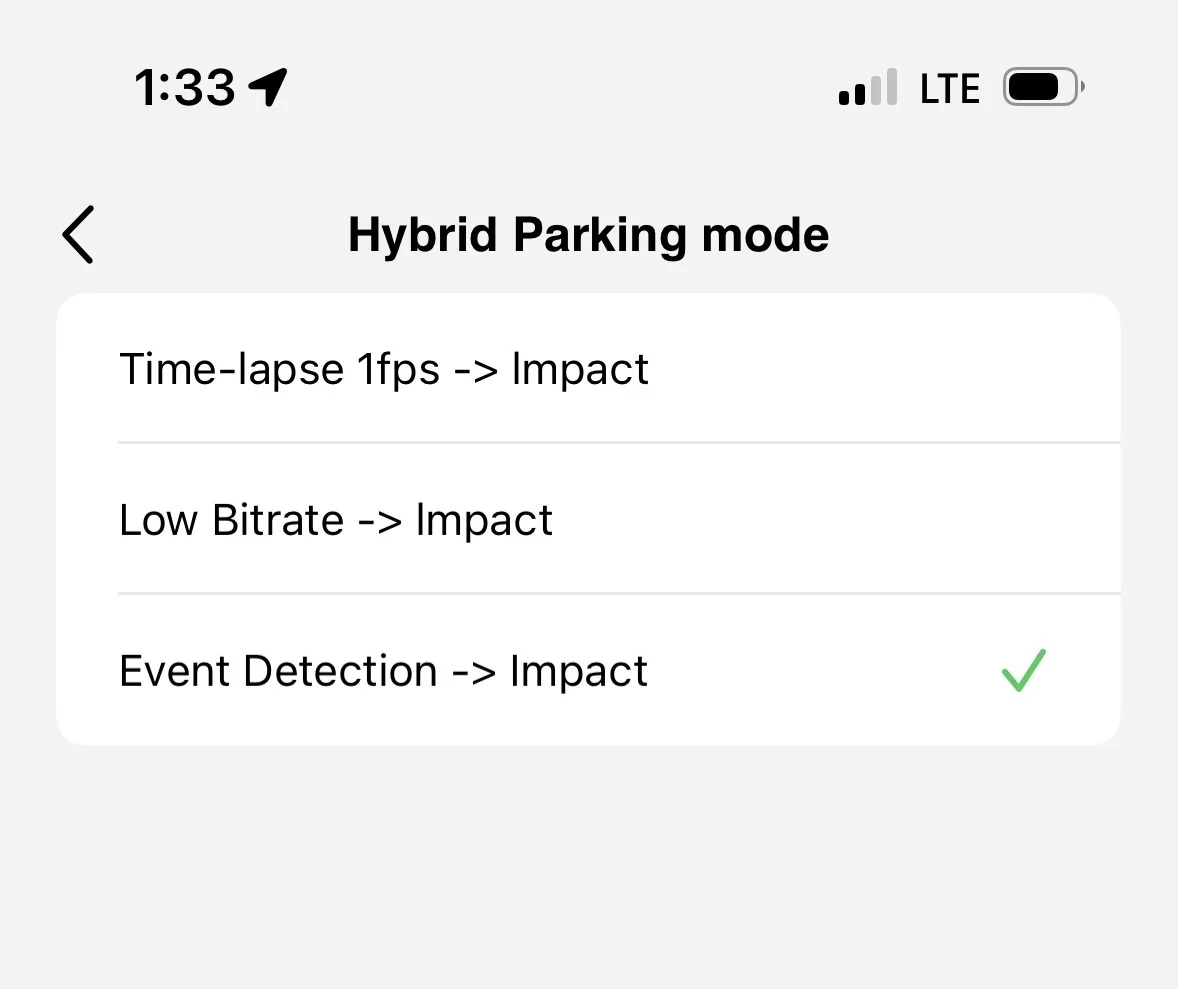
So here is my issue, after a successful install of Firmware 2.0 on my A329S, I installed the Beta version of the Viofo App on my phone and used the app to configure the camera, including setting Parking Mode -> Hybrid Parking Mode ->Event Detection -> Impact. But after a couple of days, noticed that my Parking video files were clearly recording using 1 FPS mode.

So to double check, I used the Viofo App to check the settings via WiFi, and here is a screenshot of that setting:
IMG_9237.webp


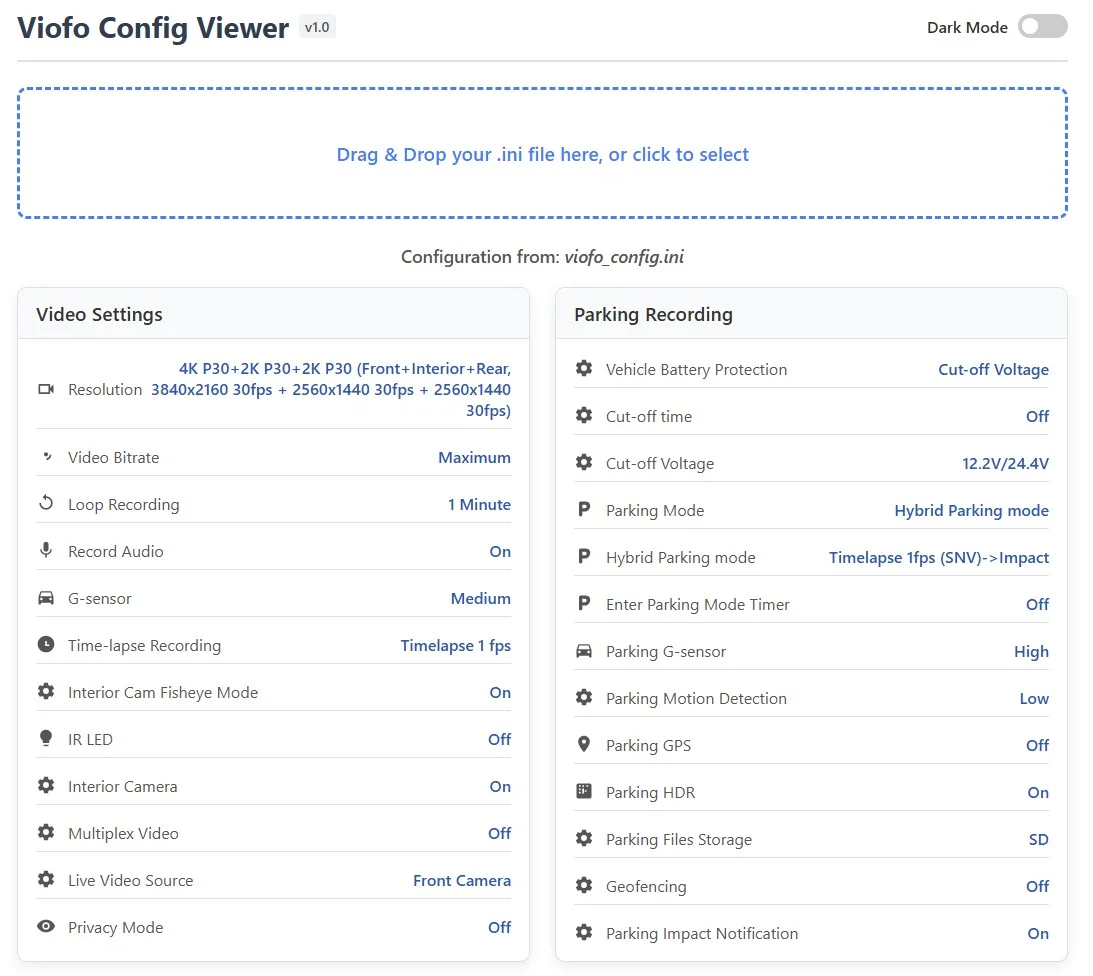
And then I used the new configuration generation option to create a Config file and copy it to my desktop. From there, I used the new Config Viewer. And it is clearly set to Parking Mode -> Hybrid Parking Mode -> Timelapse 1fps (SNV)->Impact. Here is a screenshot of the Config Viewer:
Screenshot 2025-10-25 133942.webp


I was able to select Hybrid Parking Mode->Event Detection->Impact directly through the camera LCD interface. And hopefully this will work, but definitely seems to be some issue syncing the Parking Mode settings between the camera and app. I don't know if this problem existed before Firmware 2.0 and/or the new Viofo App or if any other settings are effected.
 
Yes that is why you should chabge all the settings on the dash camera and not the app
 
Yeah, there was a public statement that the app settings would be behind/out of synch with the camera firmware for a little while until further updates happen.
 
Yes that is why you should change all the settings on the dash camera and not the app
Yeah, there was a public statement that the app settings would be behind/out of synch with the camera firmware for a little while until further updates happen.
It would help users if @VIOFO-Support made this clear in the first post of this thread. The linked blog describes the V2.0 changes and provides links to the beta apps, but does not advise users to only change settings on the dashcam.
 
It would help users if @VIOFO-Support made this clear in the first post of this thread. The linked blog describes the V2.0 changes and provides links to the beta apps, but does not advise users to only change settings on the dashcam.
You are absolutely right.
If the application has any “imperfections,” it seems obvious to me that such information should be included in the message about the new firmware.
 
Today I'm glad I have been lazy and procrastinated. I am still using the previous firmware in the
A329S and android app. The screen and buttons for the main cam is not well suited for routine
access in my vehicle. I have always used my phone and app for all access and settings.

You folks are doing the hard job for me! 😉
 
It would help users if @VIOFO-Support made this clear in the first post of this thread. The linked blog describes the V2.0 changes and provides links to the beta apps, but does not advise users to only change settings on the dashcam.
I’m not really sure of the logic in having the firmware and new App out of sync re functionality, Beta or not…..I wouldn’t have thought it would be ‘that’ hard to get the beta App to the stage where it works in unison with the new firmware or, alternatively, wait until they are working properly together (in terms of settings) and then release for testing….
Just my two pennies, but personally it doesn’t seem a particularly effective ‘test’ environment….

And yes, I agree with @Finnegan – faffing around with buttons out of reach on a mounted dashcam just doesn’t work…fine for a bench test/review, but…..
 
Last edited:
I’m not really sure of the logic in having the firmware and new App out of sync re functionality, Beta or not…..I wouldn’t have thought it would be ‘that’ hard to get the beta App to the stage where it works in unison with the new firmware or, alternatively, wait until they are working properly together (in terms of settings) and then release for testing….
The app is compatible with the existing firmware V1.2. The beta firmware V2.0 has new options, and as highlighted above the list of parking modes has been re-ordered.

I would not expect an app to be compatible with a beta FW, because some things could still change before public release. This is common for all manufacturer's dashcams I have tested - I just thought it would be useful if Viofo could highlight that point in their first post or in the update blog.

That knowledge didn't stop me from falling into the same trap and accidentally setting the wrong parking mode during testing :banghead:
 
The app is compatible with the existing firmware V1.2. The beta firmware V2.0 has new options, and as highlighted above the list of parking modes has been re-ordered.

I would not expect an app to be compatible with a beta FW, because some things could still change before public release. This is common for all manufacturer's dashcams I have tested - I just thought it would be useful if Viofo could highlight that point in their first post or in the update blog.

That knowledge didn't stop me from falling into the same trap and accidentally setting the wrong parking mode during testing :banghead:
But the new App is also Beta, effectively…
Otherwise, I would fully agree re compatibility and new firmware etc etc…But the new App is kinda floating in no man’s land currently, until the ‘old’ one is retired…to the unknowing, how do you choose on the iOS store, as they both now show…(I think the Android version is at least labelled as Beta..?)
 
@SC@AU - correct, as of this morning, right now in fact, the new version shows as 1.0.04 Beta in
Google Play for Android.

I have been thinking I will be safest making any upgrades when the Beta versions show up as the only
version available on Viofo's site and on Google Play. Until then they are Beta and I am not a Beta tester.
 
Thanks for all the suggestions, V2.0 firmware just updated.
1. Fixed the parking mode resetting issue
2. Support setting different radius for GeoFencing.
3. Optimized slow card issue in AED Parking mode.
4. Daylight saving time US options changed to On, after manually enabled the time will be set +1 hour based on current time zone.
 
Installed the new v2.0 TC firmware this morning and while I haven't had any extensive usage yet, so far, so good. Geofencing set to 15m works perfectly for my needs--cam shuts off automatically in my garage instead of going into PM and PM activates when parked on the street in front of my home. 👍 Only weirdness I encountered is that my T7 Shield SSD was not recognized at first, but that cleared up with a power cycle. Also, there was initially some button press to cam response lag in certain spots, something I've never encountered previously including with the last beta firmware. Seems better now after that power cycle, but will continue to keep an eye on that. I did not yet try either the official or beta app to check if all the current beta firmware menu settings appear or not.

By the way, I used the following mapping tool to find the best geofencing radius--in case it helps anyone else, here is the link:

Geofencing Radius Mapping Tool
 
Geofencing set to 15m works perfectly for my needs--cam shuts off automatically in my garage instead of going into PM and PM activates when parked on the street in front of my home. 👍
That’s very cool…Good to hear it’s working down to such small distances….

I’d been wondering about the GPS function and specifically when it last takes a reading of the location and passes it on to the geofence setting – I guess I won’t know until I try it, but in my particular scenario I would like the shut off to happen when I drive into our garage at the rear of the property – only thing is, the garage is basically a Colorbond tin shed and I’d presume a perfect Faraday Cage..! So if I drive in there and then shut off the engine, IF there is a weak GPS signal at that point, what happens…? Is the OS clever enough to go from the last recorded GPS location, i.e as I approach down the driveway..? Or does the function work that once the geofence radius has been entered then PM is disabled, even if GPS signal is lost, until such time the location is sensed again as being outside the radius…? Hope that makes sense – I know what I mean..!
 
Last edited:
4. Daylight saving time US options changed to On, after manually enabled the time will be set +1 hour based on current time zone.
Glad to see you recognise that we have daylight savings here too. I had to set my location to GMT+1 to get the correct time until last week.
 
the garage is basically a Colorbond tin shed and I’d presume a perfect Faraday Cage..! So if I drive in there and then shut off the engine, IF there is a weak GPS signal at that point, what happens…? Is the OS clever enough to go from the last recorded GPS location, i.e as I approach down the driveway..? Or does the function work that once the geofence radius has been entered then PM is disabled, even if GPS signal is lost, until such time the location is sensed again as being outside the radius…? Hope that makes sense – I know what I mean..!

It must be, because my home is constructed of concrete slabs and block, plus steel girders and metal studs and the garage is at the base of 4 stories of that--in other words, it is essentially a bunker. Zero GPS signal in the garage. I can only assume that what you are surmising is correct--auto PM is disabled as soon as the cam reads as being inside the set geofencing circle.

I realized from your post that I should probably do further testing in terms of how rapidly it senses when the cam leaves the GF circle. Obviously that would be connected to how quickly it locks on a GPS signal once I'm out of the garage. When I was testing PM mode when parked on my street, I did not directly drive from my garage to the street and immediately shut off the vehicle--I was first checking settings after parking with the vehicle running, so probably 3-5 minutes before I shut off the car. That's definitely enough time for GPS lock where I live.

PS: for anyone setting their geofencing zones initially, note that until you set a radius and select okay that location's GPS coordinates do not show on screen. I was sitting there waiting for those to appear assuming that would happen once there was a GPS signal lock.
 
I really like the 10-27 update for the a329S that Viofo has just put out for us. I just finished installing the 329s today. And it is improving now with the updates to much more than I expected from the decision to buy. I am very happy with this choice. Great job for Viofo Thanks !!

Is there any way to get a complete map of all the choices in the menus? When a update puts everything back to default it is a lot to remember to change it back to how it was.
 
While the Config Viewer helps, it does not have the answers to all choices that are buried in the menu. But it is a help. A file with all choices would be nice to have. So they could be found easier and a print out that could be used to mark. But maybe it is just because I am new to this sport. Would like the dash came to be for the most part set and forget.
 
Back
Top