VIOFO A329 2CH - Testing / Review - RCG

may lure customers away from Thinkware, and into a Viofo increasing their marketshare.
The first step must done by Mediatek. Mediatek is working on it. The most important parameter is the „wake-up” parameter which will be nice to be under 0.3 seconds at least on one channel recording. If I was some IT genius I would make the wake-up time under 0.3 seconds but the recording video to start first on the channel where the motion was detected or the biggest shock was detected. Then the other channel(s) to start recording.
My typical weekday is a 10 minute drive to work, 9 hours parked, 10 minute drive home.
Because you know you cant charge a normal power bank in just 10 minutes, maybe you should look for some special setup with the best and fastest charging technology. Is I was the same IT genius maybe I would invent a power bank which is charging directly from the car alternator.

But in such cases like yours the best and cheapest way is to have a CCTV camera pointed to your car. Of course, can be some legal problems because in countries like Romania you cannot (officially) point the camera to record on public domain, it is allowed only in your private area. But this is only official. In reality, if something is happening police is coming to you asking if you have some video footage from the public domain to help them. Many, many cases were solved because of illegal mounted CCTV cameras so in reality the citizen are helping the police. Why is this stupid law, I dont understand. OK, I accept the stupid things about GDPR to not make public some persons, but there is also the law which is allowing to record on public area. They agree to record with a smartphone but not agree to record with CCTV exactly the same public place.
 
My typical weekday is a 10 minute drive to work, 9 hours parked, 10 minute drive home. Parking mode is very important to me. I don't regularly drive enough to charge a car battery or a dashcam battery pack to cover that amount of parking time.

I'm building a new setup that uses a 185Wh powerbank that I can charge at home easily. I'm not sure yet - I just started testing - but I might get 3 or 4 days of parking time from a full charge, depending on the dashcam I choose to buy.

The A329 low power consumption is attractive to me, combined with it's excellent driving recording performance.
With such use of the car, you can not do without an external battery.
I bought myself a 384Wh LiFePO4 battery, which the controller switches off when the voltage reaches 10V and this does not harm the battery. The battery charging time at home is 1.5 hours. I have not done tests yet and I do not know exactly how long this battery will last for recording.
Although everything can be calculated without a test, thanks to the measurements of the user rcg530.
 
Last edited:
I'm building a new setup that uses a 185Wh powerbank
Li-ion or LiFePO4?
And how are you going to trigger the ACC wire of the HK4 to enter / exit parking mode?
 
Li-ion or LiFePO4?
And how are you going to trigger the ACC wire of the HK4 to enter / exit parking mode?
Don't Viofo models go into parking mode without НK4?
As a last resort, you can install a switch on the yellow wire.
I bought LiFePO4 and НK4, which does not have a low voltage switch.
 
Because you know you cant charge a normal power bank in just 10 minutes, maybe you should look for some special setup with the best and fastest charging technology.
I am trying a portable battery that I can easily remove from the car and charge at home.

Li-ion or LiFePO4?
Li-po. Not ideal for a car environment, but I don't live in a place with very high or low temperatures. And charging will only be at room temp at home.

EDIT: This battery only just arrived. If I find it useful in the car, I will write about it in a separate thread. If not, I will use it for camping.
 
Last edited:
@Karagandinez With long runtime comes another issue - SD card space. I also use battery that I charge myself but I have to check my vehicle every day or two otherwise it would overwrite the recording. What charger are you using?
@TonyM Are you using dashcam for surveillance? If that's the case you will need HK4 so it activates "Parking Mode" - longer runtime and smaller video size.
 
With long runtime comes another issue - SD card space. I also use battery that I charge myself but I have to check my vehicle every day or two otherwise it would overwrite the recording.
Now you can use a 4TB SSD with the A329. lol
 
With long runtime comes another issue - SD card space. I also use battery that I charge myself but I have to check my vehicle every day or two otherwise it would overwrite the recording. What charger are you using?
I have a 256GB memory card from Viofo. It's enough for 2СН. If it's not enough, I'll install a 512GB one.
Charger for LiFePO4 battery 20A.
 
GPS vs USB-C 3.0 (non-VIOFO) SSD cables

During my testing of the A329 dash camera, I had tried a few different USB-C data cables with two different SSD drives. When I moved the A329 into my vehicle, I used a non-VIOFO USB-C 3.0 data cable to connect it to a SanDisk Extreme Pro 1TB SSD. The SSD was configured as the video file write destination. On 11-Oct-2024, I drove my weekly shopping trip route. When I reviewed the footage, I found the A329 had never obtained a GPS signal lock during that trip. I reported that to VIOFO and I was told that you must use the official VIOFO SSD USB-C cable to get the GPS receiver to work with the SSD connected. A non-VIOFO USB-C 3.0 data cable with affect the GPS signal reception causing the A329 to not obtain a signal lock.

Yesterday, I received a VIOFO 2.5M SSD connection cable. I replaced my USB-C 3.0 data cable with the VIOFO SSD cable. I powered up the A329 and within two minutes (in my garage) the A329 had successfully acquired a GPS signal lock.
 
VIOFO 2.5M SSD connection cable.
Did you also get the 1.8M SSD Cable?
My A329 care package is missing the SSD Cable =(
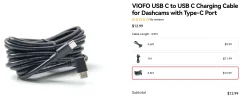
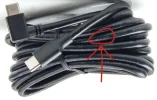
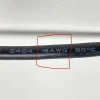
Also the extra 4M 18AWG Type-C power cable is missing, they sent a 20AWG version.
 
Did you also get the 1.8M SSD Cable?
No, I did not get a 1.8M SSD cable. I expected to get a 1.8M cable, but I ended up with the 2.5M cable.
My A329 care package is missing the SSD Cable =(
When I received my "production" A329 package, it did not contain a SSD cable. That cable being an optional accessory.
Also the extra 4M 18AWG Type-C power cable is missing, they sent a 20AWG version.
My USB-C power cable is also a 20 AWG version.
 

Attachments

  • 1 .webp
    1 .webp
    61.4 KB · Views: 125
  • 18 AWG .webp
    18 AWG .webp
    156.8 KB · Views: 138
  • Included with A329 in Box .webp
    Included with A329 in Box .webp
    153 KB · Views: 131
  • Extra Cable .webp
    Extra Cable .webp
    192.7 KB · Views: 141
My USB-C power cable is also a 20 AWG version.
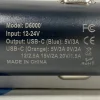
Did you test the new / upgrade CLA charger (D6000) included with the A329?
I did some preliminary tests, and this little guy is a power house.
The last time I tested the D3000 it was only capable of 30 Watts total output.
I love this new 45 Watt model now that it has PD capability.
 

Attachments

  • 1.) D 6000 .webp
    1.) D 6000 .webp
    212.1 KB · Views: 128
  • 2.) D6000 .webp
    2.) D6000 .webp
    239.8 KB · Views: 149
  • 3.) D6000 .webp
    3.) D6000 .webp
    141.1 KB · Views: 149
  • 4.) D6000 .webp
    4.) D6000 .webp
    209.4 KB · Views: 177
  • 5.) D6000 .webp
    5.) D6000 .webp
    206.2 KB · Views: 149
GPS vs USB-C 3.0 (non-VIOFO) SSD cables

During my testing of the A329 dash camera, I had tried a few different USB-C data cables with two different SSD drives. When I moved the A329 into my vehicle, I used a non-VIOFO USB-C 3.0 data cable to connect it to a SanDisk Extreme Pro 1TB SSD. The SSD was configured as the video file write destination. On 11-Oct-2024, I drove my weekly shopping trip route. When I reviewed the footage, I found the A329 had never obtained a GPS signal lock during that trip. I reported that to VIOFO and I was told that you must use the official VIOFO SSD USB-C cable to get the GPS receiver to work with the SSD connected. A non-VIOFO USB-C 3.0 data cable with affect the GPS signal reception causing the A329 to not obtain a signal lock.

Yesterday, I received a VIOFO 2.5M SSD connection cable. I replaced my USB-C 3.0 data cable with the VIOFO SSD cable. I powered up the A329 and within two minutes (in my garage) the A329 had successfully acquired a GPS signal lock.

Well; that is a bit ugly of VIOFO. A bit surprised that GPS goes to the crapper when using a SSD with a non-VIOFO cable, this is the sort of proprietary thing that Sony did, or still does I suppose and, is a reason I stop buying Sony products. Do you have a way to break out the end to end wiring to see what is terminated at both ends of the factory cable? I like VIOFO dash cams but, I do not like being locked into a proprietary cable.
 
If you use third-party cables, the USB 2.0 type-C cable will be better; the 3.0 cable has more interference.
Our official cable is customized for SSD recording to avoid the "SLOW CARD / SSD" issue.
 
If you use third-party cables, the USB 2.0 type-C cable will be better; the 3.0 cable has more interference.
Our official cable is customized for SSD recording to avoid the "SLOW CARD / SSD" issue.
Just to make sure I’m on the right track—am I understanding correctly that it’s more of an EMI/EMF issue if you’re not using the Viofo cable, rather than a GPS problem?
 
Any info on anyone getting a 4TB SSD to work with a GPT partition?

Yes, after some experimentation.

Here's the recipe that worked for me: First, on Ubuntu 24, open the disk in fdisk and delete any existing partitions. Ensure that the GPT label is applied ('g' command). Create a single 4 TB partition on the SSD, and write the new partition table to the SSD, but do not format the partition. Upon inserting the disk, the A329 asks to format the disk. Formatting will only take a few seconds, and you'll see the progress bar move. If the progress bar jumps instantly to 100% then something went wrong (this is what happened when I inserted the SSD with all its partitions deleted.

It may help to zero out the first part of the drive:
dd if=/dev/zero of=/dev/sda bs=1M
Let that run for a few minutes.

Caution: doing these things will destroy any data on your SSD!
 
Yes, after some experimentation.

Here's the recipe that worked for me: First, on Ubuntu 24, open the disk in fdisk and delete any existing partitions. Ensure that the GPT label is applied ('g' command). Create a single 4 TB partition on the SSD, and write the new partition table to the SSD, but do not format the partition. Upon inserting the disk, the A329 asks to format the disk. Formatting will only take a few seconds, and you'll see the progress bar move. If the progress bar jumps instantly to 100% then something went wrong (this is what happened when I inserted the SSD with all its partitions deleted.

It may help to zero out the first part of the drive:

Let that run for a few minutes.

Caution: doing these things will destroy any data on your SSD!
Thanks! Unfortunately I followed the steps in diskpart (convert to gpt and create partition primary) and the dashcam formatted the drive instantly and produced the 'memory card full' error 🙁
 
Back
Top