VIOFO A329S - Testing/Review - RCG

Do you have a link to some head-to-head testing showing video quality improvements with 21:9? The theory is pretty straightforward if the file size / bitrate is the same between a 16:9 and 21:9 clip. Cutting off the top and bottom while still recording the same amount of data means that you've got more data per frame with 21:9. I did try it briefly years ago with a pair of identical dashcams and I didn't notice much, but it was only a minimal amount of testing, not anything extensive.

I agree regarding the complexity of using multiplexer software you describe. I'm glad to hear you can play individual videos one at a time with the right software, but I'm guessing most people would just one a combined video to make it easier to see everything at once without having to put the individual video files into a video editor, lay them out however they want, and then export a combined clip.
 
I accept that the Multiplex name is a good one and I expect that people will understand that multiplexing means combining 2-3 videos in one video and they can not extract any separate channel from the multiplexed video created by the dashcam. You can edit, crop, but not extract.
Thanks for confirming this. I agree it is a good name for the feature and I can foresee situations where it may be useful.
 
So, if the channels are 'multiplexed' they are baked into a single video file. The only way to extract a single channel from that file at a later date is to crop using a video editor?

I'm not saying this is a bad thing. I can see why it might appeal to some people.
Yes, the multiplexed channels have been put into a single video stream in a single video file, to separate them needs some software to copy them out of the multiplexed file and write them into separate new files.

Nobody has released any details of Viofo's phone and PC app updates yet, but I think we should expect them to support the multiplexed files, for both viewing and editing...

Maybe the real question is, can the videos be separated with zero loss of detail, or without being re-encoded?
Should be possible, but probably won't quite happen.
Would be easy if they were in separate streams, as Mtz suggests above, but then it is not so easy to view the originals.

As you can see the best value for Bits/(Pixel*Frame) is the 21:9 format, one more reason for @Vortex Radar to start using 21:9.
Do you have a link to some head-to-head testing showing video quality improvements with 21:9?
More bitrate always gives better quality, a 40% increase is always hard to see, but it is a real improvement, at the bitrates we are using, we are still a long way off a professional video camera. The 21:9 mode does give 40% more bitrate per pixel, which as Mtz points out, is what actually matters.

The codecs are throwing away details that they think you will not notice, so unless you are running really short of bitrate, it is difficult to see small differences in bitrate, 40% is significant but still small enough that it is hard to see.

I do notice on my A139 Pro, running single channel at 60Mb/s, if I use 21:9 on a nice sunny day, the video looks really nice quality, if I use 16:9, it just doesn't look as much like footage from a professional video camera, the colours don't seem as nice, but I can't actually pick out the difference, it tends to be more about colour accuracy than licence plate text detail, but if you get a coloured licence plate, then there might be a significant difference. We don't really have coloured license plates here, the text is always black, and although our rear plates are yellow, it is a yellow that is fairly close to white. The Chinese EV green plates do cause more problems at insufficient bitrates, might be better for a demo, plates with red writing would be ideal.
 
More bitrate always gives better quality, a 40% increase is always hard to see, but it is a real improvement, at the bitrates we are using, we are still a long way off a professional video camera. The 21:9 mode does give 40% more bitrate per pixel, which as Mtz points out, is what actually matters.

The codecs are throwing away details that they think you will not notice, so unless you are running really short of bitrate, it is difficult to see small differences in bitrate, 40% is significant but still small enough that it is hard to see.
Is the difference easier to see in high-detail scenes like driving under trees?

I was recently testing a 1080p camera at 34Mbps - 0.54 Bits/(Pixel*Frame) - and whilst that is higher than necessary for most situations, I observed that the video detail held up very well when driving under trees.

BTW, this aspect ratio discussion is off-topic for the A329S so perhaps a separate thread for 21:9 vs 16:9 would be better?
 
Is the difference easier to see in high-detail scenes like driving under trees?
Then, as well as colour accuracy, the more obvious difference is pixelation of the road surface, any clear sky and maybe the car bonnet/dash changing to a 2fps update instead of 30fps. You tend to see the pixelation at lower bitrates, 34Mb/s for 1080 is pretty high and should normally remove all pixelation.
 
Do you have a link to some head-to-head testing showing video quality improvements with 21:9? The theory is pretty straightforward if the file size / bitrate is the same between a 16:9 and 21:9 clip. Cutting off the top and bottom while still recording the same amount of data means that you've got more data per frame with 21:9. I did try it briefly years ago with a pair of identical dashcams and I didn't notice much, but it was only a minimal amount of testing, not anything extensive.
I don't have a side by side video to prove the image quality is better on 21:9, but I know I am on the right side with more Bits/(Pixel*Frame) if using 21:9. Also I have less sky and less dashboard and less motor hood in my videos and the 21:9 aspect ratio is looking more modern than 16:9. For me there is absolute no reason to go back to 16:9 and I would never buy a dashcam which is not offering 21:9 aspect ratio. There was a long fight with Viofo to include the 21:9 aspect ratio.

By the way, if you plan to watch 21:9 videos multiplexed as 2CH or 3CH when you will play them on the PC you will need some adjustment to obtain the correct aspect ratio. In the MPC-BE, the settings are showed in these screenshots:

MPC-BE-2CH.webp

MPC-BE-3CH.webp


These settings were created by me in MPC-BE at Pan & Scan Presets menu by pressing New, writing those values and then Set and Save.
The above setting is in the Pan & Scan menu of the player by right clicking on the video image.

When editing such a 21:9 Multiplexed footage you will need to correct the aspect ratio in your editing software. I don't know how to do this properly in an editing software, but the resulted 2CH video should have these properties:
A:
Original video: 7680x2160 Aspect ratio: 3.556
Encoded video: 7680x2160 with a forced Aspect ratio: 4.8 (this 4.8 flag must be embedded in the video). Such a video is Anamorphic type, this was common on many old DVDs when the movie aspect ratio was 2:35 but it was encoded as 4:3 and the player played it as 2:35. So this is old technology.
or
B:
Original video: 7680x2160 Aspect ratio: 3.556
Encoded video: 7680x1600 with resulted Aspect ratio: 4.8 (no need for any value of the aspect ratio to be embedded in the video)

As you can see the resolution of 2CH multiplexed video is always 7680x2160 no matter if the original source is 21:9 or 16:9. I don't expect this to be fixed in the firmware. So the advantage of 21:9 Bits/(Pixel*Frame) is lost when multiplexing but remains in separate videos.

In VSDC the only way I found it was to load the video and at the encoder tab I set the new resolution of 7680x1600.
Of course, after doing such correction of the aspect ratio, all data printed on the video will be oblated.

Normally all players should play the video by reading the aspect ratio and displaying the video image properly with the correct aspect ratio but if you want to be on the safe side it is better to reencode it by manually setting the new resolution.

For me, the only way to set the aspect ratio of a MP4 video was to convert it to MKV using MKV Toolnix and put the 4.8 aspect ratio in the settings before saving. Unfortunately, the VSDC editing software and maybe many editing software are not reading the aspect ratio of a video, but only the players are doing this properly.

Normally such an Aspect ratio flag should be also in the MP4 container but I couldn't find the proper tool to embed that flag in an MP4 video. The latest tool I used was YAMB, many years ago but it is outdated. Most of the software found for editing the MP4 header and adding tags, are for the music but not for video aspect ratio. The MP4 standards are allowing forced aspect ratio (display aspect ratio).
 
When multiplexing 2-channels [front+rear or front+interior or telephoto] it creates a 7860x2160 30fps video with the front camera video on the left side and the second channel video on the right side scaled up to 2160p resolution.

Note: I added the white line separators for these screen shots:

View attachment 79888

When multiplexing 3-channels [front + rear + interior or telephoto] it creates a 3840x3240 30fps video file with the front camera video on the top of the video and the two other camera feeds in the lower section with a side-by-side placement.

View attachment 79889
that great
i dnot need use other software to do this
 

Attachments

  • IMG_20250503_103455.webp
    IMG_20250503_103455.webp
    55.8 KB · Views: 125
This information is based on using a prototype A329S dash camera and a beta firmware.

One of the new parking modes for the A329S/A329T is the "Low Power Impact Detection" [LPID] parking mode. I blurred out the name of the other new parking mode since I don't have the correct [new] hardwire kit to test it yet.

My initial tests of this parking mode were using a 3-channel configuration [front, rear, interior]. There are no settings specifically for the LPID parking mode, so you only need to select it as the active parking mode. The operation of this parking mode is very simple. When the ignition [accessory] power is turned off to the VIOFO hardwire kit powering the A329S/A329T, it will enter this parking mode and the power consumption drops to 34 mA @ 12.6V or 0.43 Watts. When an impact event it detected, the A329S/A329T resumes recording in just under 3 seconds [my tests show from 2.75 to 3.00 seconds]. When the interior camera is disabled in parking mode, the LPID parking records start in 2.55 to 2.65 seconds. A 1-minute recording will be created by default. If motion or additional impacts are detected while it is recording, the dash camera can keep recording for up to 3-minutes.

When the vehicle is started and the dash camera exits LPID parking mode, it will announce that an impact event has taken place while in parking mode. It then beeps every few seconds for up to 1-minute when the alert on screen will go away and the beeping will stop. It's nice that it it now announces the fact that impact were detected, but it seems like a really long time to have it beeping.

The video files created by LPID parking mode are stored in the "Movie\RO" directory on the microSD card.

1746303215615.webp


There is another parking mode related setting that determines where parking mode video files are stored [Parking Files Storage]. The LPID parking mode will only store impact event video files on the microSD card. If you use a SSD as the primary video file storage for the A329S/A329T, you must also use a microSD card to store the LPID parking mode video files.

1746304368022.webp


Power Consumption Info - LPID / 3-Channel / IR LEDs On and Off / Multiplexing Off

I included the power consumption data with the dash camera recording videos after an impact event so you can see how much power it draws while recording. The most important power consumption data is the "Waiting for impact event" since that is how this dash camera should be operating 99.9% of the time.

1746742734487.webp


The power consumption in LPID parking mode is less than 10% of most other parking modes in previous VIOFO dash camera models.

1746560591337.webp


Another dash camera setting that will be of interest for any of the A329S parking modes is when to record video for the interior camera. You can turn the interior camera off, on, only record while driving, or only record while parked. If the "Interior Camera" setting is set to "Only On while Driving", it does reduce the delay between the impact event and the start of recording LPID videos from "2.75 to 3.00 seconds" to "2.55 to 2.65 seconds".

1746304735495.webp
 
Last edited:
I blurred out the name of the other new parking mode since I don't have the correct [new] hardwire kit to test it yet.
Now everyone needs to work out why the new parking mode needs a new hardwire kit...
 
Seems that one month ago I was too optimistic by declaring the time-in is under one second, I didn't used a stopwatch, I was just looking at the camera screen:
Maybe the 2.75s - 3s can be improved by not turning on the screen and the first priority to be starting of the recording event even it is without audio at the beginning, or without date and hour, GPS data, HDR, or only on the front channel, or in black and white, anything that can be used to make this duration shorter by some optimization.
In my video the Multiplexing was enabled, you can see its icon.

When the vehicle is started and the dash camera exits LPID parking mode, it will announce that an impact event has taken place while in parking mode. It then beeps every few seconds for up to 1-minute when the alert on screen will go away and the beeping will stop. It's nice that it it now announces the fact that impact were detected, but it seems like a really long time to have it beeping.
Nice to see they implemented this request. One idea was to enable or disable such announcement in camera settings, another was to tell how many impacts were during the parking period by a voice or by the number of the beeps. Another idea was to be a time-out for some impact to be not announced like when you are leaving the car and closing the doors, because such an action is creating a LPID file and it will be announced. Some timer like 45-60 seconds to allow people going out of the car can avoid creating an unnecessary impact file.

But if people will use the Hybrid parking mode, closing the car door when leaving the car will not trigger a LPID file, but only when entering in the car. So if no timer will be used, every time when you will go in the car you will have an announce that the car suffered an impact.
If there will be many false alarms many people will want to disable it because they will become tired that after each starting of the car they to go out from the car and inspect the car all around and see nothing.

Of course a new idea can be when the LPID is enabled, after the car engine is turned off, the default behavior to be the camera to record in Low Bitrate parking mode for about 90 seconds (to have time to go out of the car and also the car to be protected by parking mode) and then to automatically enter in LPID mode. In this way you will have only one false alarm: when you are entering in the car. If the number of impacts can be implemented by number of beeps then if you will hear only one beep, you will know that the single beep is because you entered in the car.
And not forget that Viofo has a delay of 90 seconds to enter in Parking mode and for LPID mode you can already use this feature to avoid one false alarm.

My suggestion for the people to use the LPID mode is in Hybrid Mode, combined with one of the already standard parking mode available options and if you want to save the car battery to set the shortest timer for the standard parking mode. In this way you will avoid the leaving car false alarm.

In my opinion the storage in Hybrid Parking mode should be standard parking on SSD and only LPID files to be stored on the card. Maybe you can test this because seems that you have a newer firmware than me.
 
Last edited:
When I configured the "Interior Camera" setting to "Only On while Driving", the Low Power Impact Detection [LPID] recording start times are reduced to the 2.55 to 2.65 second range. I updated my previous post with the timing info and the power consumption in this configuration. @Mtz, I can't test hybrid parking mode yet, since the hardwire kit it requires is not available yet for testing.
 
Not needed any special hardwire kit. Just set a duration for the Parking Recording Timer and try again. 😎 Usually I am using 30 minutes or 1 hour because my car battery is 2 years old. The LPID hybrid addon is a great option for my battery. Such a firmware request was made by my battery, she still loves me even I abused it with so many parking hours and tests. 🤓
 
Last edited:
Not needed any special hardwire kit. Just set a duration for the Parking Recording Timer and try again. 😎 Usually I am using 30 minutes or 1 hour because my car battery is 2 years old. The LPID hybrid addon is a great option for my battery. Such a firmware request was made by my battery. 🤓
That's not how it works with the firmware I have. If I try to select any of hybrid parking mode settings, it presents a message on the screen of "Please set the Vehicle Battery Protection setting" and it disallows the selection of the hybrid parking mode. The only way to set the "Vehicle Battery Protection" setting is to have one of the new hardwire kits. The chart I have from VIOFO states that the hybrid parking modes require the new hardwire kit.
 
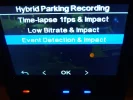
Go first to Parking Mode > Vehicle Battery Protection > Cut-off Time > Parking Recording Timer > 30 Minutes (for example)
and then you should have acces to this:

Viofo A329S Hybrid Parking Recording.webp
 
Last edited:
Go first to Parking Mode > Vehicle Battery Protection > Cut-off Time > Parking Recording Timer > 30 Minutes
to have acces to this:

View attachment 79948
It appears setting only the "Cut-off Time" is sufficient to enable a hybrid parking mode, but it's only setting one of the two settings within the "Vehicle Battery Protection" section of settings. The other setting of "Cut-off Voltage" is the setting that requires the new hardwire kit. The VIOFO chart seems to be a bit too strict in its statement that the new hardwire kit type is required for the hybrid parking modes to work. If I get some time tomorrow, I'll test using only the "Cut-off Time" setting to see if a hybrid parking mode works with the firmware I have in my A329S. Thanks!
 
I consider to be normal and correct the hybrid parking mode to work if only enabling the cut-off time. In this way you are not forced to buy any special hardwire kit, you can still use HK5.

The hybrid parking mode is about saving the car battery and the cut-off time is for the same reason so they should work together.
 
When the vehicle is started and the dash camera exits LPID parking mode, it will announce that an impact event has taken place while in parking mode. It then beeps every few seconds for up to 1-minute when the alert on screen will go away and the beeping will stop. It's nice that it it now announces the fact that impact were detected, but it seems like a really long time to have it beeping.
When there is a parking event, does the message and sound signal sound when exiting all parking modes or only when exiting LPID parking mode?
 
When there is a parking event, does the message and sound signal sound when exiting all parking modes or only when exiting LPID parking mode?
I've not had the chance to test all of the other parking modes yet. I've been busy refitting my primary dash camera test car with dash camera equipment since it finally came home from the repair shop. I'll test the other parking modes of the next few days.
 
Seems that one month ago I was too optimistic by declaring the time-in is under one second, I didn't used a stopwatch, I was just looking at the camera screen:
Maybe you had no SSD plugged in, and an empty microSD?

I can't check, but I imagine that the storage needs to be inspected on wake up, and how long that takes will depend on how many files are stored. This is likely to be the biggest factor.
 
Maybe you had no SSD plugged in, and an empty microSD?

I can't check, but I imagine that the storage needs to be inspected on wake up, and how long that takes will depend on how many files are stored. This is likely to be the biggest factor.
My test was with VIOFO 256 GB microSD card being used and no SSD plugged into the A329S. The microSD had around 50 files stored on it at the time.
 
Back
Top