VIOFO App Updates

Adapt to A329/VS1/A139 PRO

Added a new sub-option "Parking Mode" on the Bluetooth option.

Does anyone know exactly what this does? I tried to test but nothing happens
The latest firmware for the VIOFO dash camera must be installed to support the use of the BTR200 Bluetooth buttons. The "Parking Mode" button assignment will enable/disable the currently selected parking mode for that dash camera. I found the "Parking Mode" option did not work with the VS1 I was testing. With the older firmware, the VS1 would only produce a "beep" when I pressed the button on the BTR200. VIOFO released an updated firmware that implemented the "Parking Mode" button assignment for the VS1. When it works, you'll hear the dash camera announce "Parking Mode Disabled" or "Parking Mode Enabled".
 
The latest firmware for the VIOFO dash camera must be installed to support the use of the BTR200 Bluetooth buttons. The "Parking Mode" button assignment will enable/disable the currently selected parking mode for that dash camera.
Do you know if that works for a camera that is not hardwired? If the driver manually switches to parking mode, how does the dashcam know when to switch back, or does that have to be done manually too?
 
Do you know if that works for a camera that is not hardwired? If the driver manually switches to parking mode, how does the dashcam know when to switch back, or does that have to be done manually too?
The BTR200 button press that is assigned to "Parking Mode" will enable/disable the parking mode feature. It does not cause the dash camera to enter parking mode or exit parking mode when the button is pushed.

When parking mode is disabled by the BTR200 button press, when the ACC power is turned off to the hardwire kit, the dash camera will turn off. When parking mode is enabled by the BTR200 button press, the dash camera will enter/exit the configured parking mode when the ACC power is turned off/on to the hardwire kit.
 
The BTR200 button press that is assigned to "Parking Mode" will enable/disable the parking mode feature. It does not cause the dash camera to enter parking mode or exit parking mode when the button is pushed.

When parking mode is disabled by the BTR200 button press, when the ACC power is turned off to the hardwire kit, the dash camera will turn off. When parking mode is enabled by the BTR200 button press, the dash camera will enter/exit the configured parking mode when the ACC power is turned off/on to the hardwire kit.
Thank you for the clarification.

So if you want parking mode to function at work but not at home, you would need to press the button on each trip to alternate between enabling and disabling parking mode.
 
Thank you for the clarification.

So if you want parking mode to function at work but not at home, you would need to press the button on each trip to alternate between enabling and disabling parking mode.
That's certainly one way to achieve that goal. There's a couple of other options. You could use the <Pwr> button [long press on most models or three quick presses on the VS1] to power down the dash camera at home. My wife uses this approach with the A229 Pro in her car. The other option is to assign one of the BTR200 buttons to the "Power Off" action and press that BTR200 button when you park at home. Both of those options keeps the parking mode feature enabled and you don't have to remember to enable/disable parking mode.
 
You could use the <Pwr> button [long press on most models or three quick presses on the VS1] to power down the dash camera at home.
Ah yes, I did that with my A129 / A139 / A139 Pro.

The other option is to assign one of the BTR200 buttons to the "Power Off" action and press that BTR200 button when you park at home. Both of those options keeps the parking mode feature enabled and you don't have to remember to enable/disable parking mode.
That seems a better option.
 
Hello,
I have Viofo MT1.
On the support page, I see the latest firmware version is V1.2_20230316 (2023.03.16)
But i see my device firmware is V1.2 (2023.06.21)
So is my frimware is the latest? Or i need to update with the support page?
İf mine is the latest one, why we cant see this update at support page?
(i attached the screenshots)
 

Attachments

  • Ekran Alıntısı2.webp
    Ekran Alıntısı2.webp
    51.3 KB · Views: 152
  • Ekran Alıntısı.webp
    Ekran Alıntısı.webp
    41 KB · Views: 150
Hello,
I have Viofo MT1.
On the support page, I see the latest firmware version is V1.2_20230316 (2023.03.16)
But i see my device firmware is V1.2 (2023.06.21)
So is my frimware is the latest? Or i need to update with the support page?
İf mine is the latest one, why we cant see this update at support page?
(i attached the screenshots)
Your firmware is newer, so there is no need to update. The firmware version on the camera will be updated in the factory before being shipped out. We have not released it on official website since there is no new features or fixes with it.
 
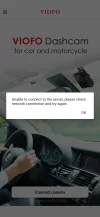
Unable to do any firmware updates using the app.
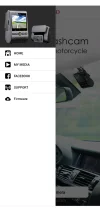
Clicking on Firmware option on left side of main screen always gives an error.
 

Attachments

  • Screenshot_20250604-182426.webp
    Screenshot_20250604-182426.webp
    51.2 KB · Views: 146
  • Screenshot_20250604-182226.webp
    Screenshot_20250604-182226.webp
    59.8 KB · Views: 125
Unable to do any firmware updates using the app.
Clicking on Firmware option on left side of main screen always gives an error.
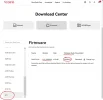
Sorry that APP cannot support firmware update at present. You need to download the firmware file from our official website to your card to update.
 

4.2.9

Aug 1, 2025

1. Adapted for A119M Pro/A329TC/A229 Pro Tele/A329WW.

You can setup through APP.

2. Fixed other bugs.

Judging by the changes, Viofo is preparing to release Mini Pro.
For those who don't need many cameras.
 
Last edited:

4.2.9

Aug 1, 2025

1. Adapted for A119M Pro/A329TC/A229 Pro Tele/A329WW.

You can setup through APP.

2. Fixed other bugs.

Judging by the changes, Viofo is preparing to release Mini Pro.
For those who don't need many cameras.
What is A329TC I wonder?

Viofo still hasn't stated if the A229 Pro Tele is the same as the older A229 Pro (with RTC300).
 
V3.2.21

I noticed a video playback issue with the Viofo Android app.

It was a previously unseen issue, and it's disappointing that a new bug has now appeared in the new, bug-fixed version.

Regarding the issue, when you try to watch a video, only audio plays. There's no image; the screen is black.
This is valid for 4k and 2k. FHD videos can be watched properly.

There was a previous issue with 4K playback, and it's been fixed. I hope this issue is resolved soon. @viofo @VIOFO-Support

In short, Android users can wait until the new version is released.

Best regards.
 
Last edited:
V3.2.21

I noticed a video playback issue with the Viofo Android app.

It was a previously unseen issue, and it's disappointing that a new bug has now appeared in the new, bug-fixed version.

Regarding the issue, when you try to watch a video, only audio plays. There's no image; the screen is black.
This is valid for 4k and 2k. FHD videos can be watched properly.

There was a previous issue with 4K playback, and it's been fixed. I hope this issue is resolved soon. @viofo @VIOFO-Support

In short, Android users can wait until the new version is released.

Best regards.
Does this issue occur occassionally or regularly?
What is your phone model?
Could you please upload the original video for testing?
You can upload it here:
https://viofo.wetransfer.com/

Please advise us after uploading.
 
Does this issue occur occassionally or regularly?
What is your phone model?
Could you please upload the original video for testing?
You can upload it here:
https://viofo.wetransfer.com/

Please advise us after uploading.
Compare the previous version with the latest version. Undo whatever you changed in the video playback section.
 
@ogzogz
@VIOFO-Support

Please understand, I have only had my A329s 3CH for about 10 days now, and it is my first dashcam, so my
experience and knowledge are very limited.

Also, after completing the A329s 3CH installation I played with many settings trying to get a feel for the system
and how everything worked. I was also playing with it and making adjustments while parked, hoping to become
more familiar with everything.

I updated the Android version of the Viofo APP on Aug 21 or Aug 22 and soon became aware of the video issue
posted here by @ogzogz , because I read about it here on DashCamTalk.

My situation is different, to the best of my limited knowledge and experience. I noticed I was not able to view any
video on my Android APP prior to Aug 21. However, with the latest Android APP V3.2.21, I have never had any
issue viewing the video from the A329s 3CH. I use it every time I am in the vehicle using a direct Bluetooth
connection, and I have had no issues viewing the video on my Android phone using the Station Mode from a
distance of almost 100 feet, or almost 30 meters.

I am not trying to be argumentative, only posting my own experiences in the hope that my information might be
useful when everyone is looking at the APP and working towards a resolution.

I sincerely hope this helps.
 
Compare the previous version with the latest version. Undo whatever you changed in the video playback section.
I forwarded this to our engineering team, and they have tested both the version 3.3.20 and 3.2.21 with videos in 4K, 2K and 1080P resolution, but have not found issues.
 
I forwarded this to our engineering team, and they have tested both the version 3.3.20 and 3.2.21 with videos in 4K, 2K and 1080P resolution, but have not found issues.
When I install version 3.2.17, I can watch the video with sound. However, when I install the current version, only the sound comes, no video.
It shouldn't be 3.3.20
Can you share version 3.2.20 with me?
 
Back
Top