Vueroid S1-4K Infinite - Test & Review PP

Wow that's a good heat resistance. But I already bought a 70mai T800 unit because I was convinced with @Julian23 's review on it. Anyway, looks like Vueroid S1 4K Infinite is a really good unit so I'll consider buying it in the future. Thanks!

yes s1 4k is very good
of course t800 is ok also
 
LOW LIGHT COMPARISON

Q: Why Low Light Testing?
A: When light levels get low weird things can happen.

When indoor testing A139 Pro I discovered a “glitch” that translated into a flicker outdoors.
Of course this was fixed with a firmware update.
Here’s what it looked like;


The good news is I don’t see anything that sticks out with S1-4K other than (HDR + IPC) is a bit darker than (HDR), an of course Normal (HDR Off) is the brightest.

Front Cameras;
1.) S1-4K HDR
2.) S1-4K HDR + IPC
3.) A329S HDR
4.) S1-4K Normal (HDR Off)

1.) HDR .webp

2.) HDR + IPC .webp

3.) A329S - HDR .webp

4.) Normal (HDR Off) .webp


However, I did notice something interesting.
When (HDR + IPC) is enabled on the front camera, and light levels drop to a curtain point IPC is dropped from the text stamp at the bottom of the screen after approximately 5 Seconds, and returns when light levels increase after approximately 5 Seconds.
@Vueroid can you explain what is happening?
Here’s what it looks like;

Front Cameras;

Rear Cameras;
5.) S1-4K Rear
6.) A329S Rear

5.) S1-4K HDR Rear .webp

6.) A329S HDR Rear .webp


Rear Cameras;
 
Chuck, the HDR+IPC "Video Enhancing" feature for the front camera only has the "IPC" image tuning enabled when sufficient ambient light is present. At low light levels, HDR+IPC and HDR are the exact same thing. In early firmware versions for the S1-4K, HDR+IPC would always have the IPC image tuning enabled which resulted in super grainy video footage at night making it worse than just having HDR enabled. That's why NC& changed it to operate in the dynamic manner you observed. The status line will show HDR+IPC when the IPC image tuning is active and HDR when the IPC image tuning is disabled.
 
Chuck, the HDR+IPC "Video Enhancing" feature for the front camera only has the "IPC" image tuning enabled when sufficient ambient light is present. At low light levels, HDR+IPC and HDR are the exact same thing. In early firmware versions for the S1-4K, HDR+IPC would always have the IPC image tuning enabled which resulted in super grainy video footage at night making it worse than just having HDR enabled. That's why NC& changed it to operate in the dynamic manner you observed. The status line will show HDR+IPC when the IPC image tuning is active and HDR when the IPC image tuning is disabled.
Yes I know, I was there. lol

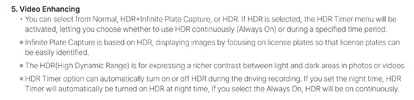
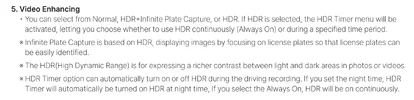
When the customer enables IPC they’re going to think IPC is always “on” until they turn it off.
This should be explained in the user manual.
“When light levels get too low, IPC is automatically disabled”
“When light levels are bright enough, IPC is automatically enabled”

Basically, I’m still not a fan of 3 different “Video Enhancing" modes.
This is too confusing.
There should only be two modes.
I wish IPC was permanently rolled into HDR.
 

Attachments

  • S1-4K User Manual .webp
    S1-4K User Manual .webp
    74.3 KB · Views: 136
Yes I know, I was there. lol

When the customer enables IPC they’re going to think IPC is always “on” until they turn it off.
This should be explained in the user manual.
“When light levels get too low, IPC is automatically disabled”
“When light levels are bright enough, IPC is automatically enabled”

Basically, I’m still not a fan of 3 different “Video Enhancing" modes.
This is too confusing.
There should only be two modes.
I wish IPC was permanently rolled into HDR.
yes little confuse
i think. hdr +ipc is on same. time
 
The user manuals that Chuck and I have [at least this ones I have] were written when the logic was to have IPC image tuning enabled all of the time when the HDR+IPC setting was selected for the "Video Enhancing" setting. I agree that the user manual needs to be updated to include the "dynamic" nature of the IPC image tuning being added/removed based on the ambient light levels.

Driving around sunset or any other situation that drops the ambient light level enough for long enough, the S1-4K will disable the IPC image tuning leaving only HDR enabled. I've observed IPC being disabled and then re-enabled a few times as I drove my vehicle just before sunset with the ambient light levels fluctuating. The same should be true in reverse when driving just after sunrise with IPC finally being left enabled when the ambient light level stabilizes after sunrise.
 
The user manuals that Chuck and I have [at least this ones I have] were written when the logic was to have IPC image tuning enabled all of the time when the HDR+IPC setting was selected for the "Video Enhancing" setting.
This screenshot was taken from the user manual on the official website tonight;
 

Attachments

  • S1-4K User Manual .webp
    S1-4K User Manual .webp
    74.3 KB · Views: 166
60fps vs. 30fps Comparison

1.) S1-4K Front 4K60fps Normal (HDR Off)
2.) S1-4K Front 4K30fps Normal (HDR Off)

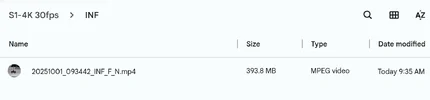
1 Minute File Size;
4K60fps = 435MB Approx Bitrate 53 Mbps
4K30fps = 394MB Approx Bitrate 48 Mbps

Bitrate;
4K60fps Approx 53 Mbps
4K30fps Approx 48 Mbps


Attachments

  • 4K30fps 394MB = 1 Minute File Size .webp
    4K30fps 394MB = 1 Minute File Size .webp
    17.8 KB · Views: 145
  • 4K60fps 435MB = 1 Minute File Size .webp
    4K60fps 435MB = 1 Minute File Size .webp
    17.3 KB · Views: 161
The User Manual was written before the IPC algorithm was updated, and we are currently carrying out a full revision. We will ensure that the updated version is released as soon as possible through official webpage and amazon.
 
REAR CAMERA 30fps vs. 15fps COMPARISON


Attachments

  • Firmware .webp
    Firmware .webp
    24.8 KB · Views: 159
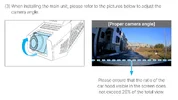
Q: What is Vueroid’s recommendation for lens adjustment?
A: See page 16 of User Manual, (attached below).

In an effort for fair & equal image quality comparison with A329S I‘ve adjusted both FRONT cameras with "identical" lens adjustment, (51% Road & 49% Sky).
S1-4K Rear camera can only be adjusted 49% Road & 51% Sky due to clicking mechanism.
A329S Rear camera is adjusted 50% Road & 50% Sky.

1.) S1-4K Front (51% Road & 49% Sky) .webp

2.) A329S Front (51% Road & 49% Sky) .webp

3.) S1-4K Rear (49% Road & 51% Sky) .webp

4.) A329S Rear (50% Road & 50% Sky) .webp


Here’s photos where the cameras are installed.

1 .webp

2 .webp

3 .webp

4 .webp
 

Attachments

  • User Manual Page 16 .webp
    User Manual Page 16 .webp
    109.1 KB · Views: 148
FRONT CAMERA S1-4K vs. A329S (separate post for rear & interior)
NIGHT TIME CITY TEST LOOP
이재민 (1987)

Settings;

S1-4K
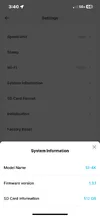
Firmware: 1.3.1
Bitrate: Maximum
Video Enhancing: HDR + IPC
CPL Filter: On

A329S
Firmware: V1.2_250708
Bitrate: Maximum
HDR: On
CPL Filter: On

Original video files uploaded to YouTube, (no editing).
S1-4K only has 1 Minute Loop Recording, (3 separate videos).
A329S Loop Recording set for 3 Minutes.


Bonus Footage;

 
Last edited:
REAR CAMERA S1-4K vs. A329S (separate post for interior)
NIGHT TIME CITY TEST LOOP
이재민 (1987)

Settings;

S1-4K
Firmware: 1.3.1
Bitrate: Maximum
Video Enhancing: HDR
CPL Filter: No CPL Filter available

A329S
Firmware: V1.2_250708
Bitrate: Maximum
HDR: On
CPL Filter: On

Original video files uploaded to YouTube, (no editing).
S1-4K only has 1 Minute Loop Recording, (3 separate videos).
A329S Loop Recording set for 3 Minutes.


Bonus Footage;

 
Last edited:
IR INTERIOR CAMERA S1-4K vs. A329S
NIGHT TIME CITY TEST LOOP
TESTING NOTE:
This was filmed simultaneously, each IR Interior camera’s IR LED Emitters are illuminated, so the cameras have “double” illumination.
I’ll refilm IR Interior test footage separately so only one camera’s IR LED Emitters are illuminated at once.
Also HDR is Off on A329S.
이재민 (1987)

Settings;

S1-4K
Firmware: 1.3.1
Bitrate: Maximum
Video Enhancing: HDR On

A329S
Firmware: V1.2_250708
Bitrate: Maximum
HDR: Off

Original video files uploaded to YouTube, (no editing).
S1-4K only has 1 Minute Loop Recording, (3 separate videos).
A329S Loop Recording set for 3 Minutes.

 
Last edited:
IR INTERIOR CAMERA S1-4K vs. A329S
NIGHT TIME CITY TEST LOOP
김정미 (1973)

TESTING NOTE:
This was filmed consecutively, so each IR Interior camera’s IR LED Emitters would not interfere with each other providing “double” illumination.

Settings;

S1-4K
Firmware: 1.3.1
Bitrate: Maximum
Video Enhancing: HDR On

A329S
Firmware: V1.2_250708
Bitrate: Maximum
HDR: On

Original video files uploaded to YouTube, (no editing).
S1-4K only has 1 Minute Loop Recording, (3 separate videos).
A329S Loop Recording set for 3 Minutes.

 
Last edited:
FRONT CAMERA S1-4K vs. A329S (separate post for rear & interior)
DAYTIME CITY TEST LOOP
세또래 (1988)

Settings;

S1-4K
Firmware: 1.3.1
Bitrate: Maximum
Video Enhancing: HDR + IPC
CPL Filter: On

A329S
Firmware: V1.2_250708
Bitrate: Maximum
HDR: Off
CPL Filter: On

Original video files uploaded to YouTube, (no editing).
S1-4K only has 1 Minute Loop Recording, (3 separate videos).
A329S Loop Recording set for 3 Minutes.


Bonus Footage;

 
REAR CAMERA S1-4K vs. A329S (separate post for interior)
DAYTIME CITY TEST LOOP
세또래 (1988)

Settings;

S1-4K
Firmware: 1.3.1
Bitrate: Maximum
Video Enhancing: HDR
CPL Filter: No CPL Filter available

A329S
Firmware: V1.2_250708
Bitrate: Maximum
HDR: Off
CPL Filter: On

Original video files uploaded to YouTube, (no editing).
S1-4K only has 1 Minute Loop Recording, (3 separate videos).
A329S Loop Recording set for 3 Minutes.


Bonus Footage;

 
IR INTERIOR CAMERA S1-4K vs. A329S
DAYTIME CITY TEST LOOP
세또래 (1988)

Settings;

S1-4K
Firmware: 1.3.1
Bitrate: Maximum
Video Enhancing: HDR On

A329S
Firmware: V1.2_250708
Bitrate: Maximum
HDR: On

Original video files uploaded to YouTube, (no editing).
S1-4K only has 1 Minute Loop Recording, (3 separate videos).
A329S Loop Recording set for 3 Minutes.

 
Back
Top