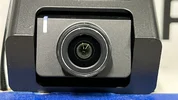
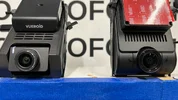
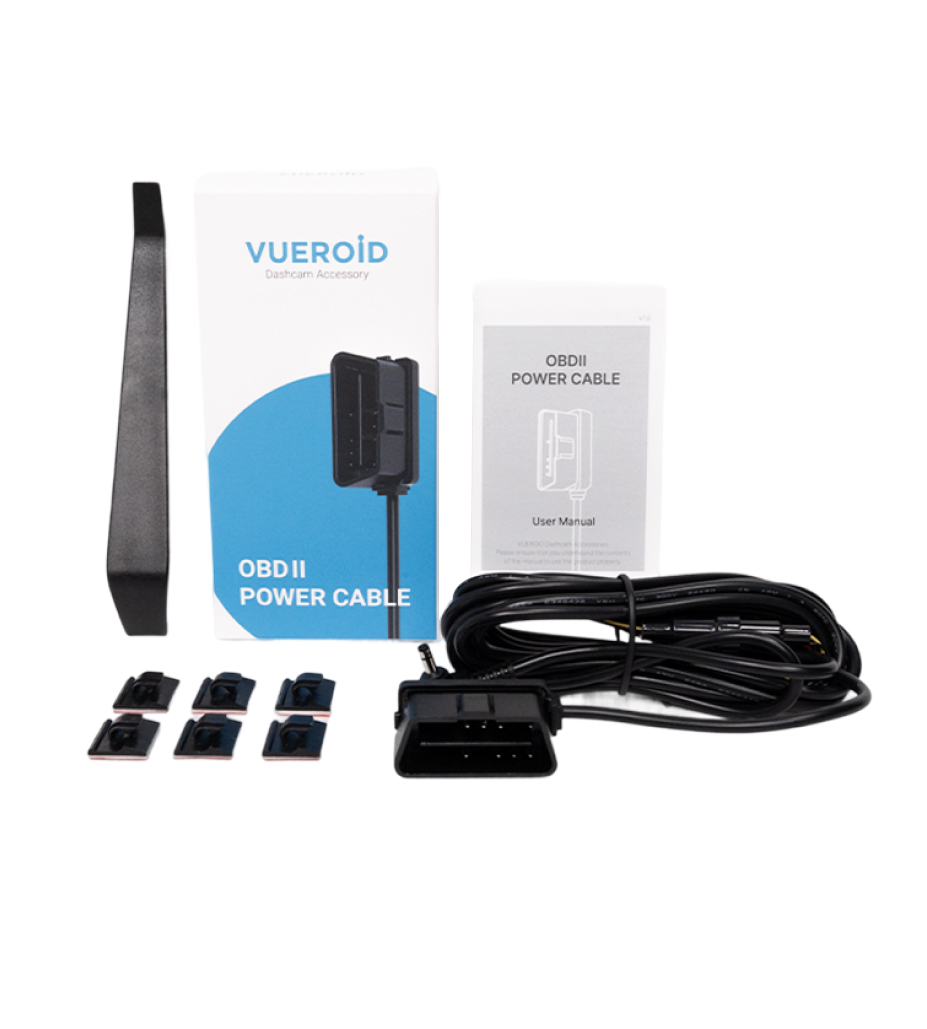
Vueroid S1-4K Infinite - Test & Review PP

@Chuck McCoy
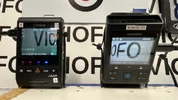
The interior videos look great but I'm a little curious as to how you managed to fit them on the back windows especially the Viofo as they only sell a 1 mtr lead.

Side note: you have posted some Korean text. One is a persons name and the other mention 3 years ago?
Am i missing something?

Good to see real world driving examples and video of same times. 👍
 
The interior videos look great but I'm a little curious as to how you managed to fit them on the back windows especially the Viofo as they only sell a 1 mtr lead.
Viofo sells 5, or 6 different length Coax cables.
As far as S1-4K I’d like to remind first time buyers of Vueroid’s warranty policy.

Void The Warranty .webp

June 24, 2025 I asked Jessie if they were going to offer a “long” 4 Meter extension cable for the IR Interior camera, and a “short” 1 Meter extension cable for the Rear camera for maximum installation flexibility.
She said no, but if there’s enough customer demand they might offer an “official accessory” that’s been tested with proven stability.
I think they’ve “warmed up” to the idea of installing the IR Interior camera on the “wrong” window because Hera asked to use my test footage for promotional purposes.

Rear Window .webp


July 12, 2025 I thought I would throw the dice on a $9 cable from Amazon, (10ft 2.5mm TRRS 4-Pole connector);
https://www.amazon.com/gp/B0DDCGZXWW
July 29, 2025 Jessie sent me an “official” 10ft extension for the IR Interior camera.
When I installed the interior cable in the headliner I used the $9 one from Amazon because it was a thicker than the official one, (in the hopes of better interference shielding).
So far it’s been working out.
Side note: you have posted some Korean text. One is a persons name and the other mention 3 years ago?
Am i missing something?
비밀
Good to see real world driving examples and video of same times. 👍
I find it extremely difficult to near impossible to evaluate image quality without comparing it to something else.
 
Last edited:
S1-4K vs. A329S
FRONT CAMERA (separate post for rear & interior)
HIGHWAY TEST LOOP
김완선 (1986)

Settings;

S1-4K
Firmware: 1.3.1
Bitrate: Maximum
Video Enhancing: HDR + IPC
CPL Filter: On

A329S
Firmware: V1.2_250708
Bitrate: Maximum
HDR: Off
CPL Filter: On

Original video files uploaded to YouTube, (no editing).
S1-4K only has 1 Minute Loop Recording, (3 separate videos).
A329S Loop Recording set for 3 Minutes.


Bonus Footage;

 
S1-4K vs. A329S
REAR CAMERA (separate post for interior)
HIGHWAY TEST LOOP
김완선 (1986)

Settings;

S1-4K
Firmware: 1.3.1
Bitrate: Maximum
HDR: On
CPL Filter: No Optional CPL Filter Available

A329S
Firmware: V1.2_250708
Bitrate: Maximum
HDR: Off
CPL Filter: On


Bonus Footage;

 
S1-4K vs. A329S
INTERIOR CAMERA
HIGHWAY TEST LOOP
김완선 (1986)

Settings;

S1-4K
Firmware: 1.3.1
Bitrate: Maximum
HDR: On

A329S
Firmware: V1.2_250708
Bitrate: Maximum
HDR: On

 
S1-4K vs. A329S - FRONT
LENS FLARE COMPARISON

Settings;

S1-4K
Firmware: 1.3.1
Bitrate: Maximum
HDR: On
CPL Filter: Off

A329S
Firmware: V1.2_250708
Bitrate: Maximum
HDR: On
CPL Filter: Off

7.) .webp


Attachments

  • 6.) S1-4K Front .webp
    6.) S1-4K Front .webp
    134.2 KB · Views: 149
  • 5.) A329S Front .webp
    5.) A329S Front .webp
    114.2 KB · Views: 138
  • 4.) .webp
    4.) .webp
    137.1 KB · Views: 139
  • 3.) A329S .webp
    3.) A329S .webp
    97.9 KB · Views: 144
  • 2.) S1-4K .webp
    2.) S1-4K .webp
    145.9 KB · Views: 117
  • 1.) .webp
    1.) .webp
    206.9 KB · Views: 131
S1-4K vs. A329S
RANDOM TEST FOOTAGE - CROSSWALK PEDESTRIANS

Settings;

S1-4K
Firmware: 1.3.1
Bitrate: Maximum
Video Enhancing: HDR
CPL Filter: On

A329S
Firmware: V1.2_250708
Bitrate: Maximum
HDR: Off
CPL Filter: On


Attachments

  • 9V-28V .webp
    9V-28V .webp
    59.3 KB · Views: 138
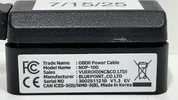
  • NOP100 Label .webp
    NOP100 Label .webp
    192.9 KB · Views: 127
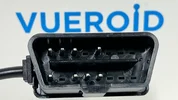
  • Pin Population .webp
    Pin Population .webp
    118.7 KB · Views: 154
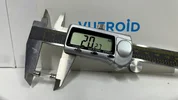
  • 20mm .webp
    20mm .webp
    119.5 KB · Views: 139
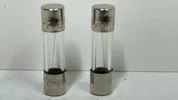
  • 2 Amp Fuse - F2AL 250V  .webp
    2 Amp Fuse - F2AL 250V .webp
    81.3 KB · Views: 122
Vueroid OBD2 Power Cable Parking Mode Demo
You triggered parking mode by reducing the voltage from 14.2V to 12.5V. For anyone who might not understand what is happening, perhaps you could add a sentence or two to describe how this simulates a car environment?

By the way, the 12V system in my hybrid car is at ~12.3V when the internal combustion engine is off (driving using just the traction battery). This does not trigger parking mode when I'm using the OBD II adapter, however based on your test this might affect other drivers if their battery voltage dips below 12.6V?
 
Last edited:
S1-4K vs. A329S
FRONT CAMERA (separate post for rear & interior)
HIGHWAY TEST LOOP
김완선 (1986)

Settings;

S1-4K
Firmware: 1.3.1
Bitrate: Maximum
Video Enhancing: HDR + IPC
CPL Filter: On

A329S
Firmware: V1.2_250708
Bitrate: Maximum
HDR: Off
CPL Filter: On

Is there any reason to compare the videos with different Video Enhancing modes in daylight?
Can you please set Linear mode(Normal) to S1 4K also?
 
Last edited:
Q: Do any S1-4K remote cameras have their own processor?
A: No
All processing is performed by the S1-4K front / main unit.
So you're telling me that if I'm in parking mode and a criminal walks past the rear camera or the cabin camera, it won't start recording?
 
So you're telling me that if I'm in parking mode and a criminal walks past the rear camera or the cabin camera, it won't start recording?
Having a processor in a camera and whether it's used for motion detection are two different questions. The S1-4K will use the front and rear cameras when in "Impact & Motion" parking mode for motion detection. The interior camera is not used in the motion detection logic. There's only one processor in the S1-4K which is in the front camera unit.
 
Vueroid released a firmware update, (v.1.4.2) and they made a YouTube video about it, so I’m thinking it might significant.


The first thing in the change log is;
1.) Improved image quality of HDR + IPC and Normal recording to enhanced license plate readability.

I wanted to see if I can spot any difference, and of course compare it to Viofo A329S Front 4K, and “gun to a knife fight” 2K Telephoto.
The telephoto really is an unfair advantage, but it is, what it is.
I went for a 90 Minute drive on March 24, 2026.
Sunset was 7:23PM, so I waited until 8:00PM before I left the house to make sure it was dark.

Oh yeah, while updating the APP I noticed the new Horizon Line Adjustment guide, (aka camera lens adjustment).
Thank you very much for making my #27 WISH COME TRUE
ADD LINK:

But now, I’m perplexed.
Previously I was aligning the Horizon Line to 50% Road 50% Sky.
@Mtz instructed me when gathering test footage for comparison with multiple different cameras they must all have “identical” Horizon Line Adjustment” so each camera is on equal footing for an apples to apples comparison, and no camera has an unfair advantage / disadvantage.
For this reason I have transferred the “true correct” Horizon Line with blue painter’s tape to the walls of my garage, so I can easily, and repeatably align cameras in my car without have to wait for daylight, or waste gasoline.

Using the new APP guide it wants me to adjust the camera lens to what appears to be more like 35% Road 65% Sky.
Do I keep with 50/50, or follow manufacturer recommendation?
My ignorant gut feeling told me it won’t matter as much at NIGHT.
But DAYTIME might be a different story.

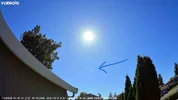
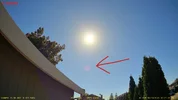
1.) A329S Front (50% Road - 50% Sky) .webp

2.) S1-4K Front (50% Road 50% Sky Front) .webp

3.) S1-4K Front (35% Road 65% Sky) .webp

4.) S1-4K Rear (35% Road 65% Sky) .webp


CAMERA SETTINGS:

S1-4K
Firmware: v.1.4.2
Resolution: 4K30fps
HDR + IPC: ON
Bitrate: HIGH (highest setting)
1 Minute File Size: 394MB
CPL Filter: Yes
SD Card: 512GB Vueroid
Power Source: Vueroid 12V Hardwire Cable

A329S
Firmware: V2.0_260104
Resolution: 4K30fps Front
Resolution: 2K30fps Telephoto
HDR: ON
Bitrate: MAXIMUM (highest setting)
1 Minute File Size: 384MB Front
1 Minute File Size: 172MB Telephoto
CPL Filter: Yes (front & telephoto)
SD Card: 512GB Viofo
Power Source: Viofo HK6 Hardwire Cable

Both 4K Front Camera captures are illegible.
But the 2K Telephoto gets it no problem.
California Plate # 7YDF883
2017 Toyota Corolla


5.) Viofo Front No Zoom .webp

6.) Vueroid No Zoom .webp

7.) Viofo Telephoto No Zoom.webp

8.) Viofo Front Zoom .webp

9.) Vueroid Zoom .webp

10.) Viofo Telephoto Zoom .webp


Next post is the Arm & Leg HDR comparison.
-Chuck
 
Last edited:
Arm & Leg HDR Comparison

CAMERA SETTINGS:

S1-4K
Firmware: v.1.4.2
Resolution: 4K30fps
HDR + IPC: ON
Bitrate: HIGH (highest setting)
1 Minute File Size: 394MB
CPL Filter: Yes
SD Card: 512GB Vueroid
Power Source: Vueroid 12V Hardwire Cable

A329S
Firmware: V2.0_260104
Resolution: 4K30fps Front
Resolution: 2K30fps Telephoto
HDR: ON
Bitrate: MAXIMUM (highest setting)
1 Minute File Size: 384MB Front
1 Minute File Size: 172MB Telephoto
CPL Filter: Yes (front & telephoto)
SD Card: 512GB Viofo
Power Source: Viofo HK6 Hardwire Cable


1.) Viofo Front No Zoom .webp

2.) Vueroid Front No Zoom .webp

3.) Viofo No Zoom Telephoto .webp

4.) Viofo Front Zoom .webp

5.) Vueroid Front Zoom.webp

6.) Viofo Telephoto Zoom .webp
 
Oh yeah, while updating the APP I noticed the new Horizon Line Adjustment guide, (aka camera lens adjustment).
Thank you very much for making my #27 WISH COME TRUE
ADD LINK:

But now, I’m perplexed.
Previously I was aligning the Horizon Line to 50% Road 50% Sky.
@Mtz instructed me when gathering test footage for comparison with multiple different cameras they must all have “identical” Horizon Line Adjustment” so each camera is on equal footing for an apples to apples comparison, and no camera has an unfair advantage / disadvantage.
For this reason I have transferred the “true correct” Horizon Line with blue painter’s tape to the walls of my garage, so I can easily, and repeatably align cameras in my car without have to wait for daylight, or waste gasoline.

Using the new APP guide it wants me to adjust the camera lens to what appears to be more like 35% Road 65% Sky.
Do I keep with 50/50, or follow manufacturer recommendation?
My ignorant gut feeling told me it won’t matter as much at NIGHT.
But DAYTIME might be a different story.

View attachment 90339
View attachment 90340
View attachment 90341
View attachment 90342
I'm also curious about the horizon line adjustment. If I align the dashcam in our Toyota RAV4 to 50% road and 50% sky, the video captures some of the dashboard. I'm not sure if that's okay. My concern is that if there is too much sky in the frame, the road will become a bit underexposed.
 
Reply function not working.

@lempogi said:
I'm also curious about the horizon line adjustment. If I align the dashcam in our Toyota RAV4 to 50% road and 50% sky, the video captures some of the dashboard. I'm not sure if that's okay. My concern is that if there is too much sky in the frame, the road will become a bit underexposed.

Chuck said:
If you have an S1-4K I would start by following the manufacturer recommendation on page 16.

S1-4K User Manual Page 16 .webp


The reason they make this recommendation is "usually" based on light metering, image quality tuning, and a bunch of other complicated stuff I know nothing about.
Here’s a demo I stole from an OG member;


However, there are exceptions when deviating from manufacturer recommendation may be warranted.
I remember reading a thread by the late @Dashmellow RIP that talked about the color of your hood may affect light metering, (light or dark hood), and camera lens adjustment may be needed.
Let me go look for it.

Another exception would be if you are filming at NIGHT, and you want to capture tall illuminated buildings like in Las Vegas.
I screwed up, and discovered this by accident.
Take a look at these two videos.
The A229 Pro is adjusted "correctly" at 50/50.
But, I must have mistakenly bumped the lens of the A329 2CH, (it appears to be around 65% Road 35% Sky.


To find out what camera lens alignment works best in your RAV4 I would film DAYTIME test footage, and make 1 click adjustments, and review the footage, (up&down) to see gives the best results.
 

Attachments

  • Screenshot 2026-03-26 3.30.08 PM.webp
    Screenshot 2026-03-26 3.30.08 PM.webp
    27.5 KB · Views: 37
Vueroid released a firmware update, (v.1.4.2) and they made a YouTube video about it, so I’m thinking it might significant.


CAMERA SETTINGS:

S1-4K
Firmware: v.1.4.2
Resolution: 4K30fps
HDR + IPC: ON
Bitrate: HIGH (highest setting)
1 Minute File Size: 394MB
CPL Filter: Yes
SD Card: 512GB Vueroid
Power Source: Vueroid 12V Hardwire Cable


View attachment 90347

Next post is the Arm & Leg HDR comparison.
-Chuck

Dear Chuck,

While reviewing the feed you shared, I conducted an interesting test.

I tested the License Plate Restoration feature.
What I used was not the algorithm currently provided through the Amazon server, but rather the next version of the LP Restoration function, which is still under continuous improvement and further development.
This feature has not yet been officially released, but it is expected to be rolled out soon (hopefully!) as an update for customers using the Vueroid S1 4K.

The results are as follows.
You already showed the image captured by the A329S Telescope, but here it is as below.
1774596739547.webp


The image we used for testing was not the one you captured here, but rather a portion extracted from a YouTube video.
And here are the results of Vueroid License Plate Restoration - New Version!!!.
1774596880440.webp

The left one was the input, and the right one was the output.
Yes, there is a point in the middle, but please ignore it.

The core concept of this feature remains the same.
Since it is not magic, it is impossible to create something out of nothing.
However, with this update, we believe we have addressed all the negative feedback we previously received and can now provide a much more practical and effective feature.

If the opportunity arises, we will continue testing and keep you updated on the progress before officially updated.

Have a good day~
James
 
Back
Top