Yi hacked resolution 2304x1296 30fps 35Mbits

I and many others are looking for the highest quality native 4x3 60fps. If you can capture more on the top and bottom it gives you more options for cropping and defishing etc.

I would always assume that if you want the highest quality, that you would only scale on a computer, scaling on the camera can never match high-quality signal processing.


Thanks for the info!

Ignoring superview, because I don't need to bring it back to 1920x1080.

I think 1920x1080@60fps is an upscale/interpolation from 1536x1152@60

So I'm wonidering if 1600x1200@60 is also an upscale from 1536x1152@60

Or would 1600x1200@60 be a native resolution of the Yi because you are using more of the sensor when you record in a 4:3 format.
 
Hi, I am writing here, because I think this problem is not only mine and you guys have the deepest knowledge of this camera:

I have the following problem:

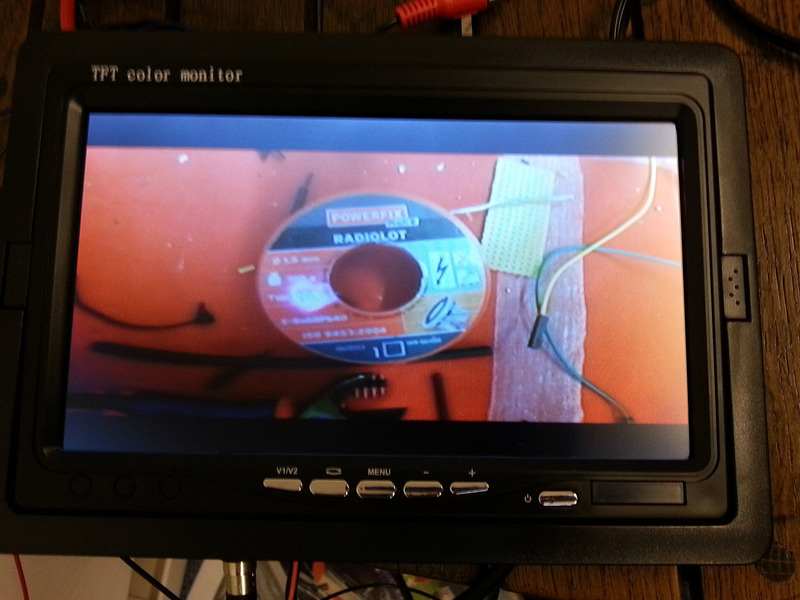
The camera outputs the video at the AV out as 4:3 but with black bars at top and bottom.

See the picture here:

img_20150907_1131203hbuog4.jpg


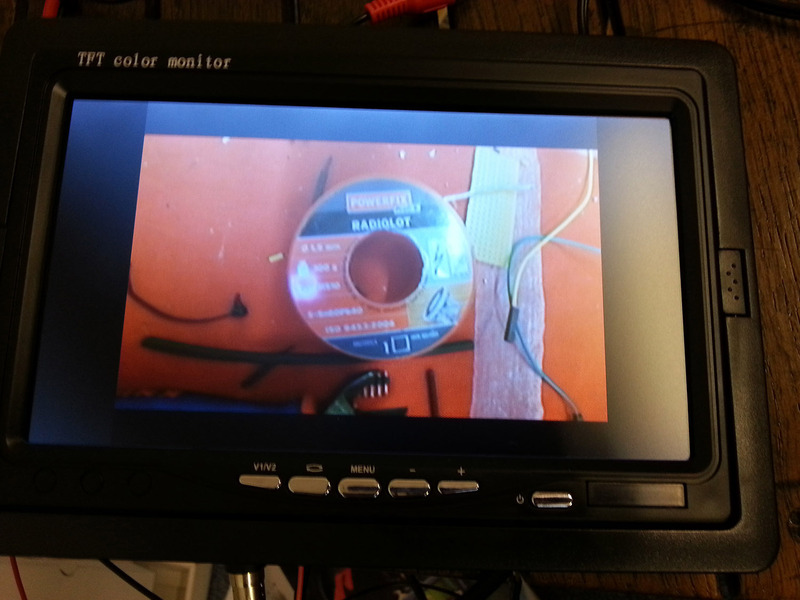
Now my screen just supports stretching the video to 16:9. The problem is, the image then looks like this:

img_20150907_113130pvb0paw.jpg


So if I want to have the right aspect ratio, I can just use that small 4:3 image on my screen...

The problem is, that the camera outputs the video in the wrong way.

So my question is: can we develop a script which "compresses" the video like in this image? (photoshopped):

img_20150907_113120_sq7oq6.jpg


because if the video was output like this, I could set my screen to 16:9 and have the fullscreen video on it!

the technique is called anamorphic widescreen and is used with dvd video!

https://en.wikipedia.org/wiki/Anamorphic_widescreen

thank you very much in advance!
 
Last edited:
hi, I produced two videos, one with my SJ4000, which in my opinion is much more sharpness in the decor of the living room and the other with my xiaomi yi (YIMAX-MOVIE) . I find the video1 much more precise sharpness in the video2. I am disappointed videos made by my xiaomi yi, I find the more blurred image, less clear. Is this possible with a script to give clarity to our xiaomi yi?

video1:

video2:
 
Hi, I am writing here, because I think this problem is not only mine and you guys have the deepest knowledge of this camera:
Yes, i have exactly the same problem. In fact i had this before with hero1-2-3-3+, and now with the Yi.
Mobius and simple FPV cams was good, without this error.
I don't know why Yi output always in 4:3 format, when recording 16:9 video. It doesn't write and OSD info to the black bars, so its just a waste of useble space on a small monitor 🙁
 
You tested my script?
I use the same one and no white shadows.
Test it and report.
Switch Metering mode to center!
LG Gente
 
You tested my script?
I use the same one and no white shadows.
Test it and report.
Switch Metering mode to center!
LG Gente


Yes @gente , there are cloud with your script and I'm on this switch metering mode to center.
 
Last edited:
Hi, I am writing here, because I think this problem is not only mine and you guys have the deepest knowledge of this camera:

I have the following problem:

The camera outputs the video at the AV out as 4:3 but with black bars at top and bottom.

See the picture here:

img_20150907_1131203hbuog4.jpg


Now my screen just supports stretching the video to 16:9. The problem is, the image then looks like this:

img_20150907_113130pvb0paw.jpg


So if I want to have the right aspect ratio, I can just use that small 4:3 image on my screen...

The problem is, that the camera outputs the video in the wrong way.

So my question is: can we develop a script which "compresses" the video like in this image? (photoshopped):

img_20150907_113120_sq7oq6.jpg


because if the video was output like this, I could set my screen to 16:9 and have the fullscreen video on it!

the technique is called anamorphic widescreen and is used with dvd video!

https://en.wikipedia.org/wiki/Anamorphic_widescreen

thank you very much in advance!

This script should do it.
 
This will stretch 1080 to 1440? Quality remain? No jagged edges, etc?
Work with 1.2.12 too?
thanks
 
Yes, quality remains the same. It's just converted 1920x1080 to 1920x1440 60 fps. Yes it should work on 1.2.12 too.
 
This script should do it.
hi @funnel, can you give me script for stretch 1280x960 60fps to 1920x1080 60fps?
Thanks a lot...and have you resolution adresses for setting "writel" codes by myself?

lg gente
 
Yes @gente , there are cloud with your script and I'm on this switch metering mode to center.
I'm wondering on your foggy video. With that script in post #604 and 2304x1296 30fps 35mbits my footages are clear with good sharpness. It looks like the videos against sun on lenses without IR filter. Is that behavior also with outside footages?
My version is 23L with refocussed IR lens.
 
Yes, quality remains the same. It's just converted 1920x1080 to 1920x1440 60 fps. Yes it should work on 1.2.12 too.

Hmm,
yes, the recorded videofile was 1920x1440, but the actual preview has still black borders on top/bottom.
And for some reason the motion was stuttering, not smooth 60fps.
Do you tested it, and worked on a 16:9 monitor?
 
I didn't try it before but I tried it now and it really doesn't work. Still black bars in AV out. I'll take a look if I can find something to make it work.
 
@gente My version is 23L with refocussed lense without IR filter. I order a lens for over two weeks in gearbest.com, I am going wait the receive before re-testing with your script, I'll talk to you after the installation of the new lens with IR filter.
 
thanks for your efforts, funnel!
If there is a way, I know you find it 🙂
 
@gente My version is 23L with refocussed lense without IR filter. I order a lens for over two weeks in gearbest.com, I am going wait the receive before re-testing with your script, I'll talk to you after the installation of the new lens with IR filter.
I think the issue may be the YIMAX-MOVIE script. I have a 22L with nonIR (factory) lens, but a custom script (attached)

Note that the line "t ia2 -awb off is disabled by the # in front of it
I believe that the YIMAX-MOVIE script is set up for a really flat look s that you can post process whereas the SJ4000 is setup for a good looking SooC (Straight Out Of Camera) look. My custom script can look a little dull inside, but it really tames down the contrast outside that tends to crush shadows. That said, I set my Yi up for a flatter image so that I can adjust it better when editing. This is how I am used to doing still photography, so I want the extra steps

You may need to try a script with just the noise reduction script. I have run just that and the SooC videos looked pretty good.
 

Attachments

Back
Top