Parking Battery-Power Station, 3X capacity and 3X cheaper than dedicated options + extra functionality

Thanks. I am testing a bluetti eb3a I already had before I invest in an ecoflow. Seems to be the same deal, have to power on manually if it dies. I am curious to know if others have tested any other power stations for this purpose. I am seeing 70mai may release a dedicated one soon. Also looking at the new ecoflow river 3 plus models and anker solix c300.


i noticed i couldn't switch on the DC (camera) until 0.5% in the app, so I've now set my minimum discharge to 1%
so when i get in, and start the car, i can switch on my DC (camera) straight way so i don't have to wait
 
I can now confirm that even though I set it to discharge cut off at 1%, battery was showing zero this morning, and having a discharge limit on , the dc won't turn on until it has reached that discharge limit.

So I had to turn the discharge limit off so that I can get my camera on earlier
 
I played with the automated schedule for my EcoFlow unit a while ago. While useful, I found it did not provide the level of resolution or control that I would find most useful for the purposes of running a dashcam for the car.
 
I finally got my hands on EcoFlow R2 and did some tests to satisfy my curiosity.
I am using my Viofo A229Plus 2ch F&R with the latest public FW, in normal recording and low-bit-rate parking.
Functionality wise it is a really good PS for the dashcam application.
The App is the best of all I have seen.

So far:
- The ‘Automated Task’ works like if>than, but as @EricSan mentioned it is not helping with dashcam application.
It will not turn 12VDC back ON once the PS is OFF (depleted) and then turned ON due to charging, basically it works the same as if devise timeout is set to Never, 12VDC will stay ON until PS is ON.
(Spoiler – this is not the case with River3!)

- But, But, But, with the River2 we do Not need to use 12VDC, we can use USB-C to 12VDC Cable as shown in the link below, it works and it works very well. It is as efficient as 12VDC out since USB-C negotiates the voltage (it is not a voltage converter)
It only needs 1 min to activate from completely dead battery, but as @Shiwarrior mentioned, we can set the discharge limit, say at 3% or better at 5% so the battery will turn off with some energy reserve, in which case the USB-C cable will activate in about 10 to 15 seconds!
So you can set the timeout to 30 min worry-free to save the energy after dashcam stops parking recording as set.

CONCLUSION: Do not use 12VDC out to power the dashcam, instead use USB-C to 12VDC Cable and wire it as shown in the link below.

https://dashcamtalk.com/forum/threads/ecoflow-and-viofo.51429/post-622920
 
- Yes, 12V USB-C is quite good for 2 channels (no power loss), but it may be unstable on 3 channel 229 Pro (output voltage <5.1V) for my case.
- USB-A 5V-12V: too much power loss, additional 1-1.5W for the converter (by River2 readings) but it works for most of the cases.
- 12V DC port+automated task: very stable voltage for 3 channel system (~12.3V at DC port), but a issue with auto ON at fully depleted PS (at 0%, I had to turn it on by app/button).

Some FB users said that Ecoflow PS does not detect the low power consumption (less than 25w) so the discharging limit has no effect for stopping/turning off the PS, and PS runs until depleting. This limit works on car startup only, it did not power on the 12DC port, 5V/12V USB ports if SOC is under the limit (0%, 30% in my case) and we have to wait. Anybody can confirm this? Does River2 stop at 1%, 5%, 30% discharging limit on low power consumption? If so, fixing the River2 firmware may work (it does detect the low power but won't stop discharging) and we can wait <1 minute for reaching SOC to power on 12VDC/USB-C port again on startup.
 
I finally got my hands on EcoFlow R2 and did some tests to satisfy my curiosity.
I am using my Viofo A229Plus 2ch F&R with the latest public FW, in normal recording and low-bit-rate parking.
Functionality wise it is a really good PS for the dashcam application.
The App is the best of all I have seen.

So far:
- The ‘Automated Task’ works like if>than, but as @EricSan mentioned it is not helping with dashcam application.
It will not turn 12VDC back ON once the PS is OFF (depleted) and then turned ON due to charging, basically it works the same as if devise timeout is set to Never, 12VDC will stay ON until PS is ON.
(Spoiler – this is not the case with River3!)

- But, But, But, with the River2 we do Not need to use 12VDC, we can use USB-C to 12VDC Cable as shown in the link below, it works and it works very well. It is as efficient as 12VDC out since USB-C negotiates the voltage (it is not a voltage converter)
It only needs 1 min to activate from completely dead battery, but as @Shiwarrior mentioned, we can set the discharge limit, say at 3% or better at 5% so the battery will turn off with some energy reserve, in which case the USB-C cable will activate in about 10 to 15 seconds!
So you can set the timeout to 30 min worry-free to save the energy after dashcam stops parking recording as set.

CONCLUSION: Do not use 12VDC out to power the dashcam, instead use USB-C to 12VDC Cable and wire it as shown in the link below.

https://dashcamtalk.com/forum/threads/ecoflow-and-viofo.51429/post-622920

I'll read it when I grt a minute, thanks
 
I played with the automated schedule for my EcoFlow unit a while ago. While useful, I found it did not provide the level of resolution or control that I would find most useful for the purposes of running a dashcam for the car.

Do you think I should do this or not bother?
 

Attachments

  • Screenshot_20240925_115921.webp
    Screenshot_20240925_115921.webp
    27.7 KB · Views: 110
If it suits your needs, then, by all means, go right ahead! Each person's use case is a little different, so experiment a bit and learn how it will work. @GPak has provided some great information and the schematic he linked is both simple and effective to make things work. The key with the EcoFlow's 12v outlet is that having it powered up will prevent the battery from sleeping, so it will continue to consume battery power. The USB-C port works better because once the draw from the dashcam is removed (you turn it off at home in the garage), the battery automatically sleeps to save power.

I haven't played with the newer version of the EcoFlow app, it might have added some new flexibility for turning things on and off again. If you can also set a time to turn the 12v port OFF again, that might be useful...
 
- Yes, 12V USB-C is quite good for 2 channels (no power loss), but it may be unstable on 3 channel 229 Pro (output voltage <5.1V) for my case.
- USB-A 5V-12V: too much power loss, additional 1-1.5W for the converter (by River2 readings) but it works for most of the cases.
- 12V DC port+automated task: very stable voltage for 3 channel system (~12.3V at DC port), but a issue with auto ON at fully depleted PS (at 0%, I had to turn it on by app/button).

Some FB users said that Ecoflow PS does not detect the low power consumption (less than 25w) so the discharging limit has no effect for stopping/turning off the PS, and PS runs until depleting. This limit works on car startup only, it did not power on the 12DC port, 5V/12V USB ports if SOC is under the limit (0%, 30% in my case) and we have to wait. Anybody can confirm this? Does River2 stop at 1%, 5%, 30% discharging limit on low power consumption? If so, fixing the River2 firmware may work (it does detect the low power but won't stop discharging) and we can wait <1 minute for reaching SOC to power on 12VDC/USB-C port again on startup.
I have tested and can confirm that the EcoFlow River2 with Viofo A229 Plus 2ch F&R in the LBR parking, will unfortunately NOT turn off when the preset discharge limit is reached.
Specifically, I tested the 3% and 5% limits.

The USB-C-12V cable output is 12.05V with the A229A Plus 2ch, in normal recording or low bit rate (LBR) parking.
It is rated at 3A or 36W, most 3 and even 4 channel cameras draw less than 10W in normal recording. I think it should be stable.
I also tested the USB-C 15V cable without any issues, if needed, 5A rated USB-C-12V cables are also available on Amazon.
The 12VDC output would be the best choice if only it would automatically activate like USBs.
It is a bit inconvenient for me to manually turn on the 12VDC port, I like to "set it and forget it"

Apparently the new EcoFlow River3 has an "output port memory" setting in the app.
It remembers the previous state of the ports and will turn on the port if it was on before the timeout/shutdown.

Check the video, specifically from 11:55
 
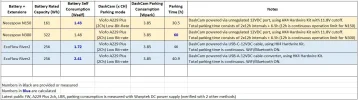
Here are EcoFlow River2 parking duration test results for Viofo A229 Plus, 2ch, Low-Bit-Rate using USB-C-12V cable and USB-A-12V cable-converter.
As expected, the USB-C to 12V cable is much more efficient since it is not a DC-DC voltage converter.

EDIT: Self-consumption includes power station itself, converters, cables, etc., basically everything except the dashcam consumption.
 

Attachments

  • Capture.webp
    Capture.webp
    85.4 KB · Views: 154
Last edited:
interesting, so usb-C is the way to go, even better than the cig lighter socket i guess too (would this be even worse than using USB-A ?)
ill have to convert my blackvuew to USB-C 🙂

Thanks @GPak
 
interesting, so usb-C is the way to go, even better than the cig lighter socket i guess too (would this be even worse than using USB-A ?)
ill have to convert my blackvuew to USB-C 🙂

Thanks @GPak
The parking test was done using wiring diagram and the USB-C to 12/15V cables as shown in the link below.
Original HK4 hardwire kit was used to power A229Plus dashcam.
I am not familiar with blackvuew, but I think you should be able to power blackvuew similarly using blackvuew original hardwire kit.

Efficiency for the 12VDC cig port, USB-C port and USB-A port output, should be close, due to all are regulated, however using USB-A to 12V cable with additional converter makes it less efficient.

 
256Wh at 12v is approx 21,000mAh. So, for the list above, you’re looking at about 21,000mAh, 42,000mAh, and 63,000mAh for each unit. I just googled “wh to mah conversion” and used an online calculator.

Just to update my pro, I bought a 24000 mah powerbank and charging ecoflow , percentage was going up about 10% each time, thought that was strange.

(Only know this because I've switched off DC at the moment)

So I used Google to see if I can find the correct answer this time, and I found it
It's actually 240,000 mAh !!

So my theory is correct. 240,000 ÷ 24000 = 10

A dedicated dashcam battery is 7500 mah at around £300 /£400

so if the ecoflow is 240,000 and a cellink 8+ is 7,500, then the ecoflow river 2 pro is 32 times bigger for approximately the same price !!!!
 
I've not had extensive experience playing around with converting mAh figures to Wh, so the online conversion tool that I used may or may not have provided an accurate conversion factor... It's also likely that I used the tool incorrectly. Reporting data using different units is one of the many tactics that companies use to try to keep customers from making more direct product comparions. It keeps crappy products from looking as crappy as they really are...

I can tell you that a fully charged River 2 (at 256Wh) can power my 2-ch Viofo A139Pro for about 40-45 hours. This capacity is roughly 3x the "typical" dedicated dashcam parking battery (there will obviously be some differences from one brand/product to another), as GPak noted at the top of this thread. The River 2 Pro is advertised as 768Wh, or three times the capacity of the non-pro River 2. Thus, you are potentially looking at about 120 hours of parking mode power for a 2-ch setup with power draw similar to mine. This will vary with how efficiently the voltage conversions are made and what the actual battery configuration is (cells in parallel, cells in series) inside the unit. Overall, I'd conclude that the River Pro2 is probably closer to about 9x the capacity of a more typical dedicated dashcam parking battery.

Either way you slice it, I'd expect the River Pro 2 to be able to provide somewhere between 2 and 3 weeks of parking mode power (assuming a 40 hr work week and that it goes to sleep otherwise) before it needs to recharged. That's quite a bit of power for a pretty nice price! I'm curious to hear how reality compares to calculated longevity running your specific dashcam. Numbers and conversions are nice, but in the end, it's the number of hours that your camera functions that are most important 😉
 
Just to update my pro, I bought a 24000 mah powerbank and charging ecoflow , percentage was going up about 10% each time, thought that was strange.

(Only know this because I've switched off DC at the moment)

So I used Google to see if I can find the correct answer this time, and I found it
It's actually 240,000 mAh !!

So my theory is correct. 240,000 ÷ 24000 = 10

A dedicated dashcam battery is 7500 mah at around £300 /£400

so if the ecoflow is 240,000 and a cellink 8+ is 7,500, then the ecoflow river 2 pro is 32 times bigger for approximately the same price !!!!

With so many battery chemistries and pack configurations, the mAh rating without voltage reference should not be used.
Instead of mAh it is better to use Wh which is independent of battery chemistry and pack configuration.
Using mAh without voltage reference is confusing at best and misleading at worst, often leads to comparing ‘apples to oranges’.

Sorry, @Shiwarrior but your calculations/conclusions are incorrect.

The 240000mAh for R2 Pro is based on LFP cell nominal voltage of 3.2V, calculated as 768Wh / 3.2V = 240Ah = 240000mAh
Contrary, the 7500mAh for the standard 96Wh dedicated battery is based on LFP 4S pack voltage, which is 4 x 3.2V = 12.8V

To compere correctly we should use LFP nominal cell voltage of 3.2V for the dedicated battery similar to R2 pro.
Then for the dedicated battery:
96Wh / 3.2V = 30mAh=30000mAh

Hence R2 Pro is, 240Ah / 30Ah = 8 times bigger (capacity wise) compare to dedicated battery. (not 32 times)
We get the same result simply using Wh as 768Wh / 96Wh = 8

However that is not the final number.

The R2, being a power station is more versatile with additional features, therefore there are some losses due to regulated voltage output, WiFi, Bluetooth, etc., and the real usable capacity is about ±75%, while for the dedicated battery it is close to 100% (no regulations there)

So the real difference between R2 Pro vs dedicated battery is about 0.75 x 8 = 6 times.

If I remember correctly, the dedicated Batteries are advertising to provide about 20h of parking for a 2ch dashcam in LBR.
The R2Pro will provide about 6 x 20 = 120h of parking, as @EricSan mentioned above


PS.
Your power bank is likely Li-Ion, with nominal cell voltage of about 3.65V hence it is about 20Ah x 3.65V = 73Wh.
 
Thanks G 🙂


got a little more detail to tell..

As i got my Dashcam + battery hardwired in by a professional...

Hooked up a cellink neo 8+ and connected the ecoflow to it via the EXT (to pretend its an external battery) so that i get instant parking mode on/off and shock sensor works correctly

when i connected it, camera was working, and the ecoflow and cellink both charging, all good (or so i hoped) just come home, and even though everything is charging and discharge as it should , opening the camera app, fails to connect to the camera, so i unplugged the Ecoflow, and i could connect to the camera via the app

i need more testing, but if this works, it will work as i want it


out of curiosity, the guys using a power station, are you managing to make the camera go into parking mode and back out instantly ? or is their still a delay like connecting to the cigar lighter socket ?
 
out of curiosity, the guys using a power station, are you managing to make the camera go into parking mode and back out instantly ? or is their still a delay like connecting to the cigar lighter socket ?

This will vary from car to car, as each car is wired/constructed differently and thus each car will behave differently. In my car, the utility outlet will power up instantly when the ignition switch is in ACC mode. After turning ACC mode off, It will stay powered up a different amount of time depending on what happens next. If the car just sits there, doors open or closed, the utility outlet will remain powered on for 5-7 minutes. If I close the doors and lock the car, the utility outlet goes dead as soon as the doors lock. In my son's car, the utility outlet is wired so it that it always live, no matter what else is going on inside the car. I changed this by cutting the positive lead to the outlet and inserted a relay that is controlled from the fusebox. Now the utility outlet is only powered when the ignition is turned on.

I wired my LTO battery in my car directly to the battery with an inline time delay relay. The relay turns on about 8s after starting the car and remains on until 3s after the ignition is turned off. The relay coil is powered with a fuse tap added to an interior fuse box. If I choose a different fuse location to tap, the behavior of the relay will change accordingly. Some fuse locations receive power as soon as the ignition is turned to ACC mode. Other fuse locations only receive power once the engine is running. Some fuse locations may be powered 100% of the time.

There is no universal answer to the question you have asked. Every car is different by design.
 
This will vary from car to car, as each car is wired/constructed differently and thus each car will behave differently. In my car, the utility outlet will power up instantly when the ignition switch is in ACC mode. After turning ACC mode off, It will stay powered up a different amount of time depending on what happens next. If the car just sits there, doors open or closed, the utility outlet will remain powered on for 5-7 minutes. If I close the doors and lock the car, the utility outlet goes dead as soon as the doors lock. In my son's car, the utility outlet is wired so it that it always live, no matter what else is going on inside the car. I changed this by cutting the positive lead to the outlet and inserted a relay that is controlled from the fusebox. Now the utility outlet is only powered when the ignition is turned on.

I wired my LTO battery in my car directly to the battery with an inline time delay relay. The relay turns on about 8s after starting the car and remains on until 3s after the ignition is turned off. The relay coil is powered with a fuse tap added to an interior fuse box. If I choose a different fuse location to tap, the behavior of the relay will change accordingly. Some fuse locations receive power as soon as the ignition is turned to ACC mode. Other fuse locations only receive power once the engine is running. Some fuse locations may be powered 100% of the time.

There is no universal answer to the question you have asked. Every car is different by design.

interesting

well, im not sure that i follow (or rather my question wasn't very good, so ill try and explain better)

if i use the Battery pack
for example, this one

or cerllink or a different brand, doesn't matter, it is al hardwired into the fuse box, so when i turn on the ignition, the battery gets power and turns on the camera when the battery gets a signal , usually within say 3 seconds. If the battery has some charge in it still, then the camera switches from parking mode on to OFF instantly (so now its in normal mode)

If i connect the camera directly to the cigar lighter socket instead of going via the battery (so not hardwired in) there is a delay going into parking mode and a delay coming out of parking mode, nothing is instant


if I use the ecoflow instead of the battery pack, i connect my camera to the ecoflow via the cigar lighter socket on the ecoflow, and this does exactly the same as if it was connected to the cigar lighter socket in my car


This is the reason why im trying to use a dedicated battery pack in the mix, to give me no delays (oh and normally when i shut my door when i come back to the cart after say 30 mins, the shock sensor would tell me an incident occurred) but i don't get this via the cigar sockets
 
Ah, gotcha... I think... Sounds like you are trying to avoid the "false" alert of an impact when the door closes and the camera has already switched into parking mode. Is this correct? If not, I feel like I'm still missing some relevant details. Or, maybe I'm just dense sometimes...

It sounds like the difference in timing that you are experiencing (switching into and out of parking mode) is the difference in how the car controls power to the fusebox vs power to the utility outlet, like I explained above. Each car will be different. Sounds like your fusebox power goes up and down immediately with the car's ignition, but the utility outlet is on a slight delay.

If I'm still off track, it would be useful to know three things:
1) what exact behavior are you trying to achieve?
2) what is the complete wiring configuration of the Cellink Neo 8?
3) what is the complete wiring configuration of the EcoFlow?
 
Back
Top