Does it only occur when it is too dark? Did you test with other parking modes? Will this issue also persist?So after a bit of testing, I don't think the rear camera is necessarily faulty. It records fine as far as I can tell in "Normal Light" and with enough Ambient lighting at night. However, I noticed in low light that I do get a flicker. Might be more of a firmware setting / image tweak. I sent this to Viofo.
Viofo did reply that they'll try to tweak the sensitivity to see if it helps the locking issue on a future firmware. Here's the "Flicker" I was talking about in low lighting. Watch on Youtube and set to Highest Resolution.

You are using an out of date browser. It may not display this or other websites correctly.
You should upgrade or use an alternative browser.
You should upgrade or use an alternative browser.
Purchased A329T - Firmware Bugs / Problems (Help) - Suggestions
- Thread starter jsmith
- Start date
jsmith
Well-Known Member
Does it only occur when it is too dark? Did you test with other parking modes? Will this issue also persist?
1. Only occurs in darkness like in the videos I posted. Camera has issues with metering light in certain darkness / lighting scenarios. I do not notice flickering in Daytime or any other time of day in low bitrate.
2. I have only tested Low Bitrate Parking Mode....... If @VIOFO-Support wants me to, I can test other parking modes and continue troubleshooting to assist Viofo.
@VIOFO-Support @Chuck McCoy. Here's a Low Bitrate Rear parking mode video around 19:30 in the evening. Direct Sunlight and Very Difficult Lighting. NO FLICKER. - Flicker only occurs in Dark.
Setup:
1. Ceramic Tint Rear Window (Same as All Tests)
2. CPL Filter on Rear Camera (Tested with and without CPL in tests above). In this Test CPL on Rear Camera (Need to order a 2nd CPL so I don't have to keep swapping).
3. Low Bitrate Parking Mode
4. Rear Camera
This Likely eliminates Rear Camera being issue since Flicker doesn't happen at any other time. Appears to be a problem with Metering the Light at night.
Last edited:
jsmith
Well-Known Member
Does low bit rate in normal driving mode flicker?
I don't understand the question. Please clarify.
Low Bitrate is a setting for Parking Mode where it compresses video while the car is parked. The camera records at the normal 30 FPS, but in lesser quality.
During normal driving or Parking (when not in parking mode), there is no flicker in the same lighting scenarios.

Hack_man
Well-Known Member
I don't understand the question. Please clarify.
Low Bitrate is a setting for Parking Mode where it compresses video while the car is parked. The camera records at the normal 30 FPS, but in lesser quality.
During normal driving or Parking (when not in parking mode), there is no flicker in the same lighting scenarios.
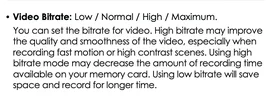
The Normal Driving mode's video quality can be changed in the Video Settings menu
Attachments
jsmith
Well-Known Member
You mean the Video Bitrate setting in Normal Driving. Yes, I've tested this to some degree per below.
I've tested High and Maximum setting at the Default 3 Channel Video Resolution. No issue at all in Normal Recording on any lighting scenario that I've noticed so far. Only in Low bitrate parking mode do I see the flicker in certain dark lighting situations per above.
I haven't had an opportunity to test everything quite yet. @VIOFO-Support wants me to try other parking modes. I'll do my best to get that that ASAP as well.
Hack_man
Well-Known Member
Yes the Video Bitrate setting in Normal Driving.
I dont know what the difference is between Parking Mode low bit rate and Normal Driving low bit rate.
I would expect the algorithm to be the same, but it would be interesting to see if low bit rate normal driving also flickers.
I dont know what the difference is between Parking Mode low bit rate and Normal Driving low bit rate.
I would expect the algorithm to be the same, but it would be interesting to see if low bit rate normal driving also flickers.
jsmith
Well-Known Member
I dont know what the difference is between Parking Mode low bit rate and Normal Driving low bit rate.
I would expect the algorithm to be the same, but it would be interesting to see if low bit rate normal driving also flickers.
I will add that to the list of tests and see what happens. I would presume the compression is still significantly different in "Low Bitrate Setting" in Normal Driving Mode and Low Bitrate Setting in Parking Mode.

GPak
Well-Known Member
It seems that no one else is reporting issues with ignition related snapshot in the LBR parking mode, or with rear camera flickering in low-light conditions.I'm starting to wonder if I have a faulty unit to be honest. The Trigger seems weird, as the A139 Pro I own doesn't trigger when my car starts. Maybe the low sensitivity is just too sensitive.
However, I came across another issue where the rear camera "flickers" at night in low bitrate recording. Records fine in normal light, daytime, etc. I thought it was the CPL filter, but removing didn't work. Also reflashed firmware and didn't change either issue.
I'll need to grab a video to post here of the flicker issue of rear camera. I did email Viofo with a follow up. Either this is another bug or my unit is simply problematic. Waiting to see what Viofo says.
The fact that your camera takes a snapshot simply when the ignition is switched ON without starting the engine (no shaking) - even with the Parking G-sensor sensitivity set to low or medium, and considering that you have performed a factory reset and reinstalled the firmware - suggests to me that there is something wrong with your particular camera.
I am not sure if there is anything else that can be done here.
I would initiate the device exchange process.

Chuck McCoy
Well-Known Member
- Joined
- Jun 9, 2022
- Messages
- 4,765
- Reaction score
- 4,730
- Location
- California
- Country
- United States
- Dash Cam
- 2026 Minimum Spec: STARVIS 2 & HDR & Low Power Parking Mode
@GPak
What if Viofo sends a warranty replacement, and he has the same malfunction? lol
1.5 lifetimes ago my first day of mechanic school the instructor said;
“Sometimes you gotta fix the part that’s broken, and sometimes you gotta fix the customer”
If Viofo sends a warranty replacement do you think jsmith should test it in house BEFORE he installs in car?
Obviously jsmith is 100% competent, but we still haven’t ruled out the malfunction is caused by something with wiring / installation, or in the car.
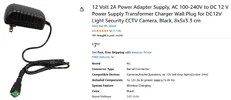
jsmith said he doesn't have a 12 Volt power supply, but they have these for $8. 12V 2A POWER SUPPLY
What if Viofo sends a warranty replacement, and he has the same malfunction? lol
1.5 lifetimes ago my first day of mechanic school the instructor said;
“Sometimes you gotta fix the part that’s broken, and sometimes you gotta fix the customer”
If Viofo sends a warranty replacement do you think jsmith should test it in house BEFORE he installs in car?
Obviously jsmith is 100% competent, but we still haven’t ruled out the malfunction is caused by something with wiring / installation, or in the car.
jsmith said he doesn't have a 12 Volt power supply, but they have these for $8. 12V 2A POWER SUPPLY
Attachments
jsmith
Well-Known Member
It seems that no one else is reporting issues with ignition related snapshot in the LBR parking mode, or with rear camera flickering in low-light conditions.
The fact that your camera takes a snapshot simply when the ignition is switched ON without starting the engine (no shaking) - even with the Parking G-sensor sensitivity set to low or medium, and considering that you have performed a factory reset and reinstalled the firmware - suggests to me that there is something wrong with your particular camera.
I am not sure if there is anything else that can be done here.
I would initiate the device exchange process.
@GPak I tested letting my car today with engine running, then shutting off the vehicle, letting it enter parking mode. While staying seated in the vehicle,I waited a few minutes, then tested putting my car into ignition mode without starting. The Camera Lock DID NOT trigger. I repeated this test multiple times.
I'm going to test this for a longer duration. Only waited a few minutes before each test. Should this not trigger locking mode, then this is a sensitivity issue triggering the camera.
I tested waking up using the Menu Button on the previous 12V Battery test and that triggered LOCK.
Troubleshooting as free time permits. Clearly, if there's something wrong, I want to find out before the return period. I don't want a refurbished item. Just trying to eliminate any possibilities of it being firmware related first.
Last edited:
jsmith
Well-Known Member
@GPak
What if Viofo sends a warranty replacement, and he has the same malfunction? lol
1.5 lifetimes ago my first day of mechanic school the instructor said;
“Sometimes you gotta fix the part that’s broken, and sometimes you gotta fix the customer”
If Viofo sends a warranty replacement do you think jsmith should test it in house BEFORE he installs in car?
Obviously jsmith is 100% competent, but we still haven’t ruled out the malfunction is caused by something with wiring / installation, or in the car.
jsmith said he doesn't have a 12 Volt power supply, but they have these for $8. 12V 2A POWER SUPPLY
@Chuck McCoy
Does the Viofo support 5 minute Idle where GPS will permit the A329T to enter parking mode if the car doesn't move? I've got the GPS very close to the headliner so I'll have to see if I can get the 12V adapter plugged in.
I can run that test in my car by letting my car sit still and seeing if the trigger lock issue still happens using 12V adapter at least. No bench testing in house without GPS mount (not removing).
I'm utilizing the same fuses that worked perfectly fine on a previous Viofo Camera. HK6 is detected. Parking Mode Enters and Exits. If there was a short, you'd expect the camera to be malfunctioning (freezing) in parking mode. I'm not experiencing any freezing issues. I've installed a bunch of cameras before via hardwire. So definitely not my first undertaking.
Chuck McCoy
Well-Known Member
- Joined
- Jun 9, 2022
- Messages
- 4,765
- Reaction score
- 4,730
- Location
- California
- Country
- United States
- Dash Cam
- 2026 Minimum Spec: STARVIS 2 & HDR & Low Power Parking Mode
I'm 99.99% sure GPS has absolutely no "trigger function" for enabling / disabling parking mode.
Always, always, always have an extra GPS mount.
At $17 for an extra GPS mount they are expensive, but worth it, (just like divorce).
Does this mean we have another 80 days of this thread before you decide to process a warranty claim?
It's only been 10 days, and I'm emotionally drained. lol
Always, always, always have an extra GPS mount.
At $17 for an extra GPS mount they are expensive, but worth it, (just like divorce).
Does this mean we have another 80 days of this thread before you decide to process a warranty claim?
It's only been 10 days, and I'm emotionally drained. lol
jsmith
Well-Known Member
@GPak @Chuck McCoy
I'll just sum this up
1. G-Sensor seems too sensitive and lock triggers when car starts from Parking Mode --- > Normal Mode
2. Parking Mode Wakeup ---> Normal Mode by Pressing Menu Button (3 lines) Triggers Lock
3. Parking Mode ---> Normal Mode DOES NOT TRIGGER LOCK if starting camera using Ignition (not turning on car)
4. Metering Issue with Dark Scenes Rear Camera.
Given these results:
A. I am guessing firmware issue on Rear Camera causing Flickering in Dark Scenes (?)
B. I am guessing Sensitivity Issue (G-Sensor) causing my car to trigger lock on Startup.
Not sure about using menu button to wake up from Parking and Camera Locking.
I'll only update thread further if I test other Parking Modes for Viofo. I'm not convinced Camera is bad. I'll get support's feedback on whether they recommend swapping Camera out or if these are Firmware Flaws.
I'll just sum this up
1. G-Sensor seems too sensitive and lock triggers when car starts from Parking Mode --- > Normal Mode
2. Parking Mode Wakeup ---> Normal Mode by Pressing Menu Button (3 lines) Triggers Lock
3. Parking Mode ---> Normal Mode DOES NOT TRIGGER LOCK if starting camera using Ignition (not turning on car)
4. Metering Issue with Dark Scenes Rear Camera.
Given these results:
A. I am guessing firmware issue on Rear Camera causing Flickering in Dark Scenes (?)
B. I am guessing Sensitivity Issue (G-Sensor) causing my car to trigger lock on Startup.
Not sure about using menu button to wake up from Parking and Camera Locking.
I'll only update thread further if I test other Parking Modes for Viofo. I'm not convinced Camera is bad. I'll get support's feedback on whether they recommend swapping Camera out or if these are Firmware Flaws.
Chuck McCoy
Well-Known Member
- Joined
- Jun 9, 2022
- Messages
- 4,765
- Reaction score
- 4,730
- Location
- California
- Country
- United States
- Dash Cam
- 2026 Minimum Spec: STARVIS 2 & HDR & Low Power Parking Mode
@jsmith said:
1. G-Sensor seems too sensitive and lock triggers when car starts from Parking Mode --- > Normal Mode
@Chuck McCoy said:
I’m almost positive Viofo made this decision to function with LPID, (low power impact detection) parking mode.
I remember @SafeDriveSolutions made a video testing LPID, and the G-sensor was not responding to impacts when other cameras were, (Vueroid S1-4K).
So Viofo made it more sensitive.
However, I think your complaint of it being too sensitive can be fixed if you set it to OFF for DRIVING / NORMAL Recording Mode.
And then choose whatever sensitivity you want for PARKING MODE.
Let me go find that video.
1. G-Sensor seems too sensitive and lock triggers when car starts from Parking Mode --- > Normal Mode
@Chuck McCoy said:
I’m almost positive Viofo made this decision to function with LPID, (low power impact detection) parking mode.
I remember @SafeDriveSolutions made a video testing LPID, and the G-sensor was not responding to impacts when other cameras were, (Vueroid S1-4K).
So Viofo made it more sensitive.
However, I think your complaint of it being too sensitive can be fixed if you set it to OFF for DRIVING / NORMAL Recording Mode.
And then choose whatever sensitivity you want for PARKING MODE.
Let me go find that video.
jsmith
Well-Known Member
@jsmith said:
1. G-Sensor seems too sensitive and lock triggers when car starts from Parking Mode --- > Normal Mode
@Chuck McCoy said:
I’m almost positive Viofo made this decision to function with LPID, (low power impact detection) parking mode.
I remember @SafeDriveSolutions made a video testing LPID, and the G-sensor was not responding to impacts when other cameras were, (Vueroid S1-4K).
So Viofo made it more sensitive.
However, I think your complaint of it being too sensitive can be fixed if you set it to OFF for DRIVING / NORMAL Recording Mode.
And then choose whatever sensitivity you want for PARKING MODE.
Let me go find that video.
Can't turn off G-Sensor in Parking Mode. The "OFF" is only for regular driving mode. Didn't help going from Parking ---> Normal which is where it constantly locks on wake up with my vehicle.
Chuck McCoy
Well-Known Member
- Joined
- Jun 9, 2022
- Messages
- 4,765
- Reaction score
- 4,730
- Location
- California
- Country
- United States
- Dash Cam
- 2026 Minimum Spec: STARVIS 2 & HDR & Low Power Parking Mode
Yes I know.
You can only turn OFF G-Sensor in DRIVING / NORMAL recording mode.
Can you please turn it OFF?
I found the video.
You can only turn OFF G-Sensor in DRIVING / NORMAL recording mode.
Can you please turn it OFF?
I found the video.
jsmith
Well-Known Member
Yes I know.
You can only turn OFF G-Sensor in DRIVING / NORMAL recording mode.
Can you please turn it OFF?
I found the video.
Per the above, I tested that already with no success. It didn't impact Parking Mode --> Normal Recording at all.
I tested G-sensor Off Normal and Low sensitivity with Parking Mode in hopes that'd correct the locked video issue. No luck.nI think we're stuck with parking mode being WAY TOO SENSITIVE to any slightest vibrations.
Not having any real issue during normal driving with false triggers of the G-Sensor on low sensitivity.
What's your thought on the Dark Flicker of Rear Camera ? Presuming it was resolved with Firmware at some point? And not a faulty camera that you received?
GPak
Well-Known Member
...
I'll just sum this up
1. G-Sensor seems too sensitive and lock triggers when car starts from Parking Mode --- > Normal Mode
2. Parking Mode Wakeup ---> Normal Mode by Pressing Menu Button (3 lines) Triggers Lock
3. Parking Mode ---> Normal Mode DOES NOT TRIGGER LOCK if starting camera using Ignition (not turning on car)
.....
Men, I can't keep up with you. 🙂...
I’m almost positive Viofo made this decision to function with LPID, (low power impact detection) parking mode.
I remember @SafeDriveSolutions made a video testing LPID, and the G-sensor was not responding to impacts when other cameras were, (Vueroid S1-4K).
So Viofo made it more sensitive.
....
So, this is not related to switching the ignition ON or OFF, and we are back to the issue of the parking G-sensor sensitivity.
Since nobody else reports this issue, it is likely not firmware related.
It appears that your parking G-sensor i.e. physical accelerometer is oversensitive, (faulty?).
I am not sure how this could be fixed with public firmware update without negatively affecting other users. (mine for example works correctly).
It could likely be resolved using a custom firmware version with updated voltage threshold required to trigger an "event,"; however, in that case, you would need to request a new custom version every time the public firmware is updated.
I would prefer a new Camera under the warranty.
jsmith
Well-Known Member
Men, I can't keep up with you. 🙂
So, this is not related to switching the ignition ON or OFF, and we are back to the issue of the parking G-sensor sensitivity.
Since nobody else reports this issue, it is likely not firmware related.
It appears that your parking G-sensor i.e. physical accelerometer is oversensitive, (faulty?).
I am not sure how this could be fixed with public firmware update without negatively affecting other users. (mine for example works correctly).
It could likely be resolved using a custom firmware version with updated voltage threshold required to trigger an "event,"; however, in that case, you would need to request a new custom version every time the public firmware is updated.
I would prefer a new Camera under the warranty.
I'll shoot Viofo a message and ask about possibility of sending me a brand new unit to test given I purchased this 10 days ago to see if the problem persists with another unit given the lack of reporting of this problem.
I know my car is a bit rougher on the start (It's a 2015 Volvo 4 Cylinder but has Turbo) so it isn't just a purr, but that still hasn't caused the A139 Pro or the Vantrue Cameras to lock EVER on startup.