How to get parking mode to work?

Remove camera from car, and update firmware in the house.
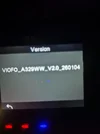
 
It's still showing this firmweear on it
 

Attachments

  • 20260508_233322.webp
    20260508_233322.webp
    64.1 KB · Views: 2
Ok so I plugged in the sd card and nothing happened..just started to record
...
It didn't instantly update the firmware like bedore???
power cycle the camera
 
Ok how do I connect it to the computer though and get power if in house.?
Do not connect camera to computer.
Use a power bank with the included Type-C power cable in the box.
 
power cycle the camera - still didn't work.

Use a power bank??? What is that?

with the included Type-C power cable in the box...I'll have a look in the box but didn't remember seeing one.
 
Disconnect power from camera.
Remove SD card.
format SD card, (should only take 5 seconds).
transfer "both" firmware update files onto SD card.
instert SD card in camera.
power up camera.
when camera boots up, and starts recording disconnect from power.
wait 5 seconds re-connect power.
update should start.
 
Disconnect power from camera.
Remove SD card.
format SD card, (should only take 5 seconds).
transfer "both" firmware update files onto SD card.
instert SD card in camera.
power up camera.
when camera boots up, and starts recording disconnect from power.
wait 5 seconds re-connect power.
update should start.
Ok one moment thanks
 
Followed your instructions to the "t" and absolutely didn't work 🙁 just went straight to recoding again???

What shall I try next? Thanks
 
Ive reformatted the sd card and cleared the previous 2 downloads from my PC and making a fresh down load of tbe 2 files.

Maybe try that?. Or just try one file?
 
OK, install both files on SD card, and then read Post #96 by @rcg530 for instructions.
 
So follow this

The first power on for the dash camera will load the LD98530A.bin file. It will appear as if "nothing" happened, but it actually loaded the LD98530A.bin file. You'll need to power down and then power on the dash camera again to get it to install the FWA329S.bin firmware file.

I did this already as Chuck said same thing. And nothing happened. But will try again one moment.
 
Back
Top