cartyre
Member
Thanks Chuck.
1) This is the battery pack I was looking at but will wait for your delivery today and see what you think.

 www.cen.uk
So of I do get one will probably need an installer to install it (not the same one as last time!!!)
2) To check the last recorded video files the morning after my last drive home the day before can I check this on the app rather than having tk remove the SD card?
Also I didn't think it recorded at all in parking mode and only recorded a clip if there was an impact? So bit confused on that?
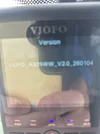
3) updating the firmwear is my next task.
I am going to buy another SD card today and try again.
Dont want to take the SD card out again from dash cam as it popped out so fast and took me an hour to find the darn thing.
When I tried to format it once I found it, it said I think that to download the updated software I had to format the sd card to 32gb. Then I tried to do this and I got 2 options a) quick format (but it said this is not recommended) so I went with the one that took a long time. It only got to 2% in 1 hour so left it over night. The night morning it had stayed at 3% and crashed and said failed.
So that's when I ran out of time trying to format it and then update the firmwear.
1) This is the battery pack I was looking at but will wait for your delivery today and see what you think.
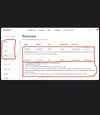
Viofo BP100 & 2xEP100 Dash Cam Battery Pack for Parking Mode Protectio
VIOFO BP100 + 2x EP100 22950mAh High Capacity Dash Cam Battery Pack for Parking Mode Protection, External Power Bank with Fast Charging, Built-in Bluetooth for Real-Time Battery Status The BP100 battery pack is designed to power your dash cam in parking mode for long-lasting surveillance without...
www.cen.uk
So of I do get one will probably need an installer to install it (not the same one as last time!!!)
2) To check the last recorded video files the morning after my last drive home the day before can I check this on the app rather than having tk remove the SD card?
Also I didn't think it recorded at all in parking mode and only recorded a clip if there was an impact? So bit confused on that?
3) updating the firmwear is my next task.
I am going to buy another SD card today and try again.
Dont want to take the SD card out again from dash cam as it popped out so fast and took me an hour to find the darn thing.
When I tried to format it once I found it, it said I think that to download the updated software I had to format the sd card to 32gb. Then I tried to do this and I got 2 options a) quick format (but it said this is not recommended) so I went with the one that took a long time. It only got to 2% in 1 hour so left it over night. The night morning it had stayed at 3% and crashed and said failed.
So that's when I ran out of time trying to format it and then update the firmwear.