70mai 4K Omni (unboxing & first impressions) (Sony Starvis 2 IMX678/IMX662, Wi-Fi 6/GPS, Novatek NT98530, 4K60 front + 1080p rear, HDR both channels)

@Augustus are your video files from 70mai Omni 4K, 25fps? I believe Australia uses that standard, as does UK, and USA uses 30fps. Mine are 25fps.
 
@Augustus are your video files from 70mai Omni 4K, 25fps? I believe Australia uses that standard, as does UK, and USA uses 30fps. Mine are 25fps.
I'm in Oz, it's 30fps for me on the video files for sure. Not sure what's going on there...
 
Weirddddddddddd
 
It is the anti-flicker setting. I changed it to 60Hz now. It doesn't matter if some store window displays flicker as I drive past.

 
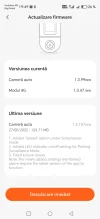
There has been a firmware update released for the 4K Omni, taking it from version 1.2.96ww to 1.3.99ww.

Changelog:
- optimise the collision sensitivity of parking mode
- optimise occasional video upload failures over 4G kit
- fixed other known issues


IMG_20250427_204741.webp
 
There has been some more updates to the 70mai APP in the Google Play Store:


The latest version is now 3.10.0 and brings the following improvements:

- Support for new device A410
- 4K Omni collision detection now supports indicator light switch, and screensaver mode adds speed display indicator
- T800 introduces vehicle battery monitoring (requires optional 4G hardwire kit)
- Fix other known issues
 
New update
 

Attachments

  • Screenshot_20250530_194915_com_banyac_midrive_app_eu_DeviceUpgradeActivity.webp
    Screenshot_20250530_194915_com_banyac_midrive_app_eu_DeviceUpgradeActivity.webp
    52.3 KB · Views: 111
There has been a firmware update released for the 4K Omni, taking it from version 1.3.99ww to 1.4.107ww

Changelog:
- added "Speed" option under screensaver mode
- added LED indicator on/off setting for parking surveillance mode
- fixed known issues


IMG_20250603_125722.webp
 
A quick photo of what the new "Speed" option looks like for the screensaver mode for the 4K Omni.

IMG_20250603_054519.webp


Screenshot_2025-06-03-05-16-53-996_com.banyac.midrive.app.intl.webp
 
Revised changelog for the new 1.4.107ww firmware update, also includes the following new changes in addition to the changes already mentioned above:

- added time format information to the master watermark
- fixed the problem of audio and video being out of sync as reported by bloggers
- adjusted the Arabic translation of 70mai_font_car_start
- fixed the problem of too large deviation between the front and rear roads and insufficient audio frames when setting 55Hz, as reported by Japanese users
 
Just saw this new FW update, having seen here and opned APP on phone, DLed and ready for install later today ( 3 AM here so better go to bed )
Looking forward to use speed screen saver.
 
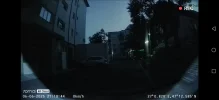
I put a 5% transparent film on the window to test if the camera sees ok, it seems it doesn't... it also distorts the light...


(Back camera)
 

Attachments

  • Screenshot_20250606_212042_com_banyac_midrive_app_eu_P2PMonitorActivity.webp
    Screenshot_20250606_212042_com_banyac_midrive_app_eu_P2PMonitorActivity.webp
    54.9 KB · Views: 112
I put a 5% transparent film on the window to test if the camera sees ok, it seems it doesn't... it also distorts the light...


(Back camera)
This is going to happen with any dashcam if you have tint on the rear windscreen.
 
Even without the tint, the lights appear the same — that's why I did the test, to see if the issue could be fixed. But no, the problem is with the software or the camera. The settings in the software are off, because with or without tint, you still can't clearly see the car behind.
 
Recommended Carrier List for the 70mai 4G Hardwire Kit (UP04/UP05):

70mai have just published a handy list of recommended network carriers to use for their 4G Hardwire Kits, across multiple countries (see below). Quite the extensive list and makes the process handy for the end user wanting to setup their 70mai Dashcam with the LTE hardwire kit.


IMG_20250620_015506.webp
 
In Denmark i use CBB that is on the TT network ( #2 largest network here )
 
Back
Top