Dashcam Viewer for Mac and Windows

@Biker27 - I am not familiar with the Road Angel Halo Play 4K. But if you send me two pairs of raw F/R videos (with your car in motion), I can take a look (please make sure the GPS feature is turned on in the settings). You can send me large files using https://wetransfer.com. Thanks!
 
Dashcam Viewer v4.0.6 Released

Dashcam Viewer
v4.0.6 was released today for both Mac and Windows. Version 4.x is a free update for all Dashcam Viewer users.

New Camera Supports:
  • Added support for Kenwood DRV-A510W 2-channel
  • Added support for GoPro HERO 13 GPS data
New Features:
  • Click-to-Go is now enabled on the Map display by default.
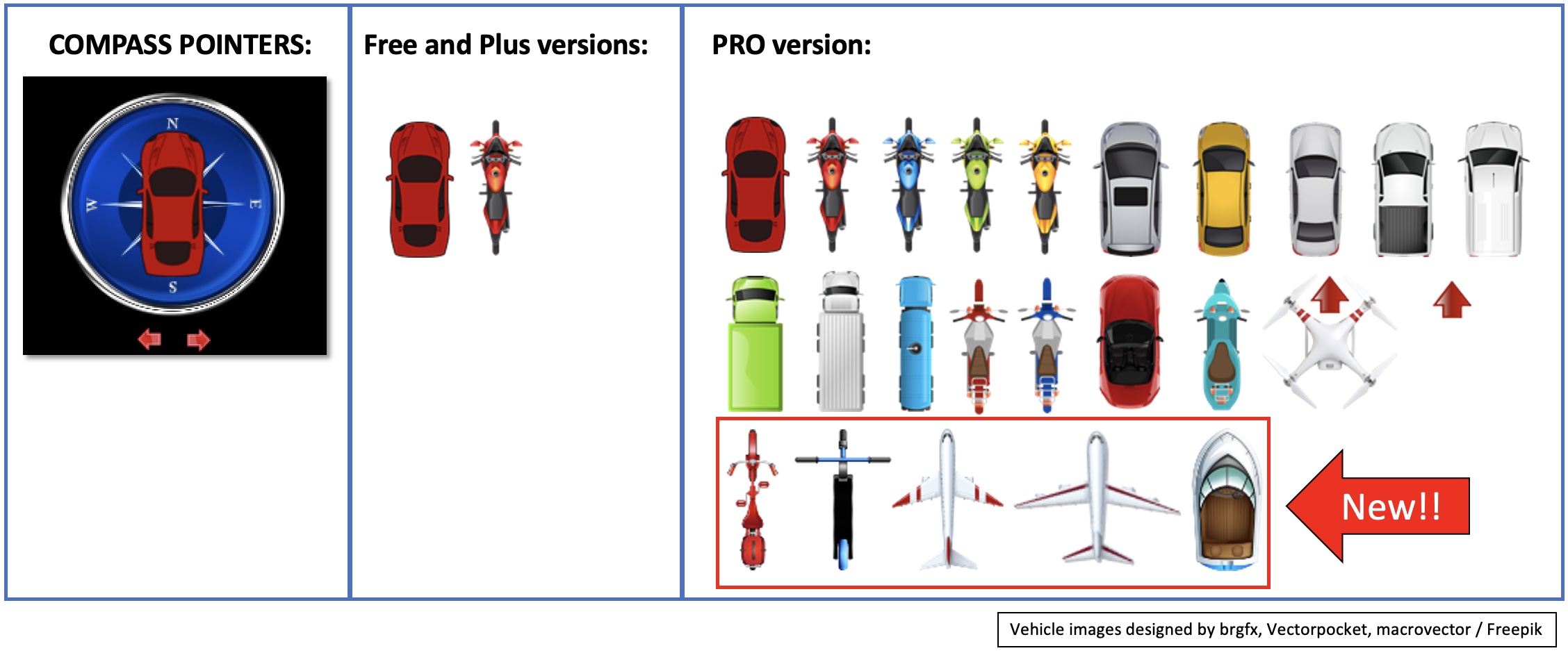
  • [PRO version] Added 5 new compass pointers to the PRO version of Dashcam Viewer (2 airplanes, bicycle, boat, scooter).
compass_pointers.jpg

Compass pointer selection in Free, Plus, and PRO versions

Bug Fixes:
  • [Windows] Fixed bug in which GPS data was not read properly for very large video files. This bug was reported with a Viofo A229 Pro dashcam.
  • Fixed bug in which the weather report at time of drive was off by the timezone difference relative to UTC.
  • Fixed crash that could occur if user zoomed the video too far.
Dashcam Viewer and Dashcam Viewer PRO are PC/Mac applications that allow you to play your dashcam's videos while simultaneously viewing your vehicle's location on a map. There are many other features in the software which are detailed on our website (https://dashcamviewer.com). The free version is fully-functional and allows the loading of up to 2 videos at a time.
 
G-Forces, HDOP, Sats In View Graph

Hi John,

how to bring up G-Forces, HDOP, Sats In View Graph? on my computer, only speed, distance, bearing, altitude graphs appear. is the G-forces graph only available on the Mac version?

the system I use
  1. Windows 10 - 64 bit
  2. GoPro HERO11 Black
  3. Dashcam Viewer v4.0.6

Thank you John

DCV.webp
 
Hello,

Recently I started using Vantrue E360 with rear camera (RC03). Looks like Dashcam Viewer does not recognize files from RC03 rear camera (when opening folder) because I can only see video from my E360. Am I doing something wrong or this configuration is not fully supported?

Thanks!
Konrad
 
Same with vantrue n4pro 3-cam setup. sigh
On the plus side, I run the E360 in the convertible, so I don’t need a “rear camera“, and it shows up fine as a single super wide 360° image.
 
Hello,

Recently I started using Vantrue E360 with rear camera (RC03). Looks like Dashcam Viewer does not recognize files from RC03 rear camera (when opening folder) because I can only see video from my E360. Am I doing something wrong or this configuration is not fully supported?

Thanks!
Konrad

Same with vantrue n4pro 3-cam setup. sigh
On the plus side, I run the E360 in the convertible, so I don’t need a “rear camera“, and it shows up fine as a single super wide 360° image.
Tagging @traveler to make him aware of this and see if the program can be updated.
 
Thanks for the request, @captain69. I'm seeing that 3channel and 4channel dashcams are becoming more popular these days. Supporting 3+ channels is on my ToDo list. To add this support would be a major time-consuming upgrade and would keep Dashcam Viewer "on blocks" for quite some time. Because development time is a limited resource, I have to be selective with which mods get added. Generally, the lower-hanging-fruit mods get higher priority, as do funded mods.
How do we "fund" mods? Could we bounty 3 and 4 channel cam support?
 
Does anyone know how dashcam viewer correlates the front and rear camera views for a dual camera dashcam - A129 Plus Duo? I purchased a key in April, and really didn't have anything interesting to try to export until recently. I had an aggressive driver come from way behind doing the lane swap thing, then ultimately cut in front of me, and continued the lane swap thing ahead of me.
Problem is that that dashcam viewer doesn't recognize the rear video as going with the front video. In the second pair of files - after the driver got in front of me, it recognizes that, and does the split screen thing.
I've filled the support form, but no response yet or even a email acknowledgement that they got the form. If nothing in the next day or so, I'll send it to the "from" email that sent me the key. Maybe it takes them a while. Figured I'd ask here if anyone knows how to make the software recognize that the "R" file goes withe the "F" file so I can export this.
 
G-Forces, HDOP, Sats In View Graph

Hi John,

how to bring up G-Forces, HDOP, Sats In View Graph? on my computer, only speed, distance, bearing, altitude graphs appear. is the G-forces graph only available on the Mac version?

the system I use
  1. Windows 10 - 64 bit
  2. GoPro HERO11 Black
  3. Dashcam Viewer v4.0.6

Thank you John

View attachment 78639

Hi @kirana125, Good question. Dashcam Viewer does not support G-Force on the GoPro (that goes for both the Mac and Windows versions). It does support the basic data suite (speed, distance, bearing) as well as Altitude. There are only a few dashcams that support HDOP and Sats In View as these are very specialized metrics.
 
Hello,

Recently I started using Vantrue E360 with rear camera (RC03). Looks like Dashcam Viewer does not recognize files from RC03 rear camera (when opening folder) because I can only see video from my E360. Am I doing something wrong or this configuration is not fully supported?

Thanks!
Konrad
Hello @dar7man,

I’m not familiar with the E360 with rear camera (RC03). If you send me a pair of raw of front and rear videos with the vehicle in motion (and any GPS files, if present) I can add it to my ToDo list. Please include a file listing of the video folder(s) on the SD Card. Also, be sure to preserve the folder/file hierarchy. This is important because some manufacturers store front and rear videos in separate folders while others combine all videos into a single folder.
You can send me large files using https://wetransfer.com . PM me if you need my email address.

Thanks,
John

PS - Thanks @DT MI for tagging me. For some reason I do not receive notifications of new posts to this thread.
 
Does anyone know how dashcam viewer correlates the front and rear camera views for a dual camera dashcam - A129 Plus Duo?
That is the problem that keeps me up at night!

Does anyone know how dashcam viewer correlates the front and rear camera views for a dual camera dashcam - A129 Plus Duo? I purchased a key in April, and really didn't have anything interesting to try to export until recently. I had an aggressive driver come from way behind doing the lane swap thing, then ultimately cut in front of me, and continued the lane swap thing ahead of me.
Problem is that that dashcam viewer doesn't recognize the rear video as going with the front video. In the second pair of files - after the driver got in front of me, it recognizes that, and does the split screen thing.
I've filled the support form, but no response yet or even a email acknowledgement that they got the form. If nothing in the next day or so, I'll send it to the "from" email that sent me the key. Maybe it takes them a while. Figured I'd ask here if anyone knows how to make the software recognize that the "R" file goes withe the "F" file so I can export this.
@BobW, I apologize for DCV not pairing the R with the F. If you send me the raw filenames of the F/R paired videos, I can make an adjustment to DCV to fix it. Thanks!
 
Yes traveler just need a few correlating files from a system and BAM in next to no time his software will support that, at least that is how it have been in all the previous years.

You can change the system to record small as possible files ( 1 minute ) or i suppose you could force even shorter files by turning ON / OFF the system, there of course need to be GPS fix ASO so you will have to be mobile and not just in your driveway.
But you will have to share those with some file share means, google drive - Microsoft similar or various file share sites out there, CUZ it will after all be more than you can attach to a mail.


I do not use travelers stuff, but i must tip my helmet for what he have whipped up for the people that way inclined.
 
PS - Thanks @DT MI for tagging me. For some reason I do not receive notifications of new posts to this thread.
AFAIK only the first new post since you visited the thread will generate a notification. Other updates do not, until you view the thread again, while logged on.
 
Dashcam Viewer v4.0.7 Released

Good afternoon, dashcamers! Dashcam Viewer v4.0.7 was released today for both Mac and Windows. Version 4.x is a free update for all Dashcam Viewer users.

New Camera Supports:
  • Added support for YDI MC10 dashcam
  • Added 2-channel PiP support for Vantrue E2
New Features:
  • [PRO version] Added new Elevation Grade graph. If the dashcam or action-cam supports Altitude data, Dashcam Viewer PRO will now display a graph of Elevation Grade in addition to Altitude. Elevation Grade is a plot of elevation slope, which is based on altitude data. Special controls have been added to the Preferences menu to control how the grade is computed and smoothed.

New “Elevation Grade” graph in Dashcam Viewer PRO
  • Increased precision from 3-digits past the decimal to 8 in the latitude/longitude data written to the EXIF block when performing a JPG snapshot.
Bug Fixes:
  1. Fixed bug in Dashcam Viewer Plus version in which the red motorcycle was replaced by a silver car as the compass pointer
  2. Fixed lockup that could occur when loading small videos
  3. Fixed tab ordering issue in Preferences window if some tabs were hidden
Notes:
  1. Added front/rear PiP display support for Cobra HD2216D; however, GPS data display may not work yet.
  2. Improved support for ROVE R2-4K but issues still exist. Work in progress
Dashcam Viewer and Dashcam Viewer PRO are PC/Mac applications that allow you to play your dashcam’s videos while simultaneously viewing your vehicle’s location on a map. There are many other features in the software which are detailed on our website (https://dashcamviewer.com). The free version is fully-functional and allows the loading of up to 2 videos at a time.
 
I've learned that Dashcam Viewer really does not play nice with Viofo A129 Plus Duo. I posted a prior question here about Dashcam Viewer not correlating the front and rear cameras. Today's issue is the result of my camera capturing an accident in a Walmart lot where a driver backing the the wrong way down a parking lot row backed into another car. I showed the cop the clip from the dashcam, I wanted to send the relevent section from the file. Smaller and not a bunch of time lading up to the incident. The file plays fine, but when I try to export, and enter the start and stop time DV says "Movie Duration: -1 seconds". I purchased a license to do some of the cool stuff this is supposed to do. Have yet to do anything useful with DV.
BTW, a backup for those running into issues like these is OBS. At least I can get a section of the files without fighting bugs.
walmart crash.webp
 
Ill tage in the maker for ya
@traveler

Some times making new stuff / changes mess up older stuff, it is a tight rope.
 
I've learned that Dashcam Viewer really does not play nice with Viofo A129 Plus Duo. I posted a prior question here about Dashcam Viewer not correlating the front and rear cameras. Today's issue is the result of my camera capturing an accident in a Walmart lot where a driver backing the the wrong way down a parking lot row backed into another car. I showed the cop the clip from the dashcam, I wanted to send the relevent section from the file. Smaller and not a bunch of time lading up to the incident. The file plays fine, but when I try to export, and enter the start and stop time DV says "Movie Duration: -1 seconds". I purchased a license to do some of the cool stuff this is supposed to do. Have yet to do anything useful with DV.
BTW, a backup for those running into issues like these is OBS. At least I can get a section of the files without fighting bugs.
View attachment 85078

Dashcam Viewer works fine with my A129 Pro. I just exported segments from several videos, all worked as expected. I have no idea the difference between my A129 Pro and your A129 Plus Duo.
 
I showed the cop the clip from the dashcam, I wanted to send the relevent section from the file. Smaller and not a bunch of time lading up to the incident.

You can edit the file in the Viofo app select the start and finish time do a test play then save it to your phone.
I did a test on a 1min video on my iPhone 8 and it took about 5 mins from start to finish.
 
Back
Top