ECOFLOW and Viofo

Just wanted to say a big thank you to everyone who contributed to this topic! I’ve been following this thread since the first post by Gpak using a power station instead of battery pack, the master who started it all, and it’s been incredibly helpful. After a busy week wrapping up work, I finally found the time to get everything in place.

Using the new cables and a multimeter, I managed to sort everything out. Everything is now working perfectly in both ignition and parking modes. Turns out the culprit was the USB-C to 12V DC cable. Replacing it with a USB-C to 15V DC cable did the trick, and it works flawlessly now. Happy days!

This method is perfect for me since my daily commute is only about 30 minutes round trip. A battery pack setup, as many others have done, wouldn’t suit my circumstances. I wouldn’t have been able to install this system without the help and contributions from everyone here. I love my car and want to ensure it’s looked after 24/7, so thank you all once again!

The only issue I’m facing now is that the GPS and speed aren’t working. My dashcam is mounted near the rearview mirror on the third visor frit. The windshield isn’t tinted or heated, so I’m not sure what’s causing the issue. It might be a faulty GPS module. I’ve already lodged a ticket with VIOFO and am waiting for their response. I’ve tried resetting the device using the ‘R’ button on the dashcam and through the app, but no luck so far. The GPS and speed settings are turned on in the app, so I’m a bit stumped.

If anyone has any insights or suggestions, I’d love to hear them. Thanks again, and I’m looking forward to more innovation and ideas from this amazing community!
 
I received my Ecoflow Rever3 Plus a couple of days ago and did some preliminary testing.

I tested the new port memory setting in the App and yes, if the 12VDC port is enabled, with port memory enabled it will turn 12VDC On the next time the R3 is turned On.
There is one caveat though: when the 12VDC port is enabled, the R3+ will not timeout if configured to timeout.
However, the R3 App does have a new feature - a 'power switch' that turns off the R3 when needed, which alleviates the timeout issue somewhat (very useful for turning Off the R3 and dash cam(s) in a garage where parking recording is not needed).

Dimensionally the R3 Plus is exactly the same height and about the same length and width as the R2 with the handle (the regular R3 is noticeably smaller)

I would prefer and recommend the R3 over the R2 because of the smaller size, the port status memory (allows for another wiring option), and especially for the ability to turn it Off from the App.

Otherwise, the performance of R3 and R2 is basically the same.
 
Thanks for the report, GPak! What an interesting mixed bag of new features. The 12v memory feature is a nice add, but it’s a shame that it still won’t turn off when that port is enabled. I guess changing the app to allow remote power off for the whole unit is somehow an easier fix than powering off when the 12v port is enabled. As a previous coder, I’m still trying to get my head around that logic.
 
Since the Ecoflow R2/R3 timeout function for the 12V DC port does not work, I decided to check the USB ports as well, just in case, and......
The timeout works for USB-A ports with a regular 5V output, as well as with a USB-A-12V converter cable.
However, unfortunately, the timeout does not work for the USB-C-12V/15V cable, I guess the power station detects the voltage request, assuming that the load is connected, although there is no power draw.
The timeout is desirable, since it will save about 1.2W per hour (about 0.45% per hour) of self-discharge after the parking recording is completed.
As I mentioned in the previous post, as an alternative, we can turn Off the Ecoflow R3 from the App if parking recording is not needed, thereby saving not only battery power but also the SD card.

If timeout is a must, consider a 5V system by removing the voltage regulator from the HW kit and feeding USB-A-5V directly to the modified HW cable (red and black wires), note that the ACC signal from the 12V vehicle output must be converted to 5V before connecting to HW kit cable (yellow wire).
 
Interestingly, the EcoFlow power consumption is pretty close to that of the JK BMS that I measured at about 1.4w/hr.
 
Interestingly, the EcoFlow power consumption is pretty close to that of the JK BMS that I measured at about 1.4w/hr.
This 1.2W (0.45%) per hour self-discharge is a rough (non-scientific) average for Ecoflow R2/R3.
I connected USB-C-12V cables to R2 and R3 and left them for 24 hours.
I then recorded the SOC percentage drop from the R2 and R3 displays over 24 hours, which was about 11% for both units, thus, the estimate is as accurate as the R2/R3 display readings.
(11%)/24h=0.458% per hour.

BTW, I finally figured out the "Smart Sleep Time" for the JK BMS.
The problem was the "Smart Sleep Voltage" setting, which was too low.
After I set it to 2.6V (full cell range), the "Smart Sleep Time" now works essentially like "Timeout" for the Ecoflow, except it will turn-off the BMS regardless of whether the dash cam is running or not, so I set "Smart Sleep Time" to one hour longer than the dash cam parking duration.
 
Last edited:
Success! My version of the app still doesn't have that feature. I'm wondering if it will show up again, or if it is dependent on the specific hardware version. My recommendation to you is not to update your app, you'll likely lose that function.
 
Thanks everyone for all the information about your setup shared here, it helped me a lot. @GPak an additional question that can be important for a worry-free solution: from your tests does the River 2 automatically turn the USB-C ports back on after a complete automatic shut-off (drainage of the battery) once the car is turned on and charging through XT60 begins? So we don't have to manually restart/reconnect cables.
I tested the River 3 series (both 3 and 3 Plus) and both works as expected but I am looking for a higher capacity that River 2 Max could offer. Thanks again
 
then back it up with Apk extractor and share. I do that with Androidauto.apk because its so buggy after almost each patch.
 
Thanks everyone for all the information about your setup shared here, it helped me a lot. @GPak an additional question that can be important for a worry-free solution: from your tests does the River 2 automatically turn the USB-C ports back on after a complete automatic shut-off (drainage of the battery) once the car is turned on and charging through XT60 begins? So we don't have to manually restart/reconnect cables.
I tested the River 3 series (both 3 and 3 Plus) and both works as expected but I am looking for a higher capacity that River 2 Max could offer. Thanks again
Yes, River 2 takes about 1 -1.5 minutes to power all USB ports from a completely dead battery, and only about 12 seconds if the battery still has charge, which is more common case. (check posts #59 and #60 on page 3 of this thread)

I just tested the River 3 Plus and it takes about 2 minutes to power all USB ports from a completely dead battery or if the battery is set to 5% DOD (depth of discharge)
I will attach a couple of River 3 testing videos shortly (sorry for poor quality)

P.S. The 286Wh River 3 Plus is expendable with additional batteries to double (572Wh) or triple capacity (858Wh) without any wires, just clicking main unit and expandable battery together!


Last edited:
This is perfect @GPak! Thanks so much for posting the videos. I did test both River 3 and River 3 Plus here with A119 Mini 2 and A229 Plus 2-channels but I didn't have the equipment for the measurements.

After your response I went ahead and ordered the RIVER 2 Max 500 499Wh for my other car ($279 at Amazon), and will look into getting the 286wh extra battery for my existing River 3 Plus, for peace of mind.

It looks like River series indeed is a great option. I wished the Solix C300 DC would also turn on the USB-C ports automatically as it would make it a very efficient 288Wh alternative without the AC inverter based on some tests I saw, but unfortunately I am returning it in favor of the River ones. On a separate note Solix C300 AC also doesn't turn it's USB-C ports back on automatically once battery is depleted (it will do it if you manually turn the unit off while battery >= 2%, but once it enters sleep mode at 1% it disconnects all ports like C300 DC and only reconnecting the cables will do it).

Thanks again for your efforts and help here!
 
It is really unfortunate that the Anker Solix C300 DC doesn't turn on the USB ports, from dead, after turning on with charging.
Did you wait long enough, maybe 2-5 minutes?
Is there a setting in the app to limit the DoD (depth of discharge)?

As for efficiency, even though the Solix is DC only, while the River 3 has an AC inverter, we actually never use the inverter for dash cam use, it's always off, not drawing any power.
For dash cam use, the Solix and River are likely the same efficiency.
Factors that affect efficiency are losses due to BMS operation, regulated 12VDC output, regulated USB-A and USB-C ports, WiFi, Bluetooth, display, LED indication, etc.

Power stations and dedicated batteries that don't have regulated 12VDC output, WiFi, Bluetooth, App are usually more efficient, but I prefer to have an App, especially as good as Ecoflow R3 app.
 
This is a great thread on one external battery option, the Ecoflow River 2. It was on sale on Amazon Canada for $209 CAD over the holidays. While I have read thru the posts here, I still am not sure how to hook up either the Viofo A139 3-Channel or Viofo A129 Duo to the Ecoflow River 2 for Parking Mode. From what I can see, both cameras need the hardwire kit?

If I just want to run either Viofo cam models via the Ecoflow, I just need to plug the cam into the battery correct? It won't run in Parking Mode because the cam doesn't detect a power shutdown (like from a car-cig lighter.

Am I correct with understanding how the Parking Mode will have to be set up?
 
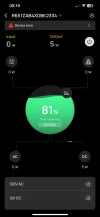
It was down to -7°C (20°F) tonight and I left my Jeep with the Ecoflow River3 powering two Viofo Mini2s outside for a cold weather test.
In the morning the temperature was about -5°C (23°F)
- I started the Jeep and River3 turned on – good.
- Both dash cams turned-on and started normal recording – good.
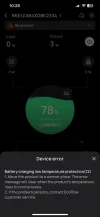
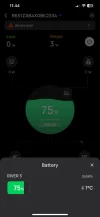
- The app showed a power consumption of about 5W, and 0W charging and a small Red triangle in the upper left corner indicating a “Device error”, which was “Battery Charging Low Temperature Protection (code 12)” – good.
(first 3 images from left to right)
With the ignition off and on, both Mini2s switch to parking mode and back to normal mode – good.

The River3 is a pass-through design (not a bypass), meaning that when the ignition is on, the dash cams are not powered by the car but by the River3 battery.
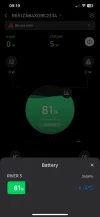
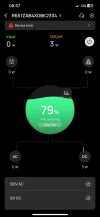
It takes around 15 minutes of driving to consume 1% of the battery capacity with normal recording at around 5W, and with no charging due to low temp protection.
Consuming 1% of the capacity in LBR parking mode at around 3W, takes about 22 minutes.
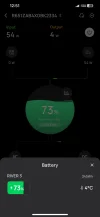
(next 3 images)
30 minute of driving is not enough to warm-up the battery, the internal battery temperature only increased by about 2°C from -4°C to -2°C, as indicated in the app, I think even 1 hour of driving would not be enough.
So, for those living in locations with cold winters, charging at home will most likely be a necessity.
After parking for a while and driving again, the River3 automatically resumed charging somewhere between +2°C and +4°C, as indicated in the app – good.
(last 2 images from left to right)

Conclusion - the Ecoflow River3 has an excellent low temperature protection, and Thanks to higher capacity and easier at-home charging options, the River3 is an even better option in cold weather conditions than dedicated batteries.
 

Attachments

  • IMG_7805.webp
    IMG_7805.webp
    33.6 KB · Views: 118
  • IMG_7806.webp
    IMG_7806.webp
    26.8 KB · Views: 119
  • IMG_7812.webp
    IMG_7812.webp
    35 KB · Views: 119
  • IMG_7817.webp
    IMG_7817.webp
    34.5 KB · Views: 108
  • IMG_7821.webp
    IMG_7821.webp
    28 KB · Views: 108
  • IMG_7823.webp
    IMG_7823.webp
    46.3 KB · Views: 108
  • IMG_7825.webp
    IMG_7825.webp
    26.4 KB · Views: 119
  • IMG_7826.webp
    IMG_7826.webp
    26.6 KB · Views: 116
Last edited:
Awesome observations! Not surprised at all by the slow warm up rate for the EcoFlow (or any other battery, really). They are pretty dense devices, to it would take a while for warmth to reach the insides. Always great to be able to confirm operational details like this! 👍
 
It was down to -7°C (20°F) tonight and I left my Jeep with the Ecoflow River3 powering two Viofo Mini2s outside for a cold weather test.
In the morning the temperature was about -5°C (23°F)
- I started the Jeep and River3 turned on – good.
- Both dash cams turned-on and started normal recording – good.
- The app showed a power consumption of about 5W, and 0W charging and a small Red triangle in the upper left corner indicating a “Device error”, which was “Battery Charging Low Temperature Protection (code 12)” – good.
(first 3 images from left to right)
With the ignition off and on, both Mini2s switch to parking mode and back to normal mode – good.

The River3 is a pass-through design (not a bypass), meaning that when the ignition is on, the dash cams are not powered by the car but by the River3 battery.
It takes around 15 minutes of driving to consume 1% of the battery capacity with normal recording at around 5W, and with no charging due to low temp protection.
Consuming 1% of the capacity in LBR parking mode at around 3W, takes about 22 minutes.
(next 3 images)
30 minute of driving is not enough to warm-up the battery, the internal battery temperature only increased by about 2°C from -4°C to -2°C, as indicated in the app, I think even 1 hour of driving would not be enough.
So, for those living in locations with cold winters, charging at home will most likely be a necessity.
After parking for a while and driving again, the River3 automatically resumed charging somewhere between +2°C and +4°C, as indicated in the app – good.
(last 2 images from left to right)

Conclusion - the Ecoflow River3 has an excellent low temperature protection, and Thanks to higher capacity and easier at-home charging options, the River3 is an even better option in cold weather conditions than dedicated batteries.
Great test! To clarify, why do you say the River 3 is a bettery cold weather battery than dedicated batteries? 30 min to an hour sounds like a long time to wait for a battery to resume charging again. Have you seen your dedicated dashcam batteries take longer than that?
 
Great test! To clarify, why do you say the River 3 is a bettery cold weather battery than dedicated batteries? 30 min to an hour sounds like a long time to wait for a battery to resume charging again. Have you seen your dedicated dashcam batteries take longer than that?
Sorry for the late reply, I was on vacation and internet access (big screen :sorry:) was limited.

To be clear, I have never had any dedicated batteries, all my conclusions and comparisons are based on published specs and low temperature testing done by reviewers on this forum, mostly by @Panzer Platform , testing the most popular PC8 and B-130X, including BBMC responses.
Also, all my Ecoflow and other power station tests were done with Viofo Mini 2 or A229 Plus, I have never had any other Dash Cams (except I played around a bit with my son's A329).
-------------
Based on my cold weather testing for the River3, with the heater on and the battery temperature rising at about 2°C, over 30 minutes, it would take somewhere between 1 and 1.5 hours to go from -4°C to +2°C to be able to start charging, assuming this rate of temperature rise is linear.
In reality, the time it takes for a battery to heat up from below freezing to above freezing so that it can be charged depends on the initial temperature of the battery and the heat transfer between the air in the vehicle and the battery, as well as the type of vehicle, the efficiency of its heater, the location of the battery in the vehicle, the material of the battery box, etc.
However, for simplicity, we can assume that the battery temperature rising rate is same/similar for any battery, so there are no appreciable advantages or disadvantages here in my opinion.

In my post I only pointed out two advantages of the Ecoflow R3 over dedicated batteries that are applicable for cold weather conditions:
- It has about twice the usable capacity, allowing to record longer before the battery runs out, and
- It can be easily charged at home with the built-in very fast AC charger if there is no enough time on the road to warm up the battery and charge it.
- But there are more to consider…

In fact, the River3 has many more advantages over the most if not all dedicated batteries on the market, and I will list/compare them in the follow up post(s).
 
Last edited:
More on low temperature testing and performance:

According to @Panzer Platform tests:
- The PC-8's low temperature charge protection did not work properly - the charge current fluctuated rapidly between 0.8 and 1.6A at around -10°C!
I hope this was only in the test unit and was later fixed, but I don't recall seeing a fix reported.
- The B-130X on another hand while having proper subfreezing charge protection, does not power the DVR at all at low temperatures, (as reported by BBMC), which is unacceptable in my opinion.
Protecting the LFP battery from charging at low temperatures should not result in the inability to simultaneously power the DVR.
LFP batteries can be safely discharged at moderate sub-zero temperatures. The low temperature protection for charging and discharging should be decoupled, i.e. independent.

Unfortunately, most of the other low temperature tests for dedicated batteries on DCT are not very informative or I missed them somehow.
Using ice means the battery is tested at 0°C at best, and probably a bit above freezing in reality, with no real charging and/or discharging, if I recall correctly.

I tested the Ecoflow R3 in -7°C ambient, the battery showed -5°C inside, (It does not get any colder here in Savannah, GA) and R3 worked flawlessly.
Speaking of the app functionality and display of the battery SoC percentage, time remaining, input and output power, etc., the Ecoflow R3 is the most accurate and useful I've seen for any power station, let alone the mostly inaccurate dedicated batteries as reported by many testers.
 
Last edited:
I think most of the other advantages of the River3 over dedicated batteries have already been covered in many posts on DCT, perhaps with the exception that with a 5-pin relay it can be charged from the car while driving and from the small solar panel while parked, if needed.

Here I just want to share my experience using the River 3 for the last 2 months in my Jeep, powering two Mini2s with USB-A ports (5V system).
In short, absolutely no issues so far, including my recent trip to Miami, FL and back, for about 1200 miles / 1920 km.
It just works!
In Miami the maximum ambient temperature reached 27 °C (81 °F) and the battery temperature reached 39 °C (102 °F) parked in the sun with LBR parking recording.
I plan to keep the River3 in my Jeep to test the most extreme summer heat conditions while parked.
Thanks to the power-off function, I don't need to charge the battery at 8A/100W, in fact, 6A/77W or even 4A/53W charging rate is enough.
For a true "set and forget" operation, the timeout feature works with the USB-A ports, shutting down the R3 in a 30 minutes after the dash cam finishes parking recording. (I wish this worked for 12VDC and USB-C ports too)

The only downside I can see to the R3 over a dedicated battery is the slightly larger size and perhaps a bit of DIY wiring.

Hope this helps you @Vortex Radar with the video review of Ecoflow River3 and comparison to dedicated batteries. (I think you mentioned somewhere that you are working on such a video review).
May be Ecoflow can support your review by providing the River3 and/or River3 Plus for testing?
 

Attachments

  • Capture2.webp
    Capture2.webp
    48.3 KB · Views: 153
Last edited:
Thanks to the power-off function, I don't need to charge the battery at 8A/100W, in fact, 6A/77W or even 4A/53W charging rate is enough.
For a true "set and forget" operation, the timeout feature works with the USB-A ports, shutting down the R3 in a 30 minutes after the dash cam finishes parking recording.

I wish there was a stand-alone BMS that would shut down in 30mins like the River2/River3 do. This is a VERY useful feature and, as you've noted, means you really only need 4-5A charge rate to keep the battery topped off. Now that I'm temporarily leaving the BMS in my LTO battery on all of the time, 4A of charge rate (from the utility outlet) only allows the battery to function for 9 days before it is depleted.

I'll be curious to see if the high temp protection for the R3 works better than the R2 (which fried after a few days in a dark blue car sitting in the sun on days with 95F highs). I suspect the construction of the R3 is similar to the R2 in that the temp probe that invokes the over-temp shut down is physically tied to the batteries, not to the output voltage regulator circuit.

To their credit, EcoFlow did repair the unit under warranty - I presume the repair was just swapping out the control board. I received the same battery pack back after warranty work, but I had to redo the BlueTooth setup because the R2 had a new "name" for its BlueTooth connection.
 
Back
Top